Website SEO Analysis: Seeing Your Site the Way Google Does
Google has never seen your website the way you do: it ignores the colours and the clever layout and reads only the code, the words and the links. A website SEO analysis is the discipline of looking through those same eyes, checking each thing Google relies on in the order it relies on them. Done properly, it answers three questions every owner cares about: can Google find and understand my pages, why are competitors shown ahead of me, and how many more visits could I realistically win. What follows walks through a complete analysis from start to finish, whether the website runs on WordPress, Wix, Squarespace, Shopify or anything else. Each part explains what to look at, what good looks like and the problems that turn up most often. The final sections show how to turn a long list of findings into a short list of fixes ranked by the visits they are worth, and how to keep checking without starting from scratch. It all starts with our ai website generator.
Your score out of 100, the visits within reach, every page read the way Google does and the tool that fixes each problem. Works on any website.
Analyse your website with AI Website SEO Tools →What a website SEO analysis covers
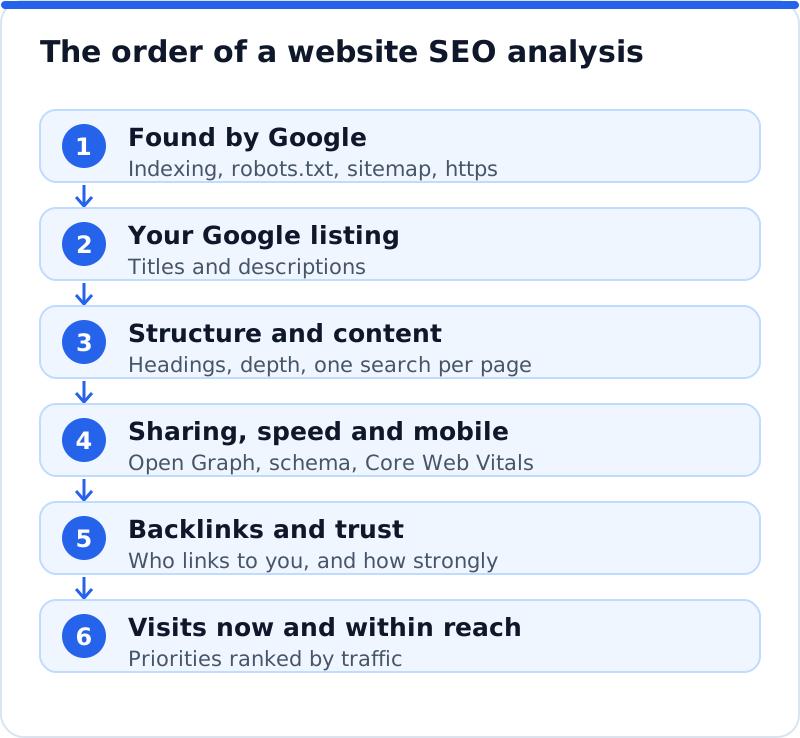
A full website SEO analysis looks at the same things Google weighs, roughly in the order Google meets them. First comes being found: whether Google can reach your pages and is willing to keep them. Next is your listing, the title and description people see in results, followed by the structure and content of each page and whether it clearly targets one search. Then come the extras that shape how pages look when shared or shown as rich results, the speed and mobile experience, and the trust other websites lend you through links. The analysis ends with traffic, comparing the visits you get now with those within reach, because that is what turns findings into priorities.
The order matters because problems higher up block everything below them. A beautifully written service page earns nothing if a robots.txt rule stops Google reading it, and a perfect title is wasted on a page Google has chosen not to index. Working upward also stops you polishing descriptions while the real problem sits elsewhere. A veterinary clinic in Brighton that skips straight to content may never notice that half its pages carry an old noindex tag from the developer. The figure shows the sequence used in the rest of this page.
Being found: indexing, robots.txt and sitemaps
The first question is whether Google has your pages at all. A search for site: followed by your domain gives a rough picture, but the reliable answer is the Pages report in Google Search Console, which lists the addresses Google has indexed and the reason each other address was left out. Common reasons include a noindex tag, a page Google crawled but chose not to index, a redirect or a duplicate of another page. For a single important page, the URL Inspection tool shows whether it is indexed, when Google last crawled it and what it found. If your main service pages are missing, nothing else in the analysis matters until that is fixed.
Two files guide Google around your website. The robots.txt file, found at your domain followed by /robots.txt, tells crawlers which areas they may not visit, and a single line such as "Disallow: /" left over from development blocks the whole website. Blocking crawling is not the same as keeping a page out of the index, because a blocked page can still appear without a description, while a noindex tag only works if Google is allowed to crawl the page and see it. The XML sitemap lists the addresses you want found, and every major platform generates one automatically. Check that it contains your real, live pages rather than drafts or test addresses, and submit it in the Sitemaps report in Search Console.
HTTPS and one main address
Every website can be reached in several versions: with or without www, and over http or https. Google treats each version as a separate address, so a website must choose one main version and send all the others to it with a permanent 301 redirect. Test this by typing each of the four combinations into a browser and checking that all of them land on the same https address. The secure https version should be the main one, because browsers warn visitors about insecure pages and Google prefers secure ones. A solicitor in Belfast whose website answers on both versions without redirecting can end up with links and signals split between two copies of the same page.
The canonical tag is the page-level version of the same idea. It sits in the code of a page and names the address that should be treated as the original, which matters when the same content is reachable at more than one address, such as product pages with filter or tracking parameters. Most platforms add a canonical tag pointing to the page itself, which is correct for nearly every page. The problems come when a template points every page's canonical at the home page, or when a staging address appears in the tag after a launch. View the source of a few pages and search for "canonical" to confirm each points to its own live https address.
Your Google listing: titles and descriptions
Your listing is the title and description Google shows for each page, and it decides whether people click. Google usually shows about 50 to 60 characters of a title, depending on the pixel width, and it often writes its own snippet when your meta description is missing or a poor match for the search. The analysis checks every page for a title and description that exist, fit the space, describe that page specifically and differ from every other page. Duplicate titles across many pages are a sign of a template left on its defaults, and they make it hard for Google and searchers to tell pages apart. Search Console shows pages with many impressions and few clicks, which are usually the listings most worth rewriting first.
| Check | What good looks like | Common finding |
|---|---|---|
| Title present and unique | Every page has its own title | One title repeated on dozens of pages |
| Title length | About 50 to 60 characters, key words first | Brand name first, important words cut off |
| Meta description | A specific summary with a reason to click | Missing, or copied across many pages |
| Main heading (H1) | One clear H1 that agrees with the title | No H1, or the logo marked up as the H1 |
| Content depth | Enough to fully answer the search | Two short paragraphs on a main service page |
| One search per page | Each page targets its own search | Two pages competing for the same query |
Page structure: headings, length and links
Once a page is indexed and well listed, the analysis looks at how it is built. Each page should have one main heading, the H1, that says what the page is about and agrees with its title, with H2 headings marking the main sections. Headings help Google understand the page's topics and help readers scan, so a heading reading "Our process" teaches less than "How a kitchen fitting in Nottingham runs, week by week". Check that headings are real headings in the code rather than bold text, and that the theme has not marked up the logo or a slogan as the H1. Look too at internal links: every important page should be linked from other pages with descriptive anchor text, because pages nobody links to look unimportant.
Length is a symptom rather than a target. There is no word count Google rewards, but a main service page of eighty words rarely answers a search as fully as a competitor's page that explains what is included, who it suits, how pricing works and what customers ask. The analysis compares each important page with the pages ranking above it for its search, and notes where yours is clearly thinner. It also flags pages so similar to each other that Google may see them as near duplicates, such as town pages that differ only in the place name. The fix is rarely padding; it is adding what a customer wants to know before getting in touch.
Content and keywords: one main search per page
Every important page should have one main search it is built to win, chosen from what customers actually type. A pilates studio in Seattle might give its home page the studio's main search, a separate page to reformer classes, and another to classes for beginners, each matching a distinct need. The analysis lists the keyword each main page should target, then checks that the title, H1 and opening text use it naturally and that no other page targets the same search. When two pages chase one search, Google tends to alternate between them and neither ranks as well as a single stronger page would. Gaps matter too: a service you offer with no page of its own is a search you cannot win.
Intent is the other half of the check. People searching "how to treat a bike chain" want an explanation, while people searching "bike repair Utrecht" want a shop, its prices and its opening hours. A page that answers the wrong intent will struggle however well written it is, so look at what already ranks for each search and notice whether it is guides, service pages, product pages or local listings. If the results are all guides and your page is a sales page, you either need a guide that leads to the sales page or a different search to target. Matching intent is often the single change that moves a page from page two to page one.
Sharing and rich results: Open Graph and schema
Open Graph tags control how a page looks when someone shares it on Facebook, LinkedIn, WhatsApp and similar services. The main ones are og:title, og:description and og:image, and without them a shared link may show the wrong picture, a cut-off sentence or no preview at all. The analysis checks that important pages set all three, with an image large enough to display well. Facebook's Sharing Debugger and LinkedIn's Post Inspector show exactly what those platforms see and let you refresh a stale preview. Sharing is not a ranking factor, but a link that looks trustworthy gets clicked, and those visits are real.
Schema markup is structured data that states facts about a page in a form machines read reliably, usually as a block of JSON-LD in the code. For a business, the most useful type is LocalBusiness or Organization on the home page, with the name, address, phone, opening hours and logo matching the website and Google Business Profile exactly. Other types describe products, events, articles and breadcrumbs, and Google can use some of them for rich results, though it never guarantees them. Google's Rich Results Test shows which structured data a page carries and whether it is eligible, and the Schema Markup Validator checks it more generally. The commonest findings are no schema at all, details that contradict the page, and two different business blocks printed by two different tools.
Speed and mobile experience
Google indexes the mobile version of your pages, so the analysis looks at each page as a phone visitor would. Text should be readable without zooming, buttons should be easy to tap, and nothing important should be hidden or broken on a small screen. Core Web Vitals measure real visits: Largest Contentful Paint for how quickly the main content appears, Interaction to Next Paint for how quickly the page responds, and Cumulative Layout Shift for how much it jumps while loading. Google's thresholds for a good experience are an LCP of 2.5 seconds or less, an INP of 200 milliseconds or less and a CLS of 0.1 or less. PageSpeed Insights shows these for any page, using real-visit data when Google has enough of it and a lab test either way.
Speed problems usually come from a short list of causes, which makes them easier to fix than they first appear. Oversized images are the commonest, followed by heavy themes or page builders, third-party scripts such as chat widgets and trackers, and slow hosting. A cleaning company in Phoenix whose home page opens with a large autoplaying video will usually see a poor LCP on phones, and swapping it for a well-compressed image can change that quickly. Hosted platforms such as Wix, Squarespace and Shopify manage the servers for you, so the levers there are mostly images, apps and embedded scripts. Speed rarely makes a page rank first on its own, but a slow page loses visitors who never come back.
Backlinks and trust
Links from other websites remain one of the main ways Google judges how much to trust a website. The analysis looks at who links to you, how many separate websites that is, how authoritative and relevant they are, and whether the links are followed. Search Console's Links report lists your top linking sites and most-linked pages, though only a sample, and commercial link indexes add estimated authority scores, which are third-party measures rather than Google's own. A tax adviser in Vienna with a handful of links from an accountancy association, the chamber of commerce and local news sites is in a stronger position than one with hundreds of links from unrelated directories. Compare your links with those of the websites ranking above you, because the gap often explains rankings that content alone cannot.
The trust check also looks for warning signs without overreacting to them. Most websites pick up low-quality links they never asked for, and Google generally ignores them. What deserves attention is a pattern you or a past supplier created, such as paid links or large numbers of links with the same keyword-rich anchor text. Pages that mention your business without linking are an opportunity rather than a problem, because a polite request often turns them into links. For most business websites, the practical finding is simply that a few more relevant, trusted links would lift every page.
Traffic now and traffic within reach
Findings only become priorities once you know what they are worth in visits. Start with the Performance report in Search Console, which shows clicks, impressions, click-through rate and average position for each page and each search over the last 16 months. Then estimate the traffic within reach: the searches each page could reasonably rank for, how many people make them each month, and how many clicks the page would earn at a better position. Clicks fall away steeply as you move down the results, so moving from position eight to position three is usually worth far more than moving from position twenty to fifteen. That shape is why pages already sitting on the lower half of page one or the top of page two are often the best opportunities.
The gap between visits now and visits within reach is the most useful number an analysis produces, because it turns abstract problems into something a business can weigh. An optician in York might find its eye test page at position nine for a search many local people make, which is worth more than every other finding combined. Estimates have a margin of error, since search volumes are rounded and seasonal, so treat them as a way to compare pages rather than a promise. Check them against your own Search Console data, which shows what each page really earns today. The point is to know where the visits are, before deciding where the work goes.
Turning findings into a priority list
A typical analysis turns up dozens of problems, and the worst way to handle them is in the order they appear or by how many there are. Ten pages missing alt text may matter less than one main service page that is not indexed, so rank fixes by the visits at stake and the effort required. Blocking problems come first, because they stop everything else working, then fixes to pages with the most traffic within reach, then the long tail of smaller improvements. Group similar fixes so they can be done together, such as rewriting all the service page titles in one session. Keep the list short enough to finish within a month, because a list of ninety items mostly produces guilt.
| Finding | Pages affected | Visits at stake | Effort | Priority |
|---|---|---|---|---|
| Main service page set to noindex | 1 | High | Minutes | Fix today |
| Titles weak on pages ranking 5 to 15 | 6 | High | An afternoon | This week |
| No business schema on the home page | 1 | Medium | Under an hour | This month |
| Images missing alt text in old blog posts | 40 | Low | A few hours | When time allows |
| Two blog posts competing for one search | 2 | Medium | An afternoon | This month |
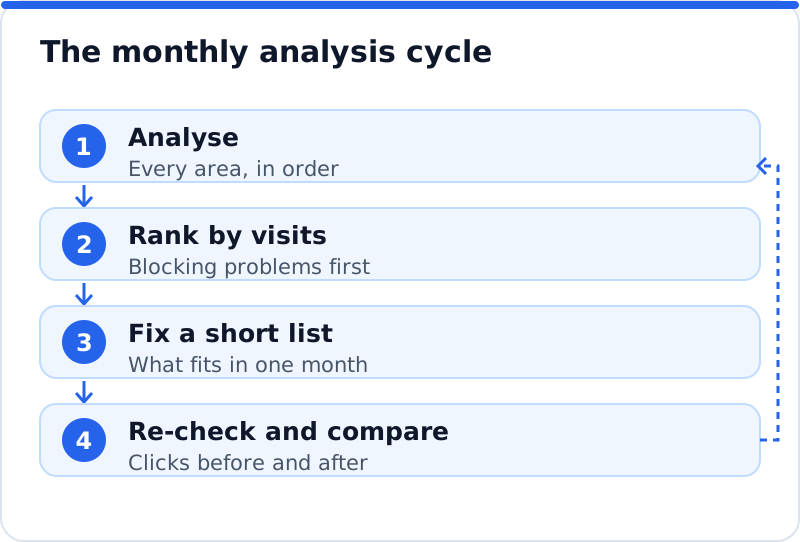
After fixing, re-check rather than assume. Confirm each change on the live page, request indexing for important pages in Search Console, and note the date, so that a month later you can compare the page's clicks with the month before. Then run the analysis again, because websites drift: new pages go up without titles, plugins and apps change, links are gained and lost, and competitors improve. A monthly re-check keeps the list current and shows whether last month's work paid off. The cycle below is the routine that turns a one-off analysis into steady progress.
Website SEO analysis on any platform
The checks are the same on every platform, but where you make the fixes differs. On WordPress, titles, descriptions, indexing settings and schema are usually managed by an SEO plugin, and the theme and plugins affect speed. Wix, Squarespace and Shopify each have their own SEO settings for pages, products and collections, generate sitemaps automatically and provide https, which removes some foundation problems but limits how much code you can change. Shopify, for example, has a search engine listing section on product, collection and page editors for the title and description, while Wix and Squarespace keep similar fields in each page's SEO settings. An interior designer in Milan on Squarespace and a language school in Barcelona on WordPress would run the same analysis but fix things in different places.
Hosted platforms handle some technical items and restrict others. You cannot edit the server, so redirects live in the platform's own settings and speed work focuses on images, apps and embeds. Custom schema is often added through a code injection or custom code area, and the platform's own schema may already cover products or the business, so check for duplicates before adding more. On any platform, test each change on the live page afterwards rather than trusting the editor. The analysis should tell you not only what to fix but where that fix lives on the platform you use.
Running a website SEO analysis with AI WebMaker
Our AI Website SEO Tools check any website, on WordPress, Wix, Squarespace, Shopify or anything else, the way Google does, and show the result as a network you can explore. You get a score out of 100, made of on-site checks (60%) and backlink trust (40%), split into six areas: Found by Google, Your Google listing, Page structure, Content, Sharing and rich results, and Keywords and traffic. The tools read up to 12 pages and show each page's problems, the keyword each main page should win, and the visits a month the website gets now and could get within reach. Each problem is joined to the tool that fixes it, so a weak title leads to new titles and a missing schema block leads to the code. Fixes come with steps and the code to paste on any platform, or are applied by our plugin on WordPress.
The analysis does not stop at one check. The tools include a monthly re-check with an email of what changed, so you can see which fixes worked and spot new problems before they cost visits. That makes it a practical way to run the cycle above without rebuilding a spreadsheet every month. It also sits alongside the rest of the AI SEO tools for business websites, such as the backlink checker, when a finding needs deeper work. To see your own score, areas and traffic within reach, use the AI website SEO tools that check any website.
Questions business owners ask
How often should I run a website SEO analysis?
A full analysis when you first take SEO seriously, after any redesign or platform move, and then a lighter re-check every month is a sensible rhythm. Monthly is often enough to catch new problems, such as a page published without a title, before they cost much. Weekly checks rarely show meaningful change, because Google takes time to recrawl and re-rank pages. After a launch or migration, check indexing and redirects within the first few days, since mistakes there do the most damage fastest. The monthly figures in Search Console then show whether your fixes are working.
Why do different tools give my website different scores?
Every SEO score is a tool's own summary, not a number Google uses or publishes. Tools check different things, weigh them differently and read different numbers of pages, so two scores for the same website can be far apart. One tool may count every missing alt tag heavily while another weights backlinks or traffic more. A score is useful for tracking your own progress over time with the same tool, and less useful for comparing tools. Focus on the problems behind the score and the visits they put at stake.
Can I do a website SEO analysis myself?
Yes, most of it needs only Search Console, PageSpeed Insights, the Rich Results Test and a careful look at your pages and their source code. The harder parts are judging content against competitors, estimating traffic within reach and checking backlinks, which take more time and data. A tool that reads the whole website saves hours and makes sure nothing is skipped, but your own knowledge of the business is what turns findings into good decisions. If you hire someone, ask for findings ranked by visits rather than a long unranked list. Keep ownership of your Search Console account whichever route you take.
What should I fix first?
Fix anything that stops Google finding your important pages first: a noindex tag, a robots.txt block, broken redirects or a missing main address. Next, work on the pages with the most visits within reach, which usually means better titles, clearer headings and fuller content on pages already near the top of results. Then add the extras that support every page, such as business schema, sharing tags and image fixes. Leave cosmetic score items until last, because they rarely move traffic. A short list finished well beats a long list started everywhere.
Your first week with a website SEO analysis
A week is enough to complete a first analysis and fix the problems that matter most. The plan below takes about an hour a day and works on any platform, from Wix to WordPress. It follows the same order as the analysis, so blocking problems are found before you spend time on polish. Keep notes of what you find and what you change, with dates, because those notes become your baseline. At the end of the week you will know where the visits are and have the first fixes live.
- On day one, set up Google Search Console if you have not already, submit your sitemap, and check the Pages report for important pages that are not indexed.
- On day two, test your four address versions, read your robots.txt file, and check the canonical tag on the home page and two main pages.
- On day three, review the title, description and H1 of every main page, and note which page should win which search.
- On day four, test your home page and two main pages in PageSpeed Insights and the Rich Results Test, and check how each looks when shared.
- On day five, list your findings, rank them by visits at stake, fix the top three, and set a date next month to re-check.
By the end of the week you will have replaced guesswork with a clear picture of how Google sees the website and a short, ranked list of what to do about it. Some fixes will show in Search Console within weeks, while content and link work takes longer to pay back. Resist the urge to change everything at once, because small, dated changes are the only ones you can judge. When the month is up, run the analysis again and compare. Start with day one now: open Search Console and look at which of your pages Google has chosen to keep.
All Website SEO Analysis guides
- Website Traffic Potential: How Many Visits You Could Be Getting
- Keyword Cannibalization: When Your Own Pages Compete
- How to Estimate Organic Traffic for a Keyword
- How to Improve Click-Through Rate From Google
- Pages Not Indexed by Google: Every Reason and How to Fix It
- Google Search Console Setup for Business Owners
- Noindex Mistakes That Hide Pages From Google
- SEO Score: What a Website Score Out of 100 Really Measures
- Open Graph Tags: How Your Pages Look When Shared
- A Monthly SEO Report for a Business Website
- SEO for Wix, Squarespace and Shopify Websites
- Wix SEO: What You Can Fix and Where to Fix It
- Squarespace SEO: A Practical Checklist for Business Sites
- Shopify SEO for Product and Collection Pages
- AI Tools for Website SEO: Seeing the Whole Website at Once