SEO for Wix, Squarespace and Shopify Websites
What hosted website builders already take care of, the settings that are still yours to get right, and a practical way to apply fixes when there is no SEO plugin to do it for you.
- Any website
- Visits within reach
- Each problem joined to its fix
A hosted website builder hands you a finished building with the wiring, plumbing and locks already installed, but it still leaves you to write the sign above the door. That is the honest summary of SEO for Wix, Squarespace and Shopify: the platform takes care of the technical groundwork that used to need a developer, and you remain responsible for the words, the structure and the decisions that tell Google what each page is for. Owners often assume that because the builder "does SEO", there is nothing left to do, and then wonder why a well-designed site gets so few visits from search. The sections below separate what each platform handles from what you control, show where the main fields live on all three, and explain the limits worth knowing. You will also learn how to apply fixes when there is no plugin, how to check that the work is paying off, and when rebuilding elsewhere deserves a calm thought.
To see your own website the way Google does, try our see your website the way Google does, part of our AI SEO Tools.
This article is part of our complete guide: Website SEO Analysis.
What hosted builders handle for you
The biggest advantage of a hosted builder is that the technical basics are switched on before you publish your first page. All three platforms generate an XML sitemap automatically and keep it current as you add or remove pages, so Google always has an up-to-date list of your addresses. They serve pages over https, with the security certificate handled by the platform once a domain is connected. Their templates are built to work on phones, which matters because Google mainly looks at the mobile version of a page when it ranks it. Shopify also generates a robots.txt file, adds canonical tags to reduce duplicate pages and ships themes with product schema, while Squarespace generates structured data for products, events and blog posts.
None of this is trivial, and it is a fair reason to choose a hosted platform. On a self-managed website, a plugin conflict can break a sitemap or a slow theme can crawl along on a phone, and hosted builders remove most of those failure points. The trade-off is that the groundwork is generic: the platform knows how to publish a page, but it has no idea what your business sells or which searches you want to win. A sitemap full of pages titled "Home", "Services" and "About" is technically perfect and commercially useless. That is where your part of the job begins.
What SEO for Wix, Squarespace and Shopify needs from you
The work that remains is the work that decides whether a page is chosen for a search. Each page needs a search title that names what it offers and where, and a meta description that gives a reason to click. Each page also needs one clear main heading, subheadings that break the content into parts, and images with alt text that describes them in words. URL slugs should be short and readable, redirects should catch every old address you retire, and a blog, if you keep one, should answer the questions customers actually type. A physiotherapy clinic in Dublin gains far more from a page titled "Sports Injury Physiotherapy in Dublin 2" than from one the template called "Treatments".
The fields for all of this exist on every platform, but they sit in different places and use different names. Knowing where they live saves real time, because the most common reason a title stays as "Home" is that the owner never found the field. The table shows where the main settings are on each platform, based on the platforms' own help pages. Menu labels change as the builders redesign their dashboards, so treat the wording as a guide. If a label has moved, the help centre's search will find the new one in seconds.
| What you set | Wix | Squarespace | Shopify |
|---|---|---|---|
| Page title and description | SEO basics, from the page's More Actions menu | SEO tab in page settings | Search engine listing on each product, collection or page |
| Defaults for many pages | SEO Settings, edited by page type | SEO title formats for home, pages and items | Home page title and description in Preferences only |
| URL slug | SEO basics | Page settings | URL handle in the search engine listing |
| Redirects | URL Redirect Manager | URL mappings in Developer tools | URL redirects, in the menus area |
| Image alt text | "What's in the image?" in image settings | Image alt text field in the image block | Add alt text on each product image |
The three platforms in plain terms
Wix is a flexible drag-and-drop builder with a large app market, and its SEO settings are the most detailed of the three. Beyond titles and descriptions, it lets you set patterns for whole page types, edit canonical tags, add extra meta tags and work with structured data. It also creates many redirects for you when an address changes, though not for every kind of page, so it pays to know which. A wedding planner in Edinburgh therefore has more levers to pull on Wix than on the other two builders. The main risk is the flexibility itself, because many apps and heavy design elements can slow pages down.
Squarespace is design-led, with a smaller set of settings that are easy to understand at a glance. Each page and each collection item, such as a blog post or product, has its own SEO tab, and a site-wide panel controls how titles are formed. Changing an address does not create a redirect for you, so every renamed or retired page needs its own line in the redirect panel. Its structured data is generated automatically and cannot be edited or removed, which keeps things tidy but limits customisation. The result is a platform where the basics are quick to set and the main discipline is remembering the redirects.
Shopify is built for selling, so its SEO settings follow the shape of a shop: products, collections, pages and blog posts. Each has a search engine listing with a title, a description and a URL handle, placed under fixed prefixes such as /products/ and /collections/. Canonical tags are added automatically, which matters because the same product can often be reached through more than one collection address. Shopify's redirects only work for addresses that no longer load a real page, so a live product cannot be redirected. A wine merchant in Bordeaux on Shopify will spend most of its SEO effort on product and collection pages, which is where the platform gives the most control.
Limits worth knowing before you start
Every hosted platform trades some control for convenience, and it helps to know the edges before you plan a project. You cannot install server software or edit the server's configuration, so anything a WordPress owner would solve with a plugin has to be solved in the builder's settings, through an app, or with code the builder allows. Wix only accepts certain tag types, up to a set number, as extra meta tags on a page, and Squarespace's code injection is only available on some plans. Some structures are fixed: Shopify's /products/ prefix cannot be removed, and Google handles it perfectly well, so there is no ranking reason to try. Squarespace's automatic structured data cannot be switched off, so adding the same schema again by hand only creates duplicates. In almost every case, the settings that move rankings for a business (titles, descriptions, headings, content, internal links and redirects) are fully within your reach.
Applying fixes when there is no plugin
On WordPress, an SEO plugin can write a fix straight into a page's fields. On Wix, Squarespace and Shopify, the fix reaches the page through you, so the quality of the instructions decides how fast the work goes. A good fix names the page, the field to open and the text or code to paste, in that order. For titles, descriptions and alt text, that means copy and paste: open the page's settings, replace the old text and publish. For code such as structured data or a verification tag, the instructions should say where the builder accepts code, and a developer can apply those few items in an hour if you would rather not edit theme files.
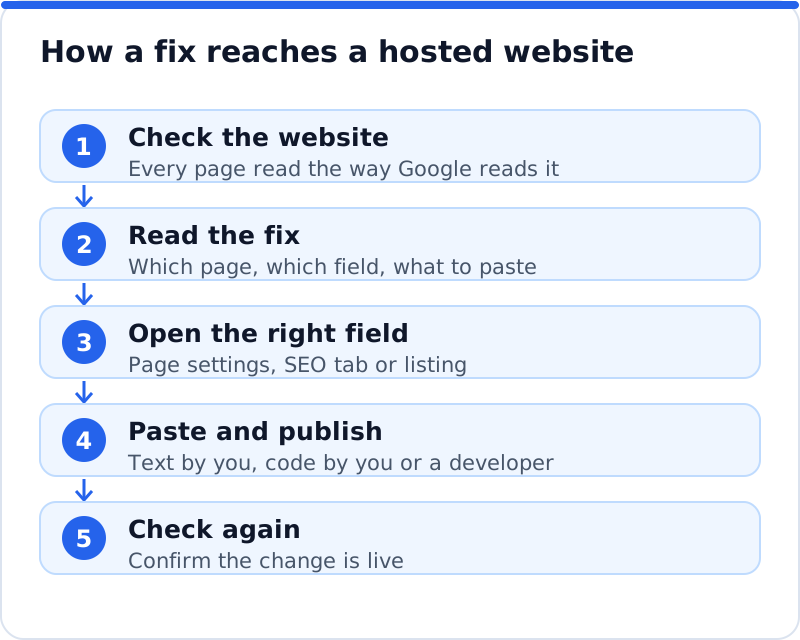
The order of work matters more than speed. Start with the pages that bring enquiries or sales, because a better title on your main service page is worth more than perfect alt text on an old gallery. Group similar changes, so you open one type of settings panel and work through every page that needs it. Keep a simple note of what you changed and when, since none of the three gives you an easy log of old SEO titles. After publishing, open the live page in a private browser window to confirm the change took effect.
Working across the whole website
The trick is to use defaults where the platform offers them and individual edits where they count. On Wix, an SEO pattern for blog posts or products can give hundreds of pages a sensible title format at once, which you then improve by hand on the pages that matter. On Squarespace, the title format decides how the site name is added to every title, so check it is not pushing your important words out of view. On Shopify, a product's default title is simply its name, so the gain comes from editing the listing on your best sellers and main collections. A sensible sequence keeps the work manageable and makes sure the most valuable pages are done first.
- Fix the home page title and description, because they shape how Google and searchers understand the whole business.
- Rewrite the titles, descriptions and main headings of the pages that sell a service or product, starting with those that already get impressions.
- Add alt text to the images on those pages, then to the rest of the site as time allows.
- Set up redirects for old addresses that now show "not found", especially ones other websites link to.
- Review the blog last, merging thin posts on the same topic and linking each post to the page it supports.
Checking SEO for Wix, Squarespace and Shopify results
Google Search Console is the place to see what your work achieved, and all three platforms can connect to it, each in its own way. Wix connects through its SEO setup checklist, Squarespace from its analytics panel, and on Shopify you verify the domain in Search Console yourself, for example with a DNS record. Whichever route you take, open the Sitemaps report and make sure the sitemap is listed, adding it there if it is not. Once data arrives, the Performance report shows the searches that found you, the clicks and impressions for each page, and the average position. The Pages report beside it shows which addresses Google has indexed, which matters most in the weeks after an address change.
Measure in periods of four weeks or more, and compare the same weeks year on year if your business is seasonal. An accountant in Leeds should expect a busy January whatever the SEO work does, so comparing January with December says little. Look at impressions first, because they rise before clicks when Google starts testing a page for more searches. Then look at the click-through rate on pages where you rewrote titles, since that is what a better title should change. If a page loses impressions after an address change, type the old address into a browser to confirm the redirect works.
When rebuilding is worth considering
For most businesses, the right move is to make the most of the platform they already use, because all three can rank well when the basics are done properly. Rebuilding costs time, risks losing traffic during the move, and rarely fixes a problem that better titles and content would not have fixed. Some situations are different: a business that needs many location pages generated from data, or a level of control the builder does not offer, may spend more time working around the platform than with it. In that case it is reasonable to compare options calmly, after checking each limit against the builder's help centre in case a supported workaround exists. Any move should copy every title and description and map every old address to its new one, because a hurried move is the most common way a business loses the rankings it spent years building.
How AI WebMaker's tools fit in
The hardest part of SEO on a hosted builder is knowing which fixes your site actually needs. AI website SEO tools that check Wix, Squarespace and Shopify sites read your website the way Google does and show it as a network of pages rather than a long list. You get a score out of 100, built from on-site checks (60%) and backlink trust (40%), grouped into six areas: Found by Google, Your Google listing, Page structure, Content, Sharing and rich results, and Keywords and traffic. The check reads up to 12 pages, lists each page's problems, suggests the keyword each main page should win, and estimates the visits a month now and within reach. On a hosted platform each fix comes with the steps and, where code is needed, the code to paste, and the tools include a monthly re-check with an email of what changed.
The changes themselves are still made in the platform's own settings, so the value lies in the order and the detail. A score helps you see progress, but the visits within reach are the better guide to which page to fix first. Each problem is joined to the tool that fixes it, so weak backlinks point you to link work and a missing description points you to the page's settings. The wider set of AI SEO tools for business websites covers backlinks, keywords and more. Use what helps and ignore the rest, because a clear plan you follow beats a long report you never act on.
Questions business owners ask
Is one of the three platforms better for SEO?
Each of the three can rank well, and the differences matter less than how carefully the pages are written. Wix offers the most detailed SEO settings, Squarespace keeps things simple, and Shopify is the natural choice when products and collections are the heart of the site. A bakery in Lyon with five pages and a contact form will do well on any of them if its titles, content and local signals are right. The platform only becomes a deciding factor when you need something it cannot do. Choose the platform that suits how your business works, then do the basics thoroughly.
Do I need an SEO app on a hosted builder?
Usually not for the basics, because the fields for titles, descriptions, alt text and redirects are built in on all three platforms. Apps can help with specific jobs, such as editing many products at once. The risk is that each app can add scripts to your pages and slow them down. Before installing one, check whether the platform already offers the feature, and remove apps you no longer use. A short list of apps you understand is safer than a long list you have forgotten.
How long until changes show up in Google?
Google has to crawl a page again before it shows a new title or description, which can take from a few days to a few weeks. Important pages tend to be crawled sooner than old pages deep in the site. You can ask Google to look at a changed page with the URL Inspection tool in Search Console. Rankings move more slowly, because Google needs time to test the page against others for each search. Allow four to eight weeks before judging whether a round of changes worked.
Your first hour on a hosted site
Start with the fields every searcher sees before reaching your site: the title and description of your home page and your three most important service or product pages. Open each in your platform's settings, rewrite the title so it names what you offer and where, and give the description a clear reason to click. Then connect Search Console if you have not already, so you have a baseline to compare against in a month. Spend the remaining time adding alt text to the images on those same pages. That hour covers the changes that most often hold a hosted site back, and the natural next step is a full check of your website so the rest of the work follows the order that brings the most visits.
Your score out of 100, the visits within reach, every page read the way Google does and the tool that fixes each problem. Works on any website.
Analyse your website with AI Website SEO Tools →