How to Improve Click-Through Rate From Google
How to find the pages Google already shows but people rarely click, rewrite their titles and descriptions for the search behind them, and judge the result fairly.
- Any website
- Visits within reach
- Each problem joined to its fix
A search result is a small advert that Google prints for you at no charge, and click-through rate is the verdict searchers give it. Two pages can sit in the same position for the same search and earn very different numbers of visits, simply because one listing answers the question in the searcher's head and the other does not. That makes listings one of the quickest wins in SEO: you do not need to outrank anyone to improve click-through rate, you need to make the result you already have more convincing. The work is mostly writing, it can be done in an afternoon, and it often shows results within weeks. You will learn how to find the pages Google already shows but people skip, why click-through rate depends on position and on the shape of the results page, and how to rewrite titles and descriptions so they match what people want. You will also see which extras, such as dates and rich results, still help, and how to test changes in batches so you know what worked.
To see your own website the way Google does, try our website traffic potential checker, part of our AI SEO Tools.
What click-through rate tells you
Click-through rate, usually shortened to CTR, is the share of people who clicked your result out of everyone who saw it. Search Console calculates it as clicks divided by impressions, for each search, each page and the website as a whole. A page with 2,000 impressions and 40 clicks has a CTR of 2%, and if the same page earned 4% from the same searches, it would bring twice the visitors without moving up a single place. That is why CTR deserves attention: it is the part of search traffic you can change with a rewrite rather than a long campaign. Rankings take months to move, while a better title can earn more clicks as soon as Google shows it.
CTR is also a diagnostic signal. A low figure on a page that ranks well usually means the listing does not match what people were looking for, or that something else on the results page is more appealing. A high figure on a page that ranks low suggests the page is exactly what people want, and that lifting its position would be worth the effort. CTR does not tell you whether visitors liked the page once they arrived, so it says nothing on its own about enquiries. Read it together with what happens after the click, such as calls, forms and bookings, so you do not end up with more visitors who leave straight away.
Why click-through rate depends on position and layout
The biggest influence on CTR is position. Results at the top of the page are seen by almost everyone and clicked far more often than results lower down, and a result on page two is barely seen at all. For that reason, comparing a page at position 2 with a page at position 9 tells you nothing useful about their listings. The second influence is the layout of the results page, which changes from one search to the next. Ads, a map with local businesses, an AI Overview, videos, images or a block of products can all sit above the plain results and take clicks before anyone reaches yours.
Because of this, there is no reliable benchmark that says what your CTR should be at each position. Published figures disagree widely, and any single table would be wrong for many searches, because a search where Google answers the question on the page behaves nothing like a search for a local service. The useful comparison is within your own website: pages at similar positions, for similar kinds of searches, on similar layouts. If most of your service pages around position 3 earn a healthy share of clicks and one earns a fraction of that, the outlier is your candidate. Searches for your own business name are a special case, since people looking for you will click you almost regardless of the listing, so filter them out before you compare.
Find the pages worth fixing first
Search Console has everything you need. Open the Performance report, tick all four measures, set the last three months and switch to the Pages tab. Sort by impressions, so the pages Google shows most often rise to the top, and look along the row at CTR and average position. Then click a page and switch to the Queries tab to see which searches it appears for, because a page can be shown for searches it was never written for. Where your property supports it, the branded queries filter removes searches containing your business name, which makes the comparison cleaner.
The best candidates have three things in common: many impressions, an average position on page one, and a CTR clearly below your other pages at a similar position. A pest control company in Houston might find that its termite inspection page sits around position 4 with thousands of impressions a quarter, yet earns well under half the CTR of its rodent control page at the same position. That gap is worth more than any new page the company could write this month, because the demand and the ranking already exist. Pages beyond position 15 are poor candidates, because hardly anyone sees them, so improving the page itself matters more than polishing its listing. Make a short list of five to ten pages, note today's clicks, impressions, CTR and position for each, and keep that record for later.
Match what the searcher wants
Before rewriting anything, look at the searches behind each page and ask what the person wanted at that moment. Someone typing "orthodontist Glasgow" wants to know who is nearby, whether they take new patients and roughly what treatment costs. Someone typing "how long do braces take" wants an answer first and a clinic second. If the listing for both is the practice name and a slogan, neither searcher sees a reason to choose it. The listing has to promise the specific thing the search asked for, in words close to the ones they typed.
Look at the other results for the same search, too, because they show what Google thinks people want and what you are competing against. If every other result for "bike repair Copenhagen" mentions same-day service and prices, a listing that mentions neither will look weaker beside them. If the results are mostly guides and your page is a sales page, you may have a mismatch that no rewrite can fix, and the better move is to create a page that fits the search. Matching intent is not about copying competitors' words. It is about making sure your listing answers the same question better, with a detail only your business can offer.
Rewrite titles to improve click-through rate
The title is the largest, bluest line of the listing, and it does most of the work. In WordPress you set it in your SEO plugin's field for the search title, which sits in the box below the editor or in the sidebar, depending on whether you use Yoast SEO, Rank Math, All in One SEO or SEOPress. Wix, Squarespace and Shopify each have an SEO title field in the page or product settings. Google usually shows about 50 to 60 characters of a title, depending on the pixel width, so put the words that matter first. Google can also rewrite a title when it thinks another one describes the page better, which is more likely when titles are vague, stuffed with keywords or identical across many pages.
| Page | Weak title | Stronger title | Why it earns more clicks |
|---|---|---|---|
| Hotel rooms, Porto | Rooms, Casa Azul | Boutique Rooms in Porto's Old Town, River Views | Says where, what kind and the view people want |
| Termite inspection, Houston | Services, Bayou Pest | Termite Inspection in Houston, Same-Week Visits | Names the service, the city and a reason to act |
| Braces, Glasgow | Orthodontics Glasgow, Orthodontist, Braces | Braces for Adults and Teens in Glasgow, Clear Fees | Reads naturally and answers a common worry |
| Bike repair, Copenhagen | Home | Bike Repair in Nørrebro, Most Fixes Same Day | Replaces an empty word with the actual offer |
A strong business title usually follows the same pattern: the service or product, the place if it is local, and one concrete reason to choose you. That reason should be true and specific, such as same-day appointments, a fixed fee, a guarantee or years of experience. Your brand name can go at the end, where it reassures without pushing out more useful words. Avoid capital letters on every word if your brand does not use them, and avoid exclamation marks, which look like advertising and rarely help. Above all, keep each title unique, because ten pages with the same title make Google more likely to rewrite them and searchers less likely to tell them apart.
Descriptions, dates and rich results
The description is the grey text under the title. Google often writes its own snippet from the page when it matches the search better, but a good meta description is still shown for many searches and costs little to write. Aim for roughly 140 to 160 characters, since longer text tends to be cut, and use it to finish the promise the title starts. Mention what the visitor will find, a detail that sets you apart and, where it fits, what to do next, such as booking online or calling for a quote. If the page's opening paragraph is clear and specific, Google's own snippet will be better too, so a vague introduction is worth fixing as well.
Dates and rich results can make a listing stand out, but only where they fit. Google may show a date beside an article, so a guide that is genuinely kept up to date should show a visible "last updated" date that matches its content; changing the date without changing the page is something Google advises against. Rich results come from structured data: products can show price, availability and ratings, and events can show dates and venues. Review stars from customers' reviews of your own business on your own website are not shown for local businesses, and Google has stopped showing FAQ rich results, so neither is a reason to add markup today. Check which of your pages already earn rich results in the Search appearance tab of the Performance report.
Trust signals beyond the words
People choose results they trust, and several parts of the listing besides the title and description shape that trust. Google shows a site name and a favicon beside each result, chosen from your website's name and icon, so make sure both are set and look like your business rather than a default. A clear address in the result, such as a short, readable page address instead of a string of numbers, also helps people feel they know where they are going. A name people recognise from local signs, ads or word of mouth will lift CTR on its own, which is one reason well-known brands earn more clicks at the same position. You cannot fix brand awareness with a rewrite, but you can make sure nothing in your listing looks careless.
Test one batch, then measure
The worst way to improve CTR is to rewrite every title on the website on the same afternoon. If clicks rise, you cannot tell which change helped, and if they fall, you cannot tell which change hurt. Work in batches of five to ten pages with a similar purpose, record the old title and description for each, and note the date. In Search Console you can right-click the Performance chart on that date and add a short annotation, so the change is visible later. Then leave the batch alone for at least three to four weeks, because Google needs time to recrawl the pages and searches vary from week to week.
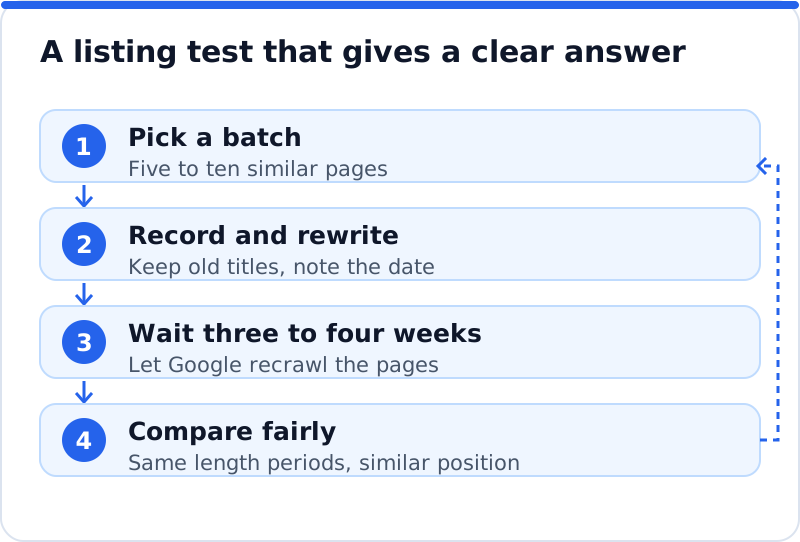
When you compare, use periods of the same length and check that the average position stayed roughly the same. If a page moved from position 6 to position 3 during the test, its CTR will rise because of the move, not because of the rewrite, so treat that result with caution. Compare against the same weeks a year earlier as well if the business is seasonal. Keep the rewrites that clearly earned more clicks, restore the ones that did worse, and carry what you learned into the next batch. Over a few rounds you will discover what your customers respond to, which is worth more than any general rule.
Where AI WebMaker's tools help
The slow part of this work is finding the right pages and writing listings that fit each one. The AI Website SEO Tools on aiwebmaker.co read up to 12 of your pages the way Google does and report on six areas, including how your Google listing looks. They show the keyword each main page should win, the visits a month now and the visits within reach, and they join each problem to the tool that fixes it, with steps and the code to paste. On WordPress, approved title and description fixes can be applied through the AI Website SEO plugin. The tools include a monthly re-check with an email of what changed, which makes the batch-and-wait rhythm easier to keep, and the tools sit with the other AI SEO tools built for business websites.
Questions business owners ask
What is a good click-through rate?
There is no single good figure, because CTR depends on position, the kind of search and what else Google shows on the page. A rate that is excellent for a page at position 8 would be weak for a page at position 1. Searches for your business name will always show far higher rates than searches for a service. The useful question is whether a page earns less than your other pages at similar positions for similar searches. Measured that way, your own website gives you the only benchmark that really fits.
Will a better click-through rate raise my rankings?
Google does not publish a simple rule that a higher CTR lifts a page, and it is wise not to rely on one. What is certain is that more clicks from the same position mean more visitors, which is the outcome you actually want. A listing that matches the search also tends to bring visitors who find what they expected, which helps enquiries. Some owners chase CTR with misleading titles, and that backfires, because visitors leave and the brand loses trust. Write listings that are accurate and appealing, and treat any ranking effect as a bonus rather than the goal.
How quickly will I see a difference?
Google usually picks up a new title within days to a few weeks, depending on how often it crawls the page. Busy pages are recrawled sooner, while rarely visited pages can take longer. You can ask for a recrawl through URL Inspection in Search Console, which sometimes speeds things up. After the new listing appears, give it a few more weeks so you have enough impressions to compare fairly. For pages with very few impressions, the result may only become clear after a couple of months.
Start with the five most-seen pages
Every point of CTR you gain on a page Google already shows is traffic you were losing without knowing it. Open Search Console, sort your pages by impressions and pick the five on page one that earn the fewest clicks for their position. Read the searches behind each one, rewrite the title and description to answer them, and record the date. Leave them for a month, compare fairly and keep what worked. Once those five are done, look at how much of your website traffic potential still sits in listings and pages just below the top, and choose the next batch from there.
Your score out of 100, the visits within reach, every page read the way Google does and the tool that fixes each problem. Works on any website.
Analyse your website with AI Website SEO Tools →