Shopify SEO for Product and Collection Pages
How to set up Shopify product and collection pages so they appear for the searches shoppers make, from the search engine listing fields to variants, redirects and reviews.
- Any website
- Visits within reach
- Each problem joined to its fix

A product page has to persuade two readers at once: the shopper deciding whether to buy, and the search engine deciding whether to show the page at all. Shopify SEO for product pages is about serving both, and Shopify gives you more control here than anywhere else in the store. Every product and collection has its own search engine listing, its own address and its own images to describe, while the theme supplies canonical tags and product structured data in the background. The trouble is that most stores fill these pages with supplier titles, copied descriptions and photos named by the camera, which leaves Google with little reason to prefer them. The sections below cover the listing fields, writing titles and descriptions for real searches, alt text, duplicate addresses and variants, collection pages, redirects, reviews and speed, with the steps to apply each one in the Shopify admin.
To see your own website the way Google does, try our SEO analysis for any website, part of our AI SEO Tools.
Use AI website SEO tools to check your Shopify product pages and get the fixes to paste in
Shopify SEO for product pages starts with the listing
Each product in the Shopify admin has a search engine listing section near the bottom of its page, showing a preview of how the product may look in Google. Editing it reveals three fields: the page title, the meta description and the URL handle. If you leave them alone, Shopify builds the listing from the product's title and the start of its description, which is rarely the best version for search. Shopify's help centre says page titles can be up to 70 characters but recommends keeping them to about 60, and suggests meta descriptions of around 160 characters. Collections have the same three fields, and so do pages and blog posts, so the habit you build on products carries across the whole store.
The page title in the listing and the product title on the page do different jobs, and Shopify lets them differ. The product title is the large heading shoppers see on the page, and Shopify's help centre notes that it becomes the page's H1. The listing title is the line in Google's results, where it competes against other shops for the click. A coffee roaster in Seattle might keep the product title short, such as "Pike Street Espresso Blend", while the listing title reads "Pike Street Espresso Blend: Whole Bean Coffee Roasted in Seattle". Both name the product, which keeps them consistent, but the listing title adds the words a searcher is likely to type. If you are setting up a store on another builder as well, the overview of SEO for Wix, Squarespace and Shopify explains how the same fields work on all three.
Product titles and descriptions written for searches
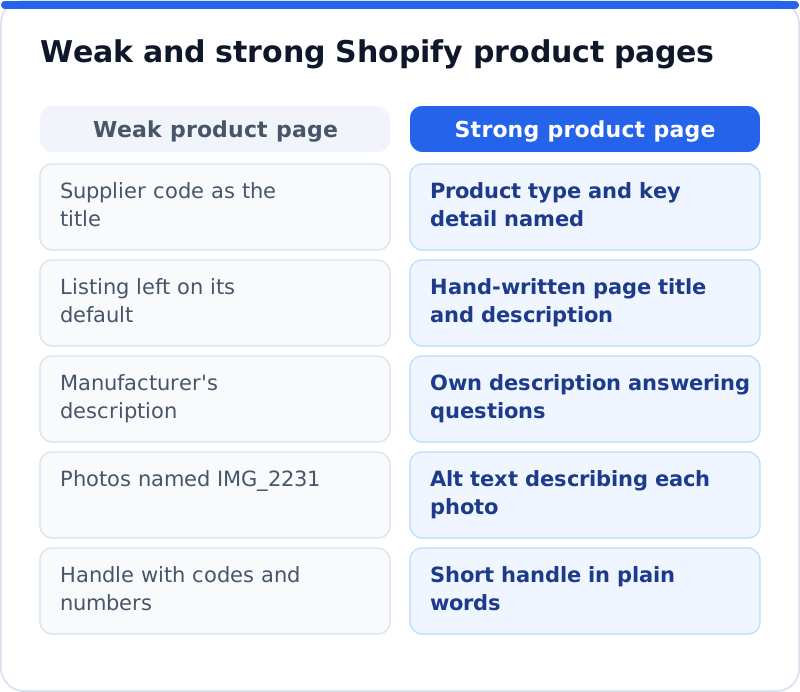
Shoppers search with a mix of product type, material, use and sometimes place, and the best product titles reflect that language. Supplier titles tend to use codes and internal names that nobody types, such as "WLT-04 Brown", which means the page has to rank on almost nothing. Start by asking how a customer would describe the product to a friend, then check that wording in Google's autocomplete and in your Search Console queries. Put the product type in the title and keep brand names, sizes and colours where they help a shopper decide. A leather goods maker in Florence will reach more buyers with "Handmade Leather Bifold Wallet in Tan" than with the collection's internal code name.
Descriptions are where most product pages fall short, because copying the manufacturer's text produces the same page as every other shop selling that item. Google has little reason to rank one identical page over another, so your own description is one of the few places you can stand out. Write about what the product is for, what it is made of, how it fits or works, and what a buyer usually wants to know before ordering, such as care, sizing or delivery. Use headings and short paragraphs inside the description so it is easy to scan on a phone. Aim for a description that answers the questions your customer service team hears most often.
Alt text for product images
Alt text describes an image in words, so it helps shoppers who use screen readers and gives Google a way to understand photos it cannot see. In the Shopify admin, open the product, click a media item to reach the preview page, select Add alt text, type the description and save. Shopify allows up to 512 characters but recommends 125 or fewer, which is plenty for a clear description. It also supports adding alt text in bulk with a CSV file, and its media editor may suggest alt text for images that have none, which you should read and correct before accepting. For stores with hundreds of products, start with the best sellers and the main image of each product.
Good alt text describes what is in the picture, including the details that distinguish one image from another. "Tan leather bifold wallet, open, showing six card slots" is far more useful than "wallet" or a list of keywords. For variant images, mention the colour or finish shown, since that is often what a shopper is checking. Rename image files before uploading as well, using plain words rather than camera numbers. Neither change will transform rankings on its own, but together they make product images eligible to appear in Google Images and make the store usable for more customers.
Duplicate URLs, collections and variants
A single Shopify product can usually be reached at more than one address. Its main address sits under /products/, but many stores also show it under a collection path such as /collections/wallets/products/bifold-wallet, depending on how the theme links to products. To keep Google from treating these as separate pages, Shopify adds canonical tags automatically, which point search engines to the main /products/ version. You do not need to change anything for this to work, but it helps to link to the main product address yourself in menus, blog posts and other pages. Some themes link product cards to the collection version and others to the main one, and either is handled by the canonical tag.
Variants raise a related question: should each colour or size have its own page? Shopify keeps variants on one product page and can show a specific variant with an address parameter, while the canonical tag points to the main product. For most stores this is right, because one strong page with all options gathers reviews and links in one place. The exception is when shoppers search for a variant as if it were a different product, for example a skincare brand in Manchester whose sensitive-skin and oily-skin versions of a cleanser answer different searches. In that case, separate products with their own titles and descriptions can serve each search better, as long as each page has enough unique content to justify it.
Collection pages that deserve to rank
Collection pages often match broader searches than products do, such as "leather wallets" or "city bikes", which makes them some of the most valuable pages in a store. Many stores leave them as a grid of products with a one-word heading, which gives Google little to understand. Use the collection's description field to add a short introduction that explains what the collection includes, who it suits and how to choose between items. Then edit the collection's search engine listing to give it a proper title and description, just as you would for a product. A bike shop in Utrecht could write a few sentences on how its city bikes differ from its touring bikes, which helps both the shopper and the search engine.
Keep the number of collections sensible, because dozens of near-identical collections with two products each create thin pages that compete with each other. Merge collections that overlap heavily, and give each remaining collection a clear purpose and its own wording. Link from popular collections to related ones, and from blog posts to the collections they discuss, so Google can see how the store fits together. Check that each collection is published to the online store and included in the menus where shoppers expect it. A small number of strong collections usually outperforms a sprawl of weak ones.
Redirects when products change
Products come and go, and every change to an address needs a plan. When you change a product or collection handle, Shopify's help centre advises choosing the option to create a redirect from the old address, so links and rankings carry over to the new one. For other changes, go to Content, then Menus, and open URL redirects to add a redirect or import a list from a CSV file. Shopify notes that a redirect only works when the old address no longer loads a page, so a product must be removed or have its handle changed before a redirect from it takes effect. The table shows sensible choices for the most common situations.
| Situation | Recommended action |
|---|---|
| Product sold out but returning | Keep the page live and show when it will be back |
| Product discontinued, close replacement exists | Redirect to the replacement product |
| Product discontinued, no replacement | Redirect to the most relevant collection |
| Handle changed to a clearer name | Tick the redirect option when saving the new handle |
| Two collections merged | Redirect the retired collection to the merged one |
Reviews and structured data through the theme
Structured data is code that describes a page's content to search engines, and on product pages it can make price, availability and ratings eligible to appear in results. Shopify's help centre says its themes automatically include schema markup for products, so the basics are usually in place without any work from you. Review stars are different, because they depend on where reviews come from and how they are added to the page, which is usually a reviews app or a feature of the theme. Check what your setup outputs by testing a product page with Google's Rich Results Test, which shows the structured data it finds and any errors. If two sources add product schema to the same page, the duplication can confuse things, so keep one source for each type.
Never mark up reviews that are not genuinely shown on the page, and never add ratings you collected for something else. Google's guidelines expect structured data to match the visible content, and markup that does not can be ignored. Keep prices and availability accurate, because a mismatch between the page and the listing frustrates shoppers who click through. After changing themes, test a product page again, since different themes output structured data in different ways. A quick test after each theme update saves a lot of confusion later.
Speed and apps on product pages
Product pages carry the heaviest load in most stores, with several images, variant pickers, reviews and often a few app widgets. Each app can add scripts and styles to the page, and the effect builds up as a store collects apps over the years. Test your main product page and a busy collection with Google's PageSpeed Insights, and look at the mobile results first, since most shoppers browse on phones. Remove apps you no longer use, and check that uninstalled apps have not left code behind in the theme. Compress product photos before uploading and avoid autoplay video at the top of the page unless it clearly helps sales.
Finding gaps in Shopify SEO for product pages
A store with a few hundred products makes it hard to see where Shopify SEO for product pages is falling short, and which pages need attention first. The AI Website SEO Tools from AI WebMaker check any website, Shopify stores included, reading up to 12 pages the way Google does and listing each page's problems. They suggest the keyword each main page should win and estimate the visits a month you get now and could reach, so you can see which products and collections are worth the effort. Each fix comes with steps and any code to paste, and the tools include a monthly re-check with an email of what changed. The same check forms part of the AI SEO tools for business websites, alongside backlinks and keyword research.
Questions business owners ask
Can I remove /products/ and /collections/ from Shopify addresses?
No, these prefixes are a fixed part of how Shopify structures a store, and they cannot be removed. That is not a problem for search, because Google ranks pages on their content, links and relevance rather than on the words before the handle. Focus on the part you control, the handle, and keep it short and descriptive. Avoid changing handles on pages that already rank, unless the new name is clearly better and you create a redirect. Time spent on titles and descriptions will do far more than any change to the address structure.
Should every product have a unique description?
Yes, at least for the products that matter to your sales, because duplicated text gives Google no reason to choose your page. For a large catalogue, start with best sellers and products with the most impressions in Search Console. A tea merchant in Hamburg with two hundred blends might write full descriptions for the top thirty and improve the rest over time. Short is fine if it is useful and original, so cover origin, flavour, how to prepare it and who it suits. Revisit descriptions when customers keep asking the same question, since the answer belongs on the page.
Does Shopify create a sitemap for products?
Yes, Shopify generates a sitemap.xml file automatically, and it includes products, collections, pages and blog posts that are published to the online store. You do not need to build or update it yourself. Submit it once in Google Search Console after verifying your domain, and Google will check it regularly. If a product is missing, confirm that it is active and available on the online store sales channel. The Pages report in Search Console then shows which products are indexed and why any are not.
A better product page by Friday
Pick your five best-selling products and your two most important collections, and give each one a hand-written listing title and description this week. Rewrite any product description that came from a supplier, add alt text to the main images, and check that each handle is short and readable. Test one product page in the Rich Results Test and PageSpeed Insights to see what the theme outputs and how quickly it loads. Remove one app you no longer use. Then run a check across the store so the next batch of products you improve is the batch with the most visits within reach.
Your score out of 100, the visits within reach, every page read the way Google does and the tool that fixes each problem. Works on any website.
Analyse your website with AI Website SEO Tools →