Keyword Cannibalization: When Your Own Pages Compete
How to tell real keyword cannibalization from harmless overlap, confirm it in Search Console, fix it by merging, re-targeting or linking, and stop it returning.
- Any website
- Visits within reach
- Each problem joined to its fix

Two pages on the same website rarely look like rivals, until you watch them take turns in Google's results for the same search. One week the service page appears, the next week an old blog post takes its place, and neither ever settles high enough to earn many clicks. That pattern is keyword cannibalization: your own pages competing for one search, so that Google keeps changing its mind about which of them to show. The fix is usually simple once you can see it, but real cannibalization has to be told apart from harmless overlap first, because plenty of websites have pages that share words without competing at all. You will learn how to confirm it in Search Console, which causes are most common, how to choose between merging, re-targeting and linking, and how a plain keyword map keeps it from coming back.
To see your own website the way Google does, try our SEO analysis for any website, part of our AI SEO Tools.
Run the AI website SEO tools to see the keyword each of your pages should win
What keyword cannibalization is, and what it is not
Keyword cannibalization happens when two or more pages on your website are built for the same search and serve the same purpose. Google then has to choose between them. Because the pages look equally relevant, Google may rotate them, show the weaker one, or rank both lower than a single strong page would rank. The signals that help a page rank, such as links from other websites, internal links and the attention of visitors, end up split across several addresses instead of building up on one. The result is a website that seems to have the topic covered twice yet wins it less often than a competitor with one clear page.
It is just as important to know what does not count. Two of your pages appearing together for one search is often a good sign, because Google sometimes shows a second result from the same website directly below the first when both are useful. Pages that share a word but answer different needs are not competing either: a page about boiler installation and a page about boiler repair both mention boilers, yet people searching for each want different things. A service page and a blog post can also coexist happily when the post answers an early question and the service page handles the decision to buy. The test is whether the pages do the same job for the same searcher. If they do, you have cannibalization; if they do not, you have a website that covers a topic well.
Why it quietly costs visits
The damage is rarely dramatic, which is why it goes unnoticed for so long. When Google cannot decide between two pages, the one it shows often sits a few places lower than one clear page would, and on a results page a few places can mean a large difference in clicks. Sometimes the wrong page wins outright, such as a short news post from five years ago appearing where the service page with prices and a booking form should be. Visitors who land on the weaker page are less likely to enquire, so even the visits you do get are worth less. Over a whole website, a few of these overlaps can hold back a noticeable share of the visits that should already be yours.
That is why cannibalization is one of the first things to look for when you compare today's visits with your website traffic potential. Searches where your website already appears, but on a page that keeps changing, sit squarely in the gap within reach. Google has already decided your website deserves to be considered, and the remaining job is to tell it, clearly and consistently, which page is the answer. Fixing that often moves a search up faster than writing anything new, because nothing has to earn trust from scratch. For a business with a limited budget, it is some of the best value SEO work available.
Spotting keyword cannibalization in Search Console
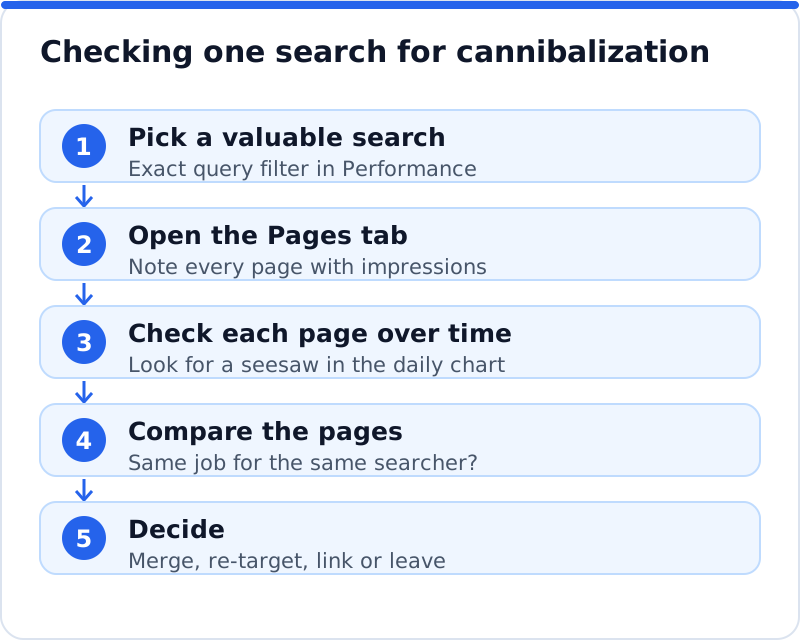
Google Search Console gives the most reliable view, because it shows which of your pages Google actually displayed for each search. Open the Performance report, add a filter for the query, and choose the exact query option so the results are not mixed with longer variants. Then switch to the Pages tab underneath the chart. If one page holds almost all the impressions and clicks, there is no problem for that search. If two or three pages share the impressions, each with its own average position, you have a candidate worth investigating further.
To confirm it, look at how the pages behave over time. Keep the query filter, add a page filter for one of the pages, and look at the daily chart for impressions and position; then repeat for the second page. Real cannibalization tends to show a seesaw, where one page appears on the days the other disappears, and positions jump about instead of settling. Also compare the two pages side by side in a browser and ask honestly whether a searcher would want either of them. An estate agent in Brighton might find that "sell my house Brighton" brings up both a valuation page and a blog post on preparing a house for sale, and only the first is what that searcher wants.
A quick site: search can help as a second opinion, but treat it with care. Typing site: followed by your domain and the search term shows pages Google has stored that mention the term, which is handy for spotting forgotten posts. Google itself says the site: operator does not show every indexed page and is not meant for counting or diagnosis, so it cannot confirm that two pages compete. It is best used to build a list of suspects that you then check properly in Search Console. Searching without the operator, in a private window set to your area, also shows which of your pages a real searcher sees today.
The usual causes
Most cases come from a handful of habits. The most common is a blog that has covered the same topic several times, such as three posts over four years on choosing a wedding venue, each a little different and none clearly the best. The second is service pages and location pages that say almost the same thing, where a landscaping firm in Atlanta has a page for garden design and a page for garden design in Atlanta, both aimed at the same local searchers. The third is the home page and a main service page both written around the same phrase, so Google cannot tell which is the authority. On WordPress, category and tag archives can add to the crowd, because each archive lists the same posts under a slightly different label.
Online shops have their own version of the problem. A tile shop in Cologne might have a category page for bathroom tiles, a filtered version of the same category, and a guide called "the best bathroom tiles", all competing for one search. Product variants with their own pages, such as one page per colour of the same item, can create the same split. Old campaign or seasonal pages that were never removed add to it year after year. In each case the cure starts with deciding which page should own the search and what job the others should do instead.
Choosing the right fix
There are five fixes, and the right one depends on whether the competing pages deserve to exist separately. If they do the same job, merge them into one strong page and redirect the others. If they can do different jobs, re-target one of them so it answers a different search. Internal links and canonical tags are lighter tools that support either choice. Removing a page from Google's index with noindex suits thin archive pages that nobody needs to find from a search.
| Situation | Best fix | What to do |
|---|---|---|
| Two posts or pages answer the same question | Merge and redirect | Move the best content to the stronger page and 301 redirect the other |
| A post competes with the service page for a buying search | Re-target | Rewrite the post's title, heading and angle around an earlier question, and link it to the service page |
| Both pages are right but Google picks the weaker one | Internal links | Point more internal links at the main page with descriptive anchor text |
| Near-identical versions of one page, such as filtered or print copies | Canonical tag | Point the copies at the main version with a canonical link |
| Tag or archive pages crowd the results | Noindex | Keep them for visitors but ask Google not to index them |
A canonical tag deserves a word of caution, because it is often used where a merge would work better. Google treats a canonical as a strong hint rather than a command, and it may ignore it when the two pages are clearly different. It is designed for copies of essentially the same content, not for two distinct articles on one topic. If you find yourself pointing a canonical from one useful page to another, ask whether the first page should exist at all. Usually the cleaner answer is to merge and redirect.
Merging two pages step by step
Merging is the fix you will use most, and the order of the steps matters. A boutique hotel in Porto with two posts about things to do near the hotel, written three years apart, would follow the same sequence as any business. The aim is to keep everything useful from both pages, keep the links they have earned, and leave visitors and Google with one clear address. Done well, the surviving page often climbs within weeks, because it now collects all the signals that were split. Done carelessly, it can drop for a while if links break or useful sections disappear.
- Choose the page to keep: usually the one with more clicks, more links from other websites and more enquiries.
- Move every useful section, example and image into the page you keep, and edit it so it reads as one piece.
- Unpublish the page you are retiring and add a 301 redirect from its address to the page you kept, so visitors and links arrive in the right place.
- Update internal links across the website that pointed to the old address, and make sure it no longer appears in your sitemap.
- Inspect the kept page with URL Inspection in Search Console, request indexing, and note the date in your change log.
After the merge, give Google time. The old address will drop out of the results as Google recrawls it and follows the redirect, which can take a few weeks for pages that are not crawled often. Keep the redirect in place for good, since links from other websites may point to the old address for years. If the kept page loses position briefly before rising, that is usually Google reassessing the combined content. Only investigate if it stays lower after a couple of months.
Building a keyword map so it does not return
The lasting cure is a keyword map: a simple record of which page on your website owns which search. A spreadsheet is enough, with one row per important page and columns for its address, its main search, the close variants it also covers, the intent behind them and the date it was last updated. The rule is one page for each main search, and every new piece of content must claim a search nobody else on the website already owns. An accountant in Cardiff who wants to write about self-assessment deadlines would check the map first and find that an existing guide already owns that topic. The new article becomes an update to that guide instead, which strengthens a page rather than creating a rival.
The map also helps at scale, when a website has hundreds of posts and dozens of service and location pages. Group pages by topic, mark the owner of each search, and look for rows where two pages claim the same thing; those rows are your list of fixes. Set the focus keyword field in your SEO plugin to match the map, so that whoever edits a page can see its job at a glance. Review the map whenever you plan new content and at least twice a year against Search Console. Teams that keep this habit rarely have cannibalization problems, because every new page starts with a clear purpose.
How AI WebMaker's analysis helps
Finding overlaps by hand means filtering Search Console one query at a time, which is slow on a large website. Our analysis reads up to twelve main pages the way Google does and shows the keyword each one should win, which makes it easy to spot two pages aiming at the same search. It also shows the visits the website gets now and the visits within reach, which tells you whether a particular overlap is worth fixing first. Each problem it finds is joined to the page it affects and to the tool that fixes it, with steps and the code to paste on any platform. On WordPress, the AI website SEO plugin can apply approved changes, including focus keywords and 301 redirects for addresses that now show "not found" after a merge.
You still make the decision about which page to keep, because that depends on your business and your customers. What the analysis removes is the hours of hunting that come before that decision. The tools include a monthly re-check with an email of what changed, so a new post that starts competing with an established page is caught early. For the wider set of tools that sit around this work, such as backlink checks and content planning, see the AI SEO tools for business websites. Used together with your keyword map, they keep each page focused on the search it is meant to win.
Questions business owners ask
Will Google penalise my website for cannibalization?
No, there is no penalty for having pages that compete with each other. Google simply has to choose which page to show, and it may choose inconsistently or pick the weaker one. The cost is lost visibility and lost clicks, not a punishment applied to the website. That is good news, because it means the problem disappears as soon as you make the choice clear. Merging, re-targeting or linking more strongly to one page usually settles it within a few weeks to a couple of months.
Should I delete old blog posts that overlap?
Deleting without a redirect is the one option to avoid, because any links and visits the post earned simply vanish. If an old post has nothing worth keeping and no traffic, merge any useful lines into the stronger page and redirect the old address. If it has a different angle worth saving, re-target it at an earlier question and link it to the main page. Old posts that sit outside your main topics and draw no visits can be removed with a redirect to the closest relevant page. The goal is fewer, stronger pages, not fewer pages at any cost.
Can my location pages target the same service?
Yes, as long as each one is genuinely about its own place. A bike shop in Copenhagen with branches in two districts can have a page for each, because people search for repairs near them. Each page can carry its own address, opening hours, staff and directions. Problems start when location pages are copies with only the town name swapped, since Google then sees several near-identical pages chasing similar searches. Give each page details that only apply to that location, and link each one to the main service page.
One page for every search that matters
Pick the five searches that matter most to your business and check each one in the Performance report with the exact query filter this week. Wherever two pages share the impressions, decide whether they do the same job, and choose a fix from the table. Merge and redirect where the pages are the same, re-target where they can do different jobs, and strengthen internal links to the page you want to win. Start your keyword map with those five rows and add every important page over the following month. When you want to see every main page and its keyword in one view, run an analysis of your website and let it show you where two pages are chasing the same search.
Your score out of 100, the visits within reach, every page read the way Google does and the tool that fixes each problem. Works on any website.
Analyse your website with AI Website SEO Tools →