AI Tools for Website SEO: Seeing the Whole Website at Once
How a whole-site check works, the six areas worth reading plus backlinks, and a practical way to decide which fixes deserve your time first.
- Any website
- Visits within reach
- Each problem joined to its fix

A website rises or stalls in Google as a whole, yet most owners still inspect it one page at a time, like judging a house by looking through a single window. AI tools for website SEO change the view by reading every page the way Google does and laying the results side by side, so patterns appear that no single page would ever reveal. Two service pages chasing the same search, a sharing image missing on every page, or a home page that holds all the internal links while the pages that bring enquiries hold none: these only show up when you see the site at once. The sections below explain how a whole-site check works, the six areas worth reading plus backlinks, how to treat a score sensibly and how to order fixes by the visits they can bring. You will also see where the software does genuinely useful work, such as reading pages in depth and drafting a fix for each one, and where a person still has to decide. By the end you should be able to open any report and know which three things to do first.
To see your own website the way Google does, try our see your website the way Google does, part of our AI SEO Tools.
This article is part of our complete guide: Website SEO Analysis.
Run AI tools for website SEO on your website and see what holds it back
Why one page at a time misses the problem
Page-level checks are the ones most owners know, such as the coloured light in an SEO plugin. They are good at confirming that a title contains the right words and a description is a sensible length. The trouble is that they judge each page in isolation, while Google judges pages in relation to each other. Google decides which page on your site best answers a search, how important each page is from the links pointing at it, and whether the site as a whole deserves trust. A physiotherapy clinic in Bristol can have a green light on every page and still never show for "sports massage Bristol", because a blog post on the same subject collects all the internal links and Google keeps choosing it over the service page. No single-page check would flag that, since each page on its own looks fine.
The patterns that matter most are the ones that repeat across pages. A theme that drops the main heading on every location page, forty products sharing the same description, or a set of pages that nothing links to are all problems of the template or the structure, not of one page. Fixing such a problem once at the source repairs dozens of pages at the same time. Seeing the whole site also tells you the scale of each issue. One missing description is a five-minute job you can ignore for now, but thirty missing descriptions on service pages is a pattern worth a focused session. Scale is what turns a long list of warnings into a short list of decisions.
How AI tools for website SEO read a whole site
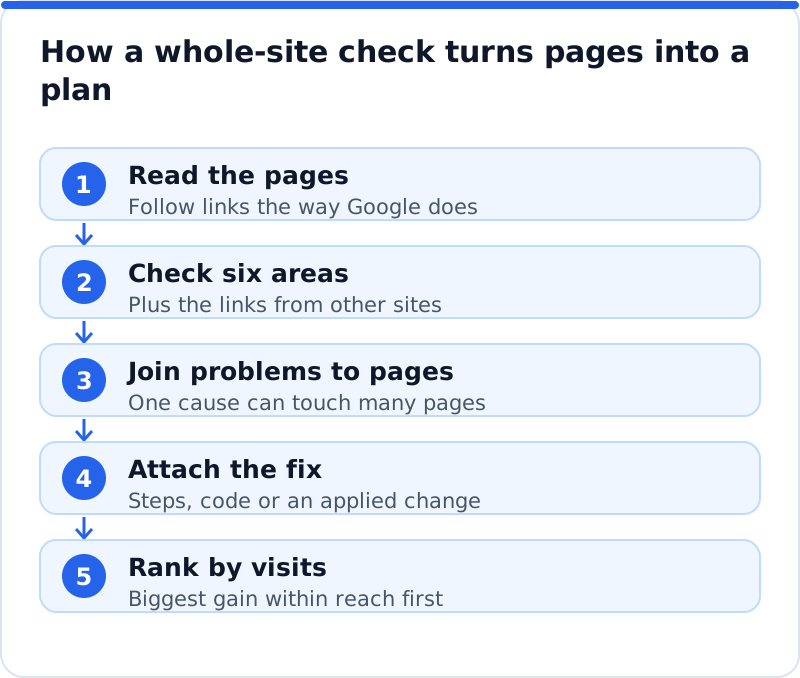
A whole-site check works in three stages. First, it crawls: it starts at the home page, follows every link and records what Google would read on each address: status code, title, description, headings, canonical, noindex, structured data, alt text and links. Second, it checks each page against a set of areas, from being found to how it shares. Third, it joins each problem to the pages it affects and to the fix that solves it. The result is less a spreadsheet and more a map of cause and effect.
Reading a site "the way Google does" means more than collecting visible text. A useful tool respects robots.txt, follows redirects to their end, notices when a page asks not to be indexed and reads the code that only search engines and social networks look at. It also has limits worth knowing. A crawler finds pages by following links, so a page that nothing links to may be missed unless the tool also reads your sitemap, and every check is a snapshot of one moment. Treat the crawl as a very good inventory rather than a complete truth, and confirm anything surprising in Google Search Console, which shows what Google itself has stored.
The six areas and the links behind them
A thorough check groups everything it finds into a handful of areas, because two hundred unrelated warnings help nobody. Six areas cover the website itself. Backlinks sit beside them as a seventh concern, because they are about other websites rather than your own. The table shows what each area looks at and the kind of finding that typically turns up. The order is deliberate, since a problem early in the list can make work later in the list pointless.
| Area | What it looks at | A typical finding |
|---|---|---|
| Found by Google | Indexing, robots.txt, noindex, sitemap, redirects | A service page left on noindex after a redesign |
| Your Google listing | Search titles and meta descriptions | Twelve pages sharing one title |
| Page structure | Headings, internal links, addresses | Location pages with no main heading |
| Content | Depth, overlap, thin pages | Three short pages answering one question |
| Sharing and rich results | Open Graph tags, business schema | No sharing image anywhere on the site |
| Keywords and traffic | The search each page should win | A key page aimed at nothing in particular |
| Backlinks | Links from other sites and their trust | A strong local link pointing at a dead page |
The areas also explain each other, which is the real value of seeing them together. A page that is not indexed cannot rank, so polishing its title is wasted effort until the indexing is fixed. A page with a fine title but thin content will earn impressions and few clicks, because the listing promises more than the page delivers. Backlinks multiply whatever is underneath them: a respected link pointing at a page that returns "not found" passes far less value than the same link pointing at a working page, which is why a 301 redirect from the dead address is often one of the quickest wins on an older site. When you read a report, look for these chains rather than treating each line as a separate job. A single cause near the top often explains half a dozen symptoms further down.
Reading a score without obsessing over it
Most tools roll their findings into a score out of 100, and in a whole-site check the total matters less than the pattern behind it. A landscaping company in Portland might score 64 and find that most of the loss comes from one area, gallery pages blocked from indexing, which is a single setting to change. A wedding photographer in Edinburgh might score 81 and feel safe, while the one page that brings bookings has been missing from Google since a theme update. A high total can hide one critical problem on your most valuable page, and a low total can come from many small things that barely matter. So read the score, note the weakest area, then go straight to your five or six most important pages and see what is wrong with each of them.
Putting fixes in order by visits within reach
The most useful number in a good report is not the score but the visits within reach. It is an estimate built from the searches each page could win, how often people make them, where the page sits now and the clicks a better position usually earns. It is a forecast, not a promise, but it lets you compare a title fix on one page with a content rewrite on another in the same unit. Without it, every warning looks equally urgent and owners tend to fix whatever is easiest. With it, you spend your limited time where the return is largest, and a sensible order usually looks like this.
- Remove anything that stops important pages being indexed, because a blocked page earns nothing however good it is.
- Improve pages that already sit on the second page of results for valuable searches, since a better title and fuller content can move them into view.
- Fix template problems that repeat across many pages, such as a missing heading or a shared description, in one change at the source.
- Settle overlaps where two of your pages compete for the same search, so one clear page can rise.
- Leave cosmetic issues, such as slightly long descriptions on minor pages, until the bigger items are done.
An architecture practice in Copenhagen shows how this plays out. Its residential extensions page sits around position fourteen for a search that people make several hundred times a month, while the portfolio has forty images without alt text. The images are the longer list, but moving the extensions page into the top five is likely worth far more enquiries, so it goes first. The alt text still gets done, just in the second week rather than the first. Most reports sort problems by type or count, which quietly pushes owners toward the wrong job.
What AI does well and where you decide
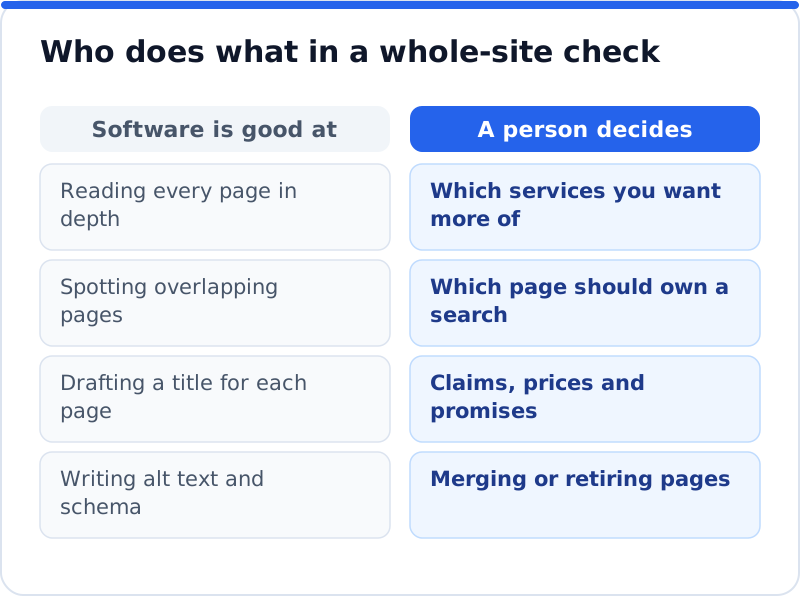
Software that can read language changes what a site check can do. It can read every page in depth and judge what each one is actually about, rather than counting how often a phrase appears. It can notice that two pages answer the same question in different words, which older tools missed because the wording did not match. It can draft a search title and description for each page in that page's own terms, suggest alt text from the image and its surroundings, and turn your business details into schema. A person could do this for a dozen pages, but across two hundred it is the tedious work that never gets finished.
Some decisions still belong to a person, and a good tool makes them easy rather than hiding them. Only you know which services you want more of, which page should own a search when two compete, and whether a page should be merged, rewritten or retired. Claims need a human eye too: a law firm cannot promise outcomes, a clinic must be careful with health statements, and any price or opening time must be correct on the day it goes live. Drafted text can also be confidently wrong about a detail it inferred, such as a neighbourhood you do not serve. Read every suggested change for your key pages before approving it, and keep the ones that sound like your business.
Common mistakes with AI tools for website SEO
The most common mistake is applying every suggested change in one go. If traffic then moves, you cannot tell which change helped or hurt, so work in batches and date each one. Another is following the report in the order it was printed, which is usually by type or severity label rather than by value to your business. Many owners also polish the home page, usually the strongest page already, while the service pages where buying searches land wait. Ignoring the links from other sites is a quieter error, since even a well-built website struggles if nobody credible points to it. The last is checking once and never again, because themes update, plugins change settings and new pages go live with blank descriptions, so a site that was clean in spring can be leaking visits by autumn.
Where AI WebMaker's tools fit in
The AI website SEO tools that check any website the way Google does at AI WebMaker follow the approach set out above. They check any website, whether it runs on WordPress, Wix, Squarespace, Shopify or something else, and show it as a network of pages rather than a flat list. You get a score out of 100, made of on-site checks (60%) and backlink trust (40%), broken down into the six areas above. The check reads up to 12 pages, so on a larger website it covers the main pages rather than every address, and it lists each page's problems, names the keyword each main page should win and estimates the visits a month now and within reach. Each problem is joined to the tool that fixes it, and fixes come with steps and the code to paste; on WordPress, our plugin can apply them into the fields of the SEO plugin you already use. The tools also include a monthly re-check with an email of what changed, so a new problem does not sit unnoticed for a season.
Measuring what changed after the fixes
Measurement closes the loop and stops you repeating work that did nothing. Google Search Console is the place to do it, because it shows what Google itself recorded rather than what a tool estimates. In the Performance report, filter by page and compare clicks, impressions and average position for the four to eight weeks after a change with the same length of time before it. In the Pages report, watch whether pages you unblocked move from "not indexed" to "indexed", and use URL Inspection on any key page that seems stuck. Seasonal businesses should compare with the same weeks of the previous year, since a garden centre will always be busier in May than in November. Keep a simple log of what you changed and when, because without dates the numbers are very hard to interpret.
Questions business owners ask
Can AI tools for website SEO replace an SEO agency?
They replace a good part of the checking and the routine drafting, which is often what smaller retainers mostly pay for. A tool can read every page, find the patterns and draft titles, descriptions and alt text far faster than a person working by hand. What it does not replace is judgement about strategy, such as which markets to pursue, what new pages to build and how to earn links from real organisations in your field. Many owners use the tools for the steady routine work and bring in a specialist for specific projects like a migration or a new service launch. Agencies use the same tools so their staff spend time on decisions instead of spreadsheets.
How often should I check the whole website?
Once a month is a sensible rhythm for most business websites, and many tools can repeat the check on a schedule. A monthly check catches slow leaks, such as a plugin update that changed a setting or new pages published without descriptions. You should also run a check straight after any big change, such as a redesign, a move to a new host, a new theme or a switch of address. Those are the moments when indexing problems and broken redirects most often appear. Between checks, a glance at the Search Console Pages report once a fortnight is enough to spot anything dramatic.
Will these tools change my website without asking?
That depends entirely on the tool, so check before you connect anything. A well-designed tool shows each proposed change, waits for your approval, records the value it replaced and lets you undo the change later. You should also be able to switch whole areas off, so that, for example, it can update descriptions but never touch page headings. Be wary of anything that rewrites pages in bulk with no log, because a repeated mistake is painful to reverse. Approval, a change log and undo are the three things to look for.
Your first whole-site check this week
Pick a quiet hour this week and run one check of the whole site rather than another test of the home page. Read the weakest area first, then look at your five or six most important pages and note what is wrong with each. Put the fixes in order by visits within reach, starting with anything that blocks indexing, and make the first batch of changes with the date written down. Come back to Search Console in about six weeks to see what moved, and run the check again to catch anything new. To see how checking, links and fixes fit together, the AI SEO tools for business websites bring them into one place. Start with the check itself, though, because every good decision after it depends on seeing the whole website at once.
Your score out of 100, the visits within reach, every page read the way Google does and the tool that fixes each problem. Works on any website.
Analyse your website with AI Website SEO Tools →