A Monthly SEO Report for a Business Website
What a useful monthly SEO report contains, where each number comes from, how to compare months fairly and how to turn the findings into three actions for the month ahead.
- Any website
- Visits within reach
- Each problem joined to its fix

Once a month is the natural pace for watching a website in search, because Google moves slowly enough that weekly numbers mostly show noise. A monthly SEO report gives you a fixed moment to ask three questions: are more people finding the website, is anything broken, and what should we do next? Done well, it fits on one page, takes about half an hour to prepare and ends with a short list of actions rather than a pile of charts. Done badly, it becomes a ritual of screenshots that nobody reads and nobody acts on. You will learn what to put in the report and where each number comes from, how to read the Search Console figures without being misled, how to compare months fairly, and a 30-minute routine that turns the report into three clear actions every month.
To see your own website the way Google does, try our SEO analysis for any website, part of our AI SEO Tools.
Put AI website SEO tools on a monthly re-check and get an email of what changed on your website
Why a monthly SEO report is worth the time
Search results change gradually. A rewritten title can take a couple of weeks to be recrawled and a few more to show its effect on clicks, while a new page may take a month or more to settle into its positions. Checking every day invites panic over normal swings, and checking once a quarter lets a broken setting cost three months of visits. A monthly rhythm sits between the two, with enough data to see a trend and often enough to catch a problem early. It also gives the person looking after the website, whether that is the owner, an employee or an agency, a regular deadline to show what was done.
The report matters most for what it changes. A veterinary practice in Bristol that reviews its search numbers every month will notice when its "emergency vet" page starts losing clicks, and can act before the phone goes quiet. Without a report, the same drop is discovered months later, when the cause is hard to trace. The written record also builds a history, so you can see which kinds of changes helped your website and which did not. Over a year, that history is worth more than any single month's numbers. It turns guesswork about SEO into decisions based on what has worked for your own business.
What belongs in a monthly SEO report
A useful report covers four things: visibility in search, the health of the website, trust from other websites and the business result. Each needs only one or two numbers, chosen because they connect to enquiries. Everything else can stay in the tools for when a question comes up. The table lists the items worth including, where each one comes from and what to look for. If you track only half of them at first, start with the Search Console numbers and the list of problems fixed.
| Item | Where it comes from | What to look for |
|---|---|---|
| Clicks and impressions | Search Console, Performance report | The change against the previous period |
| Top queries and pages | Search Console, Performance report | New entries, big gains, big losses |
| SEO score and problems fixed | Your website check | Area scores, serious problems remaining |
| Pages indexed | Search Console, Page indexing report | Sudden falls, new reasons for exclusion |
| New and lost backlinks | Backlink checker or Search Console Links | Links from relevant, trusted sites |
| Core Web Vitals | Search Console, Core Web Vitals report | Pages moving into Poor or Needs improvement |
| Enquiries from search | Analytics key events, call or form logs | Whether more visits bring more work |
Reading the Search Console numbers
Clicks are the heart of the report, because a click is a visit from Google. Impressions count how often your pages appeared in results, whether or not anyone scrolled down to see them. Click-through rate is clicks divided by impressions, and average position is the average of your highest position each time a page appeared. These four numbers move together in ways that can mislead. When a page starts appearing for many new searches at low positions, impressions rise, average position falls and click-through rate drops, even though nothing got worse.
That is why the top queries and top pages tables matter more than the totals. Sort the Queries tab by clicks and compare it with the previous period, looking for searches that rose or fell sharply. Then do the same on the Pages tab, since a fall in clicks usually traces back to one or two pages. Filter out searches that contain your business name, using the query filter, so you can see how the website does with people who did not already know you. A kitchen fitter in Chicago will learn far more from "kitchen remodel Lincoln Park" gaining clicks than from people typing the company name. Note two or three such movements in the report, each with a likely reason.
Score, problems and pages indexed
The health section answers one question: is anything stopping Google from seeing the website properly? Your website check gives a score and a list of problems, and the report should show the score, the change since last month and the serious problems still open. List the problems fixed during the month as well, since that is the work most likely to explain next month's numbers. If the score dropped, look at which area fell and which pages carry the new problems. A theme update, a new plugin or a page published in a hurry is usually the cause.
The Page indexing report in Search Console completes the picture. Note the number of indexed pages and compare it with last month, remembering that small changes are normal as pages are added or retired. A sudden fall, or a new reason appearing in the "Why pages aren't indexed" table, deserves a closer look the same day. The most common surprises are pages marked noindex by mistake, pages blocked by robots.txt after a change and redirects that send pages somewhere unexpected. An architecture studio in Copenhagen that relaunches its portfolio section should watch this report closely for the next two months. Catching an indexing fault in the monthly report saves the visits that would otherwise be lost.
Backlinks, page speed and enquiries
Links from other websites change slowly, so a monthly look at new and lost links is enough. Record the new linking sites worth noting, such as a local newspaper, a trade association or a supplier, and any important link that disappeared. Search Console's Links report shows top linking sites but updates slowly and does not list every link, so a dedicated backlink checker gives a fuller view. The aim is to see that trust is growing steadily, not to count every directory listing. If nothing new arrived in three months, that is a prompt to put some time into earning links.
Core Web Vitals measure loading speed, responsiveness and visual stability for real visitors, using data Google collects from Chrome users. The Search Console report groups your pages as Good, Needs improvement or Poor on mobile and desktop, and it only has data for pages with enough visitors. Note whether any group of pages moved into Poor, since that often follows a new script, a large image or a theme change. Finally, connect search to the business: count enquiries from organic search, using key events in Google Analytics if you track forms or calls, or simply a tally from the booking system. A hair salon in Brighton that sees bookings rise with clicks knows its SEO is paying for itself.
Comparing months fairly
Most mistakes in monthly reporting come from unfair comparisons. Calendar months have different numbers of days and different mixes of weekdays and weekends, and business searches usually fall at weekends. A month with five Mondays will look better than a month with four, for no reason connected to your website. The fairest short comparison is the last 28 days against the previous 28 days, which keeps the same weekdays on both sides. Search Console's date picker offers this directly under its Compare tab.
Seasons matter even more. A garden centre sees spring rise and winter fall every year, and a tax adviser sees a rush before each filing deadline, so month-on-month comparisons will swing for reasons outside anyone's control. Compare the same period a year earlier as well, which Search Console allows because it keeps 16 months of data. Note anything unusual in the month, such as a public holiday, a site outage, a price change or an advertising campaign that drove brand searches. Remember too that the most recent two or three days of Search Console data are usually incomplete, so end your period a few days before the report date. With these habits, a rise or fall in the report means something.
Turning the report into three actions
Every monthly report should end with three actions for the month ahead, each specific enough that someone can do it and tick it off. "Improve SEO" is not an action, while "rewrite the titles of the four pages with the most impressions and fewest clicks" is. Draw the actions from the report itself: a page that lost clicks, a serious problem still open, a query gaining impressions that deserves its own page. Three is a deliberate limit, because a business website rarely has time for more, and finishing three beats starting ten. Next month's report starts by checking whether the three were done and what happened.
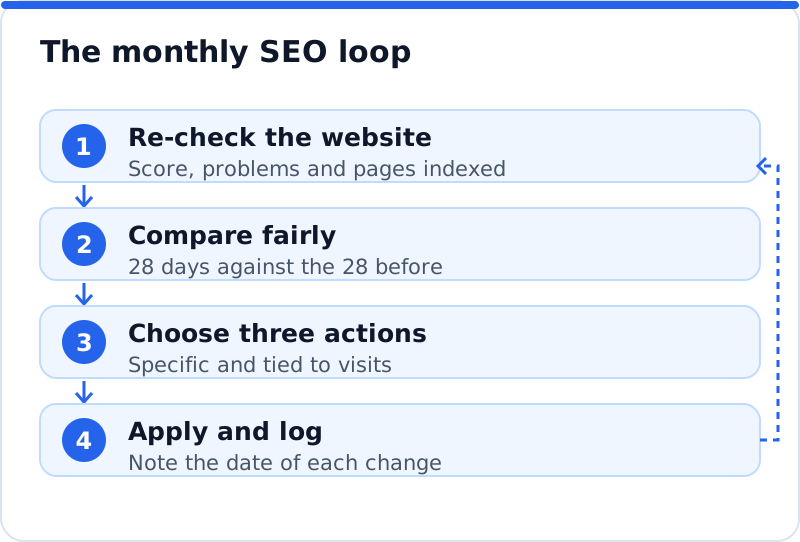
A short example shows the shape. An IT consultancy in Frankfurt finds that its "managed IT support" page lost a fifth of its clicks, its score is steady but two pages have duplicate titles, and the query "IT support for law firms" is gaining impressions with no matching page. Its three actions are to compare the page that lost clicks with the results now ranking above it and strengthen it, to fix the two duplicate titles, and to write a page for law firms. Each action names a page and a result to watch. In the next report, each one is marked done or carried over, with a note on what changed.
A 30-minute monthly routine
The report should not take an afternoon. With the same order every month, it fits comfortably in half an hour, and the numbers become familiar enough that changes jump out. Pick a fixed day, such as the first Monday of the month, and put it in the calendar. Use the same template each time, so this month's report sits beside last month's and the eye goes straight to the differences. The table shows one way to split the time.
| Minutes | Task | Output |
|---|---|---|
| 0 to 5 | Check last month's three actions | Done, carried over or dropped |
| 5 to 15 | Search Console clicks, queries and pages, 28 days compared | Two or three notable movements |
| 15 to 20 | Website check, Page indexing and Core Web Vitals | Score change and any new faults |
| 20 to 25 | Backlinks and enquiries | New links worth noting, enquiry count |
| 25 to 30 | Choose and write three actions | A one-page report ready to share |
A monthly re-check with an email
The part of the routine that is easiest to forget is the check of the website itself, because nothing reminds you when a setting changes. Our AI website SEO tools include a monthly re-check with an email of what changed, which gives the health section of your report a fixed starting point. Each check works on any platform, reads up to 12 pages and gives a score out of 100, each page's problems, and the visits a month now beside the visits within reach. Each problem is joined to the tool that fixes it, with steps and the code to paste, and on WordPress the plugin can apply the fixes you approve in your account. To understand what the score in that email captures and why it is a guide rather than a target, read about your SEO score and how to use it. The wider AI SEO tools for business websites add backlink checks for the trust section of the report.
Questions business owners ask
How long should a monthly SEO report be?
One page is enough for most business websites, and two pages is a sensible limit. The report needs a short summary, a handful of numbers with their change against the previous period, a note of what was done and three actions for next month. Detailed charts can live in Search Console and analytics for anyone who wants to dig deeper. A report that takes longer than ten minutes to read is usually skipped. If an agency sends you something longer, ask for a one-page summary on top.
What if clicks fall in a month when we did everything right?
A single month's fall is often caused by things outside your control, such as seasons, holidays, a competitor's new page or a change in Google's ranking systems. Compare with the same period last year to see whether the dip is seasonal. Look at which pages and queries lost clicks, since a fall spread evenly across the website suggests a broad cause, while a fall on one page suggests a specific one. Check the health section for new problems in case something did break. If nothing points to a fault, keep going with the plan and judge the trend over three months.
Should I report average position?
It is worth noting, but with care. Average position is an average across every search where your pages appeared, so it shifts when you start appearing for new searches, even if your main positions did not move. A falling average can therefore be good news, if it comes with rising impressions. It is most useful for a single page or a single query, viewed over time. For the headline numbers, clicks and enquiries tell you more.
Start your first report this month
Choose the day, open Search Console and set the date range to the last 28 days compared with the 28 before. Note clicks, impressions and the queries and pages that moved most, then run a check of the website and record the score, the serious problems and the number of pages indexed. Add the backlinks worth noting and a count of enquiries from search, even if it is only a tally from your inbox. Write three actions, each tied to a page and a result, and put them where you will see them. Next month, start the report by asking whether those three were done, and let the answer shape the three that follow.
Your score out of 100, the visits within reach, every page read the way Google does and the tool that fixes each problem. Works on any website.
Analyse your website with AI Website SEO Tools →