SEO Score: What a Website Score Out of 100 Really Measures
What sits behind a website's SEO score, why the number differs between tools, the trap of chasing points and how to use the score to pick fixes that bring real visits.
- Any website
- Visits within reach
- Each problem joined to its fix
A number out of 100 feels like a verdict, which is why an SEO score can cheer up or ruin a business owner's morning. The truth is calmer: the score is a summary written by a tool, built from checks that tool chose and weighted in its own way. Google never sees it, never uses it and does not publish a score of its own for your website. Read well, the score is still useful, because it turns hundreds of small facts about your pages into one figure you can track and a list of problems you can work through. You will learn what a good SEO score weighs, why two tools can give the same website very different numbers, why a perfect score does not guarantee visits and how to use the score to choose the fixes that bring the most traffic, plus a sensible target to aim for.
To see your own website the way Google does, try our website traffic potential checker, part of our AI SEO Tools.
This article is part of our complete guide: Website SEO Analysis.
Try the AI website SEO tools and see your score out of 100 with the visits each fix could bring
An SEO score is a summary, not Google's number
Google ranks pages using many signals, and it does not reduce a website to a single public grade. Search Console, Google's own reporting tool, shows clicks, impressions, indexing and Core Web Vitals data, but no overall score. The nearest thing Google offers is the SEO category in Lighthouse, which appears in PageSpeed Insights and in Chrome's developer tools. That category runs a short list of basic checks on one page, such as whether it has a title, a meta description, crawlable links and a valid robots.txt, and whether anything blocks indexing. A Lighthouse SEO score of 100 means the page passed those basics, not that it will rank.
Every other SEO score comes from a third-party tool. Each tool decides what to check, how much each check counts, how many pages to read and whether to include things outside your website, such as backlinks. That freedom is why scores vary so much, and also why they can be useful: a well-designed score reflects the things that genuinely affect visits. A poorly designed one counts trivia, such as a missing favicon, as heavily as a home page Google cannot index. Before you trust a number, find out what the tool behind it actually checks.
What a useful SEO score weighs
A score worth following looks at the website from the searcher's side, in roughly the order Google meets it. First comes being found: whether Google can crawl and index the pages, whether there is one main address, a sitemap and a sensible robots.txt. Next comes the listing, meaning the title and description that appear in results. Then page structure, content and keywords, which decide whether each page clearly answers a search. Sharing and rich results cover how pages look when shared and whether structured data qualifies them for extra features in results. Finally, backlinks show whether other websites trust yours enough to link to it.
| Area | What a good check looks at | Why it affects visits |
|---|---|---|
| Found by Google | Indexing, robots.txt, sitemap, https, one main address | Pages Google cannot index earn nothing |
| The Google listing | Titles and descriptions, length, duplicates | The listing decides whether people click |
| Page structure | One clear main heading, sub-headings, enough text | Structure tells Google what the page covers |
| Content and keywords | One main topic per page, matching the search intent | Pages must answer the search to rank |
| Sharing and rich results | Open Graph tags, schema markup | Better previews and extra features in results |
| Backlinks and trust | Linking sites, their authority, followed links | Links remain a strong sign of trust |
The weighting matters as much as the list. A noindex tag on the home page should cost far more points than an image without a width attribute. Good tools group problems by severity, so a single serious problem moves the score more than a dozen cosmetic ones. They also read several pages rather than only the home page, because an accountant in Dublin may have a polished home page and twelve service pages with identical titles. Ask whether a tool's score would drop sharply if your most important page vanished from Google. If it would barely move, the score is measuring tidiness rather than visibility.
Why two tools give different SEO scores
It is common to see 62 in one tool and 88 in another for the same website on the same day. The first reason is scope: one tool may check a single page while another reads a dozen, and the inner pages of most websites are weaker than the home page. The second reason is the list of checks, since some tools test only code and others judge content, keywords and links too. The third is weighting, as one tool may treat a long title as a serious error while another barely notices it. The fourth is backlinks: a score that includes link trust will be lower for a new website, however tidy its pages are.
Rendering explains some differences too. Websites built with heavy JavaScript can look empty to a tool that reads only the raw HTML, while a tool that renders the page like a browser sees the full content. Timing plays a part, because a tool that checked last month may not have seen your recent changes. None of this means one tool is right and the other wrong. It means you should pick one tool whose checks you understand, use it consistently and compare its numbers only with themselves. Switching tools every month makes progress impossible to read.
A perfect score does not guarantee traffic
A website can score 100 and still get almost no visits from Google. The score confirms that the pages are technically sound and well labelled, but rankings depend on things a checklist cannot fully measure. The page has to answer a search that people actually make, and answer it better than the pages already ranking. It has to suit the intent behind the search, so a sales page will struggle for a query where people want a how-to article. And in competitive markets, the strength of the websites linking to you often decides who appears first.
Think of a yoga studio in Austin with a beautifully built website and a near-perfect score. If its pages talk about "mindful movement journeys" while people search for "hot yoga classes Austin", the score cannot fix the gap between its words and theirs. A plumber in Manchester with a scruffier website and a lower score may outrank a neater competitor because forty local businesses and suppliers link to him. Scores measure the conditions for ranking, not the ranking itself. That is why the best tools pair the score with keyword and traffic data, so you can see whether better pages are turning into visits.
The trap of chasing points
Once a number exists, people try to raise it, and that can lead to bad decisions. Owners stuff keywords into headings because a checker wants the phrase in the H1, or pad pages with text to clear a word count. Some remove useful scripts, such as a booking widget, to win a few speed points, and lose enquiries as a result. Others spend a week fixing low-severity warnings while a serious indexing problem sits untouched, because the warnings were easier. The score goes up, and the business sees no change.
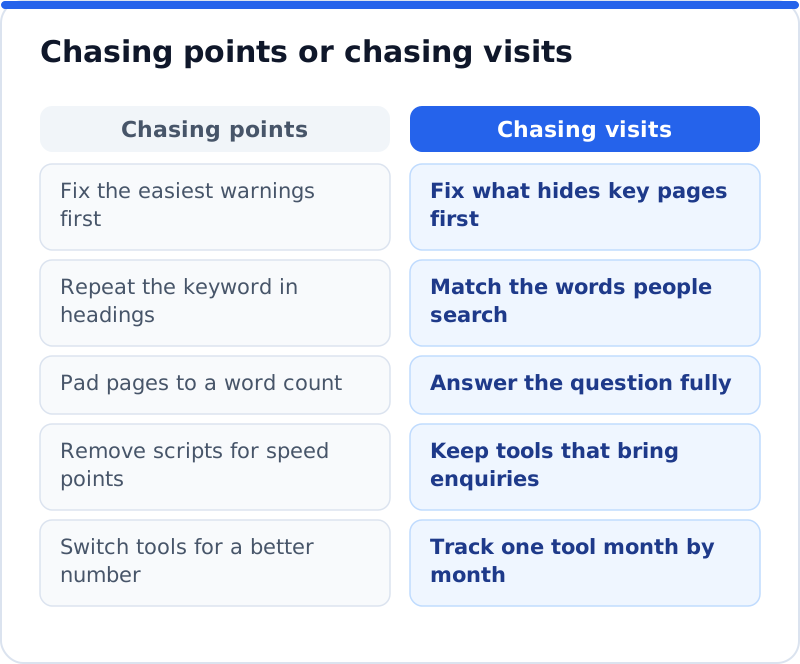
The fix is to treat every item in a report as a question rather than an order. Ask what would happen to visits if you fixed it, and how long it would take. A missing meta description on a page with thousands of impressions is worth an hour, while a missing one on a privacy policy is worth almost nothing. A warning about heading order on a blog post from five years ago can wait. When a suggestion would make a page worse for a human reader, ignore it, because readers decide whether an enquiry follows.
Use the SEO score to track progress
The score is at its best as a trend line. Check the website with the same tool at the same point each month and note the number, the score in each area and the main problems listed. A rising score with a falling list of serious problems shows the work is landing. A sudden drop is an early warning, often caused by a plugin update, a redesign or a setting that changed, and it usually appears before traffic falls. Keeping the history lets you link changes to results, such as a jump in clicks a month after the titles were rewritten.
Area scores are more telling than the total. A website might hold steady at 74 overall while its listing score climbs and its content score slips, which points to new pages being published without enough care. Look at which pages carry the problems too, since a fault on the page that brings most enquiries matters more than ten faults on old news posts. Pair each monthly check with Search Console's Performance report, comparing clicks and impressions with the same period before. The score tells you about the condition of the pages, and Search Console tells you whether people are finding them.
Prioritise by visits within reach
The most useful question is not "how many problems are there" but "how many visits are within reach if I fix them". A list of sixty problems sorted by count leaves you guessing. A list sorted by the visits each fix could bring tells you where to start. That estimate combines the searches each page could win, how often people make them and how much better the page could rank. It is never exact, but it is far better than treating every warning as equal.
| Problem found | Points it costs | Likely effect on visits |
|---|---|---|
| Main service page carries noindex | Many | Large, the page cannot appear at all |
| Ten pages share one title | Several | Medium, Google cannot tell them apart |
| Home page has no business schema | A few | Small to medium, fewer rich details |
| Old blog post lacks alt text | One or two | Very small, little search demand |
Work from the top of that kind of list. Fix anything that stops important pages being found, then improve the listings of pages that already appear often but win few clicks. After that, strengthen the content of pages close to the first page of results, since a small improvement can move them into view. Leave cosmetic warnings for a quiet afternoon. A law firm or a clinic that works this way often sees visits rise faster than its score, which is the right way round.
A sensible target for your SEO score
Aim for a score where nothing serious remains in being found and in the listing, rather than a particular number. In practice that means no important page blocked or noindexed, one main address, a sitemap Google can read and a unique, well-sized title and description on every page that matters. Once those are clean, most well-run business websites sit comfortably in the upper part of the scale on on-site checks. The backlink part of a score rises more slowly, because earning links takes months, so a new website should expect that portion to lag. Do not hold off on publishing new pages while you chase the last few points.
How the AI WebMaker score is built
Our AI website SEO tools check any website, built on WordPress, Wix, Squarespace, Shopify or anything else, and give a score out of 100 made of on-site checks (60%) and backlink trust (40%). The on-site part covers six areas: Found by Google, Your Google listing, Page structure, Content, Sharing and rich results, and Keywords and traffic. The check reads up to 12 pages, lists each page's problems, names the keyword each main page should win and shows the visits a month now beside the visits within reach. Each problem is joined to the tool that fixes it, with steps and the code to paste, or applied by the plugin on WordPress after your approval. The tools include a monthly re-check with an email of what changed, so a website SEO score with a monthly re-check shows you how the numbers move. The check sits alongside the other AI SEO tools for business websites, including the AI Backlink Checker for a closer look at the links behind the trust part of the score.
Questions business owners ask
What is a good SEO score for a business website?
There is no universal pass mark, because every tool scores differently. A better test is whether the serious problems are gone: every important page indexed, one main address, unique titles and descriptions, and clear content on each main page. Once those are in place, the number usually settles in the upper range of most tools. Compare yourself with your own score last month, not with a competitor's score in a different tool. If visits are rising, the score is doing its job whatever its exact value.
Why did my SEO score drop when I changed nothing?
Something usually did change, even if you did not change it yourself. Plugins and themes update, platforms adjust default settings and new pages get published with empty fields. The tool may also have updated its checks or read a different set of pages. For scores that include backlinks, lost links or a new competitor's links can move the number. Look at which area fell and which pages carry the new problems, and the cause is usually clear within minutes.
Should I pay attention to the Lighthouse SEO score?
It is a sound basic check and worth a glance, especially for new pages. It tests one page at a time for essentials such as a title, a meta description, crawlable links and whether indexing is blocked. It does not judge keywords, content quality, competition or backlinks, so a 100 there is a starting point. Use it alongside a fuller check of the whole website. If Lighthouse shows a red SEO item on a key page, fix it, since those items are usually simple.
Make your next score count
Run one check this week with a tool whose areas you understand, and write down the total, the area scores and the three problems with the largest effect on visits. Fix those three first, even if easier warnings tempt you, and note the date of each change. Check again in a month with the same tool and compare the areas, then look at clicks and impressions in Search Console for the same weeks. Keep that rhythm for a quarter and you will learn which kinds of fixes move your traffic and which only move the number. Start with the page that brings the most enquiries, because that is where a better score is worth the most.
Your score out of 100, the visits within reach, every page read the way Google does and the tool that fixes each problem. Works on any website.
Analyse your website with AI Website SEO Tools →