Wix SEO: What You Can Fix and Where to Fix It
Where every important Wix SEO setting lives, how to fill it in well, and how to find the problems on a Wix site before they cost you visits.
- Any website
- Visits within reach
- Each problem joined to its fix

Wix keeps almost every setting a search engine cares about one or two clicks away from the page you are editing, which is good news and a quiet trap at the same time. The good news is that Wix SEO is mostly a matter of finding the right panel and writing the right words, with no server or code to manage. The trap is that Wix fills those panels with sensible defaults, so a site can look finished while every page still carries a title like "Services | My Site" and an image with no description. Owners then judge the platform when the real gap is a set of fields nobody opened. The sections below show where Wix keeps each setting, how to fill it in for a business, how to handle redirects, blogs and speed, and which mistakes come up again and again on Wix sites.
To see your own website the way Google does, try our website traffic potential checker, part of our AI SEO Tools.
Run a check of your Wix website with AI website SEO tools and see which pages need work first
Where Wix keeps page SEO settings
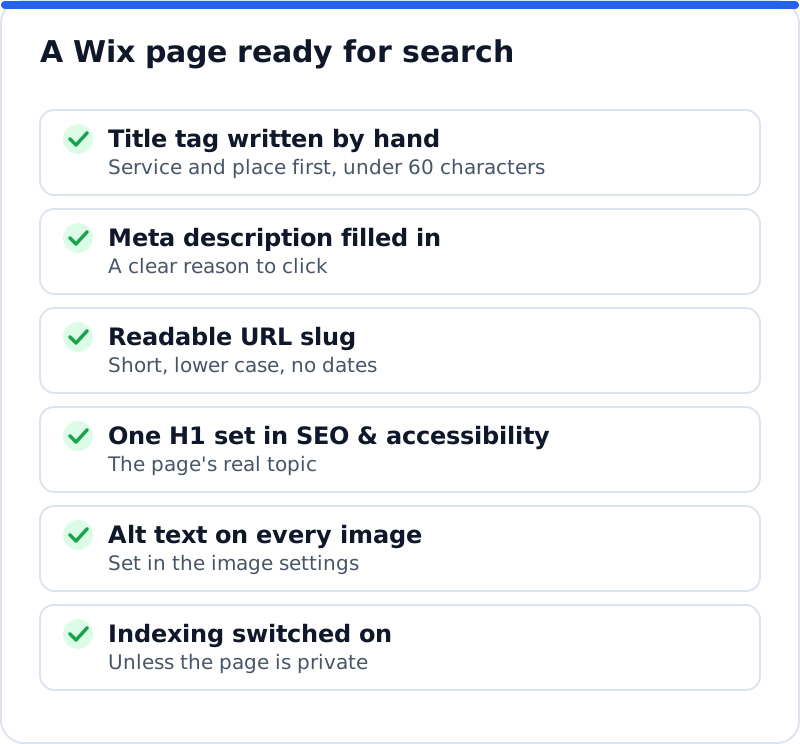
Every page you build in the editor has its own SEO panel, and it is the most important place in Wix SEO. In the Wix Editor, open Pages & Menu on the left, click the More Actions icon next to a page and choose SEO basics. In Wix Studio the path is almost the same, starting from Pages instead. The newer Wix Harmony editor opens it from the Page dropdown at the top left, under SEO and accessibility. Whichever editor you use, the panel holds three fields that matter most: the URL slug, the title tag (the blue line in search results) and the meta description (the grey text beneath it).
The same panel holds a toggle labelled "Let search engines index this page", which should stay on for every page you want customers to find. Switching it off is useful for thank-you pages, test pages and private offers, and harmful anywhere else. An Advanced SEO tab sits next to the basics and lets you change the page's canonical tag or add extra meta and link tags, which most owners will rarely need. There is also a social share area, and by default Wix uses your title tag and meta description when someone shares the page. If you are still weighing up platforms, the overview of SEO for Wix, Squarespace and Shopify compares how the three handle the same job.
Writing Wix SEO titles and descriptions
The title tag is the line most likely to decide whether a searcher clicks, so it deserves more thought than any other field. Google usually shows about 50 to 60 characters of a title, depending on the pixel width of the letters, and Wix's own guidance for store products suggests keeping titles to 60 characters and descriptions to 156. Put the service and the place at the front, then add the business name or a reason to choose you if space allows. A landscaping company in Phoenix, for example, should not let its main service page go out as "Services", because nobody searches for that word alone. The table compares weak titles that Wix sites often carry with stronger versions written for searches.
| Page | Weak title tag | Stronger title tag |
|---|---|---|
| Home page | Home \ | Desert Green |
| Service page | Services | Desert Landscaping and Xeriscape Design in Phoenix |
| Contact page | Contact Us | Contact Desert Green for a Phoenix Landscaping Quote |
| Blog post | Blog Post 4 | How Often to Water a Desert Yard in Arizona Summers |
The meta description does not affect rankings directly, but it shapes the decision to click. Write it as a short pitch of one or two sentences that says what the page offers and why someone should choose it, in roughly 140 to 155 characters. Mention something concrete, such as same-week visits, a guarantee or a service area, rather than generic praise. Google sometimes replaces your description with text from the page when it thinks that matches the search better, which is normal and not a sign that something is broken. Writing a clear description for every important page still gives Google a good option to show most of the time.
SEO settings for whole page types
Editing pages one by one works for a ten-page site, but a store or a busy blog needs defaults. Wix calls these SEO patterns, and you reach them from the SEO section of your site's dashboard: scroll to Tools and settings, open SEO Settings and choose a page type under "Edit by page type". The types you see depend on what your site uses, such as main pages, products, blog posts, booking services or events. For each type, the "Customize defaults" tab lets you edit the basics and social share settings, the structured data markup, additional meta tags and, for products and blog posts, the page URL format. A pattern fills in every page of that type automatically, and any page you edit by hand keeps your own version.
Product pages and blog posts also have their own SEO panels outside the editor. For a Wix Stores product, open the product in your dashboard and click "Edit SEO Settings" in the marketing and SEO area of the product page. For a blog post, open the post in the Blog editor and click SEO in the left sidebar before publishing. A café in Ghent selling coffee beans online would set a product pattern such as the product name plus "Coffee Beans" and the shop name, then hand-write titles for its five best sellers. That mix of defaults and hand edits gives every page something sensible while the important pages get your full attention.
Headings and alt text in the editor
Headings tell Google how a page is organised, and Wix separates how a heading looks from what it is in the code. To set the real heading level, select a text element, click Edit Text, open "SEO & accessibility" and choose from the "Choose HTML tag" dropdown. Changing the tag does not change the design, so you can keep a large decorative line as a paragraph and make the true page title the H1. Each page should have one H1 that states its topic, with H2 headings for the main sections below it. A piano teacher in Vienna might use "Piano Lessons for Adults in Vienna" as the H1 and "Lesson Prices" and "First Lesson" as H2 headings.
Alt text is the written description of an image, read aloud by screen readers and used by search engines to understand what a picture shows. In Wix, select the image, click the Settings icon and type into the field labelled "What's in the image? Tell Google". Describe the image plainly, in the way you would to someone on the phone, and include a place or service only when it is genuinely in the picture. Gallery images work differently, since Wix uses the title and description you give each image in the gallery settings. Publish the site after adding alt text, because changes in the editor do not go live until you do.
Redirects with the URL Redirect Manager
A redirect sends visitors and search engines from an old address to a new one, and it protects the value an old page has built up. Wix helps here more than many owners realise: its help centre says it automatically creates a 301 redirect when you change the URL slug of an editor page, a store product or category, a booking service or an event. The exception is the Wix Blog, where changing a post's address does not create a redirect, so you need to add one yourself. Redirects also matter when you move to Wix from another platform, because the old addresses that Google and other websites know will otherwise show "not found". Redirects only work on a connected custom domain, which most business sites already have.
To add one by hand, open the SEO section of the dashboard, scroll to Tools and settings and select URL Redirect Manager. Choose New Redirect, then Single redirect, and type the old path in the Old URL field. For the destination, type the slug of a page on your site and select it from the list, or paste a full address for an external page. Save, and allow a few minutes for the redirect to start working. A dog grooming salon in Glasgow that merged two service pages into one would redirect the retired page to the merged one, so nobody who bookmarked it lands on an error.
Connecting Google Search Console
Search Console is Google's own report on how your site appears in search, and Wix connects to it through its SEO setup checklist. Once connected, Wix submits your sitemap to Google automatically and keeps it updated as pages change. The help centre notes that a premium plan and a connected domain are needed for the connection. After a few days, the Performance report shows the searches that led to your site, with clicks, impressions, click-through rate and average position for each page. The URL Inspection tool lets you check whether a specific page is indexed and ask Google to crawl it again after a change.
Use the data to choose your next fixes rather than guessing. Pages with plenty of impressions but few clicks usually need a better title or description. Pages that show for unexpected searches may need clearer content, or a separate page for the topic people are actually looking for. Searches where you sit just off the first page are often the quickest wins, because a stronger title and a few internal links can move them up. Check the report monthly and compare four-week periods, since daily figures swing too much to read anything useful.
The Wix blog and site speed
A blog brings in searches your service pages never will, such as questions people ask before they buy. On Wix, each post has its own SEO panel for the title tag, description and slug, and the blog post page type has its own pattern in SEO Settings. Write each post around one question, link it to the service it relates to, and give it a hand-written title rather than relying on the pattern. Remember that changing a post's address needs a manual redirect. Fewer, more useful posts beat a stream of short ones on similar topics, which mostly compete with each other.
Speed is the other area where Wix sites vary a great deal, mostly because of choices made in the editor. Wix includes a Site Speed dashboard that shows Core Web Vitals from real visitors and a lab score from Google's PageSpeed simulation, once a site has at least ten sessions in the last seven days. The usual causes of a slow page are large images, autoplay video in the first screen, many fonts and apps that add scripts to every page. Review your installed apps and remove anything you no longer use, because each one can add work for the browser. Then check the dashboard again after a week to see whether real visitors notice the difference.
Common Wix SEO mistakes
The same handful of problems appear on Wix sites of every size, and each one is quick to fix once spotted. None of them is caused by the platform itself; they come from defaults left in place and settings switched off during building. They also tend to stay hidden, because the page looks perfect to a visitor even when its title tag is wrong. That is why a short review every few months is worth the time. Look for these five in particular, because each one can quietly hold back pages that are otherwise well made.
- Leaving title tags on their defaults, so pages appear in Google as "Home" or "Services" followed by the site name.
- Turning off "Let search engines index this page" while a page was in progress and forgetting to switch it back on.
- Styling text to look like a heading without setting its HTML tag, so the page has no H1 or several competing ones.
- Changing a blog post's URL slug without adding a redirect in the URL Redirect Manager.
- Installing many apps over the years and never removing the ones that are no longer used.
Finding the gaps on a Wix site
Checking every page by hand is slow, and the problems that matter most are often patterns across pages rather than single errors. A whole-site check reads your pages the way Google does and shows where titles repeat, where headings are missing and which pages have the most visits within reach. The AI Website SEO Tools from AI WebMaker check any website, Wix included, and give each fix with steps and any code to paste. You also see a score out of 100, the keyword each main page should win and the visits a month you get now and could reach. They sit alongside the rest of the AI SEO tools for business websites, and they include a monthly re-check with an email of what changed, so you can see whether the edits worked.
Questions business owners ask
Is Wix bad for SEO?
No, Wix gives business owners all the settings they need for solid SEO, including titles, descriptions, slugs, canonical tags, structured data, redirects and a sitemap. Its reputation comes partly from early versions of the platform, which had more limits than it has today. Most Wix sites that struggle do so because the defaults were never replaced and the content is thin, not because of the platform. An architect in Copenhagen with clear, well-titled project pages can rank as well on Wix as on any other builder. The work is the same: good pages, clear titles and links from other websites.
Should I use the Wix SEO setup checklist?
Yes, it is a sensible starting point, especially because it is the route Wix uses to connect your site to Google Search Console. It walks you through the basics, such as your home page title and the keywords you want to be found for. Treat it as the first step rather than the whole job, since it cannot write strong titles for each of your pages. After finishing it, work through your important pages one by one using SEO basics. Then return to the dashboard occasionally, because Wix adds new SEO tools over time.
Can I add structured data on Wix?
Wix adds some structured data automatically for page types such as products, blog posts and events, and you can edit it through the structured data settings for each page type. For a single page, the Advanced SEO tab lets you work with structured data markup as well. Business schema on the home page, describing your name, address and opening hours, is a common addition for local businesses. Test any markup you add with Google's Rich Results Test before relying on it. Keep it accurate, because schema that does not match what the page shows can be ignored.
A Wix site ready for its next visitor
Open SEO basics for your home page and your three most important pages today, and replace every default title and description with words written for the searches you want to win. Set one H1 on each of those pages through the HTML tag setting, and add alt text to the images that show your work. Connect Search Console through the setup checklist if you have not done so, so the effect of each change becomes visible. Then look at the Site Speed dashboard and clear out apps you no longer need. Once those basics are in place, a full check of the site will show which page deserves your attention next.
Your score out of 100, the visits within reach, every page read the way Google does and the tool that fixes each problem. Works on any website.
Analyse your website with AI Website SEO Tools →