 AI Web Maker
Dentist website example
A dental clinic website has to serve two very different visitors: the nervous patient who keeps putting off a check up, and the person with toothache who needs help today. This sample for the invented Bright Smile Dental does both in 5 pages, with a section for anxious patients, a toothache route, an urgent queries note and 6 treatments to book, from an examination to children's dentistry.
Bright Smile Dental is not a real practice, so its dentists, its patient reviews, its fees and its contact details are inventions made for this sample.
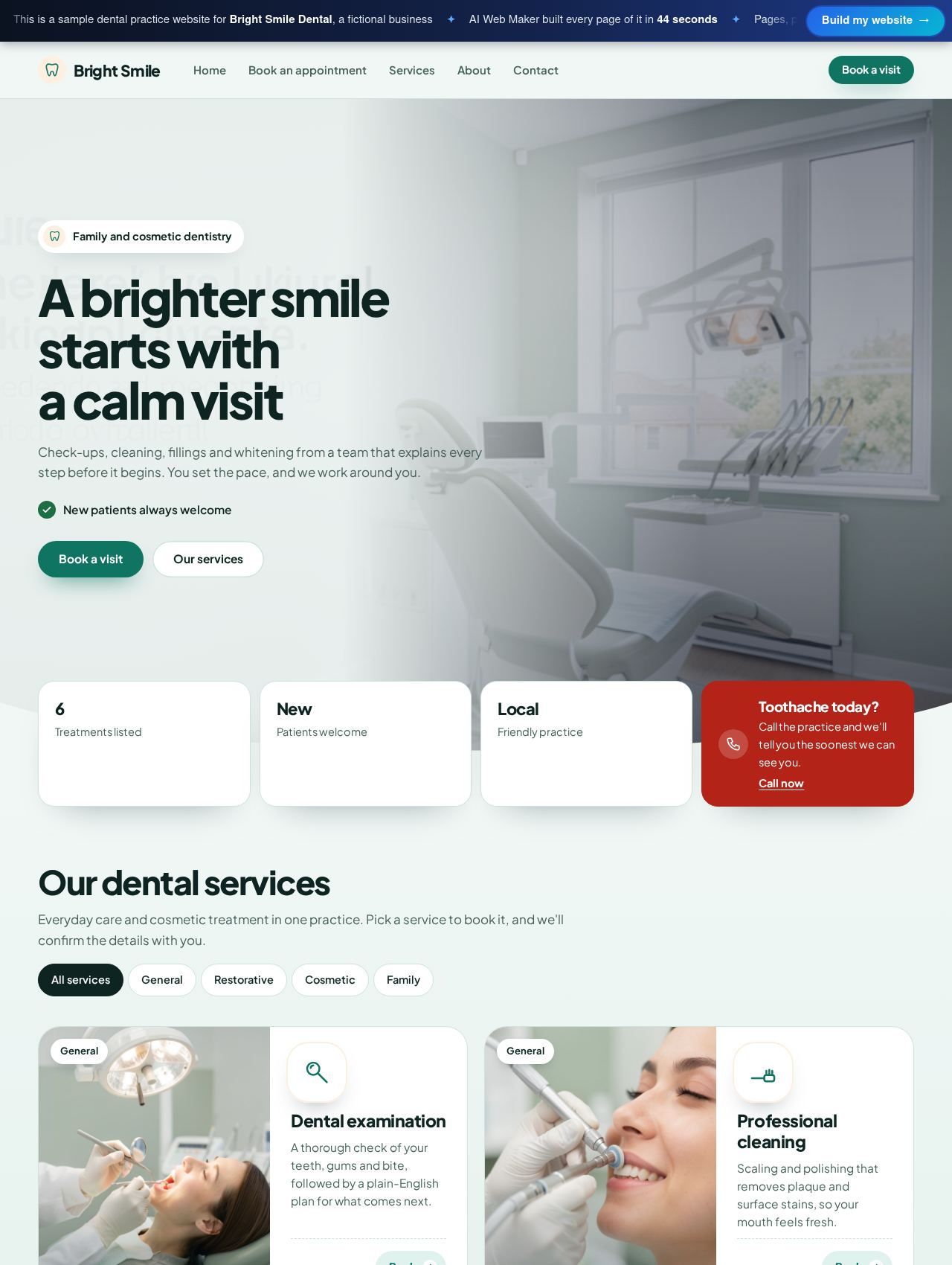
Fear keeps many people away from the dentist for years, and a practice website is often the first place that fear is met. Bright Smile Dental's home page gives it a section of its own, inviting nervous patients to go at their own pace. The About page returns to the subject under New to the Dentist or Feeling Anxious, telling readers they can ask the dentist to pause at any point. A toothache section sits on the home page as well, so someone in pain is not left scrolling past whitening offers. Services, the team, a look inside the practice and patient reviews fill the rest of that page. This balance of reassurance and quick help is exactly what the best dental clinic website examples strike.
Beyond the welcome, the sample handles the routine business of a busy family practice. Its booking page offers 6 treatments, including a dental examination at USD 75, a professional cleaning at USD 95 and children's dentistry at USD 55. The Services page separates general and preventive care from cosmetic and restorative treatment, and it describes a typical visit from the first conversation to an agreed plan. On the Contact page, an Urgent Dental Queries note says the enquiry form is not watched for emergencies and asks patients to phone instead. Dental fees, public schemes and insurance work very differently from country to country, so a real practice must add its own terms. Kept accurate, these pages spare the reception desk a great many calls.
Five pages, from check up to urgent toothache
Bright Smile Dental runs to 5 pages, and two of them, the home page and the contact page, carry advice for patients in pain. The table shows every page with its section headings.
| Page | What it opens with | Its sections |
|---|---|---|
| Home | A brighter smile starts with a calm visit | Our dental services · Toothache? Show us where it hurts · Nervous about the dentist? We'll go at your pace. · The people who'll look after you · Inside the practice · What patients say · Book a visit · Common questions · Due for a check-up? |
| Book an appointment | Book an appointment | Get a website like this for your business |
| Services | Our Dental Services | Want to Know More? · Make an Enquiry · Send us an enquiry · Get a website like this for your business |
| About | About Bright Smile Dental | Our Story and Care Philosophy · Meet Our Dentists and Team · New to the Dentist or Feeling Anxious? · Ready to Take the Next Step? · Get a website like this for your business |
| Contact | Contact Bright Smile Dental | Enquiry form · Urgent Dental Queries · Find Us · Get a website like this for your business |
How the builder put Bright Smile together
All of Bright Smile Dental came out of one builder run, started from a sentence about a family practice offering check ups, cleaning, fillings, whitening and orthodontics.
The practice's own job starts after those 44 seconds, with real dentists, fees, opening hours and urgent care instructions.
Five jobs for a dental site, from toothache to check up
A calm welcome for anxious patients
Dental anxiety is common, and a practice website should address it openly rather than hide it. Bright Smile Dental does this twice, with a home page section for nervous patients and an About page section headed New to the Dentist or Feeling Anxious. The second tells readers that feeling nervous is normal, that they can ask to pause at any point and that each step is explained before it begins. It also invites them to mention their worries when they get in touch, so the visit can be planned around them. A real practice should promise only what it truly offers, such as longer appointments, a signal to stop or sedation where its dentists are trained and permitted to provide it. Honest reassurance of this kind is often what finally brings a nervous patient through the door.
A clear route for toothache and swelling
Someone with toothache needs to know within seconds what to do, so a dental site must give pain its own clear route. The sample's home page carries a toothache section near the top, where a patient in pain finds it before the cosmetic treatments. The Contact page adds an Urgent Dental Queries note saying the enquiry form is not monitored for emergencies and asking patients to phone. A real practice should add its own urgent arrangements, including what happens at night and at weekends. It should also say plainly that swelling spreading toward the eye or neck, or any difficulty breathing or swallowing, needs the local emergency number rather than a dental appointment. In dental clinic website design, clear instructions here protect patients and spare the practice some very difficult phone calls.
Treatments sorted into routine and cosmetic
Patients rarely know dental terms, so the services should be grouped by purpose before they are named. Bright Smile Dental's Services page does this with two groups: General and Preventive Care, covering examinations, cleaning and advice on home care, and Cosmetic and Restorative Treatments, covering repair and appearance. A section on what to expect during a typical visit describes the conversation, the examination of teeth and gums, the explanation of findings and an agreed plan. An enquiry form at the foot of the page has a Treatment of interest field, so a patient who is still deciding can ask a question first. The description given to the builder mentioned orthodontics, yet the draft does not list it, so a real practice should check that every treatment it provides appears, from crowns to root canal treatment. Grouping and plain names together let a patient find their treatment without a dictionary.
Fees, children and family care in view
Price is a frequent reason people delay dental care, so a practice site should show fees or explain how they work. The sample's booking page shows a price beside each of its six treatments, from USD 55 for children's dentistry to USD 299 for teeth whitening. That openness helps, but a real practice must also explain how insurance, public schemes or its own payment terms apply in its country, because the rules differ greatly. Whitening deserves a note too, since in some countries only dentists or registered dental professionals may provide it. A family practice should also say from what age it sees children and whether parents stay in the room. Clear money and family information removes two of the biggest barriers to booking.
Bookable treatments named the way patients say them
The booking list should mirror the way patients describe what they need, not the way a practice codes it. Bright Smile Dental lists six items: dental examination, professional cleaning, tooth coloured fillings, teeth whitening, gum care and children's dentistry. After choosing an item, the patient names the dentist they prefer, settles on a day and can leave a short note for the team. Reception then accepts it, proposes a different day or declines it within the Booking Manager, and patients pay the practice directly, with none of that money going to AI Web Maker. A real practice may prefer fillings to be booked only after an examination, in which case the list should say so or drop the item. One of the simplest dental website ideas is a list built around real practice rules, which keeps online requests easy to accept.
Guides for practices with a dental chair
Search checks on the Bright Smile pages
Dental searches split between routine needs, such as a check up or a hygienist, and urgent ones, such as toothache or a broken tooth, often with a neighbourhood added. These results show how Bright Smile Dental's 5 pages are prepared for search, adding up to a score of 67.
- ✗Search titles (4 of 5 pages)
- ✗Search descriptions (3 of 5 pages)
- ✓One main heading (5 of 5 pages)
- ✗Section headings (4 of 5 pages)
- ✓Image alt text (5 of 5 pages, 0 of 4 images without it)
- ✓Phone ready (5 of 5 pages)
- ✓Language set (5 of 5 pages)
- ✓Internal links (5 of 5 pages)
- ✓Page weight (5 of 5 pages)
Two checks are missing from this list on purpose, because both test business schema and that schema was taken off the sample since the practice is invented.
test your own practice's pages for search problems
Tools for the front desk of a dental surgery
A dental practice usually needs more than a website, and these related tools pick up some of the other tasks.
Compare this sample with other websites that take bookings online on our AI booking website builder page.
Give nervous patients a calmer way to book a check up
Tell the builder in a sentence or two what your practice offers and who it serves, and it drafts the pages, text and photos for you to rework. Drafts and previews are never billed. A published practice site is hosted for $119 annually, or $19 in each calendar month, plus a domain picked from around 400 endings.
What dentists ask before taking bookings online
Should a dentist show fillings and whitening prices online?
Many practices find that showing prices, or at least starting prices, cuts down on calls and helps patients plan. Where treatment is partly covered by insurance or public schemes, add a short note on what patients usually pay themselves, since this differs by country. Check any local rules on advertising dental services before you publish.
What should a dentist's site say about swelling and pain at night?
It should give patients in pain a phone number and the practice's urgent hours, and say what to do when the practice is closed. It should also make clear that severe facial swelling, bleeding that will not stop, or trouble breathing or swallowing needs the local emergency number. An online enquiry form is never the right place for an urgent problem.
Did a dentist write the Bright Smile pages?
No. The AI Web Maker builder wrote them, and chose their photos, after being handed one sentence about an imaginary family practice, and it finished all 5 pages in 44 seconds. Anything a real practice publishes should be checked by its own dentists first.
What do dentists pay each year to keep patients booking online?
The yearly hosting charge is $119, and practices that prefer to spread it can pay $19 a month. The domain name is extra and is priced by its ending. Building the site and previewing it, however many times, are not billed.
Updated 7 November 2026 · by AI Web Maker · More healthcare wellness website guides · All sample websites