Dental SEO: How a Dental Practice Wins Local Patients
The searches dental patients type, the pages a practice needs for each treatment, and how to turn Google visibility into measured bookings.
- Any website
- Visits within reach
- Each problem joined to its fix
A cracked molar at nine on a Sunday evening turns almost anyone into a determined searcher, and the practice Google shows first is usually the one that gets the call. Dental SEO is the work of making sure that practice is yours, not only for emergencies but for the planned treatments that keep a diary full, such as implants, clear aligners and whitening. Patients search for dentistry in a very particular way: by treatment, by urgency, by worry about cost and by whether you accept their insurance plan or offer NHS care. A website that answers those searches page by page, backed by a complete Google Business Profile and a steady flow of honest reviews, wins local patients month after month. You will see which searches matter, how to build a page for each treatment, how to handle emergency hours and multi-site practices, how to use before and after photos safely, and how to measure the bookings that result.
This article is part of our complete guide: SEO for Service Businesses.
Test your dental practice website with AI website SEO tools and see which treatments it misses
Why dental SEO is its own discipline
Dentistry is health care, and Google holds health pages to a higher bar because poor advice can hurt people, so clear authorship and visible credentials matter more than they would for a florist. The groundwork is shared with every kind of practice, and the guide to medical SEO covers it in full, from clinician-reviewed content to patient privacy. What makes dentistry different is the mix of three very different patients. One is in pain and wants someone open now, one is researching a treatment that may cost thousands and will compare several practices over weeks, and one simply wants a reliable family dentist close to home. Each of them types different words, reads different pages and needs a different reason to choose you, so a home page and a short list of services cannot serve all three.
The searches dental patients type
Emergency searches are short and urgent, such as "emergency dentist near me", "dentist open Saturday" or "broken tooth" followed by a town name. Treatment searches are longer and more considered, for example "dental implants cost Nottingham", "Invisalign or braces for adults" and "composite bonding before and after". Routine searches are about access and trust, such as "NHS dentist accepting new patients" in the UK or "dentist that takes Delta Dental" in the USA, where people search by the name of their plan. Fear has its own vocabulary too, and searches like "sedation dentistry" often come from people who have put off care for years. Start with these words rather than with the pages you already have.
| Search a patient types | What they want to know | Page that should answer it |
|---|---|---|
| emergency dentist near me | Can I be seen today? | Emergency page with hours and tap-to-call |
| dental implants cost (town) | Price, finance, who does it | Implants page with a price guide |
| Invisalign (town) | Provider status and results | Aligners page with consented photos |
| teeth whitening | Method, safety, how long it lasts | Whitening page comparing options |
| NHS dentist accepting new patients | Is there space, what it costs | NHS and private fees page |
| dentist for nervous patients | Kindness, sedation | Nervous patients page |
Every distinct search deserves one page that answers it better than anyone else nearby. If one page tries to answer six of these searches, Google has to guess what it is about and usually ranks a competitor's focused page instead. Find your own patients' words in the Search Console Performance report by filtering queries for a treatment name such as "implant". Queries with many impressions but few clicks point to pages that exist but answer poorly. Ask your front desk team too, because the questions people ask on the phone are the ones they typed first.
One page for every treatment
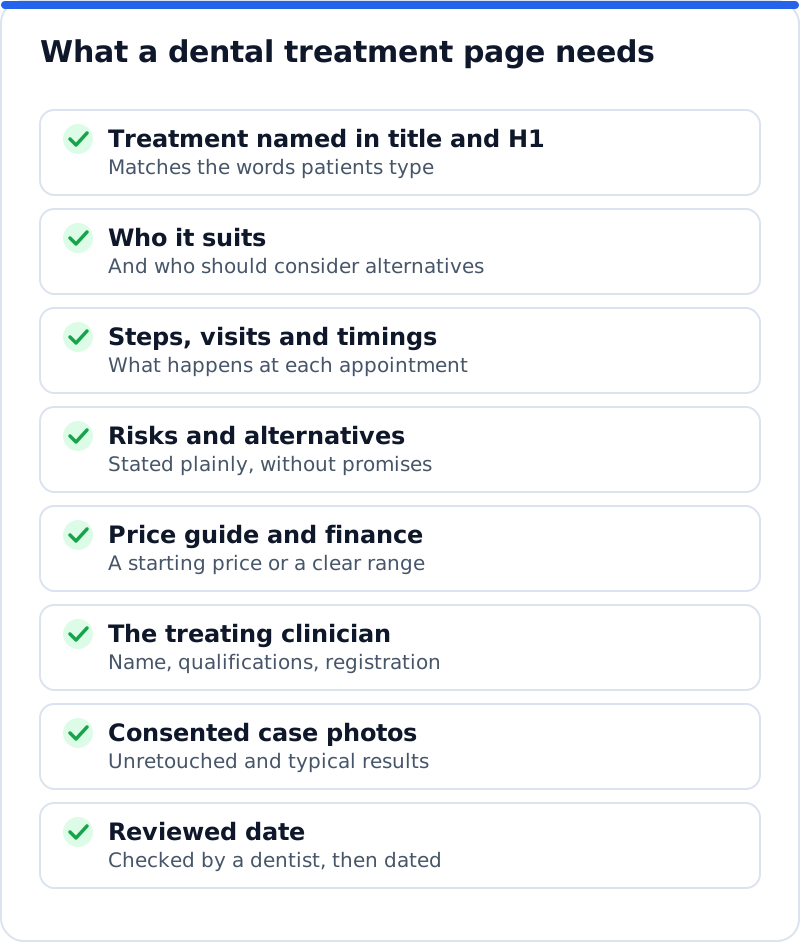
A "Cosmetic dentistry" page that lists veneers, whitening, bonding and gum contouring in four short lines cannot rank for any of them. Each treatment that matters to the practice needs its own page, with the treatment named in the search title, the main heading and the address of the page. A cosmetic dentist in Dublin who splits one crowded page into separate pages for veneers, bonding and whitening gives Google three clear answers instead of one vague one. Each page should explain who the treatment suits, what happens at each appointment, how many visits it takes, what aftercare involves and what the realistic alternatives are. It should also name the dentist who carries it out, with their qualifications, and show a date when a clinician last reviewed the page.
The words on these pages are covered by professional rules as well as by Google's expectations. In the UK, the General Dental Council publishes guidance on advertising that covers what a practice website should show, including each dental professional's name, qualifications and GDC registration number, and it restricts the word "specialist" to dentists on one of its specialist lists. In the USA, state dental boards set advertising rules, and many limit how a general dentist may describe work in a specialty such as orthodontics. Claims such as "painless" or "guaranteed results" are risky everywhere, because they cannot be shown true for every patient. Plain, accurate descriptions read as more trustworthy anyway, and they tend to convert better than superlatives that patients have learned to ignore.
Emergency dentistry and opening hours
Emergency searches are won or lost on two things: whether Google believes you are open, and how quickly the patient can reach a person. Build a dedicated emergency page that explains what counts as a dental emergency, which first steps your clinicians recommend while the patient waits, and how to get an appointment today. Put the phone number at the top as a link that dials on a phone, because most of these searches happen on a mobile in the evening. Say clearly what happens out of hours, for example that UK patients can call NHS 111 for urgent dental care, or that anyone in the USA with facial swelling that affects breathing or swallowing should go to an emergency room. Never claim to be open around the clock unless someone really answers the phone at three in the morning, because patients who are let down tend to say so in reviews.
Your opening hours must match on the website, the Google Business Profile and every directory listing. Google shows "Open now" or "Closed" beside your name, and for an emergency search that word decides who gets the call. Add special hours before bank holidays, Thanksgiving and the Christmas period, so the profile does not show you as open on a day you are closed. If you keep emergency slots each morning, say so on the emergency page and in the profile description, since that is useful information rather than marketing. Add "Emergency dental service" as a secondary category on the profile only if the practice really offers same-day urgent care.
Google Business Profile and multi-site practices
The Google Business Profile is often the first thing a local patient sees, before they ever reach your website. Choose "Dentist" as the primary category for a general practice, or the more precise category for a specialist practice such as "Orthodontist" or "Pediatric dentist", and add secondary categories that describe real services, such as "Cosmetic dentist" or "Dental clinic". Fill in the services list, set the appointment link to your booking page, and add photos of the reception, treatment rooms, team and entrance. Use the practice name exactly as it appears on the sign, because names stuffed with words like "Implants Invisalign" break Google's guidelines. Google also allows individual profiles for public-facing practitioners, which helps patients who search for a dentist by name but needs managing when someone leaves.
A practice group with several sites needs one verified profile per site and one page per site on the website. Imagine a group with three practices around Manchester: each location page should show its own address, phone number, opening hours, team, parking and transport, and the treatments offered there, since not every site will offer sedation or implants. Link each profile's website field to its own location page rather than the home page, so a patient who taps through lands on the right branch. Copying one page and swapping the town name creates doorway pages that Google tends to ignore. Real differences, such as who runs that site, make each page worth ranking.
Photos, consent and reviews
Before and after photos are among the most persuasive content a dental website can show, and they carry the most risk. Get written consent that says exactly where the photos will appear, such as the website and social media, and that explains the patient can withdraw it later. In the USA, patient photos are protected health information under HIPAA, so a signed authorisation is needed before using them in marketing, and in the UK and Europe they count as health data under GDPR. Do not retouch the results, show typical cases rather than only the most dramatic ones, and label each pair with the treatment and the time between photos. Give every image descriptive alt text, such as "upper front teeth before and after composite bonding", which helps both screen readers and image search.
Reviews matter to dental patients because they are choosing someone to work inside their mouth. Ask every patient in the same way, for example with a short message after the appointment, rather than inviting only those you expect to be happy, because selective asking is against Google's policies. Never offer discounts or prize draws in exchange for reviews, and never post or buy reviews, since Google removes them and consumer law in both the USA and the UK now targets fake reviews. When you reply, never confirm that the reviewer is a patient or mention any treatment, even if they described it themselves. US regulators have settled cases with dental practices that revealed patient details while replying to online reviews, so a safe reply thanks the person, says the practice takes feedback seriously and invites them to call the practice manager.
Directories add more places to be found and reviewed. In the USA, patients use Zocdoc, Healthgrades and Yelp, and the American Dental Association runs a Find-a-Dentist search for its members. In the UK, the NHS website lists practices that provide NHS care, and the practice can keep its profile there up to date, including whether it is taking new NHS patients. Whichever directories you use, keep the name, address and phone number identical to the Google Business Profile. An old phone number in one listing makes it harder for Google to be sure all the listings belong to the same practice.
Insurance, NHS fees and payment plans
Cost is the question patients avoid asking on the phone, so answer it online. In the USA, list the insurance plans the practice is in network with, explain what out of network means, and update the page whenever a contract changes. A family dentist in Columbus, Ohio, whose page names each plan will match searches that include the plan name. In the UK, explain the difference between NHS and private treatment, link the NHS charge bands to the treatments they cover, and say honestly whether the practice is accepting new NHS patients. Membership plans and finance deserve their own pages. Finance wording is regulated in the UK and in the USA, so take the exact wording from your finance provider rather than writing your own.
Dentist schema and technical health
Structured data tells search engines in a precise format what the practice is, where it is and when it is open. Schema.org has a dedicated Dentist type, a kind of medical business, and it suits both single practices and each site in a group. The useful properties include the name, address, telephone, opening hours, website address, a logo or photo, geographic coordinates and links to your profiles on other websites through sameAs. Place the markup on the home page for a single practice and on each location page for a group, and test it with Google's Rich Results Test and the Schema Markup Validator. Markup does not guarantee any special display in results, but it removes doubt about details that matter for local searches. While you are there, check a treatment page in PageSpeed Insights on its mobile setting, because large photo galleries and booking widgets are the usual reasons dental pages load slowly.
Measuring bookings, not rankings
Rankings matter only as a route to booked appointments. The profile's performance view shows calls, website clicks, direction requests and bookings made through the profile, month by month. On the website, set up key events in Google Analytics for the booking form, the tap on the phone number and the confirmation page of your online booking system. Search Console then shows which treatment pages are gaining clicks, so you can link the growth in implant enquiries to the implant page you rewrote. Ask new patients how they found you and record the answer in your practice software, because a phone call that started on Google often looks like a direct call in the numbers. Measure by treatment as well as in total, since one implant patient may be worth as much as many check-ups, and review the figures monthly rather than daily.
Where AI Website SEO Tools fit
Our AI website SEO tools check a practice website the way Google reads it and give a score out of 100, with on-site checks counting for 60% and backlink trust for 40%. The report covers six areas and reads up to 12 pages, listing each page's problems. It shows the keyword each main page should win, so you see whether the implants page is aimed at "dental implants" plus your town. You see the visits a month now and those within reach, and each problem is joined to the tool that fixes it, with steps and code to paste or, on WordPress, applied by our plugin. A monthly re-check emails you what changed, and the wider AI SEO tools for business websites cover backlinks and content when the practice is ready for them.
Questions business owners ask
How long does dental SEO take to bring new patients?
Profile changes such as categories, hours and photos can affect local results within weeks. New treatment pages usually take longer, often a few months, because Google needs to crawl them and gather signals such as clicks and links. A practice in a crowded city centre will wait longer than one in a market town. Reviews build steadily, so the practice that asks every patient every week pulls ahead slowly and then stays ahead. Judge progress over a quarter rather than a fortnight, and measure enquiries, not just positions.
Should we publish prices on treatment pages?
A starting price or a range usually helps, because cost is a main reason people search and a main reason they hesitate to call. A page that gives an "implants from" amount, noting that the final cost depends on an assessment, answers honestly without promising a fixed figure. Pages without any price information often lose the patient to a competitor who gives one. Check that the prices match what reception quotes, because a mismatch damages trust quickly. Review the figures whenever fees change and update the reviewed date on the page.
Can we reply to a negative review that is unfair?
You can reply, and you usually should, but the reply must not confirm that the reviewer is a patient or mention any detail of care. Write a short, calm response that thanks them, says the practice takes concerns seriously and gives a way to contact the practice manager. If the review breaks Google's policies, for example because it is abusive or about a different business, report it through the profile. Do not argue the facts in public, because prospective patients judge the tone of the reply more than the complaint. Reviews that are handled well can actually reassure people who read them.
Your first month of dental SEO
Begin with the Google Business Profile this week: correct the categories, hours, services, booking link and photos. Next, rewrite the emergency page and the page for your highest-value treatment using the checklist above, with a dentist reviewing each one. Set up key events for calls and bookings so you can see the effect of every change. Then ask every patient for a review in the same way, using a reply template that never confirms anyone is a patient. Then run a full check of the website to see which pages and problems stand between the practice and the patients searching nearby.
Your website as a network: every part of its SEO checked while you watch, your score, the traffic within reach and the fix for each problem.
Check your website with AI Website SEO Tools →