WordPress SEO Plugin With AI: What to Expect Before Installing
A clear look at the two kinds of AI found in WordPress SEO plugins, what to check on control, data and cost, and a routine to follow before you install one.
- Works with Yoast SEO and Rank Math
- You approve every change
- One-click undo
Two WordPress plugins can both carry the letters AI on their listing and do completely different jobs once they sit in your dashboard. One waits inside the editor until you press a button, then suggests a title for the page you happen to be writing. Another reads the whole website, works out which pages are losing visits, and writes fixes into the fields that already exist, often across dozens of pages at once. Choosing a WordPress SEO plugin with AI is therefore less about the AI itself and more about how the work reaches your pages, who approves it, what it costs and what happens to your data. Below are the kinds of AI features on offer, what they do well and badly, how review and pricing should work, and a routine to follow before installing one on a live business website. It also covers running one next to the SEO plugin you already have.
To have these fixes applied on your own WordPress website, try our WordPress plugin that applies SEO fixes, part of our AI SEO Tools.
Download the AI website SEO plugin for WordPress and run a check before you sign up
What a WordPress SEO plugin with AI actually does
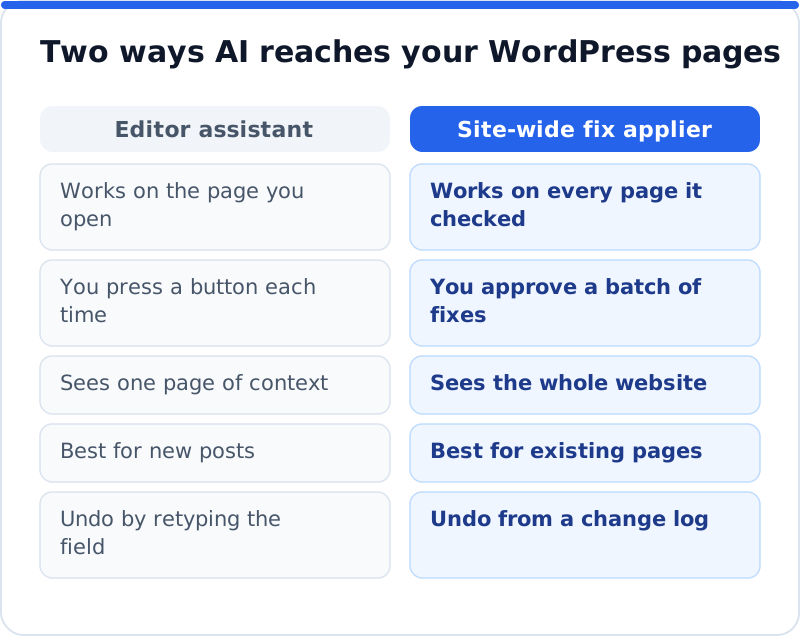
Most WordPress SEO plugins began as tools for typing metadata by hand. You type an SEO title and meta description into a box below the editor, and the plugin prints them where Google reads them. The AI features added in recent years sit on top of that habit in four broad ways. Some help you write inside the editor, some produce whole articles, some describe images that have no alt text, and some check the entire website and apply fixes for you. Each changes a different part of your workload, so know which one a product offers before you compare prices.
| Type of AI feature | What it works on | Where you use it | What to check first |
|---|---|---|---|
| Editor assistant | The page open in the editor | A button in the post editor | Whether you review each suggestion |
| Article generator | New blog posts | A separate screen or the editor | Whether posts arrive as drafts |
| Alt text generator | Images in the media library | Media screens or on upload | Whether decorative images are skipped |
| Site-wide fix applier | Metadata and more on every page | An online account and WordPress | Approval, a change log and undo |
The difference matters because SEO work on a business website is mostly maintenance, not invention. A roofing company in Denver with forty service and area pages rarely needs one clever new title. It needs sensible titles and descriptions on all forty pages, a focus keyword on each that does not clash with the others, and photos described in words. An editor assistant helps only on the page you open, so somebody still has to open forty pages one after another. A site-wide tool works from the other end, starting with the pages that cost the most visits and proposing fixes for them in a batch. Because those changes happen away from the editor, such a tool must show exactly what it will change and let you reverse it.
What AI does well in SEO, and where it slips
AI is good at the repetitive writing that most owners put off for months. Turning a page about boiler servicing into a tidy title and description is a pattern task, and a good tool does it consistently across hundreds of pages. It is also good at describing images in plain words and noticing that two pages share the same title. It never gets tired on page ninety, which is where human attention fades and copy-pasted titles creep in. That frees an owner or agency for the work that needs judgement, such as offers, pricing pages and reviews.
AI slips in predictable places, and knowing them makes review faster. It can state facts the page does not support, such as 24-hour call-outs the business never offered or a town the company does not serve. It can drift toward generic phrases like "quality service you can trust" that would fit any competitor. It knows nothing about your margins, so it may steer a page toward a search you do not want to win. It can also repeat the keyword too often, which reads badly and does nothing for rankings.
The quickest way to judge a tool is to compare a few of its suggestions against the pages they belong to. The stronger versions below name the service, the place and a reason to click, and stay within the length Google usually shows. The weak versions are vague, stuffed or careless about what the business really offers. The Bristol example is only strong if the clinic genuinely sees patients within the week, which is exactly the kind of fact a reviewer must confirm. If most of a tool's suggestions look like the weak column, it will cost more review time than it saves.
| Page | Weak suggestion | Stronger suggestion |
|---|---|---|
| Accountant in Dublin, home page | Best Accountant Dublin Accountants Ireland Tax | Accountants in Dublin for Sole Traders and Companies |
| Physiotherapy clinic in Bristol, sports injuries | Expert Care You Can Trust | Sports Injury Physio in Bristol, Seen Within the Week |
| Florist in Amsterdam, wedding flowers | Wedding Flowers 24/7 Delivery Worldwide | Wedding Flowers in Amsterdam, Designed Around Your Day |
Review, approval and permissions
Every AI feature should sit behind a review step that matches the risk of the change. A missing alt text or meta description is low risk, since anything sensible beats nothing, and many owners approve those in a batch. Changing a visible heading, publishing an article or redirecting an address carries more risk, because visitors see the result and a mistake can damage a page that already ranks. A trustworthy plugin lets you decide, area by area, what it may touch, and refuses changes in any area you switched off. Treat this as the first thing to look for on the settings screen.
Approval also needs a record. Each change should be logged with the page, the field, the old value, the new value and the date, so you can connect a rise or fall in clicks to something specific. Undo should take one click and restore the old value exactly. Ask what happens if you edited the field yourself after the plugin changed it, because a careful tool keeps your later edit. Without a log and undo, every AI change becomes a small leap of faith on a website that brings in customers.
What data leaves your website
AI features rarely run on your own server. Page text, titles, images or addresses are sent to an outside service, processed by a language model, and the result comes back to WordPress. For marketing pages that is usually harmless, since the content is already public, but check what is sent, where it is processed and whether the provider trains models on it. For businesses in the UK and the EU, read the provider's privacy policy and data processing terms with GDPR in mind, especially if the website also holds member areas or customer records. A plugin that sends only public page content is far easier to approve than one asking for broad access.
Access in the other direction matters too. Some tools push changes into your website from their own servers, so WordPress accepts requests from outside. Look for signed requests, so that only the genuine service can make changes, and a clear statement that the plugin never runs code it receives. A plugin that edits SEO fields has no reason to touch your theme files or other plugins. Ask how it behaves on a staging copy as well, because a copy that keeps talking to the live service can apply changes in the wrong place.
Subscriptions, credits and your own API key
AI costs money to run, so every WordPress SEO plugin with AI charges for it somehow, even when installing the plugin costs nothing. A subscription bundles AI use with the plugin licence, often with an allowance, and suits teams who use the features every week. Pay-per-use credits charge for each piece of work, which suits a business that needs a burst of fixes once and then light upkeep. A third approach asks you to paste in a key from an AI provider and pay that provider directly, which is transparent but puts setup and billing on you. Each model can be the cheapest, depending on how you work.
To compare fairly, cost the job rather than the price list. Count the pages that really need work, decide how many articles you will publish in a year, and price exactly that under each model. A chain of opticians with three hundred pages and a monthly blog will land somewhere very different from a wine shop with twelve pages and no blog. Check whether unused allowances expire, whether a subscription keeps charging in quiet months, and whether the plugin still does its basic jobs if you stop paying. Write the answers down, because each sales page frames them differently.
Running AI alongside Yoast, Rank Math and others
Most business websites already run Yoast SEO, Rank Math, All in One SEO or SEOPress, which print the tags, build sitemaps and output structured data. An AI tool should feed that engine rather than compete with it. The danger is duplication, where two plugins each print a title tag, or two blocks of business schema describe the same company with slightly different details. Google then has to guess which one you meant, and social networks may show the wrong preview. The safest design writes AI fixes into your existing SEO plugin's own fields, so the plugin you trust stays in charge of the output.
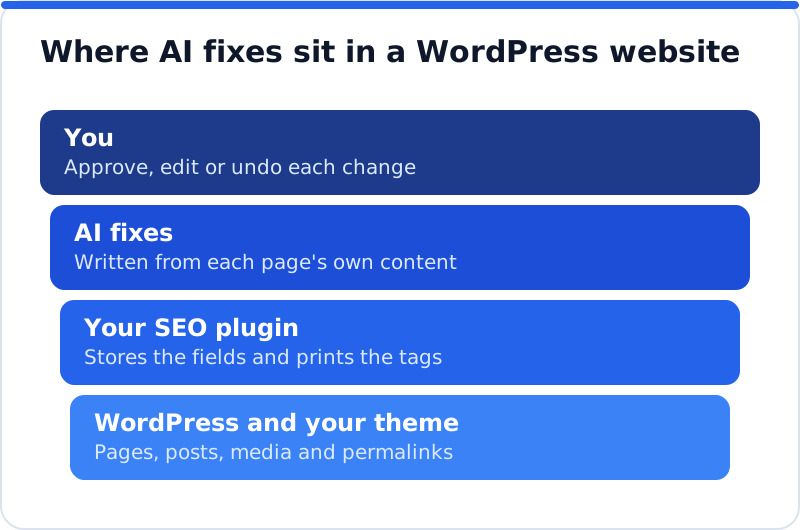
Test the combination before you rely on it. After the first batch, open a changed page, view its source and confirm it has exactly one title tag and one meta description. Paste the address into Google's Rich Results Test and check that the business appears once in the structured data, not twice. Open the SEO plugin's panel on that page too, because the new value should sit in the same field you would have typed into. A plugin that cannot pass this test on a handful of pages is not ready for a live website.
Installing a WordPress SEO plugin with AI safely
Most trouble with new plugins comes from installing them on a live website without a plan. A short routine avoids that in under an hour. Take a backup first, using your host's backup or a backup plugin, so you have a way back from anything. Then work through the steps below in order, and ask the developer if any answer is unclear. The routine applies whichever product you choose.
- Confirm your WordPress and PHP versions meet the plugin's requirements, which you can see under Tools, then Site Health, then the Info tab.
- Note which SEO plugin is active and confirm that the new plugin writes into that plugin's fields.
- Read what data the plugin sends to outside services and where that data is processed.
- Switch off every permission area you do not want touched yet, such as page headings or publishing.
- Approve a first batch of ten to twenty low-risk fixes on your most important pages.
- View the source of a changed page to confirm one title, one description and no duplicate schema.
- Find the change log and test undo on one page before you approve anything more.
- Note the date of each batch so you can compare Search Console data four to eight weeks later.
The last step is the one most owners skip. Google needs to recrawl a page before a new title can appear, so judging a change after three days tells you very little. In the Search Console Performance report, compare clicks, impressions and click-through rate for the changed pages over matching periods before and after. Pages where only the title and description changed usually show an effect first, because those fields shape the listing people see. Content and internal link changes can take longer, so give them more time.
Where the AI Website SEO plugin fits
AI WebMaker's plugin, listed as AI Website SEO Tools in your plugins screen, is a site-wide fix applier. You download it from aiwebmaker.co as a zip, install it under Plugins, then Add New, then Upload Plugin, and activate it on WordPress 5.8 or later with PHP 7.4 or later. Right after activating, you can run a check from the WordPress dashboard before creating any account, and it shows a score out of 100, what costs the most visitors and the traffic within reach. Pressing Connect to AI WebMaker signs you up or in with your email filled in, and a connection code covers cases such as a password-protected staging site. Fixes are written for your own pages in your AI WebMaker account, and nothing is applied until you press Apply. It can apply search titles, meta descriptions, focus keywords, alt text for images that have none, business schema on the home page (skipped when your SEO plugin already outputs the same) and 301 redirects for pages that show "not found".
It writes into the fields of Yoast SEO, Rank Math, All in One SEO or SEOPress, so pages never get two titles or descriptions, and with no SEO plugin it prints the title, description and Open Graph tags itself. Each area has its own permission, page headings change only if you switch that on, and AI Blog Writer articles arrive as drafts unless you allow publishing. Every change is logged with the value it replaced, and undo is one click from the account or WordPress, keeping your version if you edited the field since. Installing, the check and applying changes cost nothing, and the AI work is paid in credits that never expire, with no subscription: about 0.1 to 0.3 credit per page fix, 1 for keyword research and 2 for an article, at about $0.65 a credit. A new account starts with 1 credit, and you can see how the WordPress plugin applies and undoes each fix before deciding anything.
Questions business owners ask
Will an AI plugin replace Yoast or Rank Math?
It depends on the product, but the safer kind does not try to. Classic SEO plugins handle sitemaps, robots settings, canonical tags and schema, with years of compatibility work behind them. An AI tool that writes into their fields leaves all of that in place and only fills the boxes that were empty or weak. Replacing your SEO plugin also means migrating every title and description it stores, which is a project in its own right. Keep the engine you know unless you have a strong reason to change.
Is it safe to let a plugin change pages automatically?
It is safe when changes are limited, approved, logged and reversible. Start with low-risk areas such as missing descriptions and alt text, and keep headings, redirects and publishing switched off until you trust the output. Read every suggestion for your most valuable pages, such as the home page and main service pages. Check the change log after each batch so you know exactly what moved. If something looks wrong, undo it at once and note why.
Does Google penalise titles and descriptions made with AI?
Google's published guidance says it focuses on the quality of content rather than how it is produced, and its spam policies target automated content made mainly to manipulate rankings. A title that accurately describes a page and earns a click is useful to searchers, whoever typed it. Problems come from scale without care, such as thousands of near-identical pages or descriptions full of claims the business cannot support. Review and accuracy matter far more than the method. Treat every suggestion as a draft that must be true to the page.
Your next step before installing anything
The right WordPress SEO plugin with AI is one whose work you can see, approve and reverse, from a provider that says plainly what it sends, changes and costs. Decide first whether you need help writing new posts or fixing the pages you already have, because each points to a different kind of tool. Check that it writes into the SEO plugin you already run, and trial it on a small batch with a backup in place. For checks, backlinks and keyword work beyond the plugin, browse the AI SEO tools for business websites and match one to your biggest gap. Then take a backup, note today's date and run your first check.
Check your WordPress website, approve the fixes and they are applied for you: titles, descriptions, keywords, schema, alt text and redirects, each with undo.
Get the AI Website SEO Plugin for WordPress →