Rank Math and AI: Using Site-Wide Fixes Alongside Rank Math
How Rank Math stores titles, descriptions, keywords and schema, why the score out of 100 is a checklist rather than a forecast, and how to fill fields site-wide safely.
- Works with Yoast SEO and Rank Math
- You approve every change
- One-click undo
Rank Math puts a score out of 100 at the top of every post you edit, and few numbers in WordPress are as tempting to chase. The score is useful, but it measures how well a page matches the keyword you typed, not whether anyone will find the page in Google. The real work sits in the fields behind it: the SEO title, the description, the focus keyword and the schema, filled sensibly on every page rather than only on the last few you edited. A Rank Math AI approach takes that writing off your hands across the whole website while Rank Math stays in charge of what is printed. You will learn where each Rank Math field lives, why a high score can still mean no traffic, how to give every page its own keyword, how to avoid duplicate schema and how to check that fixes landed correctly. Each part comes with steps you can follow on your own website today.
To have these fixes applied on your own WordPress website, try our WordPress SEO plugin with AI fixes, part of our AI SEO Tools.
Run the AI website SEO plugin alongside Rank Math and fill every empty field
The Rank Math fields behind each listing
In the block editor, Rank Math opens from a button at the top right that shows the page's score. The panel has tabs for General, Advanced, Schema and Social. On the General tab, the snippet preview shows how the page may look in Google, and the Edit Snippet button opens the SEO title, the permalink and the description. Below the preview sits the Focus Keyword field, with the list of tests that make up the score. The Advanced tab holds the robots settings, such as noindex, and the canonical address, while the Social tab controls how the page looks when shared.
| Rank Math field | Where to find it | What it controls |
|---|---|---|
| SEO title | General tab, Edit Snippet | The title tag Google usually shows as the link |
| Description | General tab, Edit Snippet | The snippet text Google may show under the title |
| Focus keyword | General tab, below the preview | The search the score's tests check against |
| Schema type | Schema tab | How the page is described in structured data |
| Robots meta | Advanced tab | Whether the page may appear in search results |
| Title and description templates | Rank Math, Titles and Meta | The defaults used when a page's own fields are empty |
Rank Math saves these values with each page in WordPress post meta, under names such as rank_math_title, rank_math_description and rank_math_focus_keyword. When a page's own title or description is empty, Rank Math falls back to the templates set under Titles and Meta, where variables such as %title%, %sep% and %sitename% build a default. That fallback keeps pages from being blank, but it also hides the problem, because every page looks filled in when it is only running on a template. A recruitment agency in Hamburg might have thirty sector pages that all print "Page name, separator, agency name" and nothing about the city or the client's problem. Knowing where the fields live is the first step to seeing which pages truly have values of their own.
Why a score of 90 does not mean traffic
The Rank Math score adds up a series of tests grouped as Basic SEO, Additional, Title Readability and Content Readability. They check things such as the focus keyword in the SEO title, the description, the URL and the opening of the content, the length of the text, internal and external links, keyword use in subheadings and image alt text, and readability habits like short paragraphs. Title tests may also suggest adding a number or a strong word to the title. Every one of these is a reasonable habit, and a page that fails most of them usually deserves attention. The score is a checklist of on-page basics, and it is good at catching omissions.
What the score cannot see is everything outside the page. It does not know whether people search for your keyword, how strong the pages already ranking for it are, how many websites link to yours or whether another page on your own website targets the same search. A yoga studio in Austin could reach 95 for "holistic movement journeys" and still get no visits, because people search for "hot yoga Austin" or "beginner yoga classes Austin" instead. Pushing for the last few points can also make writing worse, with the keyword squeezed into headings where it reads awkwardly. Treat a score in the green as "the basics are in place", then judge the page by its clicks and impressions in Search Console.
One focus keyword per page, mapped across the website
The most valuable decision in Rank Math is which keyword each page gets, and it is best made for the whole website at once. When two pages chase the same search, Google tends to alternate between them or rank neither well, a problem often called keyword cannibalisation. Rank Math's tests include a check that warns when a focus keyword has already been used on another page, which helps, but only if each page has a keyword in the first place. A simple map, one row per important page, fixes this before any writing starts. The example below shows how a law firm in Munich might divide its searches so each page has a clear job.
| Page | Focus keyword | Why this page owns it |
|---|---|---|
| Home page | law firm Munich | The broad search for the firm itself |
| Employment law | employment lawyer Munich | A distinct service with its own searches |
| Dismissal claims | unfair dismissal lawyer Munich | A narrower, urgent search with its own page |
| Family law | family lawyer Munich | Kept apart from divorce so each page stays focused |
| Divorce | divorce lawyer Munich | The most searched family law service, given its own page |
Build the map in three steps. List every page that should bring visitors, ignoring legal notices and thank-you pages. Give each one the search a ready-to-act customer would type, using Search Console's queries for ideas, and favour longer, more specific phrases for narrow pages. Then scan the list for duplicates and near-duplicates, and either sharpen one of the keywords or merge two thin pages into one stronger page. Keep the map in a shared spreadsheet, so whoever edits the website next can see which page owns which search. Only then type the keywords into Rank Math, because the titles and descriptions you write next will follow from them.
Filling Rank Math fields across many pages
Once the map exists, the writing begins, and this is where most websites stall. Rank Math adds an SEO details column to the posts and pages lists, showing each item's score and focus keyword, so empty pages are easy to spot. The fix itself still means opening each page, writing a title of about 50 to 60 characters, a description of about 120 to 155 characters and checking that both match the keyword. For a car garage in Manchester with pages for each service and each nearby district, that can mean eighty pages of careful, repetitive work. Done in a rush, the titles start to look alike and the descriptions become copies of each other.
Good values follow a few rules. The title opens with the service and place, adds one concrete detail such as a price, speed or guarantee that is genuinely true, and ends with the brand if there is room. The description answers the searcher's next question, such as cost, availability or what happens at the first visit, and stays specific to that page. Weak values, such as "MOT | Services | Garage Manchester" or a description that starts "We are a family business", waste the space Google gives you. Whether you write by hand or approve suggestions, every claim must match what the business really offers.
Avoiding duplicate schema with Rank Math
Rank Math prints structured data as a single block of JSON-LD that links the website, the page and the organisation or person behind it. The organisation details come from the Local SEO section under Titles and Meta, where you choose between a person and an organisation and set the name and logo. The trouble starts when a theme, a page builder, a reviews plugin or another SEO tool adds its own business schema on the same page. Google then sees two descriptions of the same company, sometimes with different names, addresses or phone numbers, and may trust neither. One clean source of business schema is always better than two competing ones.
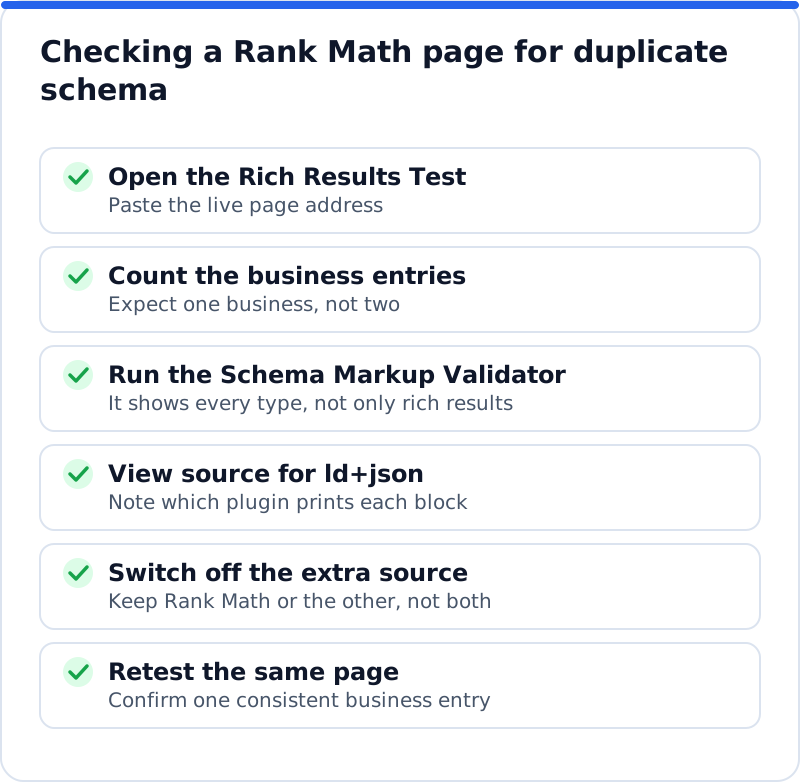
Checking takes ten minutes, and the routine below works on any page. Run it on the home page first, since that is where business schema usually lives, then on one service page and one blog post. The Rich Results Test shows the structured data Google can use for enhanced results, while the Schema Markup Validator lists every type it finds. Between them you can see whether the business appears once or twice. Write down which plugin or theme prints each block before you switch anything off, so you can reverse the change if needed.
Where Rank Math AI fixes should be written
Any AI help you add to a Rank Math website should leave Rank Math in charge of the output. That means fixes must be saved into Rank Math's own fields, the same post meta entries the plugin reads, rather than printed as extra tags in the page head. When that happens, Rank Math keeps producing one title, one description and one schema graph, and its score and tests update to reflect the new values. When it does not, a page can carry two title tags or two descriptions, and Google has to pick one. Ask any tool you evaluate exactly where it writes before you let it near a live page.
The quickest proof is on the page itself. After a fix is applied, open the page in the editor, click Edit Snippet and confirm the new title and description appear in Rank Math's fields. View the source and search for the title tag and the meta description to make sure each appears only once. Check that the focus keyword, if one was written, shows in the Focus Keyword field and that the tests recalculate. If all four hold, the AI layer is working with Rank Math rather than around it.
Running the AI Website SEO plugin with Rank Math
AI WebMaker's plugin, AI Website SEO Tools, writes search titles, meta descriptions and focus keywords straight into Rank Math's fields, so pages never get two titles or descriptions. It adds business schema to the home page only when Rank Math does not already output the same, which avoids the duplicate problem described above. Alt text for images that have none and 301 redirects for pages that show "not found" are separate areas, each behind a permission that you can switch off and that the website then refuses. Every change is logged with the value it replaced, and one click from your account or from WordPress undoes it, keeping your own version if you edited the field since. After each change it purges common caches such as WP Rocket and LiteSpeed Cache, so visitors and Google see the new value without waiting.
Measuring Rank Math AI changes in Search Console
Measure in Search Console rather than by the score. Note the date of each batch of changes, then wait at least four weeks, since Google must recrawl each page before a new title or description can appear. In the Performance report, filter to the changed pages and compare clicks, impressions, click-through rate and average position with the same length of time before. A rise in click-through rate at a similar position means the new listing persuades more people, which is exactly what titles and descriptions are for. An interior designer in Copenhagen might see impressions hold steady while clicks rise on project pages, and that is a clear win even if the scores barely moved.
Questions business owners ask
Is a green Rank Math score enough to rank?
A green score means the basics on the page are in place, which is necessary but rarely enough on its own. Ranking also depends on whether the keyword matches what people search, how strong the competing pages are and how many trusted websites link to yours. Two pages with the same score can perform very differently because of those outside factors. Use the score to fix omissions quickly, then spend your effort on content depth and links. Search Console, not the score, tells you whether the work paid off.
Should I use more than one focus keyword per page?
Rank Math lets you add more than one keyword, with the first treated as the main one. Extra keywords are useful for close variations of the same search, such as a singular and plural form or a phrase with and without the town. They become a problem when they describe different services, because the page then tries to do two jobs at once. Keep the main keyword unique across the website and treat any extras as supporting phrases. If a second keyword deserves real attention, it probably deserves its own page.
Can I switch off Rank Math's schema and use another plugin's?
You can, and some websites do, but make it a deliberate choice rather than an accident. Rank Math lets you switch its schema module off from its dashboard, so check with the testing tools what remains and whether the replacement covers the website, the page and the business properly. Mixing sources, with Rank Math describing the page and another tool describing the business, can also work if they do not duplicate the same entity. Test the result in the Rich Results Test and the Schema Markup Validator after every change. Whatever you choose, aim for one consistent description of the business.
Let the score guide and the search data decide
Rank Math is a capable engine for titles, descriptions, keywords and schema, and the score is a handy checklist while you work. The gains come from filling every important page with its own keyword, an honest title and a useful description, and from making sure only one source describes your business. A Rank Math AI approach can take on that writing across the whole website, as long as it writes into Rank Math's fields, logs every change and lets you undo it. If you are still weighing which kind of WordPress SEO plugin with AI suits your website, start with the bigger questions of control, data and cost, and for checks, backlinks and keyword research see the full set of AI SEO tools. Start this week by building the keyword map for your ten most important pages.
Check your WordPress website, approve the fixes and they are applied for you: titles, descriptions, keywords, schema, alt text and redirects, each with undo.
Get the AI Website SEO Plugin for WordPress →