All in One SEO and SEOPress With AI Fixes
Where All in One SEO and SEOPress keep titles, descriptions, keywords and schema, what each does well, and how to fill their fields across a website without duplicates.
- Works with Yoast SEO and Rank Math
- You approve every change
- One-click undo
All in One SEO and SEOPress take different routes to the same destination: a clear title, a useful description and the right signals in the head of every page. Both are mature WordPress plugins, both handle sitemaps, robots settings and structured data, and both still rely on someone filling their fields well on each page. That last part is where websites fall behind, and it is where an All in One SEO AI workflow, or the same approach with SEOPress, can help by writing those values for every page while the plugin you chose stays in charge of output. You will see exactly where each plugin stores titles, descriptions and keywords, what each one does well, how to bring written fixes into their fields across a whole website, how to stop schema appearing twice and how to switch between them without losing your work. Each section gives steps you can follow on your own website.
To have these fixes applied on your own WordPress website, try our AI website SEO plugin for WordPress, part of our AI SEO Tools.
Get the AI website SEO plugin for WordPress and fill your All in One SEO or SEOPress fields
How All in One SEO stores titles and descriptions
All in One SEO, often shortened to AIOSEO, puts its controls in an AIOSEO Settings box below the content and in a sidebar opened from its icon in the block editor, where the TruSEO score is shown. The General tab holds a snippet preview, the Post Title and Meta Description fields, and the Focus Keyphrase with its page analysis. Titles and descriptions can mix your own words with smart tags, which you add by clicking buttons such as Post Title, Separator and Site Title. Further tabs cover Social, Schema and Advanced settings, the last of which includes robots options and the canonical address. Site-wide defaults live under All in One SEO, then Search Appearance, where the Content Types section sets the default title and description for each post type.
Behind the scenes, AIOSEO keeps most of its per-page data in its own database table rather than relying only on standard post meta. That design choice does not change how you use it, but it matters to any tool that writes values into AIOSEO, which has to use the plugin's own storage for the values to show up and be printed. The Search Appearance screen also holds the Knowledge Graph settings, where you say whether the website represents a person or an organisation and add the name, logo and contact details. AIOSEO uses those details in the structured data it prints. An estate agent in Brighton who fills these once gets consistent business details across every page without retyping them.
How SEOPress stores the same details
SEOPress adds an SEO box to the editor with tabs for titles settings, social, advanced and redirection, and a content analysis section where you enter target keywords. On the titles settings tab you write the meta title and meta description, and you can insert dynamic variables such as %%post_title%%, %%sep%% and %%sitetitle%%. Target keywords are typed as a comma-separated list, and the content analysis checks the page against them. The advanced tab holds robots options such as noindex and nofollow, plus the canonical address. Per-page values are saved as post meta with names that begin with _seopress, which keeps them close to the posts they belong to.
Site-wide settings in SEOPress are split into clearly named screens under the SEO menu. Titles and Metas sets the home page title and description and the default templates for each post type, archive and taxonomy. Social Networks holds the Knowledge Graph settings for the person or organisation behind the website, along with sharing defaults. XML and HTML Sitemap controls the sitemap, and Tools includes the import and export options. A veterinary practice in Portland can set sensible templates in Titles and Metas on day one, then spend its time on the pages that deserve their own wording.
| Field | All in One SEO | SEOPress |
|---|---|---|
| Page title | AIOSEO Settings, General tab, Post Title | SEO box, titles settings, meta title |
| Meta description | AIOSEO Settings, General tab, Meta Description | SEO box, titles settings, meta description |
| Keyword | General tab, Focus Keyphrase | Content analysis, target keywords |
| Variables | Smart tags such as Post Title and Site Title | Variables such as %%post_title%% and %%sitetitle%% |
| Default templates | Search Appearance, Content Types | Titles and Metas, by post type |
| Business details | Search Appearance, Knowledge Graph | Social Networks, Knowledge Graph |
What each plugin does well
All in One SEO is strong at guiding people who are new to SEO. Its setup wizard walks through the main choices, the snippet preview makes the effect of each field visible, and the TruSEO analysis turns on-page basics into a list of clear actions. Smart tags let a non-technical owner build templates by clicking rather than typing codes. It also gathers many SEO tasks under one menu, which suits owners who prefer a single place to look. Like any score, TruSEO checks the page against your chosen keyphrase, so it confirms the basics rather than predicting traffic.
SEOPress is strong at staying out of the way. Its settings are organised into plain screens with descriptive names, its templates are flexible, and its analysis sits in its own section rather than dominating the editor. That suits agencies looking after client websites, because the settings are easy to audit and the per-page values live in ordinary post meta that other tools and exports can read. It covers the same essentials, including titles, descriptions, robots, sitemaps and social tags. Neither plugin is better for every website, and the right choice usually depends on who will maintain it.
Getting All in One SEO AI fixes onto every page
Whichever plugin you run, the fields only help when each important page has its own values. A hotel in Porto might have room pages, a restaurant page, an events page and guides to the neighbourhood, and on many such websites only the home page has a hand-written title. The rest print the template, which repeats the page name and the hotel name and says nothing about why someone should click. Writing every one by hand is slow, and by the thirtieth page the quality drops. A site-wide approach writes a fix for each page from its own content, so the fixes reflect what the page actually offers.
The rules for good values are the same in both plugins. The title opens with what the page offers and where, adds one true detail that sets it apart, and stays within about 50 to 60 characters so Google shows it in full. The description answers the searcher's next question in about 120 to 155 characters, without opening with a greeting. The keyword names the search the page should win, and no two important pages should share one. The table below shows the difference on three pages from different businesses.
| Page | Weak value | Stronger value |
|---|---|---|
| Hotel in Porto, river view rooms | Rooms | River View Rooms in Porto's Ribeira, Breakfast Included |
| Translation agency in Brussels, legal translation | Welcome! We translate many documents for many clients. | Certified legal translation in Brussels for contracts, court papers and company records, with quotes within one working day. |
| Estate agent in Brighton, valuations | Valuation Brighton Estate Agent Brighton Homes Brighton | Property Valuations in Brighton and Hove, Booked Online |
The weak Brighton title shows the pull toward repeating the town, which reads like spam and is often rewritten by Google. Every claim in a stronger version, such as online booking or a quote within a day, must be true before it goes anywhere near a listing. Once values are approved, they must be written into the plugin's own storage, the AIOSEO table or the SEOPress post meta, so the plugin prints them as the only title and description. Open a changed page in the editor afterwards and confirm the new text sits in the plugin's fields. Then view the source to confirm there is one title tag and one meta description. If both hold, the plugin is still the engine and the fixes are simply its new content.
Avoiding double schema with All in One SEO AI fixes
Both plugins print structured data about the website and the business from their Knowledge Graph settings, and AIOSEO also prints a schema graph for the page itself. Trouble starts when a theme, a page builder, a reviews widget or another plugin adds its own business schema on top. Google then sees two descriptions of one company, sometimes with different names or phone numbers, and the signal becomes unreliable. Duplicates also creep in after a migration, when a schema snippet someone once added to the theme or a code snippets plugin is still in place. The fix is to choose one source for business schema and switch the others off. The same rule applies to any AI fix that adds business schema, which should check what the SEO plugin already prints before adding anything.
Test the home page first, since that is where business schema usually sits. Paste its address into Google's Rich Results Test to see the structured data Google can use, then into the Schema Markup Validator to see every type on the page. Look for two Organization or LocalBusiness entries, and view the page source to find which plugin or theme prints each block. Remove the extra source in that plugin's settings rather than editing code, then test again. Repeat on one service page and one blog post to be sure the change held across page types.
Switching plugins without losing fields
Moving between All in One SEO, SEOPress and other SEO plugins is common, and both include importers for data from the other well-known plugins. The risk is not the import itself but the steps around it: deleting the old plugin too soon, running two plugins at once for weeks, or forgetting templates that were set in the old plugin's site-wide screens. Some plugins also offer to remove their data when deleted, so deactivate the old one rather than deleting it until you are sure. Pick ten pages with hand-written titles and descriptions before you start, and write their values down. Those ten pages are your test that nothing was lost.
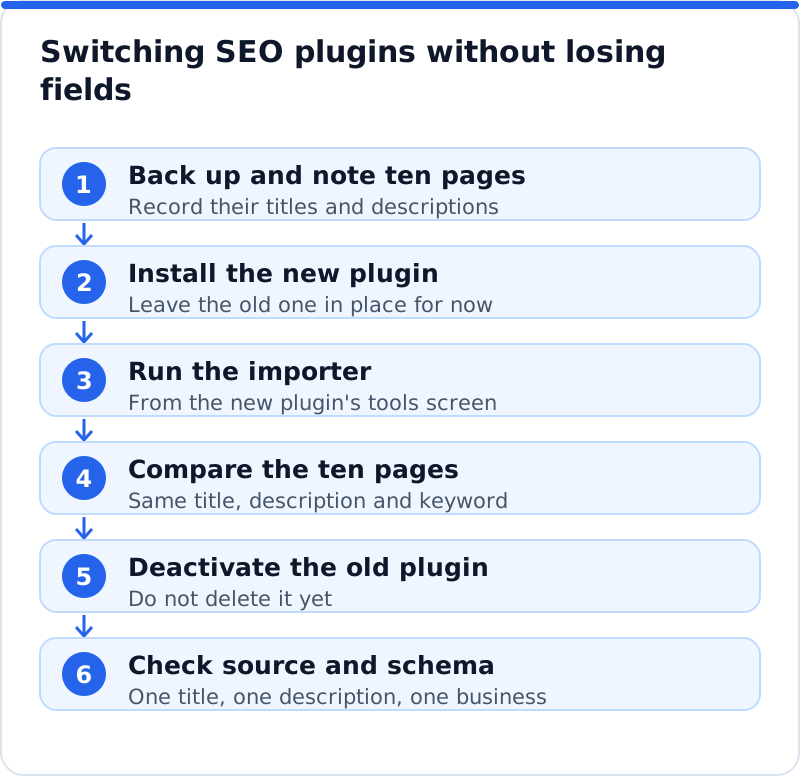
After the switch, recheck the site-wide settings by hand, because importers handle per-page values more reliably than every global option. Set the home page title and description, the templates for each post type, the Knowledge Graph details and the sitemap settings in the new plugin. Submit the new sitemap address in Search Console if it changed, and remove the old one. Watch the Pages report over the following weeks for any jump in pages listed as not indexed. Only when everything looks steady should you delete the old plugin.
Using the AI Website SEO plugin with either one
AI WebMaker's plugin, AI Website SEO Tools, writes search titles, meta descriptions and page focus keywords into the fields of All in One SEO or SEOPress, as well as Yoast SEO and Rank Math, so pages never get two titles or descriptions. It adds business schema on the home page only when your SEO plugin does not already output the same, which keeps the duplicate problem away. It can also fill alt text for images that have none and add 301 redirects for pages that show "not found", each area behind its own permission that the website refuses when switched off. Every change is logged with the value it replaced and can be undone with one click from your account or from WordPress, and if you have edited the field since, your version is kept. It never touches your theme or other plugins, and it adds nothing to the front end except the tags it manages.
Questions business owners ask
Which is better, All in One SEO or SEOPress?
Neither is better for every website, and both cover the essentials well. All in One SEO suits owners who like a guided setup and a score that turns on-page basics into a to-do list. SEOPress suits people who prefer a quiet editor and clearly separated settings screens. If your website already runs one of them and works well, switching rarely brings a ranking gain on its own. Spend the time filling the fields properly instead.
Does the keyword field help my rankings directly?
The focus keyphrase in AIOSEO and the target keywords in SEOPress are working notes for the plugin's analysis, not tags that Google reads. They help by reminding you, and any tool that writes for you, which search the page is meant to win. That shapes the title, the description and the opening text, which do matter. Give each important page its own keyword so pages do not compete with each other. Leave pages such as the privacy policy without one.
Will I lose my titles if I deactivate my SEO plugin?
Deactivating a plugin normally leaves its stored data in the database, so titles and descriptions return when you reactivate it. While it is deactivated, though, those values are not printed, and pages fall back to the basic title WordPress builds from the page name and site name. Deleting a plugin can remove its data if it offers that option and you chose it. Always run the new plugin's importer before you retire the old one. Check ten sample pages afterwards to be sure.
Pick the engine, then feed it well
All in One SEO and SEOPress are both dependable engines, and the choice between them matters less than what goes into their fields. Fill every important page with its own keyword, an honest title and a useful description, keep one source of business schema and switch plugins only with a tested routine. An All in One SEO AI workflow, or the same approach with SEOPress, can handle that writing across the whole website as long as it writes into the plugin's own storage and keeps a log you can undo. The questions of control, data and cost that come before any install are covered in what to expect from a WordPress SEO plugin with AI, and checks, backlinks and keyword research sit in our AI SEO tools hub. Start by writing down the titles of your ten most important pages and checking how many are still running on a template.
Check your WordPress website, approve the fixes and they are applied for you: titles, descriptions, keywords, schema, alt text and redirects, each with undo.
Get the AI Website SEO Plugin for WordPress →