Best AI SEO Plugin for WordPress: How to Choose for Your Business
A buyer's guide built on criteria rather than rankings. Learn what an AI SEO plugin should fix, how to judge control, privacy, speed and pricing, and how to trial one safely.
- Works with Yoast SEO and Rank Math
- You approve every change
- One-click undo
A plugin only earns the word "best" once it has done useful work on your own website, with your own pages, your own theme and the SEO settings you already rely on. Lists of AI tools tend to reward the longest feature list, yet a business website needs a short list of jobs done well: clear search titles, honest descriptions, images Google can understand and no broken pages. The best AI SEO plugin for WordPress is therefore the one that fixes what is actually wrong on your site, lets you approve every change and can put things back if you change your mind. Below you will find the criteria that separate a useful plugin from an expensive distraction, from compatibility with Yoast SEO or Rank Math to data handling, speed and pricing. You will also find a safe way to try any candidate on a copy of your website before it touches the live one.
To have these fixes applied on your own WordPress website, try our WordPress SEO plugin with AI fixes, part of our AI SEO Tools.
This article is part of our complete guide: WordPress SEO.
Test the AI website SEO plugin for WordPress on your own pages before you decide
The four kinds of AI SEO plugin
AI SEO plugins for WordPress fall into roughly four groups, and knowing which group a tool belongs to explains most of what it can and cannot do. Editor assistants sit inside the block editor and suggest a title, a description or a paragraph while you work on a single post. Alt text generators look at the images in your media library and write a short description for each one. All-in-one SEO plugins with AI add-ons keep doing their classic job of printing titles, sitemaps and schema, and add a button that drafts text for the field you are editing. Site-wide fix appliers work the other way round: they check every page, decide what is missing or weak, and write fixes into the right fields once you approve them. None of these groups is better in principle, because a writer who publishes three posts a week needs different help from a roofing company in Denver whose forty service pages have never had a meta description.
| Kind of tool | Where it works | Best suited to | What to watch |
|---|---|---|---|
| Editor assistant | One post at a time | Writing new content | Old pages stay as they are |
| Alt text generator | The media library | Many undescribed images | Generic wording |
| SEO plugin with AI add-on | That plugin's fields | Owners happy with that plugin | One field at a time |
| Site-wide fix applier | Every page, in approved batches | Existing sites with gaps | Control and undo |
What the best AI SEO plugin for WordPress should fix
Start your judgement with the jobs, not the technology. A business website wins or loses search visits on a handful of page elements, and a plugin is only as useful as its coverage of those elements on your pages. The list below is the yardstick worth holding every candidate against. None of these items is exotic: a careful consultant would check them on day one. The difference an AI plugin can make is doing them for every page instead of the five you had time for.
- Search titles that name the service and the place, kept within roughly 50 to 60 characters so Google can usually show them in full.
- Meta descriptions that give a searcher a reason to click, since Google often uses them as the snippet under the title.
- A focus keyword for each page, so two of your own pages do not end up chasing the same search.
- Business schema on the home page that states your name, address, phone number and opening hours in a format search engines read directly.
- Alt text for images that have none, which helps screen reader users and gives image search something to work with.
- Redirects for addresses that now show "not found", so old links and bookmarks land on a page that still exists.
Hold that list against your own website, not a vendor's feature page. A dental clinic in Leeds with twelve pages and good titles but no alt text has a different priority from an online shop with hundreds of products and duplicate descriptions. Open five of your most important pages and check the title in the browser tab, the description in the page source and any images with empty alt attributes. Note which gaps appear again and again, because a plugin that fixes your most common gap is worth more than one with twenty features you will never use. Treat anything beyond the basics, such as rewriting whole pages or inserting links automatically, with extra care.
Applying fixes or only suggesting them
The biggest practical difference between plugins is whether they write the fix into WordPress or hand you text to paste. Suggestion tools are gentle and safe, because nothing changes until you copy, paste and press Update yourself. The cost is time: forty pages with three fields each means one hundred and twenty boxes to fill, and most owners stop after ten. Applying tools close that gap, but they must earn the right to write into your site. A good one shows the current and proposed values side by side, applies only what you approved and tells you which fields it touched. A weak one rewrites in the background, leaves no record and asks for your trust.
Working alongside Yoast SEO, Rank Math and others
Most business websites already run a classic SEO plugin such as Yoast SEO, Rank Math, All in One SEO or SEOPress. Each of these stores a search title, a meta description and usually a focus keyword for every post and page, and each prints those values into the page head. An AI plugin that prints its own title and description on top of them creates two of each and sends search engines mixed signals. The safe design is an AI plugin that writes into the fields of the SEO plugin you already have, so there is still exactly one title tag and one description per page. You can check any candidate in a minute: open a page, view the source, and search for the title tag and for the description meta tag. If either appears twice, the plugin is fighting your setup rather than working with it.
Schema needs the same care, because many SEO plugins already output Organization or LocalBusiness data for the home page. A second block with different opening hours or a different phone number only adds confusion. Good AI plugins check what is already there and skip the job when the same type is present. If you run no SEO plugin at all, the question flips: the AI plugin then has to print the title, description and sharing tags itself, otherwise its fixes have nowhere to appear. Also ask what happens if you switch SEO plugin next year, since fixes stored in one plugin's fields move only if the new plugin imports them.
Control, approval and undo
Control is the criterion owners skip most often and regret most often. Every automated process will eventually produce a change you dislike, such as a title that drops your brand name. Look for permissions by area, so you can allow descriptions and alt text while refusing headings or redirects. Look for an optional approval step inside WordPress as well as in any outside dashboard, which suits businesses where the person paying is not the person editing. Above all, look for a log that records the old value next to the new one, because undo without the old value is just guesswork.
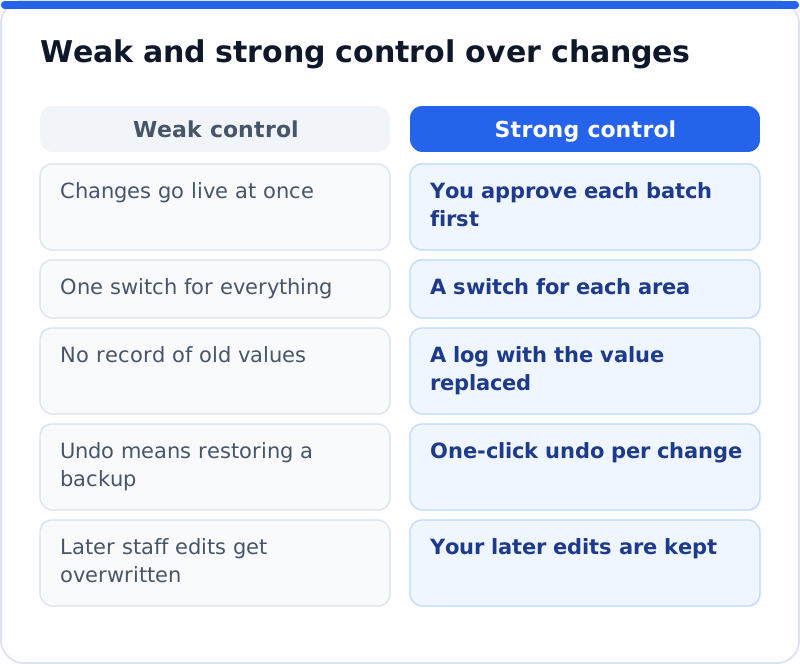
A web agency in Amsterdam looking after thirty client websites needs to show each client what changed, when and why, and needs to reverse a single change without restoring a whole backup. Restoring a backup to undo one title also wipes out every order and booking taken since. Ask how undo behaves when someone edited the field after the plugin did, because the polite answer is that the person's edit wins. Ask too whether the plugin ever runs code it receives from a server, and whether it changes your theme or other plugins. The safest answer to both is no, since a plugin that only writes values into known fields cannot break your layout.
Data, privacy and speed
Any AI plugin sends something to an outside service, because the writing happens there rather than on your web server. For SEO work that should be page content: titles, text, image file names and the addresses of your pages. It should not need your visitors' names, emails or orders, and you are entitled to ask a vendor to confirm that in writing. Businesses in the UK and the EU should also ask where data is processed and whether a data processing agreement is available, which keeps your GDPR records tidy. If a plugin adds tracking to the front end of your site, ask whether it sets cookies, since cookies on visitors' devices can bring consent requirements.
Speed deserves its own test, because some plugins load scripts and styles on every page even though their work happens in the dashboard. Run PageSpeed Insights on your home page and one service page before you install, then again after, and compare the results on mobile. Check the admin side too: a plugin that slows the editor or runs heavy tasks through WP-Cron every few minutes will frustrate whoever updates the site. The ideal SEO plugin adds nothing to the front end except the tags it manages, such as the title and description. Anything more should be optional, clearly explained and switched off until you decide you want it.
Subscriptions, credits and what you really pay
AI plugins usually charge in one of two ways: a recurring subscription or pay-per-use credits. A subscription is simple to budget and suits sites that publish and update constantly, such as a news site or a busy online shop. Credits suit the more common business pattern of a big clean-up followed by occasional work, because you pay for work done rather than for quiet months. To compare fairly, count your pages, estimate how many need fixing now and how many new articles you expect each month. Check also whether unused credits or allowances expire, because expiring balances quietly turn pay-per-use into a subscription.
| Pricing model | How it charges | Suits | Ask before paying |
|---|---|---|---|
| Monthly subscription | A fixed monthly fee | Sites changing daily | What happens to fixes if you cancel? |
| Annual licence per site | One payment a year | One predictable bill | Does a staging copy count as a site? |
| Pay-per-use credits | A small amount per job | A clean-up, then occasional work | Do credits expire? |
Support, updates and requirements
A plugin is a long relationship, so judge the vendor as well as the product. Check when the plugin was last updated and which WordPress version it says it has been tested with, because an abandoned plugin soon becomes a security worry. Confirm the minimum WordPress and PHP versions against what your host runs, which you can see under Tools, Site Health, Info. Send a support question before you buy and note how quickly and how well it is answered. Finally, ask what uninstalling leaves behind: good plugins remove their own settings and tables, while the improvements they made stay in your pages as normal content.
How to trial a plugin safely on a staging copy
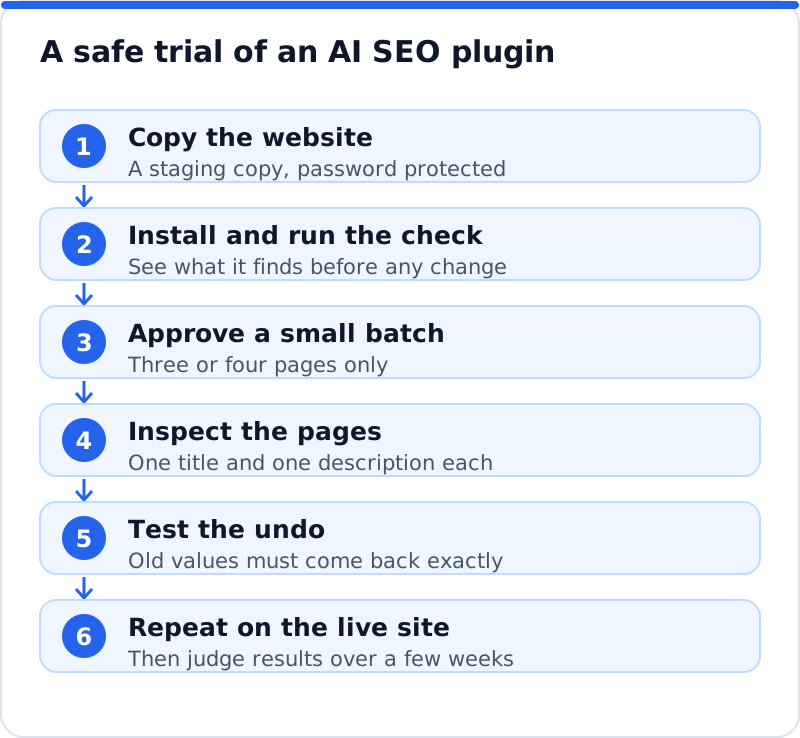
Never judge an AI plugin on your live site first. Most managed hosts offer a staging copy in a few clicks, and an accountant in Dublin can test a plugin there for an afternoon without any risk to client enquiries. Keep that copy password protected so Google never indexes it, then install the candidate and let it check the site before you approve anything. Approve a small batch covering three or four pages, view their source and confirm there is one title and one description each. Then press undo and confirm the old values come back exactly, which is the single most revealing test of the whole trial. If all of that works, repeat the same small batch on the live site and watch the results for a few weeks before approving more.
How AI WebMaker's plugin measures up
The AI Website SEO Tools plugin by AI WebMaker was built around these criteria, so hold it to them. You download it as a zip from aiwebmaker.co and install it through Plugins, Add New, Upload Plugin. Before creating any account you can run a check from the dashboard that shows a score out of 100, what costs the most visitors and the traffic within reach. Pressing "Connect to AI WebMaker" signs you up or in and links the site, with a connection code as the fallback for password-protected staging copies. Fixes are written for your own pages in your account and nothing changes until you press Apply. It writes into the fields of Yoast SEO, Rank Math, All in One SEO or SEOPress, skips home page schema when your SEO plugin already outputs the same, and prints the tags itself only when no SEO plugin is present.
Control and cost follow the same pattern. Each area has its own permission, approval inside WordPress is optional, every change is logged with the value it replaced, and one-click undo keeps your own version if you edited the field since. The plugin adds nothing to the front end except the tags it manages, never runs code it is sent, pauses itself on a staging copy and clears common caches after a change. Installing, checking and applying cost nothing, while the writing is paid in credits: about 0.1 to 0.3 credit for one page's fix, 1 credit for keyword research and 2 for an article, at roughly $0.65 a credit. Credits never expire, there is no subscription and a new account starts with 1 credit. If you want to see it against your own site, the AI website SEO plugin that writes into your existing SEO fields needs WordPress 5.8 and PHP 7.4 or later.
Questions business owners ask
Can I run an AI SEO plugin alongside Yoast SEO or Rank Math?
Yes, provided the AI plugin writes into the existing plugin's fields instead of printing its own tags. That way Yoast SEO or Rank Math stays in charge of output, and the AI plugin simply fills the boxes you would otherwise fill by hand. Problems arise only when both plugins print a title and a description, which leaves two of each in the page head. You can confirm the setup is clean by viewing the source of a page and counting the title tags. If you find exactly one of each, the two plugins are cooperating as they should.
Will an AI plugin change my pages without asking?
That depends entirely on the plugin, which is why approval belongs near the top of your criteria. Some tools apply changes automatically in the background, while others wait for you to approve each batch. For a business site, waiting for approval is the sensible default, at least until you have seen several rounds of fixes and trust their quality. You should also be able to switch off whole areas, such as page headings or redirects, so the plugin cannot touch them at all. If a vendor cannot explain clearly when and how changes happen, keep looking.
Is an AI SEO plugin safe on a shop or booking website?
It can be, as long as it limits itself to SEO fields and leaves the rest of the website alone. Ask exactly which fields it writes, and confirm it never changes your theme, your checkout or other plugins, since those carry the orders and bookings. Shops often have hundreds of products with near-identical descriptions, so approve a small batch first and read the results on real product pages. Make sure the cache is cleared after each batch, because shop pages are often cached heavily and old titles can linger. A ceramics shop in Porto that follows this routine puts only a few metadata fields at stake at a time, never the checkout.
Choosing the best AI SEO plugin for WordPress
The best AI SEO plugin for WordPress for your business is the one that passes your own tests, not a stranger's ranking. Decide first whether you need help with new content or with the pages you already have, because that choice rules out half the options. Then hold each candidate to the same standard: coverage, control, compatibility, data, speed and cost for your real workload. Trial the shortlist on a password-protected staging copy and judge the undo as carefully as the fixes. When you want to see how plugins fit into a wider plan, the AI SEO tools for business websites cover checking, backlinks and fixes together. Start by checking your own site today, because the right plugin is easiest to choose once you know exactly what it needs to fix.
Check your WordPress website, approve the fixes and they are applied for you: titles, descriptions, keywords, schema, alt text and redirects, each with undo.
Get the AI Website SEO Plugin for WordPress →