WordPress Blog SEO: Articles That Bring Visitors
How to plan, write, organise and measure a WordPress blog so its articles earn visits from Google and lead readers to your services.
- Works with Yoast SEO and Rank Math
- You approve every change
- One-click undo

A blog post that nobody finds is a diary entry with a publish button. Plenty of business owners write thoughtful articles, press Publish and then hear nothing, because the post answers a question no one types into Google or sits in a corner of the site that nothing links to. WordPress blog SEO is the set of habits that changes that outcome: choosing topics from real searches, structuring articles so they answer them fully, organising posts so each one supports a service page, and checking which articles actually earn visits. None of it requires technical skill, only a little planning before you write and a little measuring afterwards. The sections below cover each habit with WordPress specifics, from where the slug field lives to how to stop tag pages from diluting your site. Follow them and your blog becomes a steady source of visitors rather than a list of dates.
To have these fixes applied on your own WordPress website, try our AI SEO plugin with undo, part of our AI SEO Tools.
Use the AI website SEO plugin for WordPress to give every blog post a proper title and description
What WordPress blog SEO does for a business
Service pages target the searches people make when they are ready to buy, such as "yoga classes Austin". Blog articles reach people earlier, while they are still asking questions like "is hot yoga safe for beginners" or "how often should I do yoga to see results". A yoga studio in Austin that answers those questions well meets future students weeks before they choose a studio, and it can point them to the right class with a simple link. Articles also give other websites a reason to link to you, since a genuinely useful guide is easier to cite than a price list. In WordPress, the blog normally lives on a separate page set under Settings, Reading, in the "Posts page" option, while a static page acts as your home page. That keeps the blog organised without pushing your services off the front door.
Choosing topics from real searches
Good topics come from evidence rather than inspiration. Start with the questions customers ask on the phone, in emails and at the counter, because they are the same questions they type into Google. Then type the main words of your service into Google and note the suggestions that appear as you type and the "People also ask" questions on the results page. Search Console adds a third source: in the Performance report, the Queries tab shows searches for which your site already appears, often for terms you never wrote about directly. A query with many impressions but no matching article is a topic waiting to be written.
Check the intent behind each topic before you commit to it. Search the phrase yourself and look at what Google ranks: if the top results are shops, a how-to article will struggle, and if they are guides, a sales page will struggle. Narrow, specific topics usually beat broad ones for a business, because a broad topic is contested by large publishers with far more authority. The table shows how to turn a weak topic into one with a clearer searcher and a clearer purpose. Keep a simple list of topics with the main phrase, the intent and the service page each one supports.
| Weak topic | Stronger topic | Why it works better |
|---|---|---|
| Our dental services explained | How long does teeth whitening last? | It answers a question patients actually search |
| Autumn heating tips | When to service a boiler before winter in Glasgow | It is local, seasonal and specific |
| Family law news roundup | What to bring to a first meeting with a divorce solicitor | It meets the reader the firm wants to serve |
| Why we love pets | How often should an indoor cat see the vet? | It catches a worried owner at the moment of doubt |
Pillar pages and the posts around them
Single articles do better when they belong to a group. A pillar page covers a broad topic thoroughly, such as a complete guide to planning wedding photography, and a cluster of shorter posts each covers one narrower question in depth: timelines, group shots, rainy-day plans, second shooters. Every cluster post links up to the pillar, and the pillar links down to each post, so Google sees a well-organised body of knowledge rather than scattered pages. The pillar in turn links to the relevant service page, which is where the visitor can book. A wedding photographer in Barcelona with this structure gives Google a clear signal about what the site is expert in.
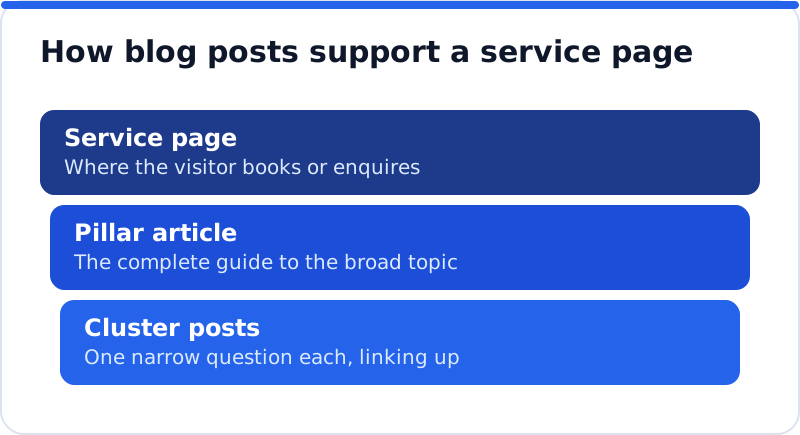
Plan clusters before writing, because retrofitting links into dozens of existing posts is tedious. Pick one service, write down the questions people ask about it, and decide which one becomes the pillar. Write the pillar first, then add cluster posts over the following weeks, linking each to the pillar as you publish. Use descriptive anchor text such as "our guide to wedding photography timelines" so both readers and Google know what lies behind the link. Avoid two posts targeting the same question, since they will compete with each other and neither will rank as well as one strong article.
Structure and depth of an article
A good article answers the question early and then earns the reader's time. Open with a direct answer in the first paragraph, then use the rest of the post to explain the reasons, the steps, the exceptions and the examples. Use Heading blocks set to level 2 for main sections and level 3 for subsections, because the post title is already the H1 in most themes. Headings should describe what the section contains, which helps readers who skim and helps Google understand the structure. Short paragraphs, a relevant image with proper alt text and a clear next step at the end make the post easier to finish.
Length should follow the question, not a target. A post explaining how long a kitchen fitter in Cork needs to install a kitchen may need four hundred words, while a guide to choosing worktops may need two thousand. Look at the articles already ranking for your topic and aim to be more useful, which usually means more specific, better organised or more local rather than simply longer. Add what only your business can add: photos from your own work, prices or timescales from your own experience, and the mistakes you see customers make. That first-hand detail is very hard for a generic article to copy.
Titles, slugs, descriptions and excerpts
Every post has several text fields that shape how it appears, and they live in different places. The post title at the top of the editor becomes the H1 on the page and, by default, the start of the search title. Your SEO plugin adds a separate SEO title and meta description, usually in a box below the editor or in the sidebar, so you can write a tighter version for Google without changing the heading readers see. The slug, the last part of the address, sits in the post settings sidebar under the URL or permalink field, and it should be short and readable, such as /fix-tubeless-puncture. Change a slug only before publishing, or add a redirect if you change it later.
The excerpt field, also in the post settings sidebar, is the short summary many themes show on the blog page and in category archives. Writing one by hand stops the theme from cutting the first paragraph off mid-sentence. The featured image, set in the same sidebar, is often used as the preview image when a post is shared on social media. Keep search titles within about 50 to 60 characters so Google can usually show them in full, and write meta descriptions that promise the specific answer the post gives. A description such as "How to fix a tubeless tyre puncture at the roadside, with the three tools worth carrying and when to call a mechanic" tells a cyclist exactly what they will get.
Categories and tags without thin archives
WordPress creates an archive page for every category and every tag, found under Posts, Categories and Posts, Tags. A few broad categories that mirror your services help readers and Google see how the blog is organised. Tags are different: if every post gets five new tags, the site fills up with archive pages that each list one or two posts, and those thin pages add nothing for searchers. A garden centre in Kent is better served by six categories such as Vegetables, Lawns and Hedges than by two hundred tags. Give each post one main category, and use tags sparingly or not at all.
If you already have hundreds of tags, you do not need to delete them all at once. Most SEO plugins let you set tag archives, and other archive types, to noindex, which keeps them out of Google while leaving them usable for visitors. Avoid naming a category exactly like a service page, because the category archive may then compete with the page you actually want to rank. Write a short introduction for each category archive if your theme shows the category description, so the archive offers more than a list. Check the Page indexing report afterwards to confirm the archives you excluded are reported as excluded by a noindex tag.
Publishing pace, drafts and review
A steady pace beats bursts of activity. Two useful articles a month, published reliably for a year, will usually do more than twelve posts in one week followed by silence. Use the Schedule option in the publish panel to queue posts in advance, so the blog keeps moving during busy periods. WordPress roles help with review: a Contributor can write and submit posts but cannot publish them, an Author can publish their own, and an Editor can publish and edit everyone's. Giving staff the Contributor role means every post passes through someone who checks facts, prices and tone before it goes live.
Review matters most for anything that makes a claim. An IT support firm in Chicago writing about data protection must get the details right, because a wrong statement costs trust and may mislead a client. Read each draft against a short routine: does it answer the question in the first paragraph, are the facts current, does it link to the pillar and the service page, and does it have a search title, description, excerpt and alt text? A post that passes those checks is ready, and one that fails stays as a draft. That habit protects the reputation the blog is meant to build.
Updating old posts that have faded
Old posts are an asset you already own. Many blogs have articles that once ranked well and slowly slipped as facts aged and competitors published fresher versions. Updating them, by correcting facts, adding a section that answers a newer question and improving the title, usually costs far less than writing from scratch. Keep the same address so the post keeps its history and its links, and show the updated date if your theme supports it. If two old posts cover the same question, merge the better content into one and redirect the other to it with a 301.
Measuring which articles earn visits
Search Console tells you which posts Google sends visitors to. In the Performance report, switch to the Pages tab and, if your blog addresses share a pattern such as /blog/, filter by that text to see only articles. Sort by clicks to find your strongest posts and by impressions to find posts Google shows often but people rarely click, which usually need a better title or description. Click any article and switch to the Queries tab to see which searches it appears for, which often reveals a related question worth its own post. Compare the last three months with the three before to see which articles are growing and which are fading.
Visits are only half the story, so check what readers do next. In your analytics tool, look at which articles lead to a visit to a service page, a contact form or a booking. An article with modest traffic that regularly produces enquiries is worth more than a popular post read by people who will never buy. Use what you learn to decide the next cluster: more posts around the topics that bring customers, fewer around those that bring only browsers. Review this every quarter and your topic list improves with every round.
How the AI WebMaker plugin helps a blog
Two parts of blog SEO are slow by hand: filling search titles and descriptions for every existing post, and producing new articles on a schedule. The AI Website SEO Tools plugin connects a WordPress site to an AI WebMaker account, where fixes such as titles, descriptions, focus keywords and alt text are written for your own posts and applied into your SEO plugin's fields when you press Apply. Articles from the AI Blog Writer arrive in WordPress as drafts unless you allow publishing, so your review routine stays in place. Keyword research costs 1 credit and an article 2 credits, with one credit about $0.65 and no subscription. If you are weighing it against other options, the guide to choosing the best AI SEO plugin for WordPress lists the criteria worth checking.
Questions business owners ask
How often should a business blog publish?
Publish as often as you can keep up with good articles, which for most businesses means two to four posts a month. Consistency matters more than volume, because a blog that stops for six months looks abandoned to visitors. Quality matters more than both, since one thorough article can outperform ten thin ones for years. Plan a quarter at a time, with topics chosen in advance and dates in the calendar. If time is short, spend it updating your best existing posts before writing new ones.
How long should a blog post be?
As long as the question needs and no longer. Simple questions can be answered well in five hundred words, while a complete guide may need two thousand or more. Look at the articles ranking for your topic to understand what readers expect, then aim to be more useful rather than longer. Padding a post to reach a word count makes it worse, because readers leave when the answer is buried. Cover the question fully, add your own experience and stop.
Should I delete old posts that get no visits?
Not automatically, because some posts serve readers who arrive through your own links rather than from Google. First check whether the post could be improved to match a real search, or merged into a stronger article on the same subject. If it is outdated, inaccurate or no longer relevant to your business, removing it is reasonable. When you remove or merge a post, redirect its address to the closest relevant page so any links to it still work. Deleting in bulk without redirects is the mistake to avoid.
Your next steps in WordPress blog SEO
Good WordPress blog SEO comes down to a cycle you can run every quarter. Choose topics from real questions and Search Console queries, group them around pillar pages that link to your services, and write each article to answer its question fully. Keep categories few and tags under control, review every draft before it goes live, and refresh older posts rather than letting them fade. Measure which articles bring visits and enquiries, then write more of what works. For a wider view of how blogging fits with checking and fixing the rest of your site, see the AI SEO tools for business websites. Pick one service this week, list five questions customers ask about it, and choose which one becomes your first pillar.
Check your WordPress website, approve the fixes and they are applied for you: titles, descriptions, keywords, schema, alt text and redirects, each with undo.
Get the AI Website SEO Plugin for WordPress →