AI SEO Plugin for WordPress: How It Works and What It Should Fix
How an AI SEO plugin for WordPress differs from a classic SEO plugin, which fixes it should apply on a business website, and how to stay in control of every change.
- Works with Yoast SEO and Rank Math
- You approve every change
- One-click undo
Plenty of WordPress websites run an SEO plugin whose boxes are mostly empty. The title field on the services page repeats the page name, the meta description was never written, half the images have no alt text, and an old pricing page now shows "not found" to anyone who arrives from Google. An AI SEO plugin for WordPress exists to close that gap: it reads every page the way a search engine does, writes the missing or weak values for your own content, and puts them into the right fields once you approve them. Below you will find how these plugins differ from a classic SEO plugin, which fixes they should handle on a business website, and how the check, approve, apply and undo loop keeps you in charge. You will also see what to look for before you install one, so it works with Yoast SEO, Rank Math, All in One SEO or SEOPress instead of fighting them.
To have these fixes applied on your own WordPress website, try our AI website SEO plugin for WordPress, part of our AI SEO Tools.
This article is part of our complete guide: WordPress SEO.
Install the AI website SEO plugin for WordPress and get a score for your site in minutes
What an AI SEO plugin for WordPress actually does
A classic SEO plugin such as Yoast SEO, Rank Math, All in One SEO or SEOPress gives every post and page a set of fields: a search title, a meta description, a focus keyword, sharing settings and schema options. It prints those values into the page's HTML, builds an XML sitemap and scores each page while you edit it. What it does not do is decide what the words should be, and that is the slow part for a business with forty service pages and two hundred blog posts. An AI SEO plugin for WordPress adds that missing step. It looks at each page's real content, the searches the page could realistically win and the problems a search engine would notice, then proposes values for that page. The useful ones go further: once you approve a fix, they write it into the field where it belongs.
The difference matters because SEO problems on business websites are rarely clever problems. They are gaps: a home page title that says "Home", thirty pages sharing one description, a team photo with no alt text, a renamed service page that now returns a 404 error. Each gap is easy to fix on its own, and it is the total that eats the time. A roofing company in Denver may know its storm damage page needs a better title, but the owner spends the day on roofs, not at a keyboard. An AI SEO plugin turns that backlog into a short list of decisions that take minutes.
How it differs from a classic SEO plugin
Think of the classic SEO plugin as the engine and the AI plugin as the person who keeps it fuelled. The classic plugin is responsible for output: the title tag, the meta description tag, canonical URLs, the sitemap and, in most cases, structured data. The AI plugin is responsible for what goes into those fields, and for jobs that span the whole website, such as old URLs that now break. A third kind of tool, the writing assistant inside the post editor, helps with one post at a time while you write it. None of the three replaces the others, and the table shows where each one usually works.
| Job | Classic SEO plugin | Editor writing assistant | Site-wide AI SEO plugin |
|---|---|---|---|
| Prints title and description tags | Yes, from its own fields | No | Writes into the SEO plugin's fields |
| Builds the XML sitemap | Yes | No | No, it leaves that alone |
| Scores a page while you edit it | Yes, page by page | Often | Scores the whole website instead |
| Fills fields on pages you never open | No | No | Yes, after you approve each fix |
| Finds images with no alt text | Varies by plugin | No | Yes, across the website |
| Spots old URLs that show not found | Varies by plugin | No | Yes, and proposes a 301 redirect |
What it should fix on a business website
The tasks that suit a plugin have something in common. They are small, they repeat on many pages, they have a right answer that can be checked, and they can be reversed without harm. Metadata fits that description almost perfectly, which is why it is the heart of any sensible AI SEO plugin. Larger jobs, like rewriting the body of a service page, carry more risk and deserve a human editor. The list below is a fair picture of what a plugin should handle, and anything beyond it should reach you as a suggestion.
- Search titles. Every page needs its own title that names what it offers and fits the space Google shows, usually about 50 to 60 characters.
- Meta descriptions. Each important page needs a description that matches the search and gives a reason to click, or Google is left to pick text from the page itself.
- Focus keywords. Each main page should have one search it is built to win, stored in the SEO plugin's keyword field so the page analysis checks against it.
- Business schema. The home page should describe the business in structured data, skipped when your SEO plugin already prints the same.
- Alt text. Images with none should get a short, accurate description, while images that already have alt text are left alone.
- Redirects. Pages that show "not found" but still get visits or links should point to the closest live page with a 301 redirect.
- Articles. New posts should answer real customer searches and arrive as drafts, so nothing is published unread.
What a plugin should not touch is just as telling. It should leave your theme, your page builder layouts and other plugins' settings alone. It should not change the visible heading of a post, which WordPress treats as the post title, unless you have switched that permission on. It should never run code that it receives from outside the website. An accountant in Dublin whose service pages were checked by a compliance adviser has good reason to keep those headings untouched, and the right plugin makes that a setting rather than a hope.
The check, approve, apply and undo loop
Every trustworthy AI SEO plugin follows the same rhythm. First it checks the website, reading each page's title, description, headings, images, links and structured data the way Google's crawler would. Then it shows what costs the most visits and proposes fixes written for those pages, which you approve one by one or in groups. Approved fixes are applied, and each change is logged with the value it replaced. After a few weeks you look at the results in Google Search Console, keep what helped and undo anything that did not.
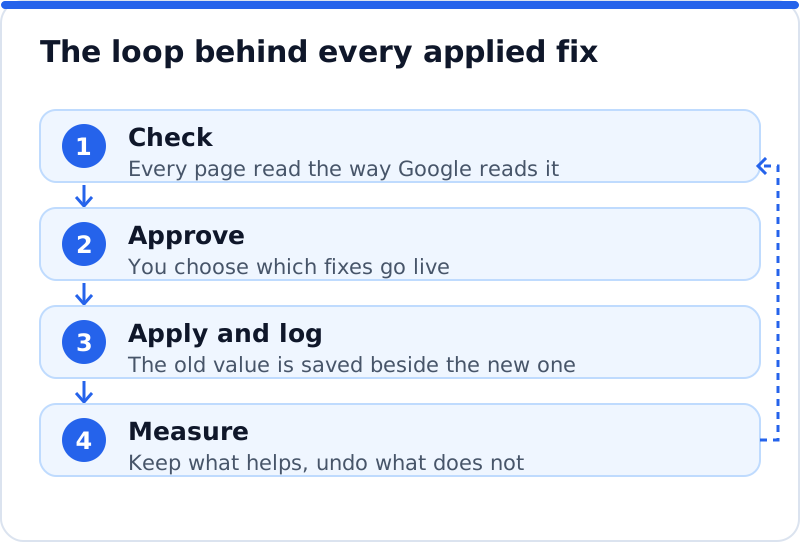
The measuring step is the one most people skip, and it tells you whether the plugin is worth keeping. Search Console's Performance report shows clicks, impressions, average position and click-through rate for each page and search term. Google needs days or weeks to recrawl a page and show a new title, so judge a change after about four weeks. Change a sensible number of pages at a time and note the date, because a hundred changes in one afternoon make it hard to tell which ones helped. A physiotherapy clinic in Bristol that updates its ten main service pages first, then waits a month, learns far more than one that rewrites everything at once.
Control matters more than cleverness
A plugin that writes good titles but gives you no brakes is a liability. Look first for permission by area: you should be able to allow titles while refusing redirects or articles, and the website itself should reject changes in any area you switched off. Look next for approval inside WordPress as well as in the outside service, so a colleague can review changes where they already work. You also want a complete log that shows the field, the old value, the new value and the date. Finally, undo should respect your later work: if you edited a title by hand after the plugin changed it, undoing should keep your version.
Reliability belongs in the same conversation. Some hosts block incoming requests from outside services, so a good plugin should be able to fetch approved changes itself on a schedule. Many business websites run a caching plugin, and a change hidden behind an old cached page is a change nobody sees, so purging the cache after an update matters. When an agency clones a live website to a staging address, the copy should notice the new address and stop accepting changes meant for the real one. These details are not glamorous, yet they separate a tool you can leave running from one you have to watch.
Using an AI SEO plugin for WordPress with Yoast or Rank Math
The biggest technical risk with a second SEO tool is duplication. If Yoast SEO prints a title tag and another plugin prints a second one, the page carries two titles and Google has to guess. The same goes for meta descriptions and the Open Graph tags that shape how a page looks when shared. A well-built AI SEO plugin avoids this by writing into the fields of the SEO plugin you already use, whether that is Yoast SEO, Rank Math, All in One SEO or SEOPress. Open the page afterwards and the new title sits in the Yoast box or the Rank Math snippet editor as if you had typed it. Your SEO plugin stays in charge of output, and the values remain even if you later remove the AI plugin.
Structured data needs the same care. Most SEO plugins already output some schema, and several let you describe your business as an organisation or local business in their settings. If another plugin then adds its own business schema to the home page, Google may see two descriptions of the same company with slightly different details. The safe behaviour is to check what the page already prints and skip anything that would repeat it. You can confirm the result with Google's Rich Results Test, which shows the structured data Google can read on a page, or with the Schema Markup Validator. Without any SEO plugin, WordPress prints a basic title tag when the theme supports it but no description or sharing tags, so the AI plugin has to print those itself.
Choosing an AI SEO plugin for WordPress
Feature lists make every plugin look complete, so test your shortlist against a few plain questions. Does it write into your existing SEO plugin, or does it want to replace it? Can you approve changes first and undo any one of them later? Does it add scripts to the pages your visitors load? Is it priced as a monthly subscription, or as a charge for the work actually done?
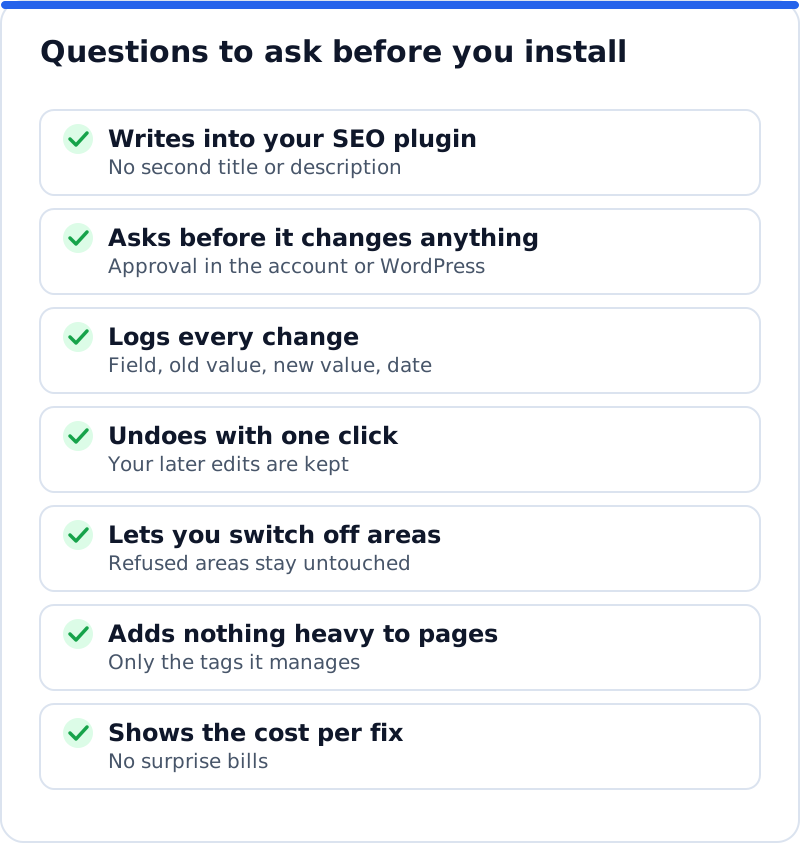
Two more points deserve a few minutes. Check the plugin's requirements against your hosting, because an old PHP version can stop a modern plugin from activating, and your host's control panel shows the version in use. Read what happens on uninstall: settings and logs should go, while the improvements it made should stay as normal content. Pay-per-use credits suit a business that fixes its website once and tops up now and then, while a subscription suits heavy, continuous use. None of these questions needs technical knowledge, only a little patience.
How AI WebMaker's plugin handles it
Our plugin, called AI Website SEO Tools in your dashboard, follows the loop and the controls described above. You download it from aiwebmaker.co as a zip, install it with Plugins, Add New, Upload Plugin and activate it; it needs WordPress 5.8 or later and PHP 7.4 or later. Straight after activation you can run a check from the dashboard, before creating any account, and see a score out of 100, what costs you the most visitors and the traffic within reach. Pressing "Connect to AI WebMaker" signs you up or in and links the website, with a connection code as a fallback for cases such as a password-protected staging site. Fixes are then written for your own pages, and nothing changes until you press Apply. The page for the WordPress plugin that applies approved SEO fixes lists every area it covers.
It applies titles, descriptions, focus keywords, alt text for images that have none, 301 redirects for pages that show "not found", home page business schema (skipped when your SEO plugin already outputs it) and articles from the AI Blog Writer as drafts unless you allow publishing. Page headings change only if you switch that permission on, and everything goes into the fields of Yoast SEO, Rank Math, All in One SEO or SEOPress. Every change is logged with the value it replaced and can be undone in one click, and if you edited the field since, your version is kept. If your host blocks incoming requests, the plugin fetches approved changes every 15 minutes, and it purges common caches such as WP Rocket and LiteSpeed Cache after each change. Installing, checking and applying cost nothing, while the AI work is paid in credits of about $0.65 each: roughly 0.1 to 0.3 credit per page fix, 1 credit for keyword research and 2 for an article, with no subscription and credits that never expire.
Where the plugin fits in a wider SEO plan
An AI SEO plugin fixes the page-level basics, and those basics often keep a decent business website from showing up at all. It does not replace the rest of search visibility. Google still weighs how well your content answers a search, which websites link to you, how usable your pages are on a phone and, for local searches, how complete your Google Business Profile is. A furniture shop in Rotterdam with perfect titles but thin product pages and no links will still struggle against a competitor with all three. Fix the gaps first, then strengthen your most valuable pages, then build reputation through reviews, listings and relevant links, and the AI SEO tools for business websites show how checking, links and content connect.
Questions business owners ask
Do I still need Yoast SEO or Rank Math?
In most cases, yes, and that is a good thing. Your SEO plugin handles sitemaps, canonical tags, output of titles and descriptions, and settings you configured over the years. An AI plugin that writes into its fields lets you keep all of that while filling in values much faster. Replacing a well-configured SEO plugin usually creates more work than it saves. On a simple website with no SEO plugin, a lightweight plugin that prints only the essential tags can be enough, and you can add a full SEO plugin later.
Can an AI SEO plugin break my website?
A well-designed one changes data, not code, which keeps the risk low. Titles, descriptions, keywords and alt text are stored as values in the database, and changing them cannot crash a page. Redirects deserve more attention, because a wrong target sends visitors somewhere unhelpful, so each one should be easy to review and undo. The real danger comes from plugins that rewrite content without asking, edit theme files or run instructions sent from outside. Choose one that refuses those things by design, and the worst case becomes a value you change back.
How long before changes show up in Google?
Google has to recrawl a page before it can show a new title or description, which can take anywhere from a day to a few weeks. Pages linked from your home page tend to be revisited sooner. You can ask Google to recrawl a single page with the URL Inspection tool in Search Console, which helps for a few key pages. Ranking changes usually take longer than display changes, because positions settle only after Google has reprocessed the page alongside everything else it knows about your website. Give each batch about a month, and compare the same weeks before and after.
Where to start this week
The quickest win is to see what your website is losing today. Run a check, read the issues in order of the visits they cost, and pick the five pages that matter most to your income. Approve fixes for those pages only, note the date, and leave them alone for a month while Google catches up. Then compare clicks and click-through rate for those pages in Search Console against the month before, and undo anything that disappoints. Start with the check, because a clear list of what is missing makes every later step easier.
Check your WordPress website, approve the fixes and they are applied for you: titles, descriptions, keywords, schema, alt text and redirects, each with undo.
Get the AI Website SEO Plugin for WordPress →