WordPress SEO Titles That Google Shows in Full
How to write a WordPress SEO title for every kind of page, where to edit it in each SEO plugin, and how to stop Google cutting or rewriting it.
- Works with Yoast SEO and Rank Math
- You approve every change
- One-click undo

Your search title is the one line of your page that Google prints large, blue and clickable, and it has about a second to persuade someone to choose you. On WordPress that line is controlled by a field most owners never open, so it often ends up as "Services | My Company" or, worse, the same words on every page. A good WordPress SEO title names what the page offers, fits the space Google gives it and gives a searcher a reason to pick it over the nine other results. You will learn how the title tag differs from the post title and the heading, where to edit it in Yoast SEO, Rank Math, All in One SEO and SEOPress, and which formulas work for service pages, the home page, location pages and blog posts. You will also see the mistakes that make Google cut or rewrite titles, and how to fix titles across a whole website without spending a fortnight on it.
To have these fixes applied on your own WordPress website, try our WordPress plugin that applies SEO fixes, part of our AI SEO Tools.
Try the AI website SEO plugin for WordPress to give every page a title that fits
Title tag, post title and H1 are different things
WordPress uses the word "title" for more than one thing, and the confusion causes real mistakes. The post title is the large field at the top of the editor where you type the page name. Most themes print that post title on the page as the main heading, the H1, and WordPress uses it to suggest the page's URL. The title tag is different: it sits in the hidden head of the page and is what Google usually shows as the blue link in results and what appears on the browser tab. Without an SEO plugin, WordPress builds the title tag from the post title, a separator and the site title you set under Settings, General. An SEO plugin replaces that automatic version with whatever you type in its SEO title field, which is why the two can and often should differ.
The split is useful because the heading and the search title do different jobs. The heading speaks to someone who has already arrived, so it can be short and plain. The search title competes in a list of results, so it should carry the main search term, the place if the business is local, and a reason to click. A dental clinic in Leeds might use "Invisalign" as the H1 on its aligner page, while the WordPress SEO title reads "Invisalign in Leeds: Clear Aligner Treatment and Aftercare". The two agree on the topic, which matters because Google compares them, but they do not need to match word for word.
How long a WordPress SEO title should be
Google does not count characters; it cuts titles that are too wide for the space in its results. On desktop that space is commonly measured at around 600 pixels, which usually works out at about 50 to 60 characters depending on the letters you use. Wide letters such as W and M take more room than i and l, and a title in capitals runs out of space much sooner than one in normal case. On phones, results can wrap titles onto more than one line, but the same rule holds: the end of a long title is the part most likely to disappear. That is why the words that matter most belong at the front. Treat 60 characters as a sensible ceiling, check the preview in your SEO plugin, and accept that a slightly shorter title that reads well beats a long one that ends in an ellipsis.
Short titles have their own problem. A title of two or three words, such as "Plumbing" or "About Us", gives Google too little to work with and tells the searcher almost nothing. Google may also replace it with text from your page, which you did not choose. Aim for a title that answers three questions in one line: what is this, who or where is it for, and why should I click? Most good titles land between 40 and 60 characters once those three answers are in place. The preview bar in Yoast SEO and the character counters in Rank Math, All in One SEO and SEOPress make the length easy to judge while you type.
Where the WordPress SEO title field lives
Every major SEO plugin gives each post and page its own title field, plus a site-wide template that fills in titles you never write by hand. The per-page field always wins over the template. The template matters anyway, because it decides what hundreds of pages show when nobody has touched them. Each plugin uses variables in its templates, such as the post title, the separator and the site name, which are swapped for real text on each page. The table shows where to find both the field and the template in the four most common plugins.
| SEO plugin | Title field on a page | Site-wide title template | Common variables |
|---|---|---|---|
| Yoast SEO | Yoast SEO panel below the editor or in the sidebar, "SEO title" | Yoast SEO, Settings, Content types | %%title%% %%sep%% %%sitename%% |
| Rank Math | Rank Math sidebar, General tab, "Edit Snippet", Title | Rank Math, Titles and Meta, Posts or Pages | %title% %sep% %sitename% |
| All in One SEO | AIOSEO Settings below the editor, General tab, "Post Title" | All in One SEO, Search Appearance, Content Types | #post_title #separator_sa #site_title |
| SEOPress | SEO box below the editor, Titles settings tab, "Title" | SEO, Titles and Metas, Single Post Types | %%post_title%% %%sep%% %%sitetitle%% |
Editing a single title follows the same pattern in every plugin. Open the page in the editor and find the SEO plugin's panel, either below the content or behind its icon in the top bar of the block editor. Clear the variables in the title field, or keep the separator and site name variables at the end if you like a consistent ending. Type the new title, watch the length indicator and the search preview, then press Update on the page itself, because the SEO field is saved with the page. Finally, open the live page, view its source with Ctrl+U (Cmd+Option+U on a Mac) and search for "title" to confirm that exactly one title tag appears and that it shows your new words.
Formulas by page type
Different pages answer different searches, so one formula for every page produces weak titles. A service page should lead with the service and the place, because that is how people search: "Emergency Plumber in Phoenix: Same-Day Repairs, Licensed Team" works for a plumbing company because it matches the words in the search and adds two reasons to call. A home page should say what the business is and where, with the brand name included because people search for it directly. A location page should name the town first and the service second, since someone in Cheltenham typing "electrician Cheltenham" wants to see their town before anything else. A blog post should promise the answer the reader is looking for, often with a number or a clear outcome, and can drop the business name if space is tight.
| Page type | Weak title | Stronger title |
|---|---|---|
| Home page of a law firm in Munich | Home | Employment Lawyers in Munich: Advice for Staff and Employers |
| Location page for a removals company | Areas We Cover, Page 3 | Removals in Solihull: Local Movers With Insured Vans |
| Blog post by a wedding photographer | Some Tips | 9 Questions to Ask a Wedding Photographer in Florence |
| Product page for a coffee roaster in Bristol | Product 114 | Ethiopian Yirgacheffe Coffee Beans, Freshly Roasted in Bristol |
| Contact page of an IT support firm | Contact Us | Contact Our IT Support Team in Glasgow: Call or Book Online |
The pattern in the stronger examples is consistent. Each one starts with the words a searcher is likely to type, adds a place where the business serves a local area, and ends with a detail that sets the page apart. None of them repeats a keyword, none uses capitals for emphasis, and each would make sense read aloud. Notice too that the brand name appears only where it adds trust or helps people searching for the business by name. If you want a brand on every page, put it at the end with a separator, so it is the part that gets cut when space runs out.
Mistakes that cost clicks
The most common mistake is putting the site name first. "Harris and Co | Accountants | Tax Returns" spends half its space on a name searchers did not type and pushes the useful words toward the cut-off. The second is duplicate titles, which happen when a site-wide template produces the same title for every page in a category or every page of a paginated archive. Duplicates make it hard for Google to tell your pages apart and harder for people to choose the right one. The third is keyword stuffing, as in "Locksmith Tulsa, Tulsa Locksmith, Emergency Locksmith Tulsa", which reads like spam and is exactly the kind of title Google tends to rewrite. The fourth is staleness, such as a title promising "2023 prices" two years later, which quietly lowers trust every time someone sees it.
There are quieter mistakes too. Some themes print their own title tag while an SEO plugin prints another, leaving two title tags on every page, which you will only spot by viewing the page source. Changing the post title and assuming the SEO title updated is another trap, because a custom SEO title stays exactly as you typed it until you change it there. Titles copied from a page builder template can carry placeholder words that nobody noticed. Finally, chasing a perfect score in the SEO plugin can lead to awkward wording, and a title that reads naturally will usually earn more clicks than one tuned to turn a light green.
Why Google rewrites titles and how to reduce it
Google treats your title tag as its first choice, not a promise. Its documentation explains that the title link in results can be drawn from other sources too, including the main heading on the page, other headings, text in links pointing to the page and structured data. Google is more likely to replace a title when it is missing, much too long, stuffed with keywords, repeated across many pages or a poor match for what the page is about. It also changes titles that look out of date or that are mostly boilerplate, such as the same long brand phrase on every page. You cannot switch this behaviour off, but you can make it rare.
The best defence is a title that already does what Google is trying to do. Keep it descriptive and specific to the page, make sure it agrees with the H1, and keep it within the width Google shows. Remove repeated phrases from the site-wide template, so the unique part of each title carries the weight. Check a few of your important pages with a search for your own domain, using the site: operator followed by your address, and compare what Google shows with what you wrote. If Google keeps choosing your H1 instead, that is a hint your title tag and your heading tell different stories.
Fixing titles across a whole website
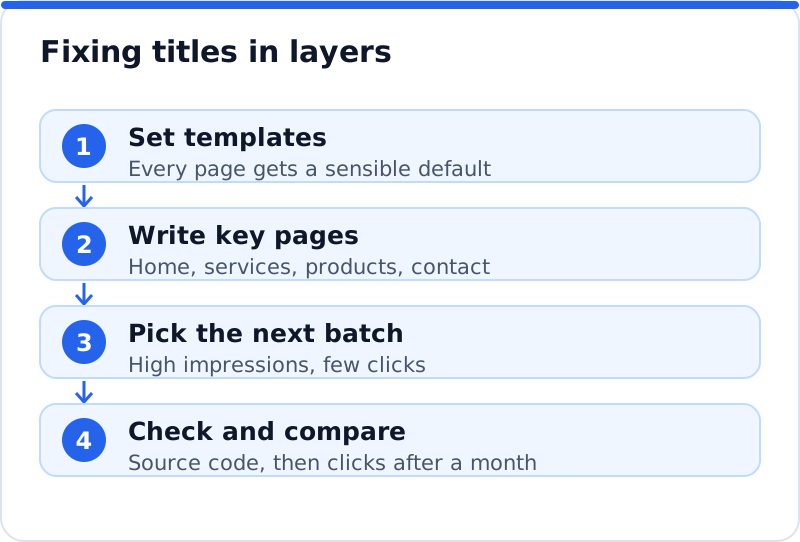
Most business websites have far more pages than anyone wants to title by hand, so work in layers. Start with the site-wide templates in your SEO plugin, so that every post, page, category and product has a sensible default built from its own name. Then write custom titles for the pages that bring in work, which are usually the home page, the main service or product pages and the contact page. Search Console helps you choose the next group: in the Performance report, sort pages by impressions and look for ones that appear often but get few clicks, because a better title can lift those quickly. Yoast SEO also includes a Bulk editor under Yoast SEO, Tools, that lists titles and descriptions for many posts on one screen, which speeds up the middle layer.
This is also where a plugin can save real time. Our AI website SEO plugin reads each page, proposes a title written for that page's content and the search it should win, and writes the approved title into the SEO title field of Yoast SEO, Rank Math, All in One SEO or SEOPress, so the page never ends up with two titles. Each change is logged with the old title beside it, and you can undo any one of them; if you edited the title by hand afterwards, your version is kept. It changes the visible post heading only if you switch that permission on, so your H1 stays as you wrote it. If you want to see how this fits a wider set of fixes, read how an AI SEO plugin for WordPress handles descriptions, keywords, alt text and redirects too. Each page fix costs about 0.1 to 0.3 credit, at about $0.65 a credit, and installing the plugin and running the first check cost nothing.
Checking a title after you change it
A change is only real once you have seen it on the live page. Open the page in a private browser window, so you are not looking at a cached copy, and view the source to confirm there is exactly one title tag. If the old title still appears, clear your caching plugin or your host's cache and try again. In Search Console, the URL Inspection tool can request indexing for a page whose title you have just improved. After about four weeks, compare that page's clicks and click-through rate with the four weeks before, using the date comparison in the Performance report, and keep notes so you know which changes worked. The wider AI SEO tools for business websites can also check every title on the website in one pass and flag the ones that are missing, duplicated or too long.
Questions business owners ask
Should my SEO title match my H1?
They should agree on the topic but they do not need to be identical. The H1 is read by people already on the page, so it can be short and plain, while the title has to win a click in a crowded results page. If the two describe different things, Google is more likely to ignore your title and show something else. A good test is whether someone who clicked the title would feel they landed in the right place when they read the heading. If the answer is yes, the pair is doing its job.
Should my business name be in every title?
On the home page and the contact page, yes, because people search for your name directly. On service, location and product pages, it is a choice: a short brand name at the end adds trust, while a long one steals space from words that win searches. Most SEO plugins let you add the brand through the separator and site name variables, which keeps it consistent. If titles are being cut off, the brand is the first thing to drop. Searchers can still see your domain name in the result, so your identity is not lost.
Will changing titles hurt my rankings?
A careful change to a clearer, more accurate title rarely does harm, and it often improves clicks. Rankings can move a little while Google recrawls and reassesses the page, which is normal. Problems come from removing the words a page currently ranks for, so check the page's top searches in Search Console before you rewrite it. Keep those words in the new title where they still fit the page. Change a group of pages, wait about a month and measure, rather than rewriting everything at once.
A title plan for the next month
Begin with your home page and the three service or product pages that bring in the most enquiries, and open each one in your SEO plugin this week. Rewrite each title using the formula for its page type, check the length in the preview and confirm the result in the page source. Fix the site-wide template so that every page you have not touched still gets a clean default, and remove any long repeated phrase from it. Note the date, leave the pages alone, and compare clicks in Search Console after four weeks. When the numbers move, move on to the next group, and let the first results guide how you write the rest.
Check your WordPress website, approve the fixes and they are applied for you: titles, descriptions, keywords, schema, alt text and redirects, each with undo.
Get the AI Website SEO Plugin for WordPress →