Focus Keywords in WordPress: Giving Every Page Its Own Search
How to choose a focus keyword for each WordPress page, where the field lives in each SEO plugin, how to map keywords across a website and how to measure the result.
- Works with Yoast SEO and Rank Math
- You approve every change
- One-click undo
A focus keyword is a promise you make to yourself about which search a page is meant to win. WordPress SEO plugins give that promise a field, and most owners fill it in with a word or two, glance at the coloured lights and move on. Used properly, the focus keyword in WordPress is a planning tool: it forces each page to have one clear job, keeps two of your own pages from chasing the same search, and lets the plugin check that the page actually says what it is about. You will see what the field does and what it does not, where it lives in Yoast SEO, Rank Math, All in One SEO and SEOPress, and how to choose a keyword that matches what searchers want. You will also learn how to map keywords across a whole website, place the keyword on the page without stuffing it, and tell from Search Console whether the choice is paying off.
To have these fixes applied on your own WordPress website, try our AI website SEO plugin for WordPress, part of our AI SEO Tools.
Use the AI website SEO plugin for WordPress to give each page its own focus keyword
What the focus keyword field does, and what it does not
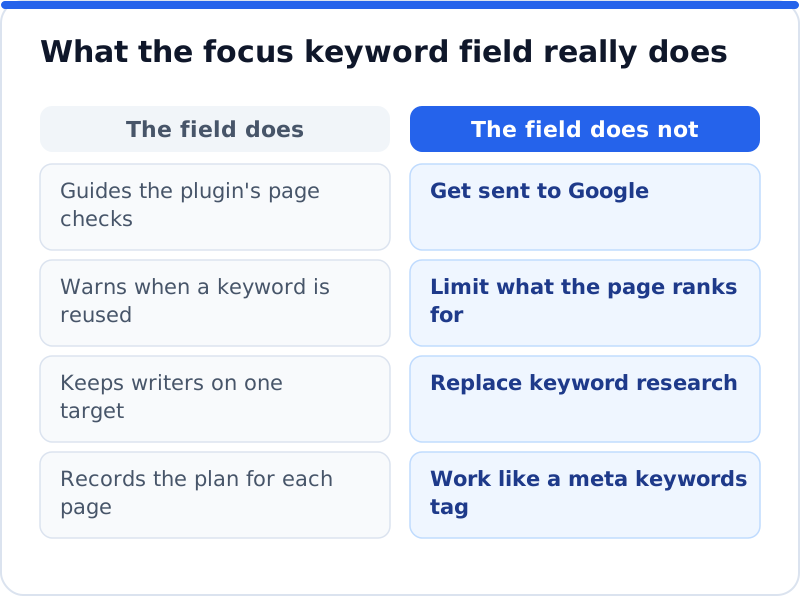
The focus keyword field is an instruction to your SEO plugin, not to Google. When you type a phrase into it, the plugin checks the page against that phrase: whether it appears in the SEO title, the meta description, the URL, the opening paragraph and the subheadings, and whether you have already used it on another page. That makes it a useful checklist while you write. It is not printed into the page for search engines, and Google never sees it. Google stopped using the old meta keywords tag many years ago, and the focus keyword field is not that tag in disguise.
It also does not limit what a page can rank for. A good service page often appears for dozens or hundreds of related searches, from the exact phrase to longer questions and local variations. The focus keyword simply names the main one, the search that matters most to the business and that the page should be built around. A green light in the plugin means the page mentions the keyword in the expected places, not that it will rank. The figure sums up the difference between the field's job and the jobs people sometimes expect it to do.
Where the focus keyword lives in WordPress
Each of the four major SEO plugins has its own name for the field, and each places it near the top of its panel in the post editor. In the block editor, you usually reach the panel through the plugin's icon in the top bar, and most of the plugins also offer a box below the content. The field is saved with the page, so you must press Update afterwards. The plugins differ in detail, such as how many keywords they accept, but the job is the same in all of them. The table shows where to look.
| SEO plugin | Field name | Where to find it | What the plugin checks against it |
|---|---|---|---|
| Yoast SEO | Focus keyphrase | Top of the Yoast SEO panel, SEO section | Title, description, URL, introduction, subheadings, earlier use |
| Rank Math | Focus Keyword | Top of the General tab in the Rank Math sidebar | Title, description, URL, content; more than one allowed, the first is primary |
| All in One SEO | Focus Keyphrase | General tab of AIOSEO Settings, under the snippet | Title, description, URL, introduction, content |
| SEOPress | Target keywords | Content analysis section in the editor | Title, description, URL, headings, content; several separated by commas |
Choosing a focus keyword for each WordPress page
The right keyword sits where three things meet: people search for it, the page can genuinely answer it, and a visit from that search could become a customer. Start with what you already know. Search Console's Performance report lists the searches each page already appears for, and pages often rank on the second or third page for a phrase you never targeted. Google's own autocomplete and the "People also ask" boxes show how customers phrase their questions. If you have a Google Ads account, Keyword Planner gives rough monthly search ranges, which help you compare options rather than predict traffic.
For most businesses, the winning keywords are longer and more specific than the obvious ones. A family law firm in Glasgow will struggle to rank for "lawyer", and even if it did, most of those searchers would want something else. "Family solicitor Glasgow" or "child arrangements order Scotland" are searched less often, but the people typing them are much closer to booking a consultation. Long-tail phrases also face fewer strong competitors, which makes them realistic for a website without years of links behind it. Pick the most valuable phrase the page can credibly win, not the biggest one in the list.
Matching the keyword to search intent
Every search has an intent, and Google ranks pages that fit it. Some searches are questions, some compare options and some come from people ready to buy or book. The quickest way to read the intent is to search the phrase yourself and look at what ranks. If the first page is full of guides and explainers, a sales page will find it hard to break in, and if it is full of local businesses and a map, a blog post will struggle. Choose the keyword for the type of page you have, or create the type of page the results show.
An electrician in Seattle shows how this works in practice. A search for "EV charger installation Seattle" returns local installers, so it belongs on the service page that explains what the company installs and how to book. A search for "how much does an EV charger installation cost" returns guides, so it suits a blog post that answers the question honestly and links to the service page. Both keywords are valuable, but they need different pages. Trying to win both with one page usually means winning neither.
Mapping keywords across the website
A keyword map is a simple list of your important pages with one focus keyword each, and it is the best defence against your pages competing with each other. When two pages target the same search, Google has to choose between them, and it may swap them back and forth or rank neither as well as one strong page would. This problem, often called keyword cannibalisation, is common on business websites that have added blog posts for years without a plan. Yoast SEO warns when a focus keyphrase has been used before, and the other plugins offer similar checks, but only a map shows the whole picture. The example below is for a language school in Barcelona.
| Page | Focus keyword | Intent |
|---|---|---|
| Home page | language school Barcelona | Find a school |
| Spanish courses page | Spanish courses in Barcelona | Compare and book |
| Intensive course page | intensive Spanish course Barcelona | Book a specific course |
| DELE exam preparation page | DELE preparation Barcelona | Book exam preparation |
| Blog post on levels | how long to learn Spanish to B2 | Learn before deciding |
| Blog post on accommodation | student accommodation for language courses Barcelona | Plan a stay |
Building your own map takes an afternoon. List the pages that matter, write the main search for each, and look for duplicates or near duplicates. Where two pages overlap, either give them clearly different targets, merge them into one stronger page with a 301 redirect from the old address, or make one page the main answer and link to it from the other. Search Console helps you spot overlaps you missed: filter the Performance report by a query and look at the Pages tab, and if two of your pages share the impressions, they may be competing. Keep the map in a spreadsheet and check it before every new page or post.
Using the keyword on the page without stuffing it
Once a page has its focus keyword, put it where readers and Google look first. These placements matter more than how many times the phrase appears. Each one tells a searcher, within seconds, that they have found the right page. Each one is also a spot the SEO plugin's analysis checks. Work through them in this order when you edit a page.
- Put the keyword, or a close variant, near the start of the SEO title, where it is least likely to be cut off.
- Use it naturally in the H1, which in most themes is the post title at the top of the editor.
- Mention it in the opening paragraph, so readers and Google see straight away that the page is about it.
- Keep the URL slug short and include the main words, set in the post sidebar before the page is published.
- Work it into the meta description and into the anchor text of a link from a related page.
Beyond those spots, write for the reader and let variations appear on their own. An orthodontist in Boston targeting "clear aligners Boston" will naturally write about aligner treatment, treatment time and retainers, and Google understands that those words belong together. Repeating the exact phrase in every paragraph makes the page clumsy and can look manipulative. Be careful with URL changes on pages that are already published, because a new slug breaks old links unless you add a 301 redirect from the old address. If a plugin's keyword density check turns red while the page reads well, trust the reader.
Setting focus keywords across a whole website
On a website with fifty or more pages, filling the field by hand is slow, and the harder part is choosing well rather than typing. Work through the keyword map first, so every important page has a target, then enter the keywords in your SEO plugin page by page. Older blog posts can wait until the main pages are done, and some may turn out to overlap so much that merging them is the better fix. After that, the SEO plugin's analysis gives each writer a quick check whenever a page is edited. Revisit the map every few months, because new services, new locations and new questions from customers all deserve their own pages.
Our AI website SEO plugin can take on the research and the typing. It checks each main page, proposes the focus keyword it should win based on the page's content and the searches within reach, and, once you approve, writes it into the focus keyword field of Yoast SEO, Rank Math, All in One SEO or SEOPress. Because it reads the whole website at once, it can give pages different targets, which is exactly what a keyword map is for. Every change is logged, and you can undo any of them in one click, with your own later edits kept. A page fix costs about 0.1 to 0.3 credit and keyword research costs 1 credit, at about $0.65 a credit with no subscription. To see the same approach applied to titles, descriptions, alt text and redirects, read the overview of the AI SEO plugin for WordPress.
Measuring whether the keyword is working
Search Console is the honest judge. Open the Performance report, filter by the page, and look at the Queries tab to see whether the focus keyword appears, along with its impressions, clicks and average position. Then filter by the keyword itself and check which of your pages Google shows for it, because the answer should be the page you chose. Give a new target about four to eight weeks before judging it, longer for competitive searches. Compare the same period before and after, and keep a note of when you changed each page.
Read position and clicks together. A page that climbs from position 30 to position 12 is moving in the right direction even if clicks have not changed yet, since page two gets few visits. A page that ranks well but gets few clicks needs a better title and description rather than a new keyword. A page that never appears for its keyword after a few months may need deeper content, links from other pages on your website or a more realistic target. For a wider check that joins keywords, traffic and page problems in one view, the AI SEO tools for business websites show the keyword each main page should win alongside the visits within reach.
Questions business owners ask
Can a page have more than one focus keyword?
It can rank for many searches, but it should have one main target. Some plugins let you enter extra keywords, which is useful for close variants such as singular and plural forms or a different word order. Treat those as supporting phrases, not as a second job for the page. If two keywords need different content to answer them well, they need two pages. One clear purpose per page keeps both your writing and Google's understanding simple.
Should I change the focus keyword of a page that already ranks?
Usually not, unless the current target brings visitors who never become customers. Check in Search Console what the page already ranks for before you change anything. If it ranks well for a useful phrase you never set as the focus keyword, it is often wiser to make that phrase the official target. Changing the title, headings and URL to chase a new keyword can lose the rankings the page already has. Small, measured adjustments are safer than a full rewrite.
Does the focus keyword affect rankings directly?
No, because Google never sees the field. What affects rankings is the page itself: the title, the headings, the content, the links pointing to it and how well it satisfies the search. The field helps indirectly by keeping each page focused and by flagging gaps, such as a keyword missing from the title. Think of it as a note to yourself and your team. The work it prompts is what makes the difference.
Start with your five most valuable pages
Open the pages that bring in most of your enquiries or sales and write down the one search each should win. Search for each phrase to confirm the results fit the page type, and adjust the choice where they do not. Enter each keyword in your SEO plugin, fix the title, H1 and opening paragraph where needed, and note the date. Check your map for overlaps before you add any new page. In a month, open Search Console, see which pages are climbing for their targets, and use what you learn to choose keywords for the next five pages.
Check your WordPress website, approve the fixes and they are applied for you: titles, descriptions, keywords, schema, alt text and redirects, each with undo.
Get the AI Website SEO Plugin for WordPress →