How to Check the Backlinks of Any Website
Every practical way to see who links to a website, why each source shows a different list, how to confirm a link is real and how to read the results.
- Who links to you
- A trust score
- The competitor gap
Every website carries an invisible address book of the other websites that point to it, and no single tool can show you the whole book. Google keeps its own copy, Bing keeps another, and commercial link indexes build theirs by crawling the web independently, so each one sees a slightly different set of pages. To check backlinks of a website properly, you combine those sources, confirm the important links on the pages themselves and then read the results with a clear idea of what matters. That last step is where most owners get stuck, because a report of three thousand backlinks can turn out to mean eleven websites, half of them unimportant. You will learn what each source shows and misses, how to check a link by hand, how to look at a competitor's links and how often to repeat the exercise.
To see who links to your own website, try our AI backlink checker, part of our AI SEO Tools.
This article is part of our complete guide: How to Get Backlinks.
Use the AI backlink checker to see which sites link to your website and whether each link is live
Why check backlinks of a website at all
Links from other websites remain one of the signals Google uses to judge whether a page deserves to rank, and they are also how its crawler discovers many pages in the first place. Knowing your own links shows where your reputation online really comes from, which often surprises owners. A veterinary practice in Cork might believe its links come from the local paper, then discover its strongest link is a university page listing placement providers. Checking also reveals problems you can fix, such as good links pointing at pages you deleted years ago. Finally, it gives you a starting point, so that in six months you can see whether your efforts to earn new links are working.
Checking someone else's links is just as useful. When a competitor outranks you for a search that brings in work, its links often explain part of the gap, and some of the websites linking to it may link to you too. A trade directory, a local awards page or a supplier's stockist list are typical examples. You cannot verify a competitor's website in Search Console, so this depends on Bing's comparison feature and commercial link indexes. The method for reading the results is the same for any website.
Google Search Console's Links report
Search Console is Google's own service for website owners, and its Links report is the most direct view of the links Google has found to your website. You need to add and verify the website as a property first, and a Domain property is the better choice because it covers every version of the address (http, https, www and any subdomains). The report sits in the left-hand menu under Links and is split into external links, meaning links from other websites, and internal links between your own pages. The external side has three tables: Top linked pages, which shows your pages with the most links; Top linking sites, which groups links by the root domain they come from; and Top linking text, which shows the most common anchor text. Click any row and you can drill into it, for example from a linking site to the pages of yours it links to.
The limits matter as much as the data. Google describes the report as a sample rather than a complete list, each table shows at most 1,000 rows, and it does not tell you whether a link is followed or marked nofollow. Linking sites are grouped by root domain, so links from a blog subdomain and the main website of the same organisation appear together, while different country domains stay separate. Some links listed may already have been removed, and the target shown can differ from the address actually linked because Google groups pages by their canonical version. The Export external links button offers two downloads of up to 100,000 rows each: Latest links, sorted by when Google found them, and More sample links, a broader sample. The report is ideal for spotting your main linking sites and new links, but it is not a full audit.
| Source | Websites you can check | What it shows | Main limit |
|---|---|---|---|
| Google Search Console | Only websites you have verified | Top linked pages, linking sites, linking text | A sample, no nofollow information |
| Bing Webmaster Tools | Your own, plus comparisons with others | Linking domains, anchor text, linking pages | Bing's crawl only, not Google's view |
| Commercial link indexes | Any website | Links, linking domains, anchors, estimated authority | Each index sees a different slice of the web |
| Search operators | Any website | Pages that mention a name or address | Finds mentions, not a list of links |
What Bing Webmaster Tools adds
Bing Webmaster Tools is Bing's equivalent of Search Console, and it has a backlinks report built from Bing's own crawl of the web. Setting it up takes minutes, because Bing can import websites you have already verified in Search Console. The report shows the websites linking to you, the anchor text they use and the pages the links sit on, and you can download the data for a spreadsheet. Because Bing crawls differently from Google, its list often includes linking sites that never appear in Google's sample, which makes it a useful second opinion at no charge. It also includes a way to compare your links with other domains, even ones you do not own, which is rare among the search engines' own tools.
Use both reports side by side rather than choosing one. Google's report is closest to what affects your Google rankings. Bing's widens the net and adds the comparison feature. When the two disagree, that is normal, since each crawler has followed different paths across the web. Merge the linking sites from both into one list without duplicates, and you already have a fuller picture than most competitors.
Commercial link indexes and backlink checkers
Several companies run their own web crawlers purely to build a database of links, and well-known examples include Ahrefs, Semrush, Moz and Majestic. These indexes let you check backlinks of a website you do not own, which the search engines' own tools mostly cannot do. They usually show the total links, the number of linking domains, the anchor text, whether each link is followed, when it was first and last seen, and an authority score of their own. Those authority scores are each company's estimate built from its own link data, not numbers Google publishes, which is why the same website scores differently in different tools. Their indexes also differ in size and crawl speed, so their counts differ too.
A backlink checker built for business owners usually draws on similar sources but focuses on the questions you actually need answered. Our backlink checker for business websites finds linking sites through web search and our own crawler, then visits each linking page to confirm the link is really there before reporting it. That confirmation step matters, because every link index carries some links that have since been removed or changed. Whichever tool you use, treat its numbers as a sample, not a census. Compare tools on whether their links check out when you open the pages, not on which one shows the biggest number.
Search operators and their limits
Google once supported a link: operator that listed pages linking to an address, but it was retired years ago and no longer gives useful results. What search operators can still do is find pages that mention a business by name or by its web address. A search for the business name in quotation marks, with -site: followed by the business's own domain to exclude its pages, shows other websites that name it. Searching for the domain name itself in quotation marks, again excluding the website, can find pages that print the address in text. These are mentions, not confirmed links, so you still need to open each page to see whether a link exists.
Search operators complement the tools above. They are good at finding unlinked mentions, pages that name a business without linking to it, which are among the easiest links to ask for. They also catch recent pages that link indexes have not crawled yet. They will never give you a complete or ordered list, though. Use them for discovery, then confirm what you find.
Confirming each link on its page
A link in a report is a claim, and the page itself is the evidence. Open the linking page in a browser, find your business name or the text around the link, and hover over it to see the address it points to. To see whether the link is followed, right-click it and choose Inspect, or view the page source with Ctrl+U (Cmd+Option+U on a Mac) and search for your domain. A rel attribute containing nofollow, sponsored or ugc means the link asks Google not to pass ranking credit, while a plain link with no such attribute is followed. Also check where the link really goes, since a link through several redirects or to a "not found" page is worth far less.
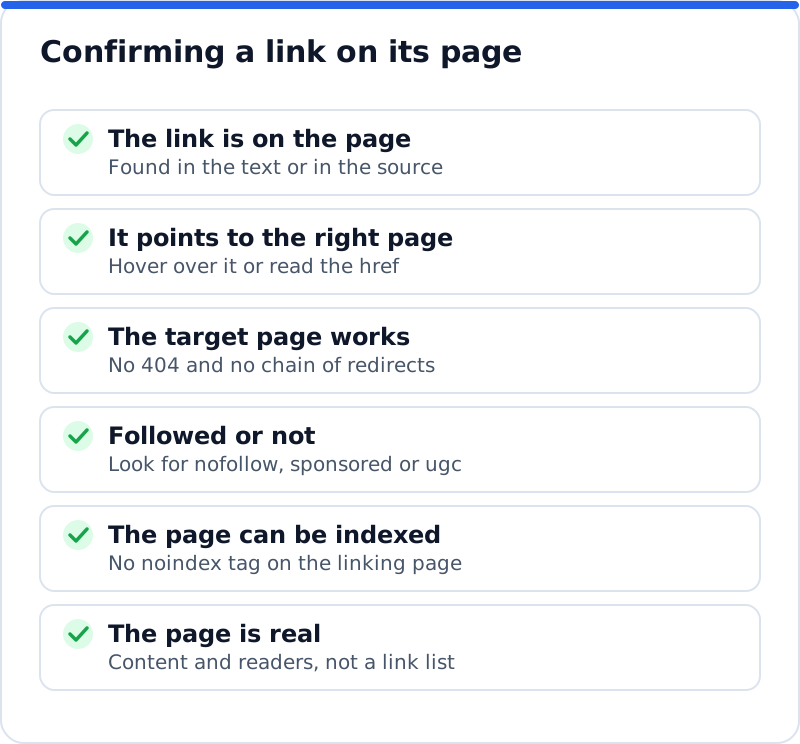
Two further checks catch links that look fine but count for little. The first is whether the linking page can be indexed at all, since a noindex tag or a login wall changes how search engines treat it. The second is whether the page is genuine, with real content, rather than a page of hundreds of unrelated links. You do not need to confirm every link this way. Confirm your top twenty linking sites, any link you worked to earn and any link that looks surprising, and let a tool handle the rest.
Reading what you find
The first distinction to understand is between backlinks and linking sites. A backlink is a single link from a single page, while a linking site, often called a referring domain, is a whole website that links to you at least once. A website that links to you from its footer can produce thousands of backlinks while counting as one linking site, which is why the number of linking sites is the better measure. A roofing company in Denver with 4,000 backlinks from six websites is in a weaker position than a competitor with 300 backlinks from ninety relevant websites. Always start with the list of linking sites and only then look at individual links.
Next, look at the followed share, the anchor text and the authority of the sites. A natural profile mixes followed links with nofollow ones from social profiles, forums and news websites that mark all outbound links that way. Anchor text should be dominated by the business name, the web address and natural phrases, not the same keyword repeated hundreds of times. Authority scores help you sort the list, so you can see which linking sites carry the most weight, but remember they are estimates from third-party data. Finally, ask how relevant each site is: a link to a wedding venue in the Cotswolds from a regional wedding magazine fits, and a link from an unrelated overseas gambling blog does not.
Checking a competitor's links
Checking a rival's links uses the same sources with one difference: Search Console is closed to you, because you can only verify websites you control. Bing Webmaster Tools' comparison feature and commercial link indexes both accept any domain, so enter the competitor's domain and export its linking sites. Check your own website in the same tool at the same time, because a rival's count from one index set against yours from another tells you nothing. Choose the websites that actually rank for the searches you want to win, which may include directories and national brands as well as the business down the road. Two or three competitors are enough for a first look.
Read the competitor's profile with the same questions you ask of your own, then set the two side by side. Start with the number of linking sites rather than backlinks, and the share of them that are relevant to your trade or your town. Look at the first-seen dates that most link indexes show, which tell you whether the rival is earning links steadily or had one burst years ago. Glance at their anchors too, since a profile full of identical keyword anchors suggests links that were placed rather than earned, and that is not a model to copy. Turning the comparison into a list of sites to approach, the link gap, is a separate job with its own method, and it starts from the exports you have just made.
How often to check backlinks
How often you check depends on how actively you are building links and how much the website depends on search. For most business websites, a monthly look at new and lost linking sites is enough, with a fuller review each quarter. If you are running an outreach campaign, check weekly for the links you asked for, so you can confirm them and thank the people involved. After a website move or redesign, check straight away that your strongest links still reach working pages. The schedule below works for most businesses.
| When | What to check | Where |
|---|---|---|
| Weekly, during outreach | Links you asked for, now live or not | The linking pages themselves |
| Monthly | New and lost linking sites, anything unusual | Search Console and a backlink checker |
| Quarterly | Followed share, anchors, authority, competitor gap | Bing comparison and a full link report |
| After a redesign or move | Strongest links still reach working pages | Top linked pages and your redirects |
Questions business owners ask
Why do different tools show different backlink numbers?
Each tool builds its list from its own crawl of the web, and no crawler visits every page. Google's report is a sample, Bing's comes from Bing's crawl, and each commercial index has its own size, speed and rules for what it keeps. Some tools count links that have since been removed until they recrawl the page, while others drop them quickly. They also count differently, for example grouping subdomains together or keeping them apart. The useful comparison is the trend within one tool over time, plus a manual check of the links that matter most.
Can I see a competitor's links in Search Console?
No, because Search Console only shows data for properties you have verified, and you can only verify websites you control. Bing Webmaster Tools is the exception among the search engines' own tools, since its comparison feature shows linking domains for other websites once your own is verified. Commercial link indexes and backlink checkers can show any website's links. Combining those sources gives you a reasonable view of a competitor's profile. Treat it as an outline rather than a complete list, because the same limits apply as for your own links.
Why does Search Console show links I cannot find on the page?
Google's report can include links found on an earlier crawl that have since been removed, and Google's own help pages say so. The target shown is the canonical version of your page, so a link to an old or duplicate address may be listed against a different page from the one actually linked. Some links sit in parts of a page that scripts load later, such as a widget or a comment section, so use Inspect as well as the page source, because the source shows the page before scripts run. Search for your domain rather than your business name, since the link text may be a logo or a phrase you would not expect. If the link really has gone and it mattered, a polite note to the site owner is often enough to restore it.
Turning a link check into a plan
Checking backlinks only pays off when it changes what you do next. After your first check, you should have one list of linking sites from Search Console, Bing and a backlink checker, with duplicates removed and your top twenty links confirmed on their pages. Mark any good link that points to a broken or redirected page and fix it on your side, since that is the quickest gain available. Note the competitors' linking sites that you could realistically earn, and the pages that mention your business without linking. If you want the checks themselves to run in one place, the AI SEO tools for business websites cover the rest of your website's health alongside its links. Set a date next month to check backlinks of a website again, yours and one competitor's, and compare the two lists to see what moved.
Every site that links to yours, its authority and relevance, the trust your backlinks earn and the links your competitors have.
Check your backlinks with the AI Backlink Checker →