Bing Webmaster Tools Backlinks: Seeing Every Link Bing Knows
How to add your website to Bing Webmaster Tools, where its backlinks report lives, what it shows, how to export it and how it fits beside Google's Links report.
- Who links to you
- A trust score
- The competitor gap
Bing sends its own crawler across the web every day, and everything that crawler learns about who links to your website is waiting in an account most business owners have never opened. Bing Webmaster Tools is Microsoft's service for website owners, and it costs nothing to use. Its backlinks report often lists linking websites that never appear in Google Search Console's sample, and it can even show the linking domains of other websites so you can compare yourself with competitors. Setting it up takes a few minutes if you already use Search Console, because Bing can import your verified websites directly. You will learn how to add your website, where Bing Webmaster Tools backlinks data lives, what each view shows, how to export it, how to handle the API key safely and how to use Bing's report alongside Google's to get a fuller picture of your links.
To see who links to your own website, try our backlink checker with a trust score, part of our AI SEO Tools.
Add the AI backlink checker to your routine and confirm every link on its page
Why Bing Webmaster Tools backlinks are worth a look
Most business owners focus on Google, and for good reason, but a second search engine's view of your links is useful even if Bing sends you few visitors. Every crawler follows different paths across the web, so Bing finds some links that Google's report does not list, and the reverse is also true. Google's Links report is openly described as a sample, which means any extra source of confirmed linking websites helps you build a more complete list. Bing's index also supplies results to other services that use it, so being well understood by Bing has value of its own. Put simply, Bing Webmaster Tools backlinks give you a second, independent opinion at no charge.
There is a practical bonus too. Bing Webmaster Tools lets you look at the linking domains of websites you have not verified, which Search Console never allows. For a solar installer in Sacramento, that means seeing which local directories, trade bodies and news sites link to the two installers that rank above it. That kind of comparison usually needs a commercial link index, so having it inside a search engine's own tool is unusual. Together, these two reasons make Bing's report worth thirty minutes of setup and a regular monthly look.
Setting up Bing Webmaster Tools
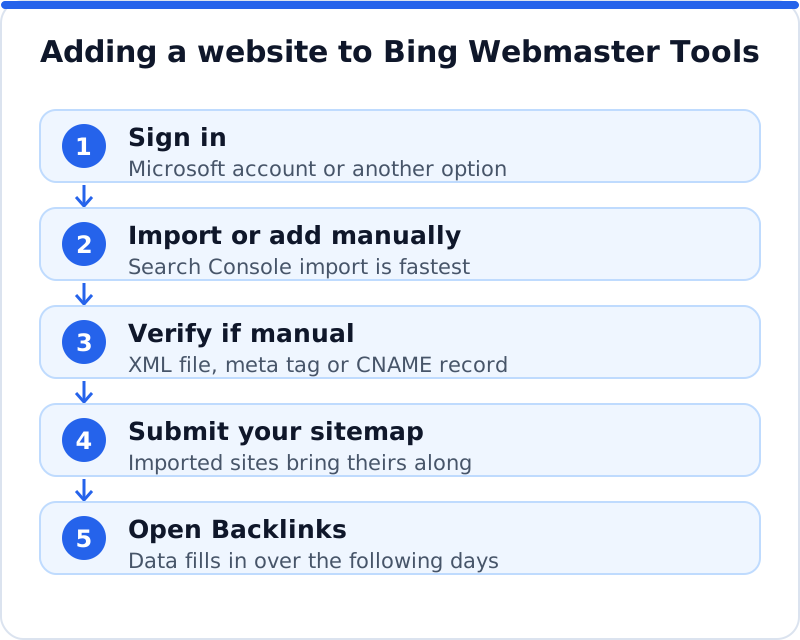
You can sign in to Bing Webmaster Tools with a Microsoft account, and Bing has also accepted Google and Facebook accounts for sign-in. Once you are in, Bing offers two ways to add a website: import it from Google Search Console, or add it manually. The import is the quickest route for anyone already using Search Console, because Bing reads the websites you have verified there and treats them as verified, and it brings across your sitemaps too. You simply grant Bing permission to read your Search Console account, choose which websites to import and confirm. The whole process usually takes a couple of minutes, and you can remove Bing's access from your Google account later if you wish.
If you do not use Search Console, or the import fails, add the website manually by typing its full address. Bing then asks you to prove that you control it, usually with one of three methods: uploading a small XML file named BingSiteAuth.xml to the root of your website, adding a meta tag to the head of your home page, or adding a CNAME record to your domain's DNS settings. On WordPress, many SEO plugins, including Yoast SEO, Rank Math, All in One SEO and SEOPress, have a field for Bing's verification code, which saves editing the theme. After verifying, submit your XML sitemap so Bing can find your pages promptly. New data takes a little while to appear, so do not worry if the backlinks report looks thin on the first day.
Where the backlinks report lives and what it shows
In Bing Webmaster Tools, Backlinks has its own entry in the left-hand menu, and Microsoft rearranges the interface from time to time, so the exact labels may differ slightly from what you see. The main view lists the websites linking to yours, usually grouped by referring domain, with a count of the links each one provides. Select a domain and you see the individual linking pages, the page of yours each link points to and the anchor text used. You can also look at the links by anchor text, which shows how other websites describe you and quickly reveals any odd patterns. Alongside these views sits a tool for comparing your links with other websites, covered in the next section.
Each view answers a different question, so it helps to know which to open. The referring domains view tells you how many distinct websites link to you and which ones provide the most links, which is the best measure of how widely you are recommended. The linking pages view lets you check individual links, such as whether a partner still links to your current address rather than an old one. The anchor text view shows whether your links read naturally, mostly your business name and web address, or whether a cluster of identical keyword anchors suggests something unusual. A language school in Valencia might discover in a few minutes that a student blog links to a course page it deleted last year, which is an easy fix with a redirect.
| View | What it shows | Use it to |
|---|---|---|
| Referring domains | Websites linking to you and how many links each gives | Count who recommends you and spot the strongest |
| Linking pages | The page with the link, the target page, the anchor | Confirm links and find ones pointing at old pages |
| Anchor text | The words other websites use to link to you | Check your anchors look natural |
| Comparison with other sites | Linking domains of websites you name | Find sites linking to competitors but not to you |
Comparing your links with other websites
The comparison feature is the part of Bing Webmaster Tools backlinks that most people miss. Once your own website is verified, you can enter the domains of other websites, typically your competitors, and see the domains that link to them, without needing to verify those websites. You can view your own links alongside a small number of other domains, and filter the results to show websites that link to them but not to you. That filtered list is a ready-made set of link prospects, because each site has already shown it links to businesses like yours. Entering whole domains works best, since the tool is designed around domains rather than individual pages.
Treat what you find as prospects to judge, not targets to copy. A jewellery maker in Birmingham comparing itself with two rivals might find a regional crafts guild, a wedding magazine and a city gift guide linking to both competitors, which are worth approaching. It might also find a network of thin blogs and a paid link directory, which are the kinds of links Google's link spam policies describe and are better left alone. Open each promising domain, check that it is genuine and relevant, and work out how you could honestly earn a place there. A short list of ten good prospects is a better result than a long export you never act on.
Exporting the backlinks data
Bing lets you download the backlinks data so you can work with it in a spreadsheet. Look for the download or export option on the backlinks views, which produces a file listing the linking pages, target pages and anchor text. Exporting is worth doing for three reasons: you can sort and filter far more freely than in the web interface, you can merge Bing's list with your Search Console export, and you keep a dated snapshot you can compare with next month's. Name each file with the date, so your history builds up without effort. A folder of monthly exports is a simple, reliable record of how your links change over time.
Once the file is open, a few simple steps turn it into something useful. Remove duplicate rows, then reduce the linking pages to their domains so you can count distinct linking websites, which matters more than the raw number of links. Add a column for whether you have confirmed each important link on its page, and another for notes such as "points to an old page" or "partner, ask to update". Sort by the linking domain and look first at the websites you recognise as trusted, local or relevant to your trade. If you want to check backlinks of a website with every source combined, this merged spreadsheet is where it starts.
The API key and keeping it private
Bing Webmaster Tools also offers an API, which lets other software read your Bing data automatically. To use it you generate an API key in the settings area of Bing Webmaster Tools, under API access, and paste that key into the tool that asks for it. Some SEO tools and reporting dashboards use this to pull in your Bing backlinks and search data without manual exports. That convenience is useful, but the key works like a password for your Bing Webmaster account data. Anyone who has it can read your website's data and act through the API on the websites in your account.
Keep the key private and treat it as you would any other credential. Never paste it into a public forum, a shared document that many people can open, a support ticket for an unrelated service, or code that will be published. Only give it to a tool you trust, and note which tools you have given it to, so you know where it is in use. If you think the key has been exposed, delete it and generate a new one in the same settings area, which stops the old key working. Do not confuse it with an IndexNow key, which is a different key that you deliberately publish as a text file on your website so search engines can confirm your URL submissions.
How Bing compares with Search Console's Links report
The two reports overlap but are not the same, and knowing the differences helps you trust each for what it does well. Google's Links report shows the links Google has found, so it is the closest view of what affects your Google rankings, but it is a sample, its tables stop at 1,000 rows and it does not say whether a link is followed. Its exports offer up to 100,000 rows of the latest or sampled links. Bing's report comes from a separate crawl, so it adds websites Google does not list and drops some that Google does. Bing also offers the competitor comparison, which Google does not.
| Feature | Bing Webmaster Tools | Google Search Console |
|---|---|---|
| Whose crawl | Bing's own crawler | Google's own crawler |
| Linking websites | Referring domains with link counts | Top linking sites by root domain |
| Anchor text | Yes, with the links behind it | Top linking text |
| Other websites | Compare your links with other domains | Only websites you verify |
| Export | Download from the backlinks views | Latest links or more sample links |
Neither report tells you everything, and neither is a substitute for opening the linking page yourself. Both can list links that have since been removed, because crawlers revisit pages only from time to time. Both group and count links in their own way, so the totals will never match. The useful habit is to treat each as a list of linking websites to merge, confirm and judge, rather than a score to watch. When both search engines list the same strong website, you can be confident that link is well known.
Using both reports together
A simple monthly routine gets the best from both. Export the latest links from Search Console and the backlinks from Bing Webmaster Tools, merge them into one list of linking domains and remove duplicates. Compare the list with last month's to see which websites are new and which have disappeared, and open any new website you do not recognise. For a property letting agency in Bath, that half-hour might reveal a new mention on a local relocation guide, a lost link from a partner's redesigned site and a directory listing pointing at an old page. Each of those leads to a clear action: thank, ask or redirect.
Every quarter, add the competitor comparison from Bing to the routine. Enter two or three websites that rank above you for your main searches and filter for domains that link to them but not to you. Pick the five most relevant and genuine ones and plan how you could earn a link from each, whether by joining an association, contributing an article or getting listed in a directory you qualify for. Keep a short tracker of those prospects and the date you approached each one. Over a year, that steady routine turns two reports nobody reads into a reliable source of new links.
How the AI Backlink Checker helps
Merging exports by hand works, but it takes time, and neither search engine confirms that a link still exists today. The AI Backlink Checker finds the websites that link to yours using web search and our own crawler, then visits each linking page to confirm the link is really there. It shows each site's authority, based on Open PageRank and shown on a scale of 0 to 100, whether the link is followed and any spam signals, and lists pages that mention your business without linking. Its competitor link gap shows websites that link to rivals but not to you, much like Bing's comparison but with each link confirmed on its page. For a view of your whole website's search health beyond links, the AI SEO tools for business websites check your pages too.
Questions business owners ask
Do Bing backlinks matter if most of my visitors come from Google?
The links themselves are the same links whichever search engine reports them, so Bing's report is really a second view of your link profile rather than a separate set of links. A website that links to you helps with any search engine that finds and trusts it. The value of Bing's report is that it lists linking websites Google's sample may leave out, and it lets you compare yourself with competitors. Bing also sends real visitors, and its index is used by other services. So even a Google-focused business gains from looking.
Why does Bing show fewer links than Search Console?
Each search engine crawls the web in its own way, at its own pace, and keeps its own rules about which pages and links to record. Bing may simply not have visited some of the pages that link to you, or it may have visited them before the link was added. Search Console's report is also a sample, so neither total is a full count. The difference in numbers matters far less than the list of websites each one shows. Merge the two lists and you will have a better picture than either gives alone.
Can I disavow links in Bing Webmaster Tools?
Bing has offered a tool for disavowing links within its backlinks area, though the interface changes over time, so check what your account shows. Disavowing is a step for clearly harmful links that you cannot get removed, and most business websites never need it. Normal low-quality links that you did not ask for are usually ignored by search engines rather than counted against you. If you suspect a real problem, review your links carefully before deciding. Our separate guide to toxic links and the disavow file covers that process in detail.
Setting up Bing this week
Start by signing in to Bing Webmaster Tools and importing your website from Search Console, or add it manually and verify it with the XML file, the meta tag or a CNAME record. Submit your sitemap, then come back after a few days and open the backlinks report to see which websites Bing has found linking to you. Export the data, merge it with your Search Console export and confirm your strongest links on their pages. If a reporting tool asks for your API key, generate it in the settings area and store it somewhere private. Then run the comparison against two competitors and choose the first five prospects to approach this month.
Every site that links to yours, its authority and relevance, the trust your backlinks earn and the links your competitors have.
Check your backlinks with the AI Backlink Checker →