Schema Markup for a WordPress Business Website
What business schema is, which type to choose, the details that matter, where WordPress SEO plugins already add it, how to avoid duplicates, and how to test it with the right tools.
- Works with Yoast SEO and Rank Math
- You approve every change
- One-click undo
Your business already has a name, an address, a phone number and opening hours, but to a search engine they are just words in a footer until something labels them. Schema markup is that label, a small block of structured data that says "this is the business, this is where it is, and this is when it opens". On a WordPress business website, adding schema markup is less about chasing shiny search features and more about removing doubt, so Google matches your website to the right business, logo and profiles. You will learn the difference between the LocalBusiness and Organization types, which details matter most, and where your SEO plugin may already be printing schema without you knowing. You will also see how to avoid duplicate markup, how to test with the Rich Results Test and the Schema Markup Validator, and what results to expect honestly. The aim is markup that is accurate, single and quietly useful for years.
To have these fixes applied on your own WordPress website, try our AI website SEO plugin for WordPress, part of our AI SEO Tools.
Add business schema to your home page with the AI website SEO plugin for WordPress
What schema markup does for a WordPress business
Schema markup is a shared vocabulary, maintained at schema.org, for describing things such as businesses, products, events and articles in a form machines can read. Google recommends writing it as JSON-LD, a short script block in the page that visitors never see. For a business, the most useful piece is a description of the business itself, usually placed on the home page. It tells Google the official name, the address, the phone number, the logo, the opening hours and the social profiles that belong to the same business. That can help Google connect your website with your Google Business Profile, your knowledge panel and mentions elsewhere on the web.
It helps to be clear about what schema does not do. It is not a ranking boost, and adding it will not lift a weak page above a strong one. It does not guarantee any special appearance in search results either, since Google decides when to use structured data. What it does is remove ambiguity, which matters more than people expect. A dental clinic in Leeds with a name similar to a clinic in Leeds, Alabama, benefits when its markup states the street address, the UK phone number and the right social profiles.
LocalBusiness or Organization
The two types you will meet most often are Organization and LocalBusiness, and the choice depends on whether customers visit you or you serve them from a distance. LocalBusiness is a more specific kind of Organization, designed for businesses with a physical place or a defined service area. It has many subtypes, such as Dentist, Plumber, LegalService, Restaurant, AutoRepair and HairSalon, and choosing the closest subtype is better than the generic parent. Organization suits businesses that are not tied to a place customers visit, such as an online software company, a national consultancy or a publisher. When in doubt, a business with a street address that appears on Google Maps should use LocalBusiness or one of its subtypes.
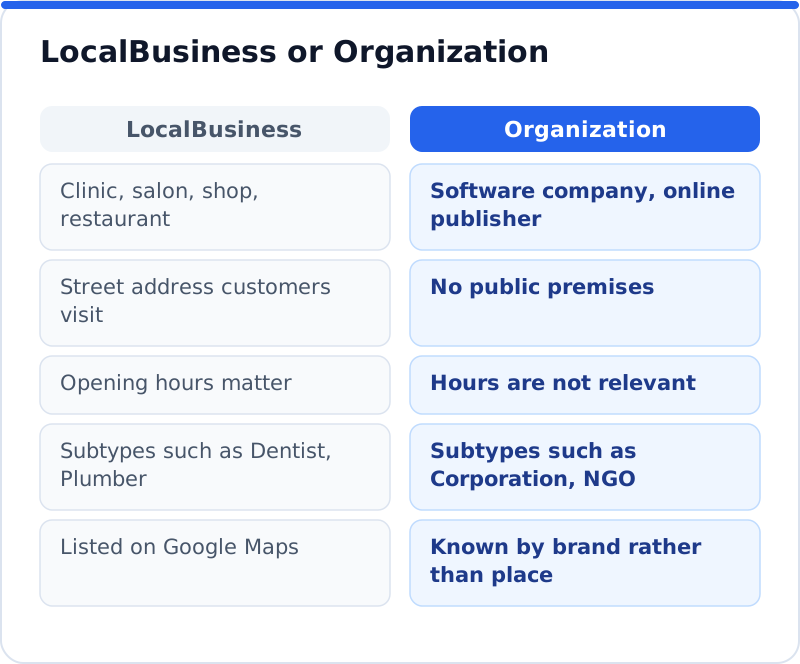
Service-area businesses sit in between, and they usually still belong under LocalBusiness. An HVAC company in Phoenix that visits homes across the valley but has no showroom can use the HVACBusiness subtype, include its registered address, and describe the area it serves. If it hides its address on its Google Business Profile, it should keep the markup consistent with what it shows publicly. The rule underneath is consistency: the details in your markup should match your website's contact page and your Business Profile exactly. Conflicting details are worse than missing ones, because they create the very doubt schema is meant to remove.
The details that matter most
A few properties do most of the work, and each one is easy to get slightly wrong. The name should be the trading name customers know, not a legal entity with "Ltd" or "GmbH" unless that is how you appear everywhere. The address should be complete and formatted the way the local postal service expects. The phone number should include the country code, so it is unambiguous to anyone abroad. Opening hours should list each day accurately, including late openings, and be updated when they change.
| Property | What it holds | Good example | Weak example |
|---|---|---|---|
| name | Trading name customers know | Harbour Lane Vets | Harbour Lane Veterinary Holdings Limited (Reg. 4471) |
| address | Full postal address | 12 Harbour Lane, Cork, T12 X4Y2, Ireland | Cork |
| telephone | Number with country code | +353 21 555 0182 | Call us! |
| openingHours | Days and times, kept current | Mo-Fr 08:30-18:00, Sa 09:00-13:00 | Open most days |
| logo | Square or wide image of the logo | A clean logo image at a stable address | A blurry favicon |
| sameAs | Official profiles of the business | Facebook, Instagram and LinkedIn pages | A list of directory listings |
The sameAs property deserves a little more care than it usually gets. It is meant for profiles that clearly represent the same business, such as your official social pages, your Wikipedia entry if you have one, or a recognised industry register. Stuffing it with every directory listing adds nothing and can blur the picture. The logo should sit at a stable address that will not change with the next theme update. Small details like these are what make the difference between markup that helps and markup that merely exists.
Where WordPress already adds business schema markup
WordPress itself prints no business schema, but most SEO plugins do, and many owners never notice. Yoast SEO builds a connected set of schema on every page, and its Site representation settings decide whether the website represents an organization or a person, with a name and logo. Rank Math offers business details in its Local SEO settings under Titles and Meta, once that module is switched on. All in One SEO keeps its organization details in the Knowledge Graph part of its Search Appearance settings. SEOPress has a Knowledge Graph section in its Social Networks settings for the business name, logo and profiles.
Themes and page builders sometimes add their own markup too, and some review or booking plugins print a business block of their own. That is how websites end up with two or three descriptions of the same business, each slightly different. Before adding anything new, check what your site already outputs. Open your home page, view the page source, and search for "application/ld+json" to see each schema block. Pasting the home page address into the Schema Markup Validator lists every item it finds in one view, which is often the quickest way to see the whole picture.
Avoiding duplicate business schema
Duplicates happen when two sources each describe the business without knowing about the other. One block might say "Northgate Plumbing" with an old phone number, while another says "Northgate Plumbing and Heating Glasgow" with a new one. Google then has to guess which to trust, and it may use neither. The fix is to choose one source as the authority for the business description and switch off or empty the others. If your SEO plugin already outputs complete, accurate business details, filling them in there is usually better than adding a separate block.
When you do add a separate block, for example because your SEO plugin only supports a generic Organization type, keep it focused. Add it to the home page only, describe the business once, and make sure the details match the plugin's settings exactly. If the SEO plugin links its items together with identifiers, a careful setup can connect to that graph rather than standing beside it. For most business owners, the simple rule is enough: one business description, on the home page, matching the contact page word for word. Anything beyond that should come from someone comfortable editing structured data.
Testing with the right tools
Two tools cover testing, and they answer different questions. The Rich Results Test, from Google, takes a page address or a block of code and reports which structured data Google can read for its search features, along with errors and warnings. It only reports types that Google uses for rich results, so it is the right check for whether Google can use your markup. The Schema Markup Validator, run by schema.org at validator.schema.org, checks markup against the whole schema.org vocabulary, regardless of whether Google uses it. Running both is a good habit, since one checks Google's view and the other checks the markup itself.
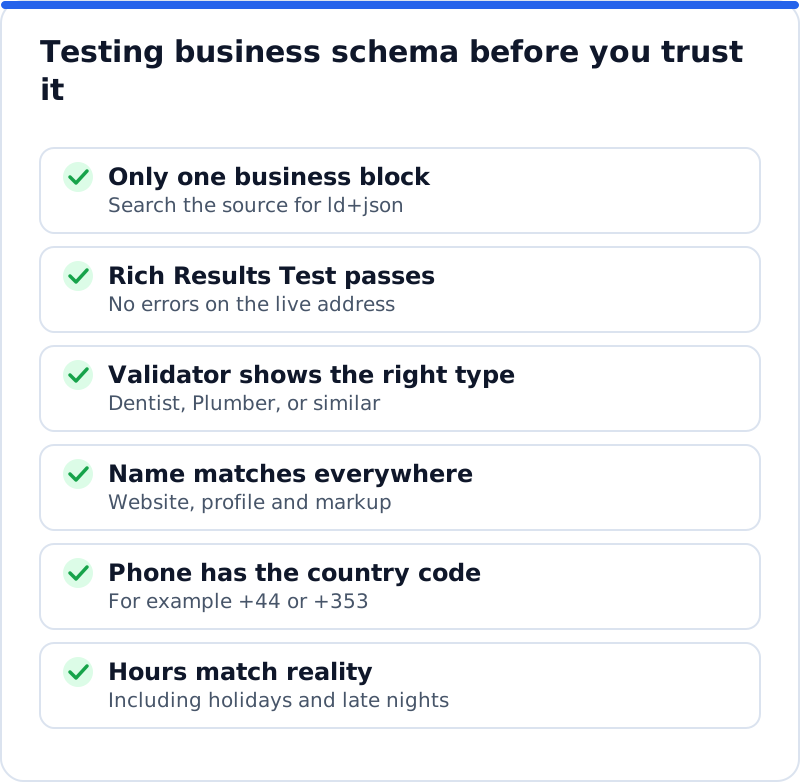
Treat errors and warnings differently. An error means a required property is missing or broken, so that item cannot be used, and it should be fixed. A warning usually means a recommended property is missing, which is worth filling if you have the information but is not a fault. Test the live address rather than a copy, because caching and plugin settings can change what visitors and Google actually receive. After fixing anything, use URL Inspection in Search Console to ask Google to recrawl the home page.
What results to expect from business schema
Be realistic, because the most visible features are not available to most business websites. Review stars in search results cannot be earned by marking up reviews of your own business on your own website, since Google treats those as self-serving for LocalBusiness and Organization. Google limited FAQ rich results to well-known government and health websites in 2023 and stopped showing them altogether in May 2026, so adding FAQ markup to a service page will not bring them back. The map pack and the business panel beside results depend mostly on your Google Business Profile, its reviews and your distance from the searcher. Schema supports that profile, but it does not replace it.
What you can reasonably expect is clearer understanding. Google is more likely to show the right logo, connect the right social profiles and trust the address and phone number it finds. A hair salon in Barcelona with two branches gains from each branch page carrying its own LocalBusiness block with its own address and hours. A chain of yoga studios in Austin gets the same benefit from separate location pages. These gains rarely show as a sudden jump in traffic, and they work more like good foundations than like decoration.
How the plugin adds business schema
This is one of the areas the AI Website SEO Tools plugin handles as part of a wider approach to automatic SEO for WordPress. When you apply the business schema fix from your AI WebMaker account, the plugin adds business schema to the home page using the details of your business. If your SEO plugin already outputs the same kind of business schema, the plugin skips it, so the page never carries two competing descriptions. The change appears in the log with the date, can be undone in one click, and the schema area can be switched off in the plugin's permissions. As with every fix, run the Rich Results Test on the home page afterwards and confirm the details match your Business Profile.
Questions business owners ask
Do I need schema on every page?
No, the business description belongs on the home page, and possibly on a contact or location page. Repeating a full business block on every blog post adds nothing and increases the chance of conflicting copies. Other pages may carry other types, such as Article for blog posts or Product for shop items, which SEO and shop plugins often add already. Location pages for a business with several branches are the main exception, since each branch deserves its own block. For a single-location business, one accurate block is the target.
Will schema help me appear in the map results?
Not directly, since map results rely mainly on your Google Business Profile, its category, its reviews and how close you are to the searcher. Schema helps by confirming that the website and the profile describe the same business. Matching name, address and phone in both places removes doubt. Keep the profile complete, add photos, answer reviews and keep hours current, because those carry more weight for maps. Treat schema as a supporting signal rather than the main lever.
What if my business details change?
Update every source on the same day, starting with your Google Business Profile, then the contact page, then the schema. If your SEO plugin holds the business details, change them in its settings so the markup follows. If a separate block holds them, update that block too. Run the Rich Results Test afterwards to confirm the live page shows the new details. Forgetting the schema after a move is a common reason old addresses linger in search.
Keeping business details consistent
Good business schema is mostly an exercise in consistency, done once properly and checked whenever something changes. Choose the right type, fill the core details accurately, make sure only one source describes the business, and test it with both the Rich Results Test and the Schema Markup Validator. Note where the details live, whether in your SEO plugin's settings or a separate block, so the next update takes minutes. Recheck once a year, or whenever you move, change your hours or rebrand. To see how schema fits with titles, content and links, the AI SEO tools for business websites give the wider plan, and adding accurate schema to your home page is a sensible next step.
Check your WordPress website, approve the fixes and they are applied for you: titles, descriptions, keywords, schema, alt text and redirects, each with undo.
Get the AI Website SEO Plugin for WordPress →