Check Ups, Hygiene and Recall on a Dental Appointment Booking Website
This guide explains how a dental appointment booking website works, from requestable visits, surgeries and hygienist time to urgent pain, policies, new and nervous patients, families and recalls. Twelve months of hosting cost the practice $119, or $19 each month if paid monthly, a domain is added, and the practice is never charged for building in preview.
- No coding required
- Live in minutes
- Blog, SEO and chatbot tools included
A dental appointment booking website lets patients request a check up, a hygiene visit or a child's appointment online, while reception checks each request against the clinicians' diaries before confirming. It suits general and family practices, hygiene clinics and cosmetic practices that want routine slots filled without the phone ringing all morning. Our sample dental clinic website, created on AI Web Maker around an imaginary practice, shows one way to keep routine check ups apart from toothache and to reassure nervous patients before they ask. For a practice, the published site means AI Web Maker hosting of $119 across twelve months, or $19 a month when billed monthly, with the domain registered on top, and building the pages and trying them in preview generates no invoice. The hard part is deciding what belongs online at all, because routine visits suit a request page while severe pain, swelling or a knocked out tooth needs a conversation straight away. What follows covers patients, pages, visit types, chairs, urgent care, policies, new and nervous patients, recalls, search and the yearly bill.
This article is part of our complete guide: Website Builder Comparison.
Recall patients, school runs and long avoiders: who asks for a dental visit
Reasons for a dental request vary widely, so the booking page has to serve each kind of patient without forcing a call. Recall patients know a check up is due and want a time that fits around work, often early in the morning or late in the afternoon. Parents look for back to back appointments for several children, ideally after school or in the holidays. Some patients have avoided the dentist for years out of fear and read every word before asking for anything. Others are in pain, and the website must quickly tell them to call rather than wait for a reply.
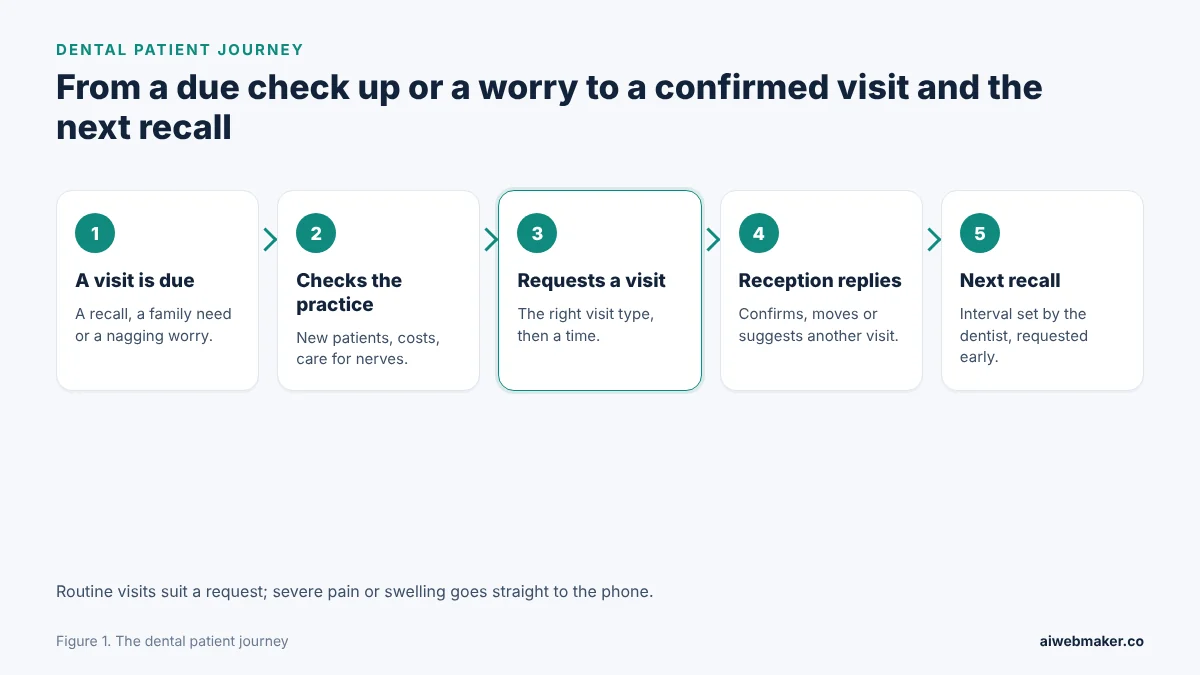
A due check up, a family need or a nagging worry starts the five steps, and they close with the next recall already agreed. The second card covers the checks patients make first, such as whether new patients are accepted, what the visit costs and how anxious patients are looked after. Highlighted in the middle is the moment of asking, when the visit type picked tells reception which clinician and how many minutes to hold. Reception then confirms the time, offers a nearby slot or explains that a different appointment is needed. After the visit, the dentist sets the recall interval and the patient requests the next visit. Pages that support each step keep both the phone quieter and the diary fuller.
Visit list, new patient notes and the urgent care line: what the practice site holds
A practice site needs a focused set of pages, and each one should settle a question that would otherwise reach reception by phone. The visit list shows each requestable appointment with its price where the practice publishes one. On the request page, patients give the visit type, the time they would like and how to reach them. A new patient page explains whether the practice is accepting patients, what the first examination includes and what to bring. A children's page reassures parents, and a team page introduces dentists and hygienists with their working days. Above all, an urgent care note with the phone number sits on every page, so nobody in pain waits for a booking reply.
| Page or setting | What it holds | Why it matters |
|---|---|---|
| Home | Hours, new patient status, phone, request button | Answers the first two questions at once |
| Visit list | Exams, hygiene, gum care, children's visits, prices | Sends each request to the right column |
| Request page | Visit type, preferred time, contact details | Turns a due recall into a proposed time |
| New patients | Acceptance, first exam, forms, records to bring | Removes the biggest barrier to joining |
| Children | Ages seen, what happens, an adult attends | Reassures parents |
| Urgent care | Phone number, out of hours guidance | Keeps pain away from the request queue |
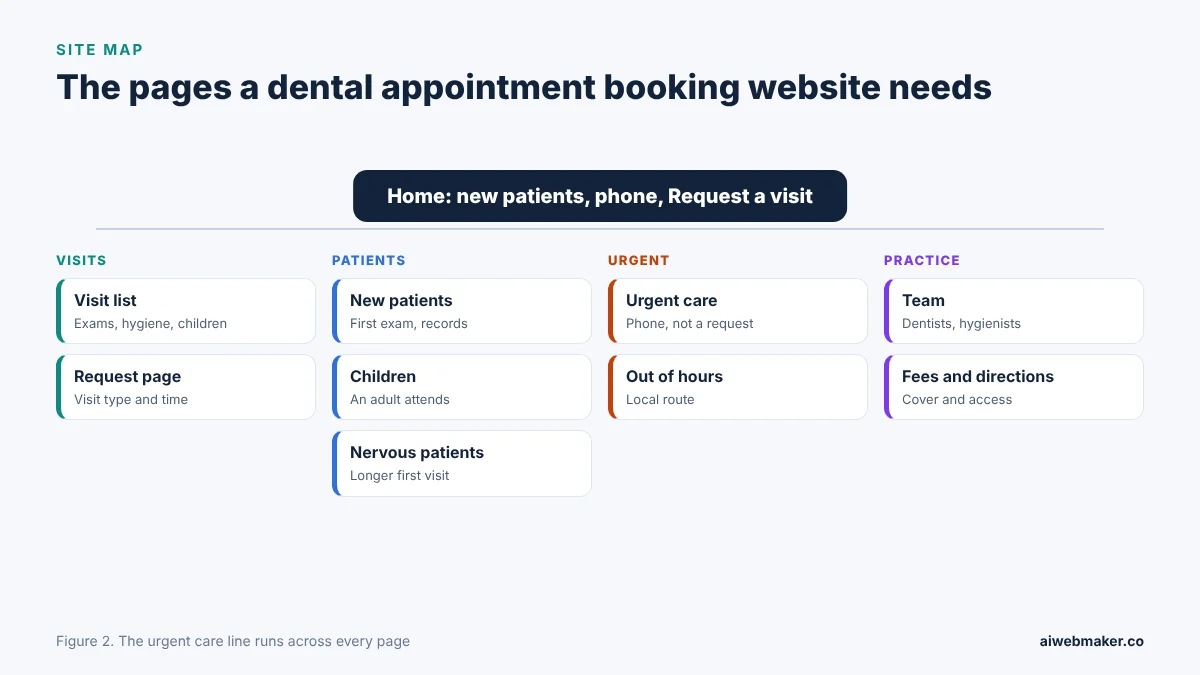
Four branches organise the practice site, and the urgent care line runs across all of them rather than hiding in one corner. The visits branch carries the visit list and the request page, and the patients branch carries new patient, children's and nervous patient guidance. The urgent branch keeps the practice number beside out of hours advice, while the practice branch holds the team, fees and directions. Bright Smile Dental, a made up practice from our sample gallery, has six treatments patients can ask for, covering exams, cleaning, gum health and appointments for children. Opening the Bright Smile sample with six treatments patients can request shows how a patient chooses a visit type before a time, which is what lets reception place the request with the right clinician.
Routine visits that suit a request page, and treatment that waits for a consultation
The visits that work best as online requests are the ones with predictable lengths and prices, such as examinations, hygiene cleans, gum care and children's check ups. A new patient examination usually takes longer than a routine one, because it includes a full history and often radiographs, so it should be its own listing. Complex treatment, such as implants, orthodontics, crowns or whitening, is better arranged after a consultation, since the dentist must assess suitability and agree a plan first. Lengths below are starting points that each practice should check against its own clinicians before publishing. A clear list stops a patient requesting a ten minute check when they really need a full new patient examination.
| Visit type | Time to allow | Online request or consultation first |
|---|---|---|
| Routine examination | 15 to 30 minutes | Online request |
| New patient examination | 30 to 60 minutes | Online request |
| Hygiene clean | 30 to 45 minutes | Online request |
| Gum care appointment | 45 to 60 minutes | Online request, if advised by the dentist |
| Child's check up | 15 to 20 minutes | Online request |
| Cosmetic or orthodontic consultation | 30 minutes | Consultation before any treatment |
Surgeries, hygienist columns and sterilisation time between patients
A dental practice's capacity is shaped by surgeries, clinicians and the time each room needs between patients. Dentists and hygienists keep separate columns, so a hygiene request must land with a hygienist rather than in the dentist's diary. Each surgery needs cleaning and instrument handling between patients under infection control rules, which vary by country but always take time. Many practices also hold a few slots back each day for patients in pain, which keeps the urgent line workable. Offering times that respect these limits means reception confirms requests it can actually keep.
| Limit | Effect on the diary | How to plan for it |
|---|---|---|
| Dentists on shift | Examinations and treatment | Working days on the team page |
| Hygienists on shift | Hygiene and gum care only | A separate listing per visit type |
| Surgeries | Patients seen at once | Count rooms on busy days |
| Turnaround time | Cleaning between patients | Build it into each slot |
| Urgent slots held back | Same day pain | Keep them out of online requests |
Urgent pain, swelling and knocked out teeth go to the phone, not the request queue
Urgent dental problems should always be routed to the telephone, because a request that waits even a few hours can be too slow. The website should say clearly that the request page is for routine visits, and show the practice phone number on every page. Severe pain, a knocked out adult tooth, bleeding that will not stop or swelling of the face or jaw need a prompt conversation. Swelling that affects breathing or swallowing is a medical emergency, and the page should tell patients to contact emergency services in that case. Out of hours arrangements differ by country and region, so the practice should explain the local route in plain words. This is general signposting, and the clinical decision always rests with the dental team.
The booking website builder where practices accept, move or decline appointment requests is built for exactly these routine visits. A patient chooses a visit type and suggests a time, and reception confirms it, offers another slot or declines with a short explanation. Fees, whether paid privately, through an insurer or under a public scheme, are settled between practice and patient. No part of any appointment fee goes to the platform. With a short owner's description of the practice, the builder produces a draft of the visit list, new patient guidance and request page at the same time. Clinical and diary decisions therefore stay with the people running the surgery.
Lateness, missed appointments and children attending with an adult
Dental policies protect clinical time, and patients accept them more readily when they read them before requesting. A patient who arrives late for a check up may still be seen if the examination can be completed properly, while a late hygiene visit may need to be shortened or moved. Patients who cancel early, ideally a day or two before, let the practice pass the slot to someone waiting. Repeated missed appointments are handled differently in different systems, and in some public schemes they can affect a patient's place on the list, so the practice should state its own rule. Children should attend with a parent or guardian, and the practice should explain its approach to consent following local rules. Plain, kind policies keep the diary moving without making patients feel blamed.
| Situation | A common approach | Wording that keeps trust |
|---|---|---|
| A few minutes late | Seen if the visit can be done properly | We will try to fit you in |
| Very late for hygiene | A shorter visit or a new time | Your clean deserves the full time |
| Repeated missed visits | A conversation, then the practice's own rule | Rules differ between schemes |
| Children | A parent or guardian attends | Consent follows local rules |
| Long planned treatment | Any deposit arranged by the practice | Terms come with the treatment plan |
New patients, nervous patients and the recall that keeps a practice full
A new patient page should answer whether the practice is accepting patients, which kinds of care it offers and what the first examination involves. Patients should be told to bring a list of medicines, any recent dental records or radiographs, and details of insurance or public cover where it applies. Nervous patients benefit from a calm description of the first visit, a promise that they can stop at any time and the option of a longer first appointment listed separately. Recall intervals vary from a few months to much longer, because the dentist sets them according to each patient's oral health. Requesting the next visit before leaving keeps the cycle going without reminders from anyone.
Dentist near me accepting new patients, and other searches with a deadline
People searching for a dentist usually add a condition, such as dentist near me accepting new patients, children's dentist, hygienist appointment or emergency dentist open today. Visit pages and the new patient page should use those plain words in their headings, so a search for those words leads to the right page. The map listing should show correct hours, access details and real photos, linking both to the request page and to the urgent phone line. Reviews that mention a gentle hygienist, a calm first visit or a child who left smiling help the next patient decide. Helpful articles, such as how often to see a hygienist or how to help a child feel calm before a check up, draw readers long before a visit is due. Taken together, these pages put the practice in front of patients at the moment they decide to book.
The practice's hosting bill measured against one family's check ups
Hosting and the domain make up the whole fixed bill for the practice's website, however many appointment requests come in. Paid once for the year, hosting is $119, and a practice preferring monthly instalments pays $19 at a time. One article a month on topics such as children's brushing, drafted through AI credits, comes to about $0.65 each. Adding a clinician, changing hours or editing a visit price is never charged. The $189 tier is set in the table purely for comparison.
| Item | Yearly | Monthly |
|---|---|---|
| Hosting the practice pages | $119 | $228 over twelve months |
| Domain | Depends on the ending | Depends on the ending |
| Higher plan, for comparison | $189 a year | Not needed |
| Twelve dental care articles at about $0.65 | About $7.80 | About $7.80 |
| Clinician, hours and visit price changes | No charge | No charge |
| Year before the domain | About $126.80 | About $235.80 |
What makes a patient close the page and keep putting it off
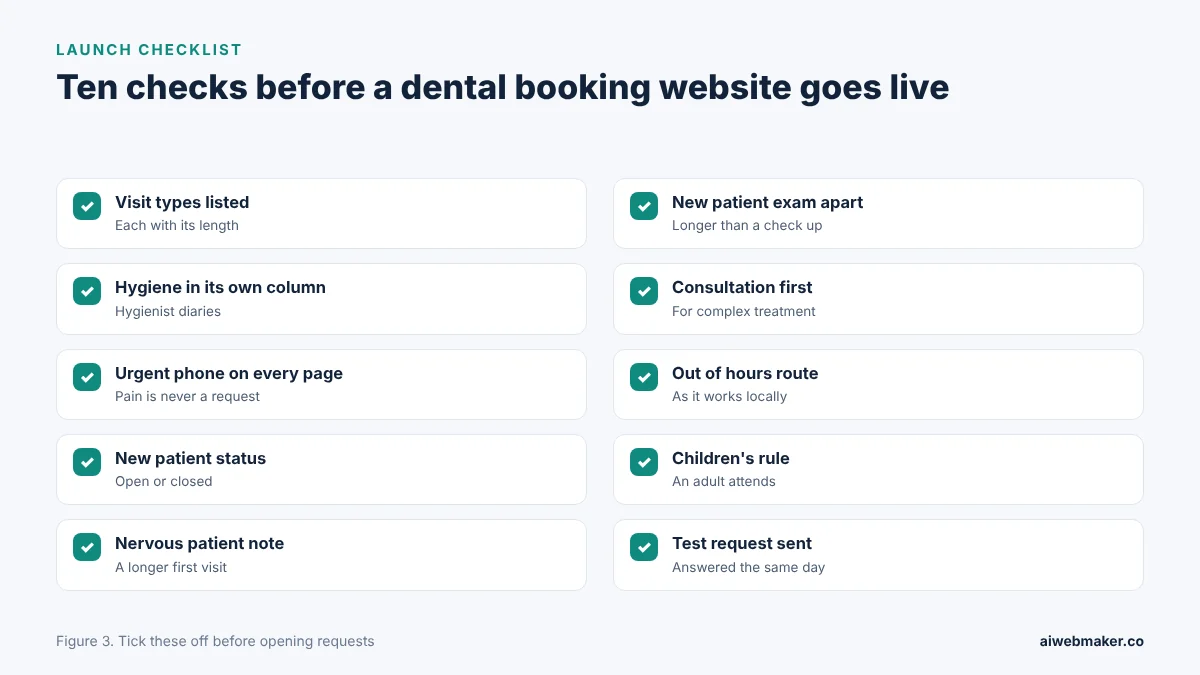
Patients leave a dental website when they cannot tell whether they are welcome or which visit to ask for. No word on new patient status makes newcomers assume the list is closed. A single "appointment" option leaves them unsure whether to ask for an examination or a clean. A request page with no urgent care number leaves someone in pain waiting when they should call. Nothing on nervous patients confirms the fear that kept them away. Each of those doubts has a matching item among the ten checks shown below.
Frequently asked questions
Can several family members be requested in one go?
Families can mention every child or adult in a single request, and reception can then place the visits back to back with one or more clinicians. Some practices prefer one request per person, which the request page should state. School holidays and after school times fill early, so families should ask well ahead. Grouping visits saves parents repeated trips. A clear family note keeps whole households coming back together.
Should a patient with toothache send an online request?
A patient with toothache should phone the practice rather than send a request, especially if the pain is severe or comes with swelling. The urgent care note should make this obvious on every page. Mild sensitivity that has lasted a while can be raised at a routine examination, though the patient should still call if it worsens. The dental team decides how quickly someone needs to be seen. Clear routing protects patients and keeps the request page for routine visits.
How should a practice handle a request when it is not taking new patients?
When the practice is not accepting new patients, the website should say so plainly on the home page and the new patient page. Requests that still arrive can be answered politely with any waiting list arrangement the practice offers. Pointing patients to local ways of finding care is a kind gesture. Updating the status when the list reopens matters just as much. Honesty about capacity protects the practice's reputation.
Can a hygiene visit be requested without seeing the dentist first?
Whether a patient can see a hygienist directly depends on the country and the practice, since rules on direct access to hygienists vary. Some practices let established patients request hygiene visits at any point between examinations, while others require a recent check up first. The visit list should say which applies. Reception can then redirect any request that does not fit. Clear rules prevent wasted appointments and confused patients.
A single family's check ups against twelve months online
One family's check ups and hygiene visits can more than cover a year of hosting, and a single routine examination each month covers a monthly plan. A patient who requests the next recall before leaving returns again and again without any booking fee. Clear visit types, a prominent urgent care line and honest new patient information keep the requests that arrive suitable. Because the team answers each one, both the diary and clinical judgement remain in the practice's hands. Weighed against one loyal family, twelve months of hosting is a minor expense that pays for itself early.
Build your website in Minutes and get the AI Tools that work
Start Building Your Website →