Fixing 404 Errors in WordPress With Redirects That Keep Visitors
How to find the pages on your WordPress website that show not found, decide which deserve a redirect, choose the right type and target, and check every redirect works.
- Works with Yoast SEO and Rank Math
- You approve every change
- One-click undo

A 404 error is a signpost still pointing at a shop that closed last year. Someone followed a link from Google, an old newsletter or a partner's website, and instead of your service page they got an apology. A well-chosen WordPress 404 redirect turns that dead end back into a visit, and it carries most of the value of any links pointing at the old address with it. Done carelessly, though, redirects create chains, loops and vague jumps to the home page that frustrate people and confuse Google. You will learn why 404s appear in WordPress, how to find the ones that matter, when to use a 301, a 302 or a 410, and how to choose a target a visitor will thank you for. You will also see where WordPress actually stores redirects and how to test that each one behaves as intended.
To have these fixes applied on your own WordPress website, try our WordPress SEO plugin with AI fixes, part of our AI SEO Tools.
Test the AI website SEO plugin for WordPress and redirect the pages that show not found
Why 404 errors appear on WordPress websites
Most 404s on a business website are self-inflicted, and they usually follow a sensible decision made for a different reason. Someone tidies a page address, changing "/our-services-2/" to "/services/", and every old link to the first address now fails. Someone deletes a page about a discontinued product, or merges three thin blog posts into one stronger article. A redesign brings a new permalink structure, perhaps dropping dates from blog addresses. A move from another platform, such as an old Wix or hand-built site, changes almost every address at once.
WordPress does help a little on its own. When you change the slug of a published post, WordPress remembers the old one and quietly sends visitors to the new address. That memory applies to posts and other non-hierarchical content types, but not to pages, so renaming a page such as "/emergency-plumbing/" leaves the old address broken. WordPress also tries to guess a close match for some missing addresses, which occasionally sends people somewhere odd. Neither feature replaces a deliberate redirect plan, especially after a migration.
When a 404 is fine and when it costs you
Not every 404 is a problem, and chasing all of them wastes time. Google has said plainly that 404 errors for addresses that never existed, or for content you removed on purpose, do not harm the rest of your website. Bots try made-up addresses constantly, and those should simply return a 404. The ones that cost you are addresses that used to hold real content, earned links or still receive visits. Those deserve attention, because each one is lost traffic or lost link value.
A bakery in Lyon is a good illustration of the difference. If its old "/galette-des-rois/" page was featured by a local food blog every January, that link keeps sending visitors who now meet an error. A redirect to the current seasonal page keeps those visitors and passes along the value of the blog's link. By contrast, a random address like "/wp-admin2/backup.zip" being probed by a bot needs no redirect at all. Sorting real losses from noise is the first and most useful step.
Finding the missing pages that matter
Google Search Console is the best starting point, because it shows what Google itself has tried and failed to reach. In the Pages report (under Indexing), look in the list of reasons pages are not indexed for "Not found (404)". Clicking it shows example addresses, and the URL Inspection tool can tell you where Google found a link to each one. Search Console also has a "Validate fix" button, which asks Google to recheck the group after you have dealt with it. Expect the list to update slowly, since Google recrawls old addresses on its own schedule.
A site crawler covers the gaps Search Console misses, especially broken links inside your own pages. Tools such as Screaming Frog SEO Spider follow every internal link and list the ones that lead to a 404, so you can correct the link itself rather than relying on a redirect. Server access logs and the 404 log kept by some redirect plugins show addresses real visitors are hitting today. For a migration, the most reliable source is a list of old addresses saved before the move, ideally exported from the old sitemap. Combine all of these into one sheet, then mark which addresses have links or visits.
301, 302 or 410 for a WordPress 404 redirect
The type of response you send tells browsers and Google what has happened to the old address, and choosing the wrong one muddles the message. A 301 says the page has moved permanently, and it is the right choice for almost every renamed or merged page. A 302 says the move is temporary, so Google tends to keep the old address in mind, which suits a seasonal page or a short promotion. A 410 says the page is gone on purpose and is not coming back, which is honest for content you have removed with no replacement. Leaving a plain 404 in place is also acceptable for content with no links and no visits.
| Response | What it tells Google | Use it when |
|---|---|---|
| 301 Moved Permanently | The new address replaces the old one | A page was renamed, moved or merged |
| 302 Found (temporary) | The old address will return | A page moves for a short time, such as during a promotion |
| 410 Gone | The page was removed on purpose | A product or service ended with no close replacement |
| 404 Not Found | Nothing exists at this address | Junk addresses and content with no links or visits |
A law firm in Munich might use all four in one tidy-up. Its old "employment law" page, renamed to "labour law for employers", gets a 301 to the new address. A page about a one-off seminar that ran last spring gets a 410, since there is nothing to replace it. A booking page moved to a temporary address for two weeks while the firm changes booking systems gets a 302, although a whole site down for brief maintenance should send a 503 instead. Random bot addresses keep their plain 404, and the firm spends no time on them.
Choosing a target visitors will thank you for
The right target is the page that answers the same need as the old one, as closely as possible. If an old page about "boiler servicing" now lives inside a broader "heating services" page, redirect it there. If a blog post was merged into a longer guide, redirect it to that guide. If a product was replaced by a newer model, redirect it to the new model, not to the shop's front page. The test is simple: would someone who clicked the old link feel they had arrived somewhere relevant?
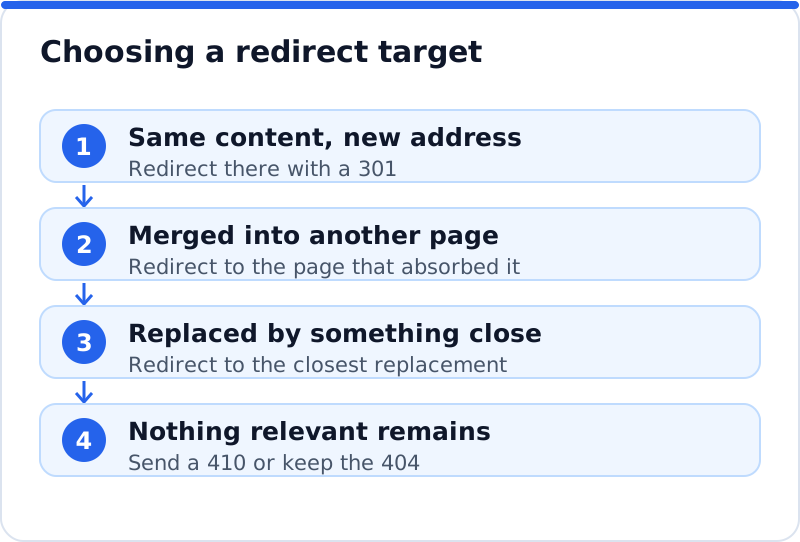
Redirecting everything to the home page is the most common weak choice, and Google often treats it as a "soft 404", meaning it ignores the redirect and drops the old address anyway. Visitors fare no better, since they land on a general page and have to search again. An estate agent in Manchester with dozens of expired property listings is a typical case. Sending each sold listing to the home page helps nobody, while sending it to the page of current listings in the same area keeps the visitor's intent intact. Where no sensible target exists, a 410 or an honest 404 page with search and clear links is better than a misleading redirect.
Redirect chains and loops
A chain happens when one redirect points to another address that also redirects, often after several site changes over the years. The first redesign sent "/services.html" to "/services/", and a later tidy-up sent "/services/" to "/what-we-do/". Now every visitor to the oldest address makes two jumps, and each jump adds a small delay. Google follows a limited number of hops before giving up, and long chains dilute the clarity of the signal. The fix is to point every old address straight at the final page.
A loop is worse, because the redirects point back at each other and the page never loads at all. Browsers show an error such as "too many redirects", and the address is effectively dead. Loops often appear when a redirect plugin and a rule in the server configuration disagree, or when a page is redirected to an address that WordPress itself redirects back. Whenever you add redirects in bulk, test a sample of the old addresses straight away. Finding a loop in five minutes is much better than finding it in Search Console a month later.
Where WordPress stores redirects
WordPress itself has no redirect manager, so redirects live in one of three places, and knowing which matters when something breaks. Redirect plugins, such as Redirection, and the redirect features in some SEO plugins, such as Rank Math, store rules in the WordPress database and apply them when a request arrives. Server rules, written in the .htaccess file on Apache or LiteSpeed hosting, act before WordPress even starts, which makes them slightly faster but easier to break with a typo. Sites on Nginx have no .htaccess file at all, so server rules there live in the host's configuration. Some managed hosts also offer redirect settings in their own control panel.
The practical advice is to choose one place and keep all redirects there. Rules spread across a plugin, the .htaccess file and a host panel are the usual source of loops and forgotten chains. Database rules are easier for non-technical owners to read, search and change, and most redirect plugins record how often each rule is used. Server rules suit large migrations handled by a developer. Whichever you choose, export a copy before major changes, so a mistake can be rolled back quickly.
Checking every redirect works
Checking a redirect means confirming both the destination and the response type. Typing the old address into a browser shows the destination, but not whether the jump was a 301 or a 302. The Network tab in your browser's developer tools does show this, listing each hop with its status code, and online header checkers do the same in plainer form. After a migration, check every address in your list, not just a few, since one wrong pattern can affect hundreds of pages. Then return to Search Console after a few weeks and confirm the "Not found (404)" group is shrinking.
- Visit each old address and confirm it lands on the intended page in one jump.
- Confirm the status code is 301 for permanent moves and 302 only for genuinely temporary ones.
- Update internal links and menus to point at the new address directly, so visitors skip the redirect.
- Revisit the Pages report in Search Console after a few weeks and press "Validate fix" for the 404 group.
How the plugin handles missing pages
This is one area where a tool can genuinely save hours. The AI Website SEO Tools plugin, part of a wider approach to automatic SEO for WordPress, can apply 301 redirects for pages on your website that show "not found". The redirects are prepared in your AI WebMaker account, and nothing changes until you review the list, check each target and press Apply. Each redirect is recorded in a log, can be undone in one click, and the redirect area can be switched off entirely in the plugin's permissions. A garden centre in Ghent that rebuilt its plant category pages could clear a backlog of old addresses this way, while still reading each target before approving it.
Questions business owners ask
How long should I keep a redirect in place?
Keep permanent redirects for at least a year, and in practice there is little reason to remove them at all. Google needs time to recrawl old addresses and move signals to the new ones. External links, bookmarks and printed materials keep sending people to old addresses for years. A redirect rule costs almost nothing to keep, while removing it brings the 404 straight back. The only rules worth deleting are those that point to pages you have since removed.
Will lots of redirects slow my website down?
A few hundred redirect rules make no noticeable difference on typical hosting. Each rule is a quick lookup, and only visitors to old addresses pass through one. Chains are the real speed concern, because each extra hop adds a round trip before the page starts loading. Internal links that still point at old addresses also add a needless hop on every click. Updating those links removes the delay for nearly everyone.
Should I redirect a deleted page to a similar competitor product?
Only if that product is something you sell, since the target should always be on your own website. If a bike shop in Portland stops stocking one brand of touring bike, the closest replacement is another touring bike it does sell. If nothing similar remains, the category page for touring bikes is a reasonable target. If the whole category has gone, a 410 or a helpful 404 page is more honest. Visitors forgive a clear message more easily than a redirect that wastes their time.
Keeping missing pages from piling up again
The best time to create a redirect is the moment you rename or delete a page, not months later when Search Console complains. Make it a habit: whenever a page address changes, note the old one and add the redirect before publishing the change. Check the Pages report once a month, and run a crawl after any redesign or migration. Treat your redirect list as part of the website, with an export kept alongside your backups. For the wider picture of keyword, content and link work, the AI SEO tools for business websites show where redirects sit among everything else, and a quick test of your own site is the best next step.
Check your WordPress website, approve the fixes and they are applied for you: titles, descriptions, keywords, schema, alt text and redirects, each with undo.
Get the AI Website SEO Plugin for WordPress →