Tracking SEO Changes in WordPress, and Undoing the Ones That Hurt
How to record every SEO change on a WordPress website, connect it to Search Console data, judge it fairly after a few weeks and reverse the changes that did harm.
- Works with Yoast SEO and Rank Math
- You approve every change
- One-click undo

Every SEO change is a small experiment, and an experiment with no notebook is just a guess. You rewrite a title in March, clicks fall in April, and by May nobody can remember what the old title said or whether the two events are even connected. The ability to track SEO changes in WordPress turns that fog into evidence: what changed, when, by whom, and what happened next. It also makes mistakes cheap, because a change you can find is a change you can reverse. You will learn what a useful change record contains, where WordPress keeps history and where it quietly loses it, and how to line up changes with Search Console data. You will also see how long to wait before judging a change, how undo should behave when someone has edited a field since, and why a steady pace of changes beats a burst.
To have these fixes applied on your own WordPress website, try our WordPress plugin that applies SEO fixes, part of our AI SEO Tools.
Try the AI website SEO plugin for WordPress, with a log and one-click undo for every change
Why it pays to track SEO changes in WordPress
On most business websites, SEO edits come from several hands over several months. The owner tweaks the home page title, an office manager updates opening hours, a freelancer rewrites service descriptions, and a plugin update changes a default setting. Each change is reasonable on its own, but together they make results impossible to explain. When traffic moves, up or down, the first question is always "what changed?", and without a record the honest answer is "we are not sure". That uncertainty leads either to doing nothing or to undoing good work by mistake.
A plumbing company in Atlanta shows the cost clearly. Its emergency plumbing page drew steady calls for two years, then dipped after a busy spring of edits. The owner suspects the new page title, the marketing contractor suspects a theme update, and both may be wrong. With a simple log, the team could see that the title changed on 14 March and the meta description on 2 April, and compare clicks around each date. Without one, they can only argue, and arguments rarely fix pages.
What to record when you track SEO changes
A good record captures enough to understand and reverse each change, and nothing more. The essentials are the page, the field, the old value, the new value, the date and who made the change. A short reason is worth adding, because "shortened to stop Google cutting it off" tells a future reader far more than the values alone. Keeping the old value in full is the part people skip, and it is the part that matters most for undo. A record that says only "title updated" is barely better than no record.
| Page | Field | Old value | New value | Date | By |
|---|---|---|---|---|---|
| /courses/intensive-spanish/ | SEO title | Courses | Intensive Spanish Courses in Valencia, 2 to 12 Weeks | 3 Feb | Owner |
| /contact/ | Meta description | (empty) | Visit us near the Mercado Central, open Monday to Saturday | 3 Feb | Plugin, approved by owner |
| /about/ | Page heading | About | Our Teachers and Our School | 10 Feb | Marketing assistant |
The "by" column matters more than it looks. It tells you whether a change came from a person, an agency or an automated tool, and whether it was approved. When a change from a tool turns out badly, the log shows exactly which batch it belonged to, so you can review the rest of that batch too. When a person's edit performs well, you know whose judgement to trust next time. Over a year, the log becomes a record of what works for your particular audience.
Where WordPress keeps history, and where it does not
WordPress revisions are useful, but they cover less than most owners assume. Each time you update a post or page, WordPress saves a revision of the title, the content and the excerpt, and you can compare or restore them from the Revisions panel in the editor. The fields your SEO plugin stores, such as the SEO title, meta description and focus keyword, are kept separately as post meta. By default, those fields are not saved in revisions, so restoring an old revision does not bring back an old SEO title. Settings pages, such as your SEO plugin's global options or schema settings, have no revision history at all.
Activity log plugins fill part of the gap. Plugins such as Simple History and WP Activity Log record who logged in, which posts were updated and when settings changed, and some capture field-level detail. They are good at answering "who touched this page on Tuesday?", which is valuable on a site with several editors. They are less suited to lining up SEO fields with results, since the details sit among logins, plugin updates and comments. Many teams combine an activity log with a simple spreadsheet of deliberate SEO changes, or use a tool that keeps its own SEO-specific log.
Lining changes up with Search Console
Google Search Console is where a change's effect becomes visible, through the Performance report's clicks, impressions, click-through rate and average position. Filter the report by page to see only the address you changed, then use the date comparison to set the weeks before the change against the same number of weeks after it. Remember the delays involved. Search Console data usually runs a couple of days behind, and Google may take days or weeks to recrawl a page and show the new title or description. Use URL Inspection to check when Google last crawled the page, since the clock really starts from that moment, not from your edit.
Marking dates on the chart makes patterns easier to see. Since late 2025, Search Console lets you add your own notes to the Performance chart by right-clicking it on a date, with up to 120 characters per note, and everyone with access to the property can see them. Keep a dated list in your own log as well, because a note cannot be edited once saved and Google deletes notes older than about 500 days. Note changes you made, Google updates you heard about and business events such as a price change or a new branch. A café in Brighton might find that a dip lined up with a week of building works outside, not with its new title. Context like that saves you from undoing a change that was never the problem.
Judging a change after a few weeks
Patience is the hardest part of measuring SEO changes. Give each change about four to six weeks after Google has recrawled the page, then compare equal periods, ideally covering the same days of the week. For seasonal businesses, compare against the same weeks last year too, since a summer dip may be normal. Look at the right number for the change you made: a new title or description mainly affects click-through rate, while a content change is more likely to move impressions and position. A page with only a handful of clicks a month will rarely give a clear answer, so judge those in groups rather than one by one.
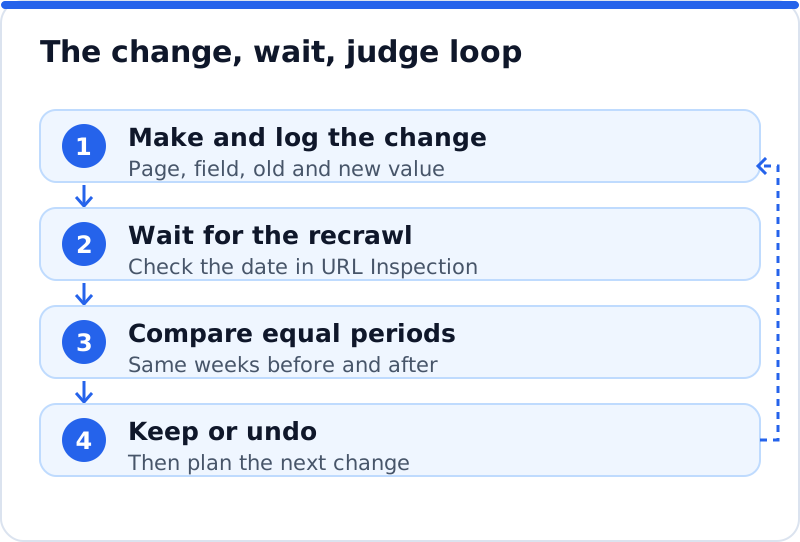
A clear result looks like a sustained change in the metric you expected, not a single good or bad day. If an architecture practice in Copenhagen rewrites the title of its "residential extensions" page and click-through rate rises from a steady level to a clearly higher one for five weeks, while position stays similar, the title is probably working. If clicks fall but position also fell across the whole website in the same week, the cause is more likely a Google update or seasonal demand. When results are mixed, the safest course is often to wait another few weeks. Undo is for changes that clearly did harm, not for every wobble.
Undo when a field has been edited since
Undo sounds simple until two people have touched the same field. Suppose a tool changed a page's meta description on Monday, a colleague improved it on Wednesday, and on Friday you decide Monday's change was a mistake. A careless undo restores the original value from before Monday, wiping out Wednesday's improvement without anyone noticing. A careful undo first checks whether the field still holds the value Monday's change wrote. If it does not, someone has edited it since, and the safe choice is to keep their version and tell you so.
That rule protects the work of people over the work of tools, which is the right priority on a business website. It also means a log must store the value each change wrote, not only the value it replaced, so the comparison is possible. If you keep a manual log in a spreadsheet, apply the same rule by hand: before restoring an old value, check the current one matches what you expect. A solicitor's office in Cardiff with three people editing the same practice pages will find this habit prevents most accidental losses. It takes a few seconds and spares a lot of awkward conversations.
Keeping a steady pace of changes
The pace of changes decides whether you can learn anything from them. Change fifty titles, forty descriptions and the home page heading in one week, and any result is a blend of all of them. Spread the same work across a few months, one kind of change at a time, and each batch can be judged on its own. A steady rhythm also makes problems smaller, since a bad batch affects a known set of pages. The work still gets done, just in an order that leaves a trail of evidence.
- Change one kind of field at a time, such as titles first and descriptions a few weeks later.
- Start with a batch of pages that share a purpose, such as all service pages, so results are comparable.
- Leave a few similar pages unchanged for a while, so you can see whether the whole website moved anyway.
- Avoid big batches during a known Google update, since its effects will mask your own.
How the plugin keeps a log and undo
The AI Website SEO Tools plugin was built with this kind of tracking in mind, as part of a careful approach to automatic SEO for WordPress. Every change it applies is recorded in a log with the page, the field, the date and the value it replaced. Any change can be undone in one click, either from your AI WebMaker account or inside WordPress. If someone has edited the field since the change, undo keeps their version rather than overwriting it. Changes are applied only after you press Apply, with optional approval inside WordPress too, so the log always matches decisions someone actually made.
Questions business owners ask
How long should I keep a change log?
Keep it for as long as the website exists, since the cost is tiny and the value grows. Search Console keeps about sixteen months of performance data, so a log covering the same period at least lets you compare any change with its results. Older entries still help when a page that worked for years suddenly drops and you want to know what it used to say. A spreadsheet or a plugin log takes almost no space. Deleting history is the only way to make it useless.
Should I log changes made by my SEO plugin's own settings?
Yes, global settings often affect every page at once, so they deserve a line in the log. Switching the title separator, changing how category pages are indexed or editing the default title pattern can move results across the whole website. Those changes leave no trace in post revisions. Note the setting, the old choice, the new choice and the date. If traffic shifts afterwards, it will be the first thing you check.
What if I cannot tell whether a change helped?
That is common, and it usually means the page has too little traffic or too much else changed at once. Wait a few more weeks, then compare again over a longer window. Grouping similar pages, such as all location pages, often gives a clearer signal than any one of them alone. If the result is still flat, keep the change only if it is clearer for visitors, since a better description is worth having even when the numbers are quiet. Use the lesson to plan smaller, cleaner batches next time.
Building a habit of recorded changes
Tracking SEO changes is less about software and more about a habit: write it down, wait, compare, then decide. Start with a simple log today, even a spreadsheet with page, field, old value, new value, date and name. Add a note to the Search Console chart for each batch, change one kind of field at a time, and judge each batch after a fair wait. Keep undo safe by checking a field's current value before restoring an old one. For the wider plan that these changes feed into, the AI SEO tools for business websites show how checks, fixes and content connect, and trying a tool with a built-in log is a sensible next step.
Check your WordPress website, approve the fixes and they are applied for you: titles, descriptions, keywords, schema, alt text and redirects, each with undo.
Get the AI Website SEO Plugin for WordPress →