SEO for Gyms and Fitness Studios: Members From Search
How gyms and fitness studios turn class, near me and price searches into trial bookings and members, with pages, profile settings and measures that work.
- Any website
- Visits within reach
- Each problem joined to its fix
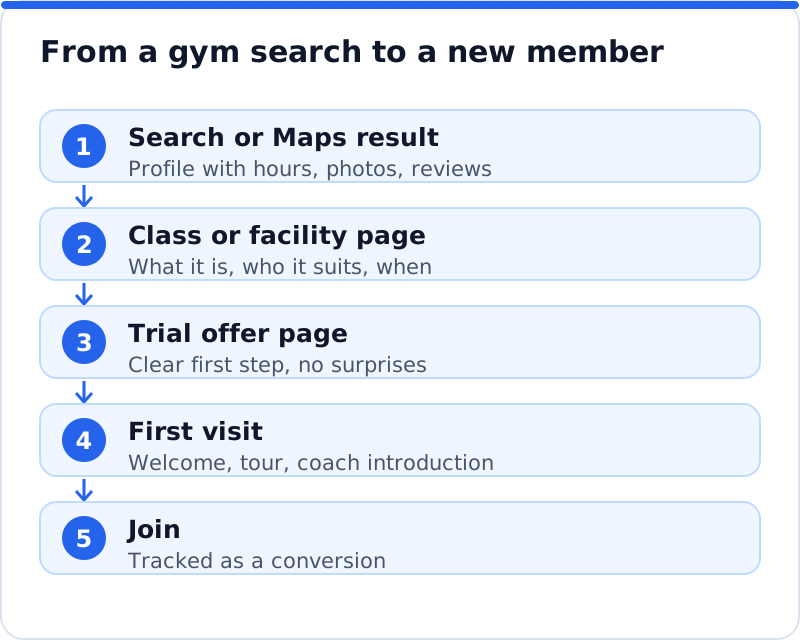
A new member usually decides to join a gym within a short walk or drive of home or work, and the search that starts that decision takes a few seconds. SEO for gyms is about being the place that search shows, with enough detail on the page that the person books a trial class instead of scrolling on. People search by class type, by facility and by convenience, for example "reformer Pilates near me", "24 hour gym with parking" or "boxing classes for beginners", and each search needs a page that answers it. That means class and timetable pages Google can read, honest membership pricing, trainer profiles, a Google Business Profile that matches your real hours and photos, steady reviews and ExerciseGym markup. It also means measuring trial bookings and joins, not just visits, so you know which pages actually fill the studio.
This article is part of our complete guide: SEO for Service Businesses.
Use AI website SEO tools to analyse your gym website and see which pages lose new members
How people search for a gym or class
Fitness searches split into a few clear kinds, and most gym websites only cover one of them. The broadest is the near me search, such as "gym near me" or "gym open now", where Google relies heavily on your profile, location and hours. More specific searches name a class or discipline: "hot yoga Amsterdam", "spin class Brooklyn", "kettlebell class Leeds" or "Olympic lifting coach Munich". Facility searches look for something particular, like a pool, a sauna, a women-only area, a crèche or parking. Then there are intent searches near the decision, such as "gym membership prices", "no contract gym" or "beginner friendly gym", where the visitor is ready to act.
Each of those kinds of search lands best on a different page. A near me search is won mostly by the profile, while a class search needs a page about that class, and a price search needs a page about prices. A gym that has only a home page and a timetable widget will rarely appear for "reformer Pilates for beginners" even if it runs that class twelve times a week. Good SEO for gyms starts by listing the classes, facilities and questions people search for in your area, then making sure each important one has a clear home on your website. That list is also a useful check on what you offer, because searches sometimes reveal demand you are not yet meeting.
Class and timetable pages Google can read
Most gyms and studios run their timetable through booking software, and the timetable is often loaded by a script or shown inside a frame from another domain. That works well for members booking a slot, but search engines may not see the class names as part of your page, and a visitor arriving from search sees a grid with no explanation. The solution is to keep the booking widget and add a written page for each main class type. Each class page should explain what happens in the session, who it suits, the level, how long it lasts, what to bring, which days and times it usually runs and who teaches it. Put the "Book this class" button near the top, linked straight to that class in your booking system.
Write class pages the way an instructor would explain the class to a nervous newcomer at the front desk. A page about indoor cycling might describe the music, the lighting, how the bike is set up for each rider and what a first session feels like. Avoid copying generic descriptions from equipment makers or franchise materials, because Google sees the same text on many websites and has no reason to prefer yours. Add a short timetable summary in plain text, such as "Tuesdays and Thursdays at 6.30am and 7pm", even if the full schedule lives in the widget. This gives a reader, and a search engine, the essential facts without depending on a script loading correctly.
| Page | Example search it serves | What it must include |
|---|---|---|
| Class page | "reformer Pilates for beginners Leeds" | What happens, level, length, times, instructor, book button |
| Facility page | "gym with sauna and pool" | Photos, opening times, access rules |
| Membership page | "gym membership prices" | Plans, prices or starting prices, contract and cancellation terms |
| Trainer page | "female personal trainer" plus the town | Qualifications, specialisms, photo, how to book |
| Trial offer page | "trial gym pass" plus the town | What is included, how to claim, what happens next |
Membership pricing that builds trust
Many gyms hide their prices and ask visitors to call or visit, which loses a large share of people who simply want to compare. Searches like "gym membership cost Glasgow" show that prospective members are already comparing, and a page with clear plans and prices is far more likely to be chosen than one that says "contact us". Show each plan, what it includes, the price or at least the starting price, any joining fee, the minimum term and how to cancel. Clear cancellation terms matter as much as the price, because fear of being trapped in a contract is one of the biggest reasons people hesitate. Consumer protection rules in the US, the UK and the EU expect subscription terms to be clear, so honest pricing pages also keep you on the right side of them.
If your prices vary by location or promotion, explain how and keep the page updated rather than letting old prices linger. Compare your plans in a simple table rather than a long paragraph, so visitors see the differences at a glance. Add a short section answering common questions, such as whether you can freeze a membership or bring a guest. A strength gym in Denver that lists its three plans, its month-to-month option and its freeze policy on one clear page gives searchers everything they need to decide. That page often becomes one of the most visited on the website, so give it a search title that includes the gym's town and the word "membership".
Trainer bios and a strong trial offer
People join gyms partly for the coaching, and trainer pages answer searches like "personal trainer for over 50s Cardiff" or "postnatal fitness coach". Give each trainer a page or a substantial profile with a real photo, their qualifications, their specialisms, the classes they teach and how to book them. Describe qualifications accurately, such as CIMSPA membership in the UK or certifications from recognised bodies such as NASM or ACE in the US, and only list what the trainer actually holds. Specialisms help both search and choice: a coach who focuses on strength training for women, rehabilitation after injury or older adults will attract people searching for exactly that. Add a short personal note in the trainer's own words, because members often choose a coach they feel comfortable with.
A trial offer gives a searcher a low-risk first step, and it deserves a page of its own rather than a pop-up. Explain what the trial includes, how to claim it, what happens on the first visit and what the person needs to bring. Describe it in plain terms, such as "your first class at no charge" or "a seven-day pass", and state clearly whether any payment details are needed. Link the trial page from your profile, your home page and each class page, because it is the main conversion for most visitors who arrive from search. A boxing gym in Dublin with a clear "first session" page, explaining that beginners are paired with a coach and gloves are provided, removes the fear that keeps many people away.
Your Google Business Profile for a gym
The profile does much of the work for near me searches, so treat it as a front desk that never closes. Choose the primary category that best describes you, such as "Gym", "Fitness center", "Yoga studio", "Pilates studio" or "Boxing gym", and add secondary categories only if they are genuinely true. If members have access around the clock but staff are only present during certain hours, set the profile hours to match access and explain the staffed hours in the description and on your website. Upload photos of the equipment, the studios, the changing rooms, classes in progress (with members' consent) and the entrance, and refresh them after any refit. Add your website link to the trial offer or home page, and use the booking link if your provider supports it.
Profile posts are useful for new classes, timetable changes and seasonal challenges, especially in January and September when interest rises. Check the questions people ask on your profile and answer them, because many will be about parking, showers or beginners. Keep your name, address and phone number identical on your website, your profile, Apple Maps, Bing Places and any fitness directories or class booking apps you use. If your gym has several branches, each needs its own profile and its own page on your website, with branch-specific hours, classes and photos. A chain that sends every profile to the same home page loses the local relevance that each branch could have earned.
Reviews, community and local links
Reviews matter for gyms because they answer the questions people are often shy to ask: is it friendly, is it clean, is it crowded, will I feel out of place? Ask every new member for a review after their first few weeks, using the same message for everyone, and never offer membership discounts or merchandise in exchange. Google's policies forbid incentives and selectively asking only happy members, and in the US the Federal Trade Commission's rule on consumer reviews bans fake and bought reviews, while in the UK fake reviews are banned under the Digital Markets, Competition and Consumers Act. Reply to reviews with specifics, thank people for mentioning coaches or classes, and handle complaints about equipment or cleanliness by explaining what has changed. Never mention a member's health, weight or personal goals in a public reply, even if they mentioned them first.
Local links come naturally from the community work many gyms already do. Sponsoring a running club, hosting a charity workout, partnering with a local physiotherapist or offering classes to a nearby employer can all lead to mentions on other local websites. Write about these events on your own website too, so there is something for others to link to. A climbing gym in Bristol that runs youth sessions with local schools might earn links from the schools, the council's activity listings and local news. These links tell Google that your gym is a real part of the area, which helps you rank across the neighbourhood rather than only next door.
ExerciseGym schema and site speed
Schema.org has an ExerciseGym type, which sits under SportsActivityLocation and LocalBusiness, and it is the natural choice for most gyms and studios. A club with spa and pool facilities may fit HealthClub, which schema.org places under both SportsActivityLocation and HealthAndBeautyBusiness. Mark up the name, address, phone number, opening hours, geographic coordinates and price range on your home page or each location page, and make sure everything matches what visitors can see. Test the code with Google's Rich Results Test and the Schema Markup Validator before you publish. If your website runs on WordPress, check whether your SEO plugin already outputs business markup, so you do not add a second, conflicting copy.
Speed matters because most gym searches happen on phones, often on the way somewhere. Large hero videos of workouts look impressive but can slow the page badly on mobile data, so compress them or replace them with a strong image on phones. Booking widgets and chat tools add more scripts, so remove any you no longer use. PageSpeed Insights shows how your pages perform and what slows them down. A page that loads quickly with a visible trial button will usually convert more visitors than a slower page that looks more polished.
Measuring SEO for gyms by sign-ups
The numbers that matter are trial bookings, tour requests, calls and joins, not rankings or page views. Set up conversions in your analytics for each of these actions, and if your booking or joining form runs on another domain, connect the two so the source of each sign-up is not lost. Add a "How did you hear about us?" question to your joining form, with Google search and Google Maps as separate options. Your Google Business Profile performance view shows calls, direction requests and website clicks, which are good signs of local search interest. Search Console then shows which searches bring people to each class and pricing page.
Before rewriting pages, it helps to see where your website stands. The AI website SEO tools check your gym's website the way Google does, give a score out of 100, show the visits within reach and join each problem to the tool that fixes it, such as a class page with no description or a timetable Google cannot read. Gyms share much with other places people visit, which is why the same groundwork that powers restaurant SEO applies here: an accurate profile, readable pages and steady reviews. The wider set of AI SEO tools for business websites also covers keywords and backlinks. A monthly re-check emails what changed, which helps around the busy January and September seasons.
Questions business owners ask
Should a boutique studio target "gym" searches?
Only if the studio genuinely offers what gym searchers want, such as open training. A Pilates or yoga studio usually does better targeting its own disciplines, because people searching "gym" often want equipment and long opening hours. Discipline searches are often less crowded and attract people who are already interested in what you teach. Use the categories and page titles that match what you actually run. A visitor who finds what they expected is far more likely to book than one who feels misled.
How often should we update class pages?
Update them whenever the class itself changes, such as a new format, level or instructor. Timetable changes can stay in the booking widget, but keep the plain text summary of times accurate. Review all class pages at least twice a year, ideally before January and September. Remove pages for classes you no longer run, or redirect them to the closest alternative so visitors do not land on a dead end. Fresh, accurate pages also make it easier for the front desk to point people to the website.
Do we need separate pages for each location?
Yes, if you have more than one branch. Each location page should have its own address, hours, phone number, photos, classes and trainers, so it can rank in its own neighbourhood. Link each page to its own Google Business Profile. Avoid copying the same text across every location page, because Google may treat them as duplicates and show only one. Specific details, such as local parking or the nearest station, make each page genuinely useful.
Putting SEO for gyms into practice this month
Start with your Google Business Profile: check the categories, hours, photos and website link, and make sure it matches what members actually experience. Then write a page for each of your three most popular classes and a clear membership page with prices and terms. Add a trial offer page and link it from the profile and every class page. Set up conversions for trial bookings and joins, and add the "How did you hear about us?" question. Once those are in place, use a website check to see which pages and signals are holding your gym back, and work through them in order.
Your website as a network: every part of its SEO checked while you watch, your score, the traffic within reach and the fix for each problem.
Check your website with AI Website SEO Tools →