Dentist Website Cost Explained for Practices Seeking New Patients
A dental practice keeps its website hosted for $119 a year, or $19 each month, with the domain on top. Covered here: how patients choose, treatment pages, new patients, emergencies, fees, nervous patients, accessibility, appointment requests, search and the budget.
- No coding required
- Live in minutes
- Blog, SEO and chatbot tools included
A dental practice keeps its website hosted for $119 a year, while practices on monthly billing pay $19 each month, and the domain comes on top. Nothing is billed by AI Web Maker while the practice drafts its site and checks each page on screen first. One new patient who stays for regular checkups covers that fee many times over, so the price is rarely the barrier for a practice. The kind of site that fee keeps online is clear from this dental clinic website example, where AI Web Maker gave an invented practice complete pages for toothache cases and nervous patients. The harder part is answering the questions people bring to a dental website, which range from a calm search for a family dentist to a frantic search during a toothache at night. Many visitors are anxious about treatment, unsure about fees or new to the area and unfamiliar with how local practices work. The sections ahead set out the pages, policies and appointment requests that convert those visitors into patients who return for years.
This article is part of our complete guide: Healthcare Website Builder.
How do patients choose a new dentist?
Patients usually choose a new dentist for one of a handful of reasons, and each reason sends them to a different part of the website. People who have moved home look for a practice close to work or school that accepts new patients. Parents want a dentist who is gentle with children and can see the whole family. Someone with sudden pain wants an emergency appointment today and searches with urgency rather than care. Others are interested in cosmetic treatment, such as whitening or straightening, and compare results and prices across several practices. Anxious patients, a large group, look for reassurance before anything else. A website that recognises these motives and routes each visitor quickly wins more appointments.
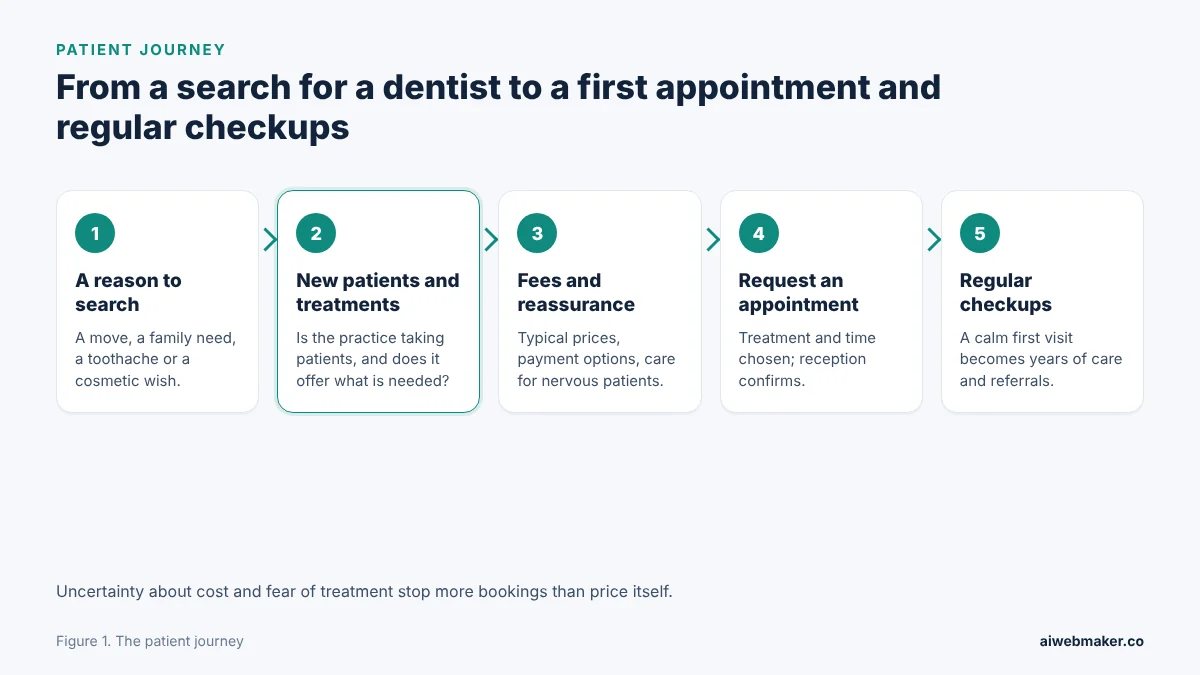
The figure traces the steps from a first search to a patient who comes back every six months. Most visitors check whether the practice accepts new patients and which treatments it offers before anything else. Fees and payment options come next, since not knowing the likely bill keeps many people away from the chair. A short request for an appointment then turns interest into a date in the diary. A calm first visit, with clear explanations and no surprises, leads to regular checkups and family referrals. Every page in the guide supports one step on this path.
Which pages does a dental practice website need?
A dental practice website needs pages that answer clinical, practical and emotional questions, because patients arrive with all three in mind. Treatment pages explain what each service involves, how long it takes and what recovery looks like. A new patient page covers registration, the first visit and what to bring. An emergency page tells people in pain exactly what to do and when the practice can see them. A fees page sets out typical costs and payment options, while a team page introduces the dentists, hygienists and reception staff. A contact page with the address, parking, step access and opening hours completes the set. The AI website builder that dental practices use for appointment requests drafts these pages once the practice describes itself in a few lines.
| Treatment | What patients want to know | What the page should state |
|---|---|---|
| Examination | How often, what happens, how long | Length, what is checked, X ray policy |
| Professional cleaning | Whether it hurts, how often | Process, comfort, recommended interval |
| Gum care | Signs of gum disease, treatment steps | Symptoms, stages of care, follow ups |
| Children's dentistry | Age to start, how nerves are handled | First visit age, approach, parent role |
| Fillings and crowns | Materials, appointments, lifespan | Options, number of visits, aftercare |
| Whitening | Methods, results, sensitivity | Options offered, realistic outcomes |
| Implants or dentures | Suitability, timeline, cost range | Assessment process, stages, starting prices |
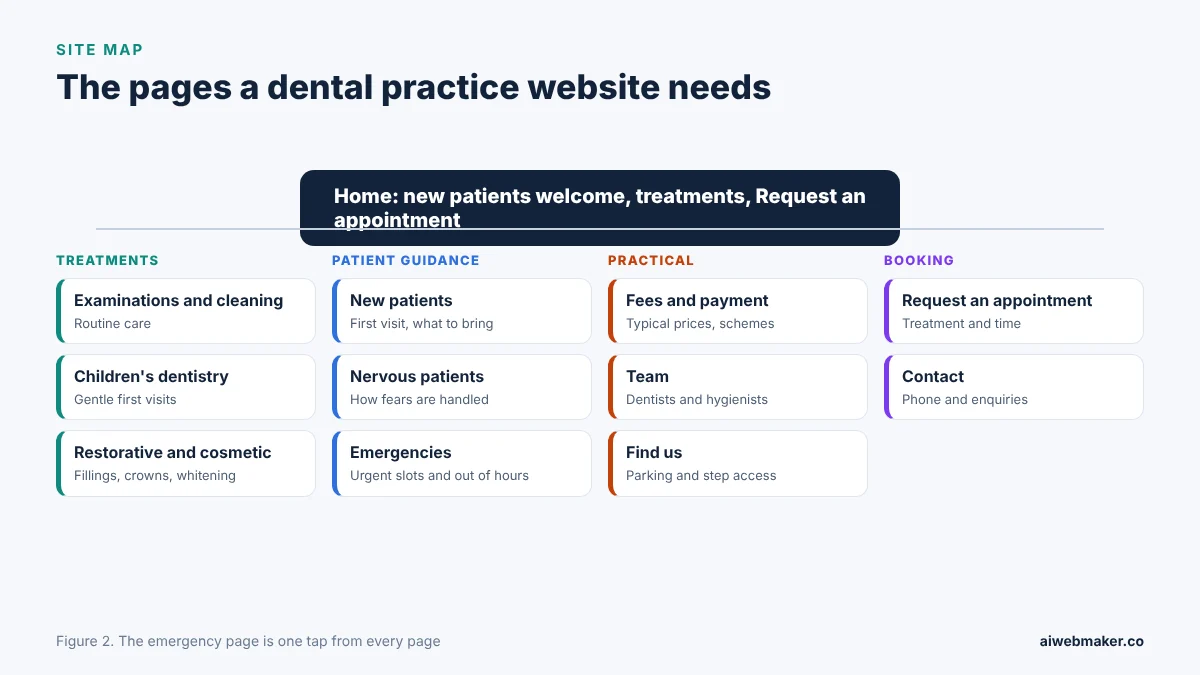
A dental site map separates treatments, patient guidance, practical information and booking, so that each type of visitor finds a short route. Treatment pages sit together and link to each other, letting someone reading about cleaning discover gum care. Patient guidance groups new patient information, nervous patient support and emergency instructions. Practical pages cover fees, insurance or payment schemes, the team and how to find the practice. Booking pages hold the appointment request and the contact route. Our sample practice, Bright Smile Dental, shows six bookable treatments, among them an examination, a professional cleaning, gum care and appointments for children, and the dentist website example with online appointment requests was generated in 44 seconds.
What should the new patient page explain?
The new patient page should explain every step from registration to the end of the first visit, because uncertainty keeps many people from booking. It can say whether the practice is currently accepting new patients and whether there is a waiting list. A simple account of the first appointment, covering the examination, any X rays and the discussion of a treatment plan, removes much of the anxiety. A list of what to bring, such as a list of medicines and details of previous dental work, saves time on the day. Medical history is better collected through the practice's secure forms or at reception than through a general website message. A clear new patient page often decides whether a nervous visitor books at all.
| Stage of a first visit | What happens | What the page should say |
|---|---|---|
| Before arriving | Registration and medical history | How forms are completed and kept private |
| Welcome | Reception and a short wait | Arrival time, parking, step access |
| Examination | Teeth, gums and mouth checked | How long it takes, whether X rays are needed |
| Discussion | Findings and options explained | Patients choose, with costs given in writing |
| Next steps | Cleaning or treatment booked | How follow up appointments are arranged |
How should a practice guide patients with a dental emergency?
A practice should guide patients with a dental emergency through a dedicated page that is reachable from every other page in one tap. The page should give the phone number for urgent appointments, the hours when emergency slots are offered and what to do outside those hours. Plain advice for common situations, such as a knocked out tooth or a broken filling, helps people act sensibly while they wait. Severe swelling that affects breathing or swallowing, or heavy bleeding that will not stop, needs urgent medical care, and the page should say so clearly. The practice should keep the advice general and invite patients to call for anything specific. A calm, clear emergency page builds lasting trust with people who arrive in distress.
| Situation | What the page should tell patients |
|---|---|
| Severe toothache | Call the practice for the next urgent slot; how pain relief questions are handled |
| Knocked out adult tooth | Call at once; keep the tooth moist, for example in milk, and bring it |
| Broken tooth or filling | Call for an appointment; avoid chewing on that side |
| Swelling with fever | Call promptly; seek urgent medical care if breathing or swallowing is affected |
| Outside opening hours | The local out of hours dental service or emergency number |
How should fees, insurance and payment options be explained?
Fees should be explained with typical prices for common treatments and a clear note that a personal treatment plan follows the examination. Showing the cost of an examination, a cleaning and a filling gives visitors a realistic sense of what to expect. If insurers, public schemes or employer plans help pay for dental care locally, a short list of what the practice accepts spares reception many calls. Payment plans for larger treatments, if the practice offers them, should be described with their terms. Patients should always know the cost before treatment starts, and the website can promise written estimates. Transparent fees remove one of the strongest reasons people delay going to the dentist.
How can the website reassure nervous patients?
The website can reassure nervous patients by naming their fears openly and describing exactly how the practice responds to them. A dedicated page can explain that patients can raise a hand to pause, that every step is explained before it happens and that longer appointments are available for those who need more time. If the practice offers sedation or other support for very anxious patients, the page should describe it accurately and explain who is suitable. Photos of a bright, calm treatment room and a friendly team help more than any slogan. Short stories from patients who overcame their fear, shared with consent and within local advertising rules, can be powerful. A practice known for gentle care often fills its diary through recommendations alone.
Why does accessibility matter for a dental website?
Accessibility matters because a dental practice serves people of every age and ability, including patients with sight loss who rely on screen readers. In the United States, the Department of Justice has published guidance on web accessibility under the Americans with Disabilities Act, and many other countries set similar expectations for services open to the public. Practical steps include readable text sizes, strong colour contrast, descriptive text for images and forms that work with a keyboard. Physical access, such as step access, an accessible toilet and parking, should be described on the contact page as well. Clear information about access helps patients plan their visit with confidence. An accessible website is simply a better website for every patient.
How do patients searching locally find a dental practice?
Patients searching locally find a practice through phrases such as dentist near me, emergency dentist, children's dentist or teeth whitening with the town name. Matching each treatment page heading to the words patients type sends specific searches to specific pages. A map listing with consistent opening hours, photos of the practice and the website address carries much of the local search traffic. Reviews that mention gentle care, short waiting times or a particular treatment strengthen the listing. Articles on everyday worries, from sensitive teeth to how often a cleaning is needed, draw readers who may register later. Practices that keep these signals current tend to appear above those that update once a year.
Which costs does the website add to a dental practice's budget?
Across a year a dental practice pays for hosting and a domain, and articles drafted with credits add only a few dollars. A practice with a settled list of patients saves by choosing yearly billing. A newly opened practice may prefer monthly payments while patient numbers grow. Adding treatments, updating fees or changing opening hours costs nothing extra. The comparison below includes the $189 tier.
| Expense | Annual billing | Monthly billing |
|---|---|---|
| Hosting the practice pages | $119 | $228 over a year |
| Domain for the practice | Set by the ending chosen | Set by the ending chosen |
| Higher plan, shown for comparison | $189 a year | Not needed |
| Twelve patient guidance articles at about $0.65 | About $7.80 | About $7.80 |
| Treatment, fee and hours updates | No charge | No charge |
| Year before the domain | About $126.80 | About $235.80 |
What sends a patient to a different practice's website?
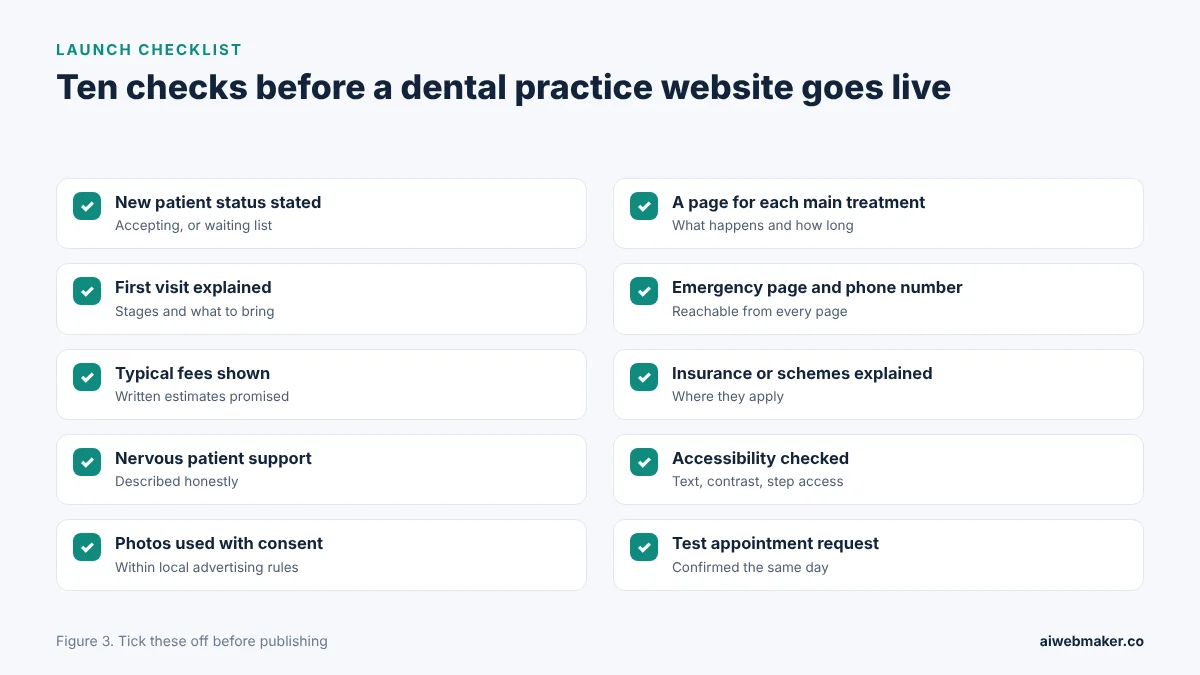
Patients often move to a different practice's website when they cannot tell whether new patients are being accepted. Missing fee guidance makes cost conscious visitors assume the worst. An emergency page that is hard to find loses people in pain, who will call the first number they see. A cold, clinical tone with no mention of nervous patients drives away a large share of visitors. Stale opening hours cause wasted calls and frustration. The checklist figure that follows guards against each of these problems.
Frequently asked questions
Do patients expect to see treatment prices online?
Most patients appreciate seeing typical prices for routine treatments, because it helps them budget before they call. Prices for complex work can be shown as starting points, with a note that a personal estimate follows the examination. Showing fees also reduces the number of price questions reception has to answer. Practices should update prices whenever they change. Clear information makes patients more comfortable about committing to treatment.
Can patients request an emergency appointment online?
Patients can send an online request for an urgent slot where the practice offers one, but the emergency page should always show the phone number prominently. Severe pain needs a quick answer, and many patients prefer to speak to someone. The practice can confirm the request, offer another time or direct the patient to an out of hours service. Clear instructions for evenings and weekends prevent distress. A visible phone number remains the most important emergency feature.
What should a new patient bring to the first visit?
A new patient should usually bring a list of current medicines, details of any medical conditions and information about previous dental work. Some practices ask for identification or insurance details, and the page should say which apply. Arriving a few minutes early allows time to complete any remaining forms. Children should bring a parent or guardian who can give consent. A short, clear list on the website makes the first visit smoother for everyone.
Can a dental practice show before and after photos?
Before and after photos can be shown in many countries, provided patients give written consent and the images are genuine and representative. Dental regulators in some countries publish advertising guidance that also covers claims and testimonials, and practices should follow the rules where they work. Photos should not be edited in ways that exaggerate results. A short note explaining that results vary keeps expectations realistic. Honest images build more trust than dramatic ones.
How many new patients pay for a year of the practice website?
A single new patient attending regular checkups is likely to bring in far more than the $119 needed to host the practice website for a year. On monthly billing, one routine examination covers the $19 with plenty to spare. Each family that registers after reading the website adds years of appointments and referrals. Treatment pages, a clear emergency route and honest fee guidance do most of the persuading. Practices that keep these pages current fill their diaries with patients who stay. A steady flow of new patient requests is the best measure of the site's value.
Build your website in Minutes and get the AI Tools that work
Start Building Your Website →