Anchor Text: How Links Describe Your Pages
The clickable words in a link are a label for the page it points to. Learn the anchor types, a natural mix for a business, the over-optimisation trap and how to check yours.
- Who links to you
- A trust score
- The competitor gap
The few clickable words in a link are a label that someone else writes for your page, and search engines read that label before they read the page itself. Those words are called anchor text, and they have helped Google understand pages since its founders described using link text to judge pages they had never crawled. For a business, anchor text works in two directions: the words other websites use when they link to you, and the words you choose when you link between your own pages. The first you can influence but should not control, while the second is entirely yours and is one of the easiest improvements on any website. Get the balance right and your links describe your business accurately, in your customers' language. You will learn the types of anchor text, what a natural mix looks like, why over-optimised anchors are risky, how to write internal links and how to check your own profile.
To see who links to your own website, try our backlink checker with a trust score, part of our AI SEO Tools.
Start with a full audit in the AI backlink checker to see the anchor text other sites use for you
What anchor text is and why Google reads it
Anchor text is the visible, clickable text of a link, the words between the opening and closing link tags in a page's code. In the sentence "book a class at our Austin yoga studio", the underlined words "Austin yoga studio" are the anchor, and they tell readers and search engines what to expect on the other side. Google's original research paper, written by Larry Page and Sergey Brin in 1998, explained that link text often describes a page more accurately than the page describes itself. That idea still holds: Google's own documentation says good anchor text is descriptive, reasonably concise and relevant to the page it points to. Anchor text is therefore a clue to what your page is about, written in someone else's words.
When the link is an image, there is no visible text, so Google uses the image's alt attribute as the anchor text. A logo that links to your home page with the alt text "Harbour Veterinary Practice, Norwich" gives a clear label, while a logo with empty alt text gives none. Google also reads the words around a link, so a plain anchor in a sentence about your services still carries some context. Anchors that are vague, such as "click here" or "read more", tell Google almost nothing and do not help people who use screen readers either. Every link you write is a small chance to describe a page well, and most websites waste many of them.
The types of anchor text
Anchors fall into a handful of types, and each one appears naturally when people link for different reasons. A journalist mentioning your business will usually use its name, a directory will often show your web address, and a blogger recommending a resource may describe it in their own words. Exact-match anchors, where the link text is precisely the search phrase you want to rank for, occur naturally only now and then, because real people rarely talk in search queries. Knowing the types helps you read your own profile and spot when something looks engineered. The table uses a furniture maker in Copenhagen as the example business.
| Type | Example anchor | Where it usually comes from |
|---|---|---|
| Branded | Nordlys Furniture | News coverage, partners, reviews, associations |
| Naked URL | nordlysfurniture.dk | Directories, citations, forum posts |
| Generic | this workshop, their website | Blog posts and casual mentions |
| Descriptive or partial match | handmade oak tables from Copenhagen | Editors and bloggers describing you |
| Exact match | oak dining tables | Rarely natural; common in bought links |
| Image (alt text) | Nordlys Furniture logo | Partner and sponsor logo walls |
Branded and naked URL anchors make up the bulk of most real businesses' profiles, because that is how people refer to a company. Descriptive anchors are valuable because they add topic information without looking forced, and they arise whenever someone explains what you do. Generic anchors are harmless and normal, even if they carry little meaning on their own. Exact-match anchors are not forbidden, and a few will appear on their own over time, but a profile dominated by them looks like the result of a campaign rather than of genuine recommendations. The healthiest profiles look varied, a little untidy and clearly written by many different people.
What a natural anchor text mix looks like
There is no correct percentage for each type, and anyone who quotes a precise target is guessing. What you can say with confidence is how natural profiles tend to look. For an established business, the name and the web address account for most anchors, descriptive phrases form a healthy minority, generic phrases appear here and there, and exact-match keyword anchors are rare. A personal injury lawyer in Miami whose links come from local news, bar associations and community sponsorships will mostly be linked with the firm's name, because that is what those sources write. If the same firm found that half its links used "Miami car accident lawyer", the pattern would say more about how the links were made than about the firm.
The best way to judge your own mix is to compare it with the websites that rank well in your field. If their anchors are mostly brand names and yours are mostly keywords, you have a problem worth looking at. If both look similar, your anchor text is probably not what holds you back. Remember that the mix grows from how you earn links, not from editing anchors one by one. A business that earns links through memberships, coverage and partnerships ends up with a natural mix without trying. A business that builds links by placing them itself tends to drift toward keyword anchors, which is exactly why the mix is worth watching.
The risk of over-optimised anchors
Anchor text was once one of the easiest signals to manipulate, and for years websites ranked by collecting large numbers of links with the same keyword phrase. Google's Penguin update in 2012 targeted that kind of webspam, and since 2016 Penguin has run as part of Google's core systems, generally devaluing spammy links rather than penalising whole sites. Google's link spam policies still name links with optimised anchor text in articles, guest posts and press releases distributed on other sites as a problem. A sudden cluster of identical keyword anchors is one of the clearest signs that links were placed rather than earned. Even when Google simply ignores them, the time and money spent on them is lost.
The practical risk for a business usually comes from well-meaning shortcuts. A kitchen fitter in Leicester might ask every supplier, directory and guest blog to link with "kitchen fitters Leicester", thinking it will help. Each request on its own seems harmless, but together they create a pattern no natural profile has. The same problem appears when an agency writes guest articles that all carry the same keyword link in the author bio. Vary the wording, prefer the business name, and let the people linking to you choose their own words wherever possible. Your rankings will benefit far more from relevant links with ordinary anchors than from a few with perfect keywords.
Internal links: the anchor text you control
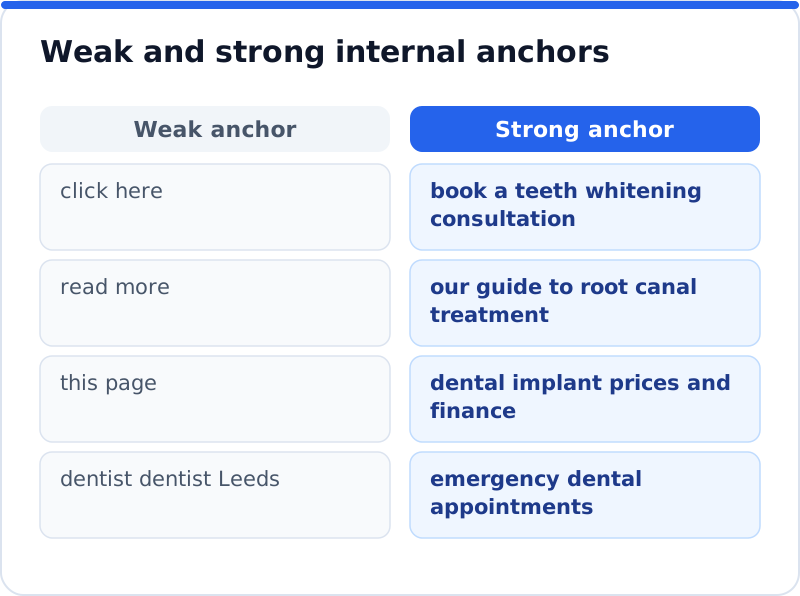
Internal links, the links between pages on your own website, are where anchor text is fully in your hands and carries no spam risk when written naturally. They help visitors find related pages, help Google discover and understand your content, and show which pages you consider important. Google's guidance is that every page you care about should have a link from at least one other page on your site. Descriptive internal anchors are one of the simplest ways to tell Google what each page covers. A language school in Valencia that links from its blog posts to "our intensive Spanish courses" rather than "click here" is giving both readers and Google a clear signal.
In WordPress, adding an internal link takes seconds. In the block editor, select the words you want to link, press the link button or Ctrl+K (Cmd+K on a Mac), type part of the page name and choose it from the suggestions. Choose anchor words that describe the destination page, keep them reasonably short and place them in a sentence that makes sense. Vary the wording across different pages, so that your service page is linked as "boiler servicing" in one post and "annual boiler checks" in another. Avoid linking the same words to different pages, because that sends mixed signals about which page covers the topic.
Asking for links without dictating anchors
When you ask another website for a link, it is natural to wonder whether to suggest the wording. The safe approach is to give the editor what they need and let them write the link. Supply your business name, the address of the most relevant page and a one-sentence description of what you do, and leave the anchor to them. Most editors will use your name or a short description, which is exactly the natural pattern you want. Asking for a specific keyword anchor, especially in exchange for anything of value, starts to look like the link schemes Google's policies describe.
There are a few situations where a gentle steer is fine. If a partner has linked your home page with a generic anchor but the content is clearly about one of your services, you can ask whether the link could point to that service page instead. If your business name has changed, asking for the new name in existing links is ordinary housekeeping. If a page links with a misleading anchor, such as an old service you no longer offer, a polite correction helps everyone. In each case you are asking for accuracy, not for keywords, and editors respond much better to that kind of request.
Checking your anchor text profile
Google Search Console shows the anchors other websites use for you in its Links report, under the external links section labelled "Top linking text". It lists the most common words used in links to your website, which gives a quick view of your profile without any other tool. Look for your business name near the top and for any unexpected phrases, such as words in another language or terms unrelated to your business, which can reveal spammy links. Search Console shows a sample rather than every link, so treat it as a guide rather than a complete record. For internal links, crawling tools and some SEO plugins list the anchors used across your own pages.
A full backlink tool adds context that Search Console lacks, such as which linking website uses which anchor and whether those links are followed. Our AI Backlink Checker's full audit lists the anchor text of the links to your website alongside a relevance judgement for each linking site, toxic links with a disavow file and history over time. Its crawler confirms each link on its page, so you are reading anchors from links that exist today. Reading anchors next to relevance matters, because a keyword anchor on a relevant trade site is very different from the same anchor on an unrelated page. For the wider picture of what makes each link valuable, see our guide to backlink quality, and for checks on the website itself, the AI SEO tools for business websites cover titles, content and structure.
Questions business owners ask
Should I ask for my main keyword as the anchor?
Usually not, and there is a good reason. Letting the person linking choose their own words produces the natural pattern that Google expects, and their wording is often closer to how customers speak. If you ask for anything, ask for a link to the most relevant page and offer your business name and a short description. A keyword anchor now and then is normal, but a pattern of them is a warning sign. The relevance of the linking site and its page will do more for you than the exact words in the link.
Do anchors on nofollow links matter?
They matter less for rankings, because Google treats nofollow, sponsored and ugc as hints and usually gives such links little or no ranking weight. They still matter to the people who read and click them, since a clear anchor earns more visits than a vague one. They also form part of how your business is described across the web. If a nofollow link from a busy directory uses your name or a good description, it is doing its job. There is no need to chase changes to anchors on nofollow links.
Can my internal links use my main keyword as the anchor?
Yes, within reason, because internal links are yours to write and a descriptive anchor is exactly what they need. Linking a blog post to your service page with "emergency boiler repairs" tells readers and Google what that page offers. The problem starts when every link on every page uses the same phrase, which reads badly and adds nothing after the first few times. Vary the wording naturally, use the phrase where it fits the sentence and make sure each anchor points to the one page that best covers it. Write for the reader first, and the keyword will appear often enough on its own.
Writing links that describe your business well
Open Search Console's Links report this week and read your top linking text, noting how much of it is your business name and whether anything looks out of place. Then go through your five most important pages in WordPress and improve the internal links that point to them, replacing vague anchors with short, descriptive ones. When you next ask a website for a link, give the editor your name, the right page and a one-line description, and let them choose the words. Check your anchors again in three months and watch for any pattern that looks more like a campaign than a set of recommendations. Start with the internal links on your home page today, because they are the anchors you can improve in the next ten minutes.
Every site that links to yours, its authority and relevance, the trust your backlinks earn and the links your competitors have.
Check your backlinks with the AI Backlink Checker →