SEO for Photographers: Turning a Portfolio Into Bookings
How photographers turn a beautiful portfolio into a website that ranks for genre and location searches and brings in enquiries with real dates.
- Any website
- Visits within reach
- Each problem joined to its fix
A portfolio can be stunning and still invisible, because search engines cannot judge a photograph the way a client does. SEO for photographers is the work of giving Google the words, structure and speed it needs to understand what you shoot, where you shoot it and who it is for. Clients search by genre and place, such as "wedding photographer Cotswolds", "newborn photographer Seattle" or "headshots for actors London", and they rarely scroll past the first few results. Winning those searches takes genre and location pages, images that are named, described and compressed, posts about real shoots and venues, links from directories and partners, a Google Business Profile set up for how you work, and reviews from past clients. Each part supports the others, and together they turn a gallery into a steady flow of enquiries.
This article is part of our complete guide: SEO for Service Businesses.
Run AI website SEO tools on your photography website and see what hides your work from Google
How clients search for a photographer
Photography searches almost always combine a genre with a place. Couples search "wedding photographer" plus a city, region or venue; parents search "family photographer" or "newborn photographer" plus their town; businesses search "product photographer", "headshot photographer" or "corporate event photographer" plus their city. Many add a style, such as "documentary wedding photographer" or "natural light newborn photographer". Some search for a venue's name with "photographer", hoping to see work from the place they have booked. Each of these patterns points to a page you can build.
The difference between genres matters more than many photographers expect. A wedding client is planning a year or more ahead and reads widely, while a business needing headshots this week wants a fast answer and a clear price. A photographer who shoots both should treat them as separate offers with separate pages, rather than one portfolio that tries to serve everyone. Good SEO for photographers starts with deciding which two or three genres you most want to be booked for, and in which areas. Those decisions shape every page, title and post that follows.
Genre and location pages that rank
Each main genre deserves its own page, written for the client who searches for it. A wedding page should explain your style, how the day works with you, what is included, how many images clients receive and when, and a starting price or package guide. A headshot page should cover session length, locations, retouching, turnaround time and price, because business clients compare quickly. Show a curated set of your best images for that genre, not your whole archive, and put an enquiry button near the top and the bottom. Name the page in the words people search, such as "Documentary Wedding Photographer in the Cotswolds" rather than "Weddings".
Location pages work when they are genuinely different from each other. If you shoot weddings across several counties or cities, a page for each main area can rank for searches there, but only if each one shows real work from that area, the venues you know and practical details such as travel. Copying the same text with a different place name swapped in is a poor experience and rarely ranks for long. A family photographer in Seattle who writes about favourite shoot locations in each neighbourhood, with photos taken there, gives each page a real reason to exist. Start with the areas where you most want work, and add more only when you have real material for them.
| Page | Example search | What it must include |
|---|---|---|
| Genre page | "documentary wedding photographer" | Style, process, what is included, starting price, enquiry button |
| Location page | "family photographer Seattle" | Real local work, favourite locations, travel details |
| Venue post | Venue name plus "photographer" | A real shoot at the venue, with the couple's permission |
| Business page | "headshot photographer London" | Session length, turnaround, pricing guide, booking |
| About page | The photographer's name | Your story, approach, a recent photo of you |
Image SEO for a portfolio
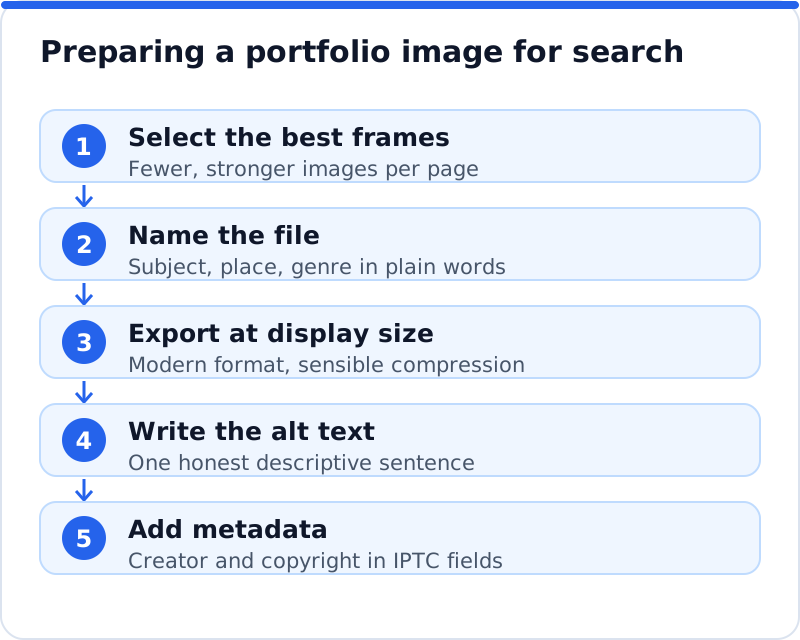
Images are the heart of a photography website, and they need words before search engines can understand them. Give each image a descriptive file name before you upload it, such as "bride-and-groom-at-barnsley-house-cotswolds.jpg" instead of "IMG_4821.jpg". Write alt text that describes what is in the picture in a short, natural sentence, such as "Couple laughing under an oak tree after their ceremony at Barnsley House". Alt text exists first for people using screen readers, so describe the scene honestly rather than stuffing in keywords. Add captions where they help, especially on venue posts, because captions are visible text that search engines and readers both use.
Compression is just as important, because full-resolution photos can be many megabytes each. Export images at the size they will actually be displayed, use modern formats such as WebP or AVIF where your website supports them, and compress them until the quality loss is not visible. WordPress creates smaller copies of each image for different screen sizes and scales very large uploads down automatically, but it is still better to export sensibly sized files to begin with. Avoid lazy loading the first large image on a page, because it delays the moment the page appears complete, while lazy loading images further down helps. Google Images can also show creator and copyright details from your images' embedded IPTC metadata, so fill in those fields in your editing software before exporting.
Blog posts about real shoots and venues
Posts about real shoots are one of the most effective tools a photographer has, because they match how clients search. A couple who has booked a venue often searches its name with "photographer" or "wedding photos", hoping to see what their day could look like. A post about a wedding at that venue, with a thoughtful selection of images, notes about the light, the best photo spots and the timeline that worked, answers that search directly. Ask the couple's permission before publishing, and credit the other suppliers involved, such as the florist and the venue. A wedding photographer in Tuscany who writes about each villa she works at will build a library of pages that couples planning at those villas find.
Keep each post focused, with a selection of the strongest images rather than every frame from the day. Write a few paragraphs of real substance, because a gallery with no text gives search engines little to work with. Give the post a clear title with the venue and the type of shoot, such as "Winter Wedding at Ashridge House". The same idea works for other genres: a food photographer in Barcelona might write about a restaurant shoot, and a commercial photographer might write about a product launch, both with the client's permission. Over time, these posts build a body of work that ranks for many specific searches.
Directories, venues and partner links
Links from other relevant websites tell Google that your business is real and respected. For wedding photographers, wedding directories such as The Knot and WeddingWire in the US, or Hitched and Bridebook in the UK, can bring both visibility and links, and recommended supplier lists from venues are especially valuable. Professional associations, such as the Professional Photographers of America or the British Institute of Professional Photography, often have member directories. Featured weddings on wedding blogs, credits from other suppliers and local press can all add links too. Check each directory's terms and what a listing includes before signing up, and choose quality over quantity.
Partnerships with other businesses often bring the most useful links. Florists, planners, venues, makeup artists and dress shops frequently share photos with credit, and asking for a link in that credit is reasonable. For family and business photographers, partners might include nurseries, coworking spaces, local business groups or marketing agencies. Share your images with partners generously, with credit agreed in advance. A headshot photographer in London who works with a coworking space might earn a link from its members' page and steady referrals as well.
Your Google Business Profile for a photographer
A Google Business Profile helps photographers appear in local results, even without a studio. If clients visit you at a studio, show the address; if you travel to clients and do not receive them at your address, set up the profile as a service area business and hide the address, as Google's guidelines require. Choose the most accurate primary category, such as "Wedding photographer", "Photographer" or "Portrait studio", and add secondary categories only where they are true. Upload a good range of your work, a photo of yourself and, if you have one, your studio. Add a description that names your genres and areas in plain language.
Use profile posts for new work, seasonal sessions and availability, which keeps the profile active. Answer questions people ask, such as travel fees or how long editing takes. Keep your business name, phone number and website consistent across your profile, your website, directories and social media. A wedding photographer working across several counties should set the service area to match where they actually work. For a home-based photographer, this keeps the profile within Google's rules while still appearing in local results.
Reviews from past clients
Reviews matter for photographers because clients are trusting you with moments they cannot repeat. Ask every client for a review shortly after they receive their images, when their reaction is strongest, using the same message for everyone. Google's policies forbid offering anything in return for reviews and selectively asking only happy clients, and in the US the Federal Trade Commission's rule on consumer reviews bans fake and bought reviews, while in the UK fake reviews are banned under the Digital Markets, Competition and Consumers Act. Reviews on wedding directories carry weight with couples too, so make it easy for clients to leave one wherever they prefer. Reply to each review personally, mentioning something specific about the shoot.
Reviews also feed your website. With permission, quote short testimonials on your genre and location pages, close to the images from that client's shoot. Real words from past clients about how you made them feel at ease are often more persuasive than anything you write about yourself. Keep testimonials current, because a page full of quotes from years ago suggests the business has slowed. A newborn photographer in Edinburgh whose reviews mention patience and calm gives anxious parents exactly the reassurance they need.
Schema and site speed for photographers
Schema.org has no dedicated type for photographers, so LocalBusiness is the usual choice, with your name, address or service area, phone number, opening hours and geographic coordinates. ProfessionalService also exists on schema.org, but its own page says the general type was deprecated because it was confused with Service and points to LocalBusiness instead. You can also mark up images with ImageObject, including properties such as creator, copyrightNotice and creditText, which help search engines connect images with you. Test the markup with Google's Rich Results Test and the Schema Markup Validator. Make sure everything you mark up matches what visitors can see on the page.
Speed is a particular challenge for photographers, because large images slow pages down. Use PageSpeed Insights to see which pages load slowly and why, and pay attention to the largest image on each page. Many portfolio themes and gallery plugins add heavy scripts and sliders, so choose them carefully and remove any you do not use. Keep the number of images on each page reasonable, and link to full galleries rather than loading hundreds of images at once. A fast page with fewer, stronger images will usually win more enquiries than a slow page with every frame.
Measuring SEO for photographers by enquiries
Enquiries with real dates are what matter, not page views or rankings. Set up conversions in your analytics for enquiry form submissions, calls and email clicks, and ask on the form how the client found you, with Google search, Google Maps and directories as separate options. Your Google Business Profile performance view shows calls, website clicks and direction requests. Search Console shows which searches bring people to each page, including venue and location searches. Track which enquiries become bookings, so you know which pages bring the clients you want.
Before rewriting pages, see where your website stands. The AI website SEO tools check your photography website the way Google does, give a score out of 100, show the visits within reach and join each problem to the tool that fixes it, such as images missing alt text or slow pages. Photographers share much with other local businesses, so the same groundwork that powers restaurant SEO, from a complete profile to steady reviews, applies here too. The wider AI SEO tools for business websites also cover keywords and backlinks. A monthly re-check emails what changed, which helps you see whether new venue posts are being found.
Questions business owners ask
Should I focus on one genre or several?
Focus on the two or three genres you most want to be booked for, because each needs its own pages and work. Spreading across many genres makes it harder to rank for any of them. Clients also tend to trust specialists, especially for weddings and newborns. You can still mention other work, but give your main genres the most attention. As your business grows, you can add new genre pages when you have strong work to show.
Does Instagram replace a website?
Instagram can be valuable for showing work and building a following, but it does not replace a website for search. Google search results lead to websites far more than to social posts, and clients searching "wedding photographer" plus a place usually land on websites and directories. A website also lets you control how your work is presented, add enquiry forms and explain your packages. Use Instagram to support your website, not as a substitute for it. Link your profile to your website so followers can find your packages easily.
How many images should a gallery page show?
Show enough to demonstrate your style and range, usually between fifteen and forty strong images per page. Too many images slow the page and dilute the impact of your best work. Choose images that tell a story and show variety, such as wide scenes, details and people. Link to full galleries for clients who want to see more. A curated page loads faster and leaves a stronger impression.
Your next month of photography SEO
Start by choosing your main genres and areas, then write or improve one page for each with curated images, clear details and an enquiry button. Rename, compress and add alt text to the images on those pages. Write one post about a recent shoot at a venue or location, with permission. Check your Google Business Profile and ask your last five clients for reviews. Once those are in place, run a website check to see which pages and signals are still hiding your work from Google, and work through them in order.
Your website as a network: every part of its SEO checked while you watch, your score, the traffic within reach and the fix for each problem.
Check your website with AI Website SEO Tools →