SEO for Landscapers: Showing Your Work to the Right Gardens
How a landscaping business uses seasonal searches, project galleries and separate design and maintenance pages to win better garden work all year.
- Any website
- Visits within reach
- Each problem joined to its fix

A finished garden sells itself the moment someone stands in it, but online it has to be seen in photos and found in search before anyone ever visits. SEO for landscapers is the work of putting your best gardens in front of the people searching for one like it, at the time of year they start planning. Landscaping has two very different customers: the homeowner commissioning a new patio, planting scheme or full redesign, and the household or property manager who wants the lawns and hedges kept tidy every fortnight. They search in different words, in different seasons, and they judge you on different proof. You will learn how seasons shape searches, why design and maintenance need separate pages, how to build galleries that rank, and how to cover the towns where your best clients live. You will also see how to use portfolio profiles, Google Business Profile photos and reviews, which schema to use when schema.org has no landscaping type, and how to measure enquiries.
This article is part of our complete guide: SEO for Service Businesses.
Put your landscaping website through AI website SEO tools and see which projects are hidden
How seasons shape landscaping searches
Landscaping searches rise and fall with the weather far more than most trades. In late winter and early spring, people search for garden designers, new patios, turf, fencing and planting plans, because they want the work finished before summer. In summer, searches turn towards lawn care, hedge cutting, irrigation and garden tidy-ups before a party or a sale. Autumn brings leaf clearance, planting bulbs and trees, and in many places drainage problems, while winter is quieter apart from hard landscaping planning and, in colder parts of the USA, snow removal. Google Trends shows the relative interest in a search over time and by region, so you can see when "patio installation" peaks in your area and publish or refresh pages a month before. The broad foundations of home services SEO apply all year, but landscapers who plan content around the seasons arrive in search results just as demand begins.
| Season | What people search | What to update on your website |
|---|---|---|
| Late winter | garden designer, landscape design ideas | Design page, new project write-ups |
| Spring | patio installation, new turf, fencing | Hard landscaping and lawn pages |
| Summer | hedge cutting, lawn care, irrigation | Maintenance and watering pages |
| Autumn | leaf clearance, tree planting, drainage | Seasonal clear-up and drainage pages |
| Early winter | garden lighting, planning for spring | Lighting page, booking calendar note |
Design work and maintenance need separate pages
The biggest structural mistake on landscaping websites is a single page that tries to sell both design and maintenance. A design and build client is planning a project worth thousands, wants to see your style, your process and finished gardens, and will compare two or three firms carefully. A maintenance client wants reliability, a clear schedule, a fair price and someone who turns up when promised. Writing for both on one page confuses Google about what the page offers and makes each reader wade through content meant for the other. Give design its own section of the website, with pages for the design process, hard landscaping, planting and any speciality such as small urban gardens or family gardens. Give maintenance its own pages too, covering regular visits, lawn care, hedge and shrub care and seasonal clear-ups, each with its own search title and description.
Each design page should walk through your process in plain steps: the first visit, the survey, the design drawings, the quote, the build and the aftercare. Explain how long each stage usually takes and what the client is expected to decide, such as materials, plants and budget. A landscaper in Surrey who explains how a sloping garden becomes three usable terraces, with photos of a real job, will rank for searches about sloping gardens that a list of services never touches. Use the words customers use, such as "garden makeover" and "low maintenance garden", alongside the trade terms. Mention the materials you work with, such as porcelain paving, natural stone, composite decking and gravel, because those names are searched too. Close each page with a clear way to book the first visit.
Service pages that match real searches
Beyond design and maintenance, most landscapers sell a set of services that people search for by name. Patios and paving, decking, fencing, turf and lawns, artificial grass, retaining walls, garden lighting, drainage and, in drier parts of the USA, irrigation and drought-tolerant planting are all common. Each one deserves a page if you do it regularly, with photos from your own jobs, the options you offer, what affects the price and how long the work takes. A garden company in Galway might write about drainage for heavy, wet ground, while a design studio in Portland, Oregon, might focus on native planting and rain gardens, because those reflect what local homeowners actually face. These local details are what make a page useful and rankable, rather than a copy of every other landscaping website. Link each service page to related projects and to the design or maintenance section it belongs to.
Project galleries with before and after
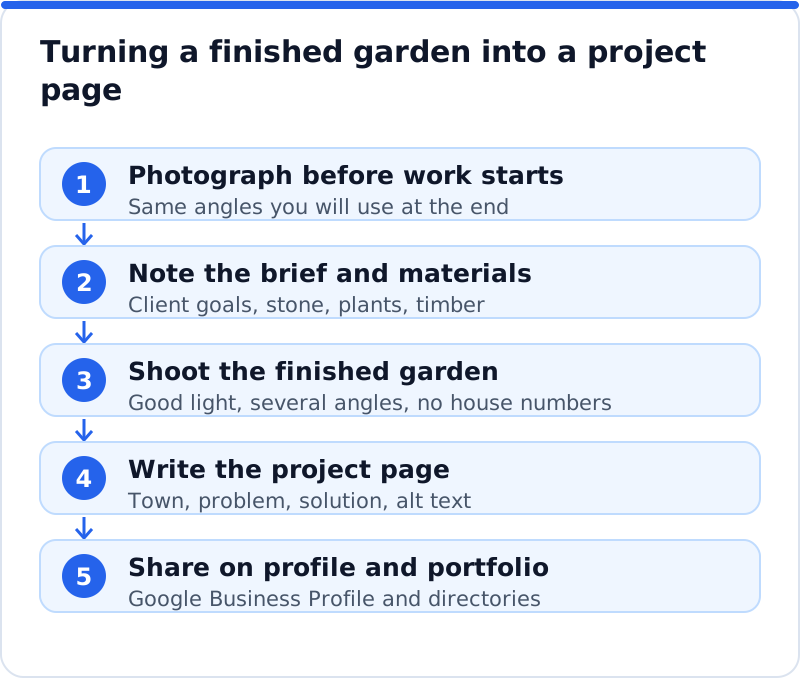
Photos are the core of SEO for landscapers, because people buy gardens with their eyes. The trick is to publish projects as pages, not as a single gallery of unlabelled images. Each project page should name the town or district, describe the starting point, explain what the client wanted and show what you built, with before, during and after photos taken from the same angles. Write two or three paragraphs, mention the materials and plants, and add descriptive alt text to every image, such as "sandstone patio and raised oak beds in a terraced garden in Harrogate". Ask clients for written permission before publishing photos of their garden, and avoid shots that show house numbers or anything that identifies the household. Over a season, a set of well-described project pages becomes the evidence that wins searches in each town you serve.
Towns and garden types you cover
Landscapers usually serve a ring of towns around their yard, and a page for each main town helps you appear in searches like "landscaper in" followed by the place. A town page earns its rank when it shows real work there, mentions the soil, the typical garden sizes or the housing styles, and links to local project pages. A page that only swaps the town name is thin and rarely holds a position. You can also build pages around garden types, such as courtyard gardens, family gardens with play space or large country gardens, which often match how clients describe their own plot. A maintenance firm in Hamburg might write separate pages for apartment building grounds and private gardens, because the clients and contracts differ. Start with the towns and garden types that bring your most profitable jobs, and add more as you gather projects to show.
Portfolio profiles and directories
Landscaping is one of the trades where portfolio platforms matter as much as classic directories. Houzz and similar home design platforms let you publish projects, collect reviews and appear when homeowners browse ideas, and many design-led clients start their search there before they ever reach Google. Treat these profiles as an extension of your website: use the same project names, the same photos and the same business details, and link back to your own project pages. In the USA, Angi, Thumbtack, Yelp and Nextdoor are common sources of landscaping leads, and membership of the National Association of Landscape Professionals is a recognised trust signal. In the UK, membership of the British Association of Landscape Industries or the Association of Professional Landscapers can be shown on your website and in your profiles, alongside Checkatrade, Trustpilot and similar review platforms. Choose the few your clients use, keep them current, and make sure every listing matches your Google Business Profile exactly.
Google Business Profile photos and reviews
Your Google Business Profile is where many local clients first see your work, so feed it with photos all year. Choose the primary category that best describes your main work, such as "Landscaper", and add secondary categories like "Landscape designer" or "Lawn care service" only if you really offer them. Use "Landscape architect" only if you hold that qualification, because the title is regulated in many places, including licensing in US states. If clients do not visit your yard, set up the profile as a service area business, hide the address and list the towns you cover. Upload photos of finished projects, work in progress, your team and your vehicles at least monthly, since a profile with fresh images of real gardens looks active and trustworthy. Use posts to share seasonal offers, such as spring design slots or autumn clear-up bookings, with a link to the matching page.
Reviews matter greatly for landscapers, because clients are letting a team into their garden for days or weeks. Ask for a review when the project is handed over, while the client is enjoying the result, and send a direct link so it takes a minute. Encourage clients to mention the work in their own words, such as "new porcelain patio and lighting", because detailed reviews help trust and search. Do not offer incentives and do not ask only the clients you expect to be happy, as Google's policies forbid both, and consumer protection rules in the USA and the UK treat fake or bought reviews seriously. Reply to every review with thanks and a mention of the project, and answer complaints calmly with an offer to put things right. A landscaper in Raleigh with steady, specific reviews through every season will outrank a rival with more stars but fewer words.
Schema for a landscaping business
Schema.org does not have a dedicated landscaping type, so you choose the closest accurate one. HomeAndConstructionBusiness, which schema.org describes as a local business providing services around homes and buildings, fits most landscapers well, and LocalBusiness is a safe general choice. Add it to your home page with your business name, phone number, website, logo, opening hours, the areas you serve and links to your main profiles. Describe your main offers with the Service type, using its serviceType property for "Landscaping", "Garden design" or "Lawn care", and link each service to your business as its provider. Keep everything in the markup consistent with what visitors see, and test it with Google's Rich Results Test or the Schema Markup Validator. Check what your SEO plugin already outputs before adding another block, so the business is not described twice.
Pages for maintenance contracts
Maintenance contracts are the steady income that carries a landscaping business through quiet months, and they deserve a dedicated page. Explain what a contract includes, how often you visit, what happens in each season, how you handle extra work and how billing works. Offer clear tiers if you can, such as fortnightly lawn and hedge care or monthly full garden care, and say what each covers rather than hiding everything behind a form. If you serve commercial clients, such as offices, apartment blocks or business parks, give them a separate page that covers insurance, risk assessments, reporting and out-of-hours work. A firm in Bath that lists its contract options clearly will attract more serious enquiries than one that writes "maintenance available, please call". Link the contract page from every design project, because clients who have invested in a new garden are often the best maintenance customers.
Measuring enquiries and booked work
The measure of SEO for landscapers is booked consultations and signed contracts, not rankings on their own. Track calls and form submissions from the website and your Google Business Profile, and mark forms as key events in Google Analytics 4 so you can see which pages lead to enquiries. Search Console shows which searches bring impressions and clicks, and comparing seasons year on year tells you whether your spring pages are earning more than last spring. Ask every new client how they found you and record it, because portfolio platforms and word of mouth often play a part that analytics cannot see. Separate design enquiries from maintenance enquiries in your notes, since the two have very different values. When a page brings visits but few enquiries, improve its photos, its process explanation and its call to action before writing anything new.
A full check of the website makes these decisions quicker. Our AI website SEO tools read your website the way Google does, give it a score out of 100 and list the problems on each of up to 12 pages, such as project images with no alt text or design and maintenance pages chasing the same keyword. They show the keyword each main page should win and the visits a month you get now compared with the visits within reach. Each problem is joined to the tool that fixes it, with steps and code to paste, or applied by the plugin on WordPress, and a monthly re-check emails what changed. The wider AI SEO tools for business websites add keyword research, backlinks and fixes in one account.
Questions business owners ask
Should I publish prices for landscaping work?
For maintenance, clear prices or starting prices work well, because clients compare like with like. For design and build, explain the factors that drive cost, such as size, access, materials and groundwork, and give realistic ranges only if they hold for most jobs. Pages that discuss cost honestly rank for the many searches that include "cost" or "price". They also filter out enquiries that would never fit your work. Review any figures you publish every season so they stay accurate.
How many project pages do I need?
Start with six to ten good project pages that cover your main services and towns, rather than dozens of thin ones. Add a new project whenever you finish a job you are proud of and have permission to show. Quality matters more than quantity, because each page needs photos, a clear story and useful detail. Over a year that steady habit builds a portfolio that covers most of what clients search for. Older projects can stay online as long as they still represent your work well.
Is a blog useful for a landscaper?
A blog helps when it answers questions clients ask, such as when to lay turf, which paving suits a shady garden or how to prepare a garden for winter. Each article should link to the service that solves the problem, so readers can move from advice to booking. Seasonal articles published a few weeks before demand rises tend to perform best. Two useful articles a season are worth more than weekly posts written to fill space. Project pages often do the job of a blog better, so choose the format that suits your time.
Planning your landscaping SEO season
Begin with the season ahead: check Google Trends for your main services and note when interest rises in your region. Split design and maintenance into separate sections if they share a page, and give each its own titles and descriptions. Publish three project pages from recent work, each naming the town and materials, and add the same photos to your Google Business Profile and portfolio profiles. Add business schema to the home page using the closest accurate type, test it and set up tracking for calls and forms. Then ask recent clients for detailed reviews, and use next month's enquiry numbers to decide which service or town page to build next.
Your website as a network: every part of its SEO checked while you watch, your score, the traffic within reach and the fix for each problem.
Check your website with AI Website SEO Tools →