Restaurant SEO: Filling Tables From Google Searches
A practical guide to restaurant SEO, from the profile diners see on Google Maps to a readable menu, review habits, schema and measuring bookings.
- Any website
- Visits within reach
- Each problem joined to its fix
Most tables are now chosen on a phone, a few streets from the door, within a minute of someone feeling hungry. Restaurant SEO is the work of making sure your restaurant is one of the handful of places that phone shows, with a menu, photos and opening hours that make the choice easy. It is less about clever writing and more about accurate, complete information in the places Google reads: your Google Business Profile, your website and the review and booking sites diners trust. You will learn how diners search, what to fill in on your profile, why a PDF-only menu holds you back, how to handle reviews, which schema.org types describe a restaurant and how to count the bookings searches bring in. The same habits carry over to hotels, gyms, salons and other places people visit, so the groundwork here pays off well beyond the dining room.
This article is part of our complete guide: SEO for Service Businesses.
Check your restaurant website with AI website SEO tools and see which pages lose diners
How diners search for a restaurant
Restaurant searches fall into a few clear patterns, and each one needs something different from you. The most common is the near me search, such as "pizza near me" or "brunch open now", where Google leans heavily on distance, opening hours and your Google Business Profile. Next come cuisine and place searches, such as "Sichuan restaurant Manchester" or "tapas in the Marais", where your website and your profile both count. Then there are occasion searches, for example "birthday dinner private room Chicago" or "Sunday roast for large groups", which reward pages written for that occasion. Finally there are dish and need searches, like "best ramen Dublin" or "vegan tasting menu", which only work when Google can read your actual dishes. A good restaurant SEO plan covers all four.
It helps to know that the map results, often called the local pack, are where most of these decisions are made. Google says local results are based mainly on relevance, distance and prominence, and you can only influence two of those. Relevance comes from your categories, your menu, your website text and what reviewers write about you. Prominence comes from reviews, mentions, links and how well known you are offline. Distance is fixed, so the other two deserve care: a well described place further away can still beat a closer one with a half empty profile.
Your Google Business Profile comes first
For most restaurants, the Google Business Profile does more selling than the website, because it is what people see on Maps before they ever visit a page. Choose the primary category that describes you most precisely, such as "Italian restaurant" rather than just "Restaurant", and add secondary categories only where they are true, like "Wine bar" or "Brunch restaurant". Fill in your regular hours and your special hours for holidays and closures, because a diner who arrives to a locked door rarely forgives it. Add your menu or a link to your menu page, set the attributes that apply (outdoor seating, wheelchair access, takeaway), and connect a booking link if you use a supported provider. Every field you leave empty is a question a diner has to answer by going somewhere else.
Photos deserve their own routine. Diners judge food and atmosphere from pictures, so upload clear photos of real dishes, the dining room at service, the entrance and the team. Replace seasonal photos when the menu changes, so a summer terrace shot is not still the first thing people see in January. Posts on the profile are useful for events, new menus and holiday bookings, and they show visitors that the place is active. A family trattoria in Boston that adds new dish photos each month looks far more alive than a rival whose last photo is three years old.
A menu Google can actually read
Many restaurant websites still offer the menu only as a PDF or as a photo of the printed card, and that is one of the most common reasons good restaurants miss dish searches. Google can read many PDFs, but a PDF is slow on a phone, awkward to zoom and often out of date. A photo of a menu is worse, because the words in the image are not text on the page at all. The fix is simple: put the menu on an ordinary web page as real text, with section headings for starters, mains and desserts, each dish named, described in a line and priced. When a bistro in Lyon lists "quenelles de brochet" in plain text, it has a chance of appearing for that dish, while the same dish locked inside an image has none.
| Menu format | What Google can read | What diners experience | Verdict |
|---|---|---|---|
| Photo of the printed menu | Almost nothing | Pinching and zooming on a phone | Replace it |
| PDF download | Often the text, as a separate file | Slow to open, easy to go out of date | Keep only as a print option |
| Booking platform menu only | Text on someone else's website | Fine, but your site gains nothing | Mirror it on your own page |
| HTML menu page with dishes and prices | Every dish, section and price | Fast, readable, easy to share | The one to link everywhere |
Write dish descriptions the way a server would describe them at the table, in plain words with the ingredients people search for. Mark dietary options clearly with words, such as "vegan", "vegetarian" or "suitable for coeliacs", rather than only with small symbols, because symbols mean nothing to a search engine. If the menu changes daily, keep a stable menu page and update the dishes on it, so the address that collects links and visits never changes. Make sure allergen information is easy to find and accurate, and follow the allergen labelling rules that apply where you trade, since a menu page is also a public promise. Give the page a search title with the cuisine and the place, not just "Menu".
The pages a restaurant website needs
A restaurant website does not need dozens of pages, but it does need the right ones, each answering a clear search. The home page should state the cuisine, the neighbourhood and what makes the place worth choosing, with the booking button visible on a phone without scrolling. The menu page, covered above, carries the dish and diet searches. A booking page, or a clear booking section, should explain group sizes, deposits and how to reach someone for parties that cannot book online. A location page with the full address, a map, parking or transport notes and accessibility details helps both diners and Google confirm where you are.
Beyond the basics, pages for occasions are where many restaurants find extra searches. A private dining page with room sizes, set menus, photos and an enquiry form can win searches like "private dining room Edinburgh", which are worth far more than a single cover. An events page for tasting nights, live music or holiday menus gives you something new to publish and a reason for local websites to link to you. Groups with several sites need one page per location, each with its own address, hours, phone number and photos. A steakhouse group in Texas with three sites should treat each location page as a small home page of its own, because each one competes in a different neighbourhood.
Reviews on Google, TripAdvisor and booking sites
Reviews shape both ranking and choice, and restaurants collect more of them than most businesses. Google reviews feed directly into your profile, while TripAdvisor, Yelp in the US and the review sections of booking platforms such as OpenTable or TheFork carry weight with diners researching a meal. Ask in ways that fit service: a card with the bill, a line in the booking confirmation or a message the day after. Ask every guest in the same way rather than only the ones who seemed happy, because Google's policies forbid selectively asking satisfied customers and offering anything in return for a review. The law has moved in the same direction: the US Federal Trade Commission's rule on consumer reviews bans fake and bought reviews, and in the UK the Digital Markets, Competition and Consumers Act made fake reviews a banned practice from April 2025.
Replies matter almost as much as the reviews themselves. Thank people by name when they leave praise, and mention something specific, such as the dish or the occasion, because a reply that could fit any review reads as automatic. When a review is critical, reply calmly, acknowledge the problem, explain what you have changed and offer a way to talk directly, without arguing about details in public. Future diners read those replies to judge how you treat people when something goes wrong, and a measured response often reassures them more than another five stars. Watch the words that appear across your reviews too, since phrases like "best carbonara" or "great for kids" tell you what people value and what to emphasise on your pages.
Listings, booking platforms and local links
Your name, address and phone number should read the same everywhere, from your website footer to Google, Apple Maps, Bing Places, TripAdvisor, Yelp, booking platforms and delivery apps. Inconsistent details, such as an old phone number on a delivery app, confuse diners and weaken Google's confidence in your listing. Booking platforms like OpenTable, Resy and TheFork are valuable sources of covers, but they also rank in search for your own name, so make sure your website still appears as the obvious place to book directly. In the UK, your food hygiene rating is public on the Food Standards Agency website, and many diners look it up, so a strong rating is worth displaying. Local guides, food writers, newspapers and tourist boards provide the links that show Google you are part of the area.
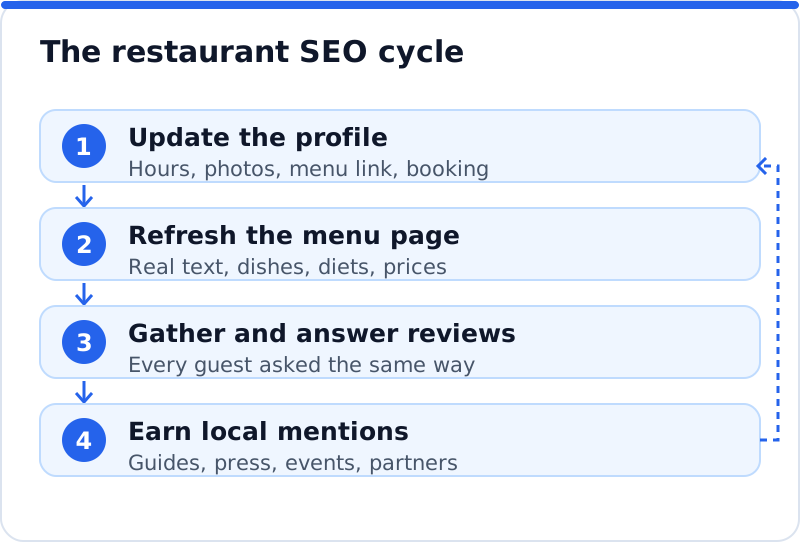
The figure below shows the order that works for most restaurants, starting with the information diners see first and ending with the signals that build over months. Treat it as a cycle rather than a one-off project, because menus, hours and photos change every season. A bakery café in Copenhagen might refresh its profile each spring, gather reviews from summer visitors and earn a mention in a winter pastry guide. Chasing links first rarely works, because a mention in a guide sends people to a profile that must already convince them. Accurate details are the foundation every later step stands on.
Schema markup for restaurants
Structured data describes your restaurant in a format search engines read without guessing. Schema.org has a Restaurant type, which sits under FoodEstablishment and LocalBusiness, alongside related types such as BarOrPub, CafeOrCoffeeShop and Bakery. On your home page or location page, mark up the name, address, phone number, opening hours, price range and geographic coordinates, and add the properties that are specific to food, such as servesCuisine, acceptsReservations and hasMenu pointing to your menu page. Schema.org also has Menu, MenuSection and MenuItem types if you want to describe the menu itself in detail. Use the most specific type that fits, and make sure every value matches what visitors can see on the page.
Markup does not guarantee any special display in results, and Google is clear that it decides when to use structured data. It does, however, remove ambiguity about who you are, where you are and what you serve, which is exactly what local search depends on. Test your code with Google's Rich Results Test, which shows whether the page's structured data can be read and whether it is eligible for any rich results, and with the Schema Markup Validator for general schema.org errors. If your website runs on WordPress, your SEO plugin may already output basic business markup, so check the page before adding a second copy. Multi-site groups should mark up each location page with that location's own details, never the head office address on every page.
Measuring restaurant SEO by bookings
Rankings are a means, and the real measure of restaurant SEO is covers, orders and enquiries. In your Google Business Profile, the performance view shows how many people called, asked for directions, clicked through to your website and, where a booking link is connected, made bookings. Add tracking tags to the website link on your profile, so analytics can separate profile visits from other search visits. On the website, record a conversion each time someone completes a booking, taps the phone number or submits a private dining enquiry, and if your booking widget runs on another domain, set up cross-domain tracking so the booking is not lost. Search Console then shows which searches brought people to your pages, where you find searches worth a page of their own.
| What to measure | Where to find it | What it tells you |
|---|---|---|
| Calls, direction requests, website clicks | Google Business Profile performance | How well the profile converts searchers |
| Bookings and enquiry forms | Analytics conversions or booking system reports | Which pages and sources fill tables |
| Searches and clicks to each page | Search Console Performance report | Which dishes and occasions you rank for |
| Review count and recent rating | Google, TripAdvisor and booking platforms | Whether trust is growing month to month |
A website check is a quick way to see where the gaps are before you start. The AI website SEO tools for restaurant websites read your pages the way Google does, give a score out of 100, show the visits within reach and join each problem to the tool that fixes it, so a menu locked in an image or a location page without hours stands out at once. On WordPress the plugin can apply the fixes, and on Wix, Squarespace or other builders they come with steps and code to paste. For a wider view of the same approach across other kinds of business, the AI SEO tools for business websites cover keywords, backlinks and content too. A monthly re-check emails you what changed, which is handy around menu changes and seasonal openings.
Questions business owners ask
Do I need a website if my Google profile is complete?
A complete profile brings in many searches, but it does not replace a website. The profile has limited space, so private dining details, event pages, allergen information and the stories behind dishes have nowhere to live. Google also uses your website to confirm and expand what it knows about you, which helps your profile rank for more searches. Platforms can change their terms, while your own website stays under your control. A modest, fast website with a proper menu page is enough for most restaurants.
Should I put prices on the online menu?
Yes, in almost every case, because diners use prices to decide before they book. A menu without prices makes people guess, and many will simply choose somewhere that tells them. Prices also help set expectations, which reduces disappointed reviews about cost after the meal. If prices change often, update the page when the printed menu changes, and set a price range on your profile that matches. Tasting menus can show the menu price and the wine pairing price without listing every course.
How long does restaurant SEO take to show results?
Profile changes, such as correct hours, a better primary category and new photos, can affect what people see within days or weeks. Changes to the website, such as a new menu page or a private dining page, usually take a few weeks to be crawled and to settle in results. Reviews and local links build more slowly, and their effect grows over months rather than days. City centre restaurants face more competition, so progress there takes steadier effort. Measuring bookings each month gives you a clear picture long before the rankings stop moving.
Your first week of restaurant SEO
Start by opening your Google Business Profile and checking every field: the primary category, regular and holiday hours, menu link, booking link, attributes and at least ten current photos. Next, turn your menu into a real web page with headings, dish names, short descriptions, dietary labels and prices, and point the profile, social accounts and booking platforms to it. Then pick one way of asking every guest for a review and reply to every review from the past month. Add Restaurant markup to the home or location page and test it before you publish. Once those basics are in place, check your restaurant website to see which page or signal is holding you back most, and work on that next.
Your website as a network: every part of its SEO checked while you watch, your score, the traffic within reach and the fix for each problem.
Check your website with AI Website SEO Tools →