HVAC SEO: Heating and Cooling Searches Through the Seasons
How heating and cooling companies plan their website and Google profile around the seasons, so the pages are ready and ranking before the first cold snap or heatwave.
- Any website
- Visits within reach
- Each problem joined to its fix

The first cold night of autumn and the first heatwave of summer send thousands of people to Google at once, all asking why their furnace, boiler or air conditioner has stopped. HVAC SEO is the work of making sure your company is ready for those surges before they arrive, not scrambling to catch up once the phones of better-prepared competitors are already ringing. Heating and cooling has a rhythm most trades do not: demand swings with the weather, buying decisions involve large sums and finance, and much of the steady income comes from maintenance plans sold in the quiet months. That rhythm should shape which pages you build, when you publish them and how you measure success. You will see how searches shift through the year, how far ahead to publish, which service, brand, maintenance and financing pages earn their place, how to set up your Google Business Profile and HVACBusiness schema, and how to read your results season by season.
This article is part of our complete guide: SEO for Service Businesses.
Get AI website SEO tools to analyse your HVAC website before the next busy season
HVAC SEO follows the weather
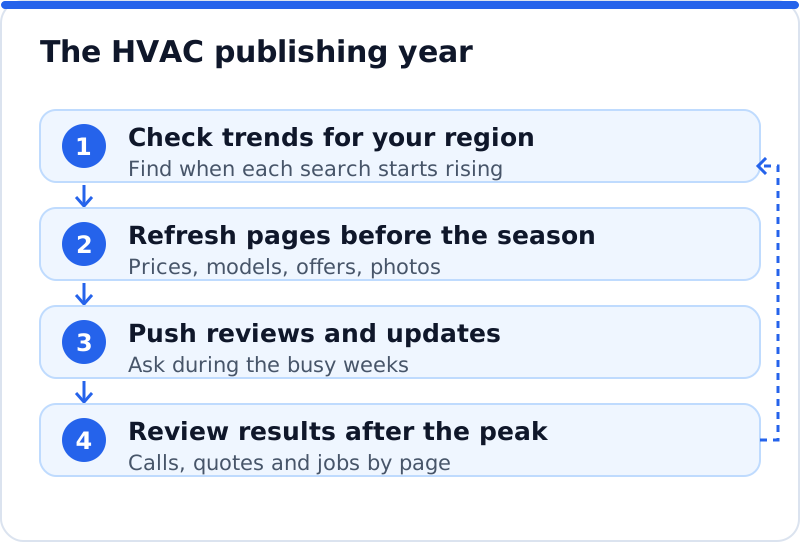
Heating and cooling searches rise and fall with the temperature, and the pattern is easy to see in Google Trends for any phrase you care about. In most of the USA, searches for furnace repair, heat pump problems and "no heat" climb through late autumn and peak in the coldest weeks, while AC repair and "air conditioner not cooling" surge with the first hot spell. In the UK and much of northern Europe, boiler repair and servicing dominate the colder months, and interest in air conditioning and heat pumps grows in spring and during summer heat. Spring and autumn are quieter for breakdowns, but they are when people search for servicing, tune-ups and replacements they have been putting off. A heating and cooling company in Minneapolis and an air conditioning firm in Seville live with very different calendars, so check the trend for your own region rather than assuming. Once you know your calendar, every page and every review request can be timed to it.
| Season | What people search for | Pages to have ready | When to update them |
|---|---|---|---|
| Late summer and autumn | Furnace or boiler service, heating tune-up | Heating maintenance and servicing pages | Mid to late summer |
| Winter | No heat, furnace repair, boiler breakdown | Emergency heating page, heating repair page | Early autumn |
| Spring | AC tune-up, heat pump installation, replacements | Cooling maintenance, installation and financing pages | Late winter |
| Summer | AC repair, air conditioner not cooling | Emergency cooling page, AC repair page | Mid spring |
Publishing ahead of the season
A new or rewritten page rarely ranks the day it goes live. Google has to find it, crawl it, judge it and see how people respond, which can take weeks or longer for a competitive search. That means a page about AC repair written in the middle of a heatwave usually arrives after most of the demand has passed. The practical rule is to publish or refresh each seasonal page a couple of months before its season begins, then request indexing for it in Search Console's URL Inspection tool. Update the seasonal details each year, such as the dates of your maintenance offer or the models you now install, so the page stays accurate. Use the quiet months for this work, when your engineers are less stretched and you have time to take photos and gather reviews.
Service pages and brand pages
Each main service deserves its own page: furnace or boiler repair, heating installation, AC repair, AC installation, heat pumps, ductwork, indoor air quality and, if you offer them, commercial services. A page should describe the symptoms people notice, what you check, typical causes, what affects the price and how quickly you can attend, with photos of your own engineers at work. Credentials belong on these pages too: in the USA, technicians handling refrigerants need EPA Section 608 certification, while in the UK and EU work on air conditioning and heat pumps involves F-gas certification, and gas boiler work in the UK requires Gas Safe registration. For heat pumps in England and Wales, installers usually need MCS certification for their customers to claim the Boiler Upgrade Scheme grant, which is worth stating clearly if you hold it. An HVAC firm in Sacramento might separate "AC repair" from "AC installation", because the person with a broken unit in July and the person comparing new systems in March want different information.
Many customers search by brand, such as "Carrier furnace repair", "Daikin heat pump installer" or "Worcester Bosch boiler service". A page for each brand you genuinely service or install can catch those searches, especially if it covers common faults with that brand's units, parts availability and the models you fit. Be careful with wording: say you service or install a brand, and only claim dealer or accredited installer status if the manufacturer has actually granted it. Use the brand's name accurately and do not copy its logos or product descriptions without permission. Keep brand pages genuinely different from each other, with your own photos and notes on real jobs, rather than one template with the name swapped. Link each brand page to the matching service pages, so visitors who arrive through a brand search can find the repair or installation they need.
Maintenance plan pages
Maintenance plans smooth out the seasonal swings, and a strong page for them is one of the most valuable on an HVAC website. Explain exactly what is included, how many visits a year, when they happen, whether members get priority booking or reduced repair rates, and how to cancel. Many manufacturer warranties expect regular servicing, so point customers to their warranty terms and explain how a plan keeps the paperwork in order. Show what a service visit involves with photos and a short checklist, because people value what they can picture. Publish or refresh the page before the spring and autumn tune-up seasons, when people are most open to booking. Ask plan members for reviews after their visits, since a review mentioning "our annual service" reassures the next person considering a plan.
Emergency heating and cooling
A broken furnace in January or a dead air conditioner in a heatwave is urgent, and for elderly people or babies it can be dangerous. Emergency searchers want a phone number they can tap, an honest statement of when you answer and how fast you arrive, and a sign you cover their area. Put the number at the top of every page as a tap-to-call link, and give the emergency page simple first steps, such as checking the thermostat, the breaker or fuse and the filter, before calling. If you offer a 24 hour service, show it consistently on the website and in your profile hours; if you do not, say exactly when you answer. Explain how out-of-hours charges work in plain terms, so nobody is surprised by the bill. A clear, calm emergency page often brings in customers who later sign up for a maintenance plan.
Financing and rebate pages
A new heating or cooling system is a large purchase, and many buyers search for finance and incentives before they search for an installer. A financing page should explain the options you offer, who provides the finance, how to apply and what happens next, in plain language. Advertising credit is regulated: in the USA, the Truth in Lending Act and Regulation Z require further disclosures when an advert states certain terms such as a monthly payment, and in the UK, arranging consumer credit is a regulated activity that generally needs FCA authorisation, with rules on how finance is promoted. Check with your finance provider, which usually supplies approved wording, rather than writing your own figures. Rebates and grants change often, so summarise them carefully, date the summary and tell customers to confirm current terms with the official programme. A heat pump installer in Norwich, for example, would explain how the grant reaches the customer and what paperwork it needs from both sides.
Towns covered and your Google Business Profile
Most HVAC companies visit customers rather than receive them, so Google's guidelines ask you to hide your address and list service areas, up to 20 of them, within a realistic distance of your base. Choose the primary category that matches your main work most precisely, such as an HVAC, heating or air conditioning contractor category, and add secondary categories only for services you genuinely provide. Fill in the services list, keep hours accurate through holidays, and post seasonal Updates such as reminders to book a furnace service before winter. Upload photos of your vans, engineers and installed systems regularly, because a profile with recent images looks active. On the website, write a page for each main town you serve, describing the jobs you do there, the typical housing and systems, and reviews from local customers. An HVAC company in Atlanta might note that many older homes in Decatur still run original ductwork, which gives a town page real local substance.
Reviews that sell the next system
Reviews carry great weight in HVAC because jobs are expensive and customers let engineers into their homes. Ask every customer for a review shortly after the job, by text or email with a direct link, and suggest they mention the system and the problem, such as "replaced our 20-year-old furnace in two days". Time your requests to the season too, so that fresh reviews about heating appear as heating searches rise. Reply to every review with thanks and a detail about the job, keep customer addresses and private details out of replies, and answer complaints calmly with facts. Google's policies prohibit paying or rewarding customers for reviews and asking only happy customers, and fake reviews are banned by law in the USA and the UK. Steady, specific reviews from real jobs are what a new customer reads when choosing between two companies at the same price.
HVACBusiness schema on the home page
Schema.org has a dedicated type, HVACBusiness, under HomeAndConstructionBusiness and LocalBusiness, and it is the right choice for most heating and cooling companies. Add it to the home page with your trading name, phone number, website, logo, opening hours and the areaServed property naming the towns or counties you cover. Include your street address only if it is shown publicly, since a service area business can leave it out. Keep every detail identical to your Google Business Profile, because mismatched phone numbers or hours undermine the point of the markup. Most SEO plugins let you set the business type in their settings, and you can test the result with Google's Rich Results Test or the Schema Markup Validator. Schema does not lift weak pages, but it states clearly what you are and where you work.
Measuring HVAC SEO across the year
Because demand swings so much, compare each month with the same month last year, not with the month before. A drop in calls from July to October may be completely normal, while a drop from last October to this October is worth investigating. Track calls, quote requests, maintenance plan sign-ups and booked installs in a simple monthly sheet, alongside calls and website clicks from your Google Business Profile and key events in Google Analytics. In Search Console, filter by page to see whether each seasonal page started appearing before its peak, which tells you whether you published early enough. For the groundwork shared by every trade, such as service area profiles, directories and town pages, the guide to home services SEO covers the basics this article assumes.
Knowing which page to fix before the next season is the hard part, and that is where our tools help. The AI Website SEO Tools read up to 12 of your pages the way Google does, give the website a score out of 100 and show the visits a month you get now and the visits within reach. They list each page's problems, suggest the keyword each main page should win, and join every problem to the tool that fixes it, with steps and code to paste, or applied by the plugin on WordPress. A monthly re-check emails you what changed, which suits a business that needs to see progress before each season rather than after it. It works on WordPress, Wix, Squarespace, Shopify or any other platform. The wider set of AI SEO tools for business websites covers keywords, backlinks and content too.
Questions business owners ask
Should I take seasonal pages down when the season ends?
No, keep them live all year and update them before each season. A page that stays published builds history, links and reviews over time, and it is ready to rank the moment demand returns. Taking it down and putting it back resets much of that progress. Instead, change the offer or the call to action in the quiet months, for example from "book an emergency repair" to "book your pre-winter service". The page keeps its place while its message follows the calendar.
Do I need separate pages for heating and cooling?
Yes, because people search for them separately and with different worries. Someone with no heat in January wants speed and reassurance, while someone thinking about air conditioning in March wants options, efficiency and cost. One combined page tends to rank weakly for both, and it forces each visitor to read about a problem they do not have. Separate pages also let you time updates, reviews and offers to each season. Link them together so anyone who needs both can find the other easily.
Are blog posts worth it for an HVAC company?
They are, if they answer real questions people search before calling, such as why a heat pump is blowing cold air, how often a boiler needs servicing or what size air conditioner a room needs. Posts like these bring visitors early, build trust and give you something to share on your profile each season. Publish them ahead of the season they relate to, just like your service pages. Link each post to the matching service page, so a reader who decides to act can book. A few practical, well-illustrated posts a season are worth more than many short ones.
Your HVAC SEO calendar for the next quarter
Look up the search trend for your main heating and cooling phrases in your region and mark when each one starts to rise. Pick the season that comes next and refresh its service, emergency and maintenance pages now, with current prices explained, new photos and your certifications. Check that your Google Business Profile categories, service areas and hours are right, add HVACBusiness schema to the home page if it is missing, and make sure financing wording comes from your provider. Plan your review requests so fresh reviews appear as the season starts. Then compare each month with the same month last year, and decide which page to prepare next while the current season is still running.
Your website as a network: every part of its SEO checked while you watch, your score, the traffic within reach and the fix for each problem.
Check your website with AI Website SEO Tools →