Home Services SEO: Winning the Jobs People Search For
How trades and home service companies get found on Google for urgent call-outs and planned projects, from a service area profile to pages, reviews and call tracking.
- Any website
- Visits within reach
- Each problem joined to its fix

A burst pipe, a dead boiler or a roof leaking into the bedroom turns a homeowner into a searcher within minutes, and the business Google shows first usually gets the call. Home services SEO is the work of making sure that business is yours, both for the panicked search at night and for the planned kitchen refit someone researches for weeks. Trades win work differently from shops or restaurants: you travel to the customer, you rarely have a showroom, and one job can be worth more than a month of website visits. That changes how your Google Business Profile is set up, which pages your website needs, how you collect reviews and what you measure. Below you will see how urgent and planned searches differ, how to run a service area profile, how to build service and town pages that rank without copying, which directories matter in the USA and the UK, and how to count the calls and quotes that pay the bills.
This article is part of our complete guide: SEO for Service Businesses.
Urgent searches and planned searches
Almost every search for a trade falls into one of two groups, and each needs a different answer from your website. Urgent searches are short and blunt, such as "emergency electrician near me", "locksmith open now" or "boiler not working", and they are usually typed on a phone by someone who will call the first business that looks trustworthy and available. Planned searches are longer and calmer, such as "loft conversion cost Bristol" or "best roofing material for snow", and the person behind them compares several companies over days or weeks. An urgent searcher wants a phone number, proof that you cover their street and a sign that someone will answer right now. A planned searcher wants photos, prices explained, reviews from similar jobs and a simple way to request a quote. A website that treats both people the same tends to fail both.
| Search typed | Kind of search | What the searcher needs first | Page that should answer it |
|---|---|---|---|
| emergency plumber near me | Urgent | A phone number and proof you cover the area | Emergency service page with a call button |
| garage door repair open now | Urgent | Opening hours and how fast you arrive | Service page plus accurate profile hours |
| new boiler cost Manchester | Planned | Price ranges and what changes the price | Installation page with a pricing guide |
| patio installers Austin | Planned | Photos of local jobs and reviews | Service page with a project gallery |
| handyman Clontarf | Either | Proof you work in that suburb | Town or area page with local jobs |
Google Business Profile for a service area business
Most trades are service area businesses in Google's terms: they visit customers instead of receiving them at a shop. Google's guidelines say that if customers do not come to your address, you should hide it on your profile and list the areas you serve instead, which you do in the business information section by clearing the address from public view and adding service areas. Google lets you add up to 20 service areas, such as towns, postcodes or ZIP codes, and advises that the whole area should not stretch much beyond about two hours' drive from your base. A roofing company in Denver that also works from a yard where customers collect materials would be a hybrid business, showing its address and its service areas together. Hiding the address does not stop you ranking, but your base location still influences where you appear, so be realistic about how far you travel.
The rest of the profile deserves as much care as the address. Choose the primary category that describes your main trade most precisely, then add secondary categories only for work you genuinely do, because categories strongly shape which searches you appear for. Fill in the services list with plain names and short descriptions, set opening hours that match reality, and add special hours for bank holidays so nobody calls into silence. Write the description in normal sentences, not a list of keywords. Add photos regularly, including your van, your team and finished work, and use the Updates feature for seasonal offers or a new service.
One page per service and per main town
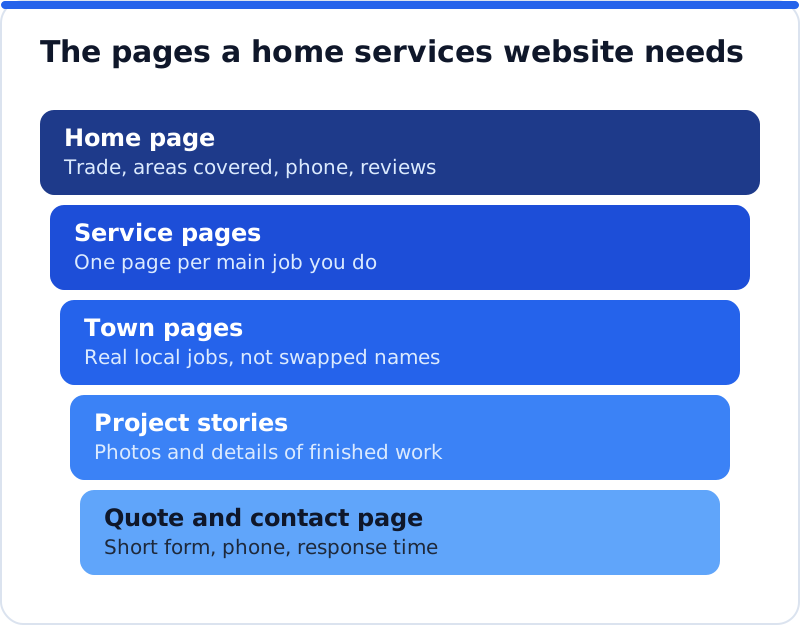
A single "Services" page listing everything you do gives Google one weak page to rank for dozens of different searches. A home services website works best with one page for each main service, such as drain unblocking, rewiring, boiler installation or roof repairs, each written for the person who needs that exact job. Each service page should explain the problem it solves, how the job is done, what affects the price, roughly how long it takes, what guarantees or certifications apply and how to book. It should carry photos of that type of job and a few reviews that mention it. A landscaping company in Austin, for example, might have separate pages for irrigation repair, sod installation and drought-tolerant garden design, because the people searching for each have different worries.
Town pages are where many trades go wrong. A page for each main town you serve can work very well, but only if it is genuinely about that town: the jobs you have done there, the local housing stock, typical problems, how quickly you arrive and reviews from customers nearby. An electrician in Bristol could explain that many Victorian terraces in Bishopston still have old wiring and show three rewires completed there, which no competitor could copy. Pages that are identical except for the town name are a pattern Google treats as doorway pages, which its spam policies warn against, and they rarely rank for long. Start with the five or six towns that bring in the most work, write each page properly, and add more only when you have real jobs and photos to show. Link each town page to the matching service pages, so visitors and Google can move between them easily.
Photos of real jobs
Stock photos of smiling models in clean overalls do nothing for a trade website, and homeowners spot them immediately. Real photos of your own work build trust faster than any sentence, because they prove you exist, that you work locally and that you take care. Take before and after pictures on every job, with the customer's permission and without showing house numbers or anything that identifies their home. Give each image a clear file name and alt text that describes the job, such as "replacement slate roof on a terraced house in Harrogate", since that helps both visually impaired visitors and image search. Add the best ones to the matching service page, the relevant town page and your Google Business Profile, where fresh photos keep the listing looking active.
Reviews that win the next job
Reviews matter more for trades than for most businesses, because letting a stranger into your home is a real act of trust. The best moment to ask is right after a job goes well, while the customer is still pleased, and the easiest way is a short text or email with a direct link to your Google review form. Ask customers to mention what you did and where, because a review that says "fixed our leaking shower in Didsbury the same afternoon" helps the next searcher far more than "great service". Reply to every review, thanking people by first name and adding a detail about the job, and answer negative reviews calmly with facts and an offer to put things right. Never reveal a customer's address or private details in a reply, even when a review is unfair. A slow, steady flow of reviews looks far more natural than a sudden burst after a campaign.
The rules around reviews are strict and worth knowing. Google's policies prohibit offering discounts or gifts in exchange for reviews, writing reviews for yourself, and asking only happy customers while steering unhappy ones elsewhere, which is often called review gating. In the USA, the Federal Trade Commission has a rule against fake reviews and buying positive ones, and in the UK the Digital Markets, Competition and Consumers Act 2024 brought in a ban on fake reviews and on hiding negative ones. Breaking them can mean removed reviews, profile warnings or legal trouble. Ask every customer, make it easy, and let the overall picture speak for itself.
Directories, citations and Local Services Ads
Trade directories still bring in work directly and help Google confirm that your business is real. In the USA, the familiar names include Angi, HomeAdvisor, Yelp, Thumbtack, Houzz for design and building work, Nextdoor for neighbourhood recommendations and the Better Business Bureau. In the UK, Checkatrade, MyBuilder, Rated People, Which? Trusted Traders and Trustpilot are widely used, and several of them vet members or check reviews against real jobs. Some charge for leads, some for membership and some are open listings, so read their terms first. Wherever you list, make your business name, phone number and service details match your website and Google profile exactly, since inconsistent details create doubt. Show your registrations too, such as a Gas Safe Register number for gas work in the UK or a state contractor licence number in the USA, because customers can look them up.
Google Local Services Ads deserve a brief mention, because in many US areas and some other countries they appear above both the map results and the normal results for trade searches. They are a paid format where you are charged per lead rather than per click, and businesses must pass Google's screening, which can include licence, insurance and background checks, before they show with a badge. They can bring calls quickly, but they sit alongside SEO rather than replacing it, because the people who scroll past the ads still compare profiles, reviews and websites. Treat them as a separate decision with its own budget. Either way, keep your organic work going, since ads stop the day the budget does.
Schema for home services SEO
Structured data tells search engines in a fixed vocabulary what your business is, where it works and how to contact it. Schema.org has a type called HomeAndConstructionBusiness, with more specific types beneath it including Plumber, Electrician, HVACBusiness, RoofingContractor, Locksmith, HousePainter, GeneralContractor and MovingCompany. Use the most specific type that fits, add your name, phone number, website, logo, opening hours and the areaServed property listing the towns or regions you cover, and include your address only if it is public. The markup usually lives on the home page and should match your Google profile exactly. You can check it with Google's Rich Results Test or the Schema Markup Validator, both of which show errors and the properties they found. Schema will not make a weak page rank, but it removes doubt about who you are.
Measuring calls and quote requests
Rankings are only a means to an end for a trade, and the end is booked jobs. Your Google Business Profile shows calls, direction requests and website clicks from the profile, which tells you how much work comes from the map results. On the website, set up Google Analytics so that form submissions and taps on the phone number are recorded as key events. Search Console shows which searches bring people to each page and how often they click, so you can see whether a new town page is starting to appear. Many trades also use call tracking numbers to see which pages or campaigns produce calls, and a common approach is to put the tracking number in the profile's primary phone field with your main number as an additional phone, so your listings stay consistent. Ask every new customer how they found you, then bring it all together monthly in a simple sheet of calls, quote requests and booked jobs by service and town, so you can see which work your searches actually bring.
Mistakes that keep trades off the map
The same mistakes appear on trade websites again and again. One is a phone number shown only as an image, or hidden in the footer, which frustrates urgent searchers on phones and cannot be tapped to call. Another is a profile that shows a home address when the owner meant to hide it, or a fake office address used to appear in a town where the business has no base, which breaks Google's guidelines and can get a profile suspended. Many sites list twenty services in one paragraph and give none of them a page. Others promise "24/7 service" on the website while the profile shows the office closing at five, which confuses customers and search engines alike. Each of these is easy to fix once you see it, which is why a proper check of the website comes first.
How AI Website SEO Tools help
Doing all of this by hand is possible, but finding where to start is the hard part. Our AI Website SEO Tools read your website the way Google does, give it a score out of 100 and show the visits a month you get now and the visits within reach. The check covers six areas, from being found by Google and your Google listing to page structure, content, sharing and rich results, and keywords and traffic, and it reads up to 12 of your pages and lists each page's problems. It also suggests the keyword each main page should win. Every problem is joined to the tool that fixes it, with steps and code to paste, and on WordPress the plugin can apply the approved fixes for you. You can check your trade website's SEO and see which service pages lose the most visits, then re-check each month and get an email showing what changed.
Questions business owners ask
Do I need a separate website for each town I cover?
No, and in most cases separate websites make things harder. One strong website with a page for each main town builds authority in one place, collects all your reviews and links together, and is far easier to keep up to date. Separate websites split that strength and often end up with thin, copied content that ranks for nothing. If you have genuinely separate branches with their own staff and premises, each branch can have its own Google Business Profile and its own page on the main website. That keeps every review and link working for one brand.
How long does home services SEO take to bring in calls?
It depends on your competition, your starting point and how much work you put in. A well set up Google Business Profile with steady reviews can start bringing calls within weeks, especially in smaller towns. New service and town pages usually take a few months to settle in the results, because Google needs to crawl them and see how people respond. A plumber in a large city competing with established firms should expect a longer climb than a carpenter in a market town. Measure monthly and judge the trend over a season, not a single week.
Should I pay for leads from directories instead?
Paid leads and SEO do different jobs, and many trades use both. Leads from directories arrive quickly but stop the moment you stop paying, and the same lead is sometimes sent to several companies at once. SEO takes longer to build but keeps working, and the calls it brings come straight to you from people who chose your business. A sensible approach is to use paid leads to fill the diary while your website and profile grow, then reduce them as organic calls increase. Track the cost and value of jobs from each source so the decision is based on your own numbers.
Your first month of home services SEO
Start with the profile: hide your address if customers do not visit you, set realistic service areas, check your categories and hours, and add ten real job photos. Next, list your main services and make sure each one has its own page with clear prices explained, photos and a call button at the top. Write proper pages for your three busiest towns using real local jobs, and ask every customer from this month for a review that mentions the work and the area. Set up call and form tracking so you know where enquiries come from, and start your monthly sheet. When you want a clear list of what to fix first across the whole site, run it through the AI SEO tools for business websites and work through the problems in the order they cost you jobs.
Your website as a network: every part of its SEO checked while you watch, your score, the traffic within reach and the fix for each problem.
Check your website with AI Website SEO Tools →