Pricing a Smart Home Installer Website and Explaining Automation
Automation installers spend $119 a year hosting their site, or $19 in months on monthly billing, plus a domain. This guide covers how to describe smart lighting, heating, security, audio and networks in plain words, packages, compatibility, the survey to handover process, privacy, support plans and the yearly budget.
- No coding required
- Live in minutes
- Blog, SEO and chatbot tools included
Automation installers spend $119 a year hosting their lighting and security pages, or $19 in months when an installer chooses monthly billing, and add a domain alongside. Building and previewing the installer's AI Web Maker site carry no charge at all. The bill is small; the communication challenge is not. Most homeowners interested in automation are curious but cautious, worried about complicated apps, devices that stop working and paying for features they will never use. The smart home installer website example shows a fictional installer meeting that caution on AI Web Maker by grouping the work into clear packages a homeowner can compare. They want to understand what daily life will feel like, see homes like theirs, and trust that someone will help when something goes wrong. This guide shows how an installer's website can explain automation simply and turn curiosity into booked consultations.
Why do homeowners hesitate to hire a smart home installer?
Homeowners hesitate because they have heard stories of systems that need three apps, devices that lose connection and installers who disappear after the job. Many have already bought a smart speaker or a few smart bulbs and found the experience fiddly. Others worry about cost, assuming automation means rewiring the whole house. Privacy concerns about cameras, microphones and data are common and reasonable. Some fear that a system will be too complicated for older relatives or children to use. A website that addresses these doubts directly, rather than celebrating technology, wins far more trust.
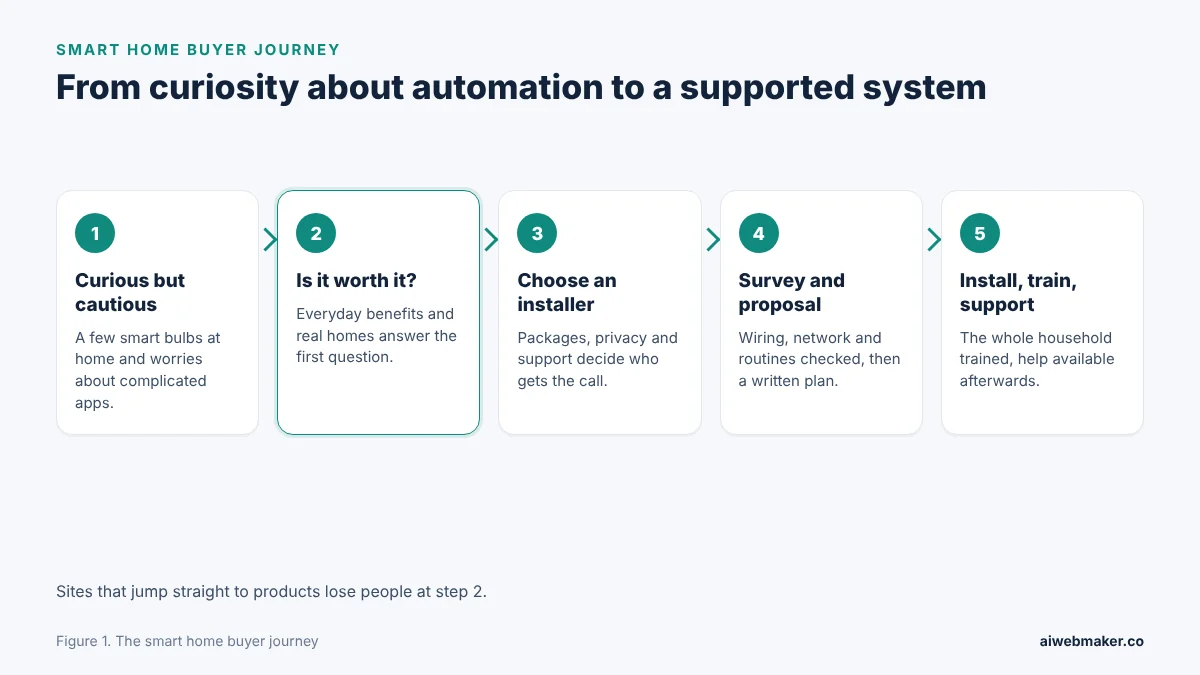
The journey above shows that the decision happens in two stages. First the homeowner decides whether automation is worth it at all, and only then do they choose an installer. Sites that jump straight to products lose people in the first stage. Pages that describe everyday benefits, show real homes and explain support keep them reading. The consultation request comes once trust is in place. After installation, a well supported system turns the client into a source of referrals.
How should each smart home service be explained?
Explain each service by the moments it improves: lights fading up in the morning, a warm house on arrival, a doorbell answered from anywhere. Technical details can follow, but the opening line of each service should describe life rather than hardware. Lighting pages can cover scenes, dimming, outdoor lighting and schedules. Heating and climate pages can explain room by room control and energy savings. Security pages can cover cameras, door sensors, smart locks and alarms, with careful notes on privacy. Audio and home cinema pages can show how speakers and screens blend into the decor.
| Service | Everyday benefit to lead with | What the page should explain next |
|---|---|---|
| Smart lighting | Scenes for mornings, evenings and films | Dimmers, switches, outdoor lighting, schedules |
| Heating and climate | A warm home on arrival, lower waste | Room by room control, thermostats, energy reports |
| Security and access | Seeing who is at the door from anywhere | Cameras, sensors, smart locks, alarms, privacy settings |
| Audio and video | Music in every room, a simple cinema | Speakers, screens, single remote control |
| Motorised blinds | Blinds that open with the sunrise | Quiet motors, schedules, cordless safety |
| Networking | Reliable signal in every room | Mesh systems, wired access points, guest networks |
| Energy monitoring | Seeing where power is used | Monitoring devices, solar and battery integration |
A short glossary can sit at the foot of the services pages for visitors who meet unfamiliar terms. Words like hub, scene, protocol and mesh are second nature to installers but puzzling to homeowners. One clear sentence for each term removes a barrier to enquiry. Linking the glossary from each service page keeps it close at hand. Plain language signals that the installer will be easy to work with. That impression often matters more than any specification.
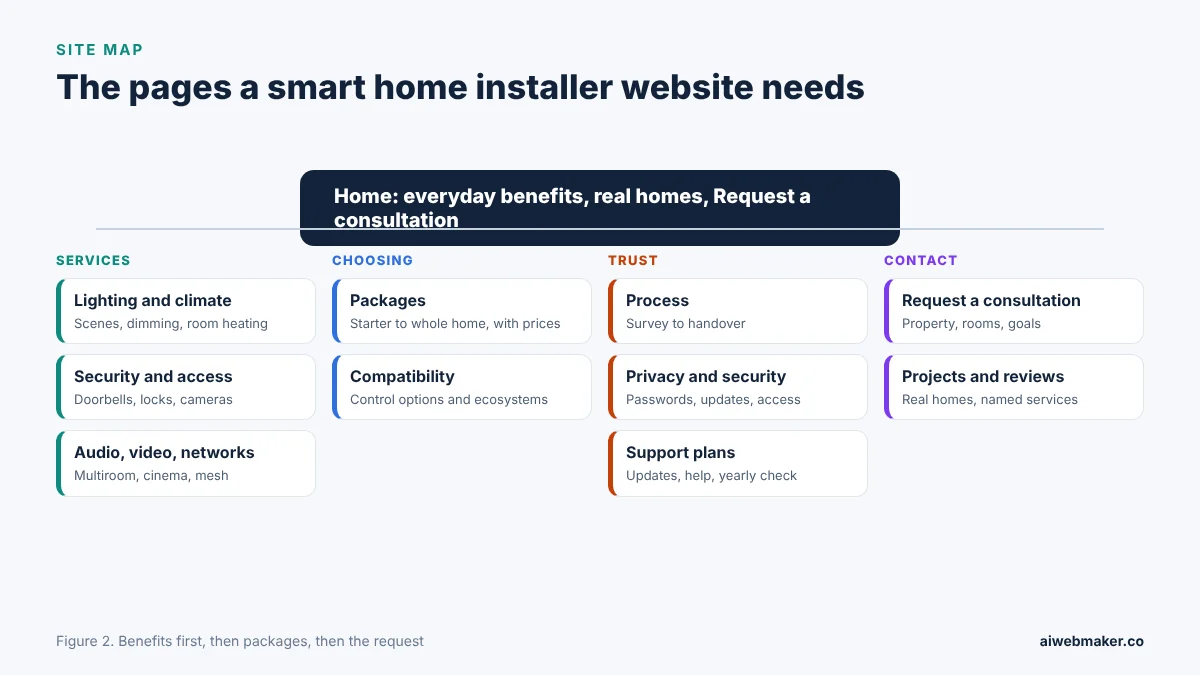
Smart home installer sites work best when technical detail is grouped behind plain, outcome led pages. Service pages for lighting and climate, security and access, and audio, video and networks describe everyday benefits first. Choosing pages hold the packages and the compatibility notes that answer which brands and apps work together. Trust pages explain the installation process, how privacy and network security are protected and what support plans include. Contact pages bring together the consultation request and real projects with reviews. A homeowner curious about one room can then reach a consultation without reading every specification.
How should smart home packages be designed and shown?
Packages should let a homeowner start small with a priced first step and add more later, because most clients test before committing. A lighting starter package for the main living areas, a security package for entrances and a climate package for heating are natural starting points. Each package should list what is included, the size of home it suits, the typical installation time and the support that follows. Whole home projects can be quoted after a survey, with an example of a finished home. Showing how packages combine into a larger system reassures clients that early choices will not need replacing. Starter packages bring in first projects that often grow into larger ones.
| Package | What it typically includes | Who it suits |
|---|---|---|
| Lighting starter | Smart switches and dimmers in main rooms, two or three scenes | Homeowners new to automation |
| Secure entrance | Video doorbell, smart lock, door sensors, app access | Families who want peace of mind |
| Climate control | Smart thermostat, room sensors, schedules | Homes with uneven heating |
| Entertainment | Multiroom audio, a cinema room setup | Music and film lovers |
| Whole home | A designed system across lighting, climate, security and audio | New builds and renovations |
How should compatibility and app control be explained?
Explain compatibility through what the homeowner already owns and how they want to control the home, since many fear being locked in. The page can describe the main control options, such as one app for the whole home, wall keypads, voice control and automations that run on their own. It can say which popular ecosystems the installer works with, without promising that every device will work with every other. Explaining how the system behaves if the internet goes down is a mark of real expertise. Clients appreciate honesty about limitations, such as older devices that cannot be integrated. A clear compatibility section prevents disappointment after installation.
How does an installation unfold from survey to handover?
The installation process page should walk through each stage from the first conversation to handover and support, so homeowners know what will happen inside their home and for how long. A survey visit lets the installer understand the house, the existing wiring and the client's routines. A written proposal follows, with the devices, the installation days and the price. Installation itself can be described with notes on dust, cabling, protection of floors and how much of the house is affected each day. Handover should include training for everyone in the household, including older relatives and children. A clearly described process makes a technical project feel manageable.
| Stage | What the client should know |
|---|---|
| Consultation | A call or visit to discuss goals and routines |
| Survey | Wiring, network, rooms and existing devices checked |
| Proposal | Devices, layout, installation days, price |
| Installation | Daily plan, tidy cabling, rooms affected |
| Handover | Training for the household, written guide |
| Support | How to get help, response times, updates |
The installer can also explain what happens to existing devices, such as smart speakers or bulbs the client already owns. Some can be integrated, and others may be better replaced. Being upfront about this avoids an awkward conversation during installation. A note on how long a typical installation takes for each package helps clients plan around work and family. Clients who know what to expect rarely complain. Confidence in the process is often what tips the decision.
Why do privacy and network security deserve their own page?
Privacy and network security deserve their own page because cameras, microphones and connected locks raise real questions about who can see and control the home. The page can explain how the installer sets up secure passwords, separate networks for devices, two step login where available and regular software updates. It can describe who has access to camera recordings and how long they are stored, and how clients can change those settings. Families with children or elderly relatives appreciate guidance on safe use. Explaining that the installer does not keep remote access without the client's permission builds trust. A thoughtful privacy page sets a professional installer apart from a box shifter.
Is a support plan worth offering?
A support plan is worth offering because automation systems need software updates, occasional troubleshooting and help when new devices are added, and clients want someone to call. The website can describe what the plan covers, such as remote assistance, priority visits and a yearly check, with a clear price. Clients who buy a plan feel safer committing to a larger system. For the installer, plans bring steady income between projects. They also keep the installer in regular contact with past clients, which leads to upgrades and referrals. Support turns a single job into a long relationship.
What should a homeowner share when asking for an automation quote?
A quote request should ask about the property type, the rooms involved, the services of interest and the homeowner's main goals, so the first conversation is focused. Inviting clients to mention devices they already own helps the installer plan integration. The form can offer a choice between a call and a survey visit. The AI website builder that home automation installers use for quote requests builds those service and package pages, each with a way to ask for a quote. Replying within a working day, with a few times for a call, keeps momentum. A calm, informative first reply reassures cautious buyers.
How do homeowners searching for automation find an installer?
Homeowners find an installer by searching for phrases like smart home installation, home automation company, smart lighting installer or home cinema installation, often with their area. Each main service should have a page or section with those words in the heading and opening lines. A Google Business Profile with project photos and consistent details supports local searches. Reviews that mention specific services, such as lighting or security, strengthen both. Articles that answer beginner questions, such as whether smart lighting needs rewiring or how to secure a video doorbell, attract homeowners early in their research. A library of clear explanations positions the installer as the trusted expert.
What does an installer's website cost in its first twelve months?
An installer's website costs its hosting and domain in the first twelve months, with optional article credits adding only a few dollars. Paying the year at once is cheaper for an established installer. Monthly billing suits someone launching a new business. Adding projects, packages and photos never adds to the bill. Both routes appear in the table, along with the $189 tier.
| Line | Yearly payment | Monthly payments |
|---|---|---|
| Hosting the installer's site | $119 | $228 over twelve months |
| Domain | Varies by ending | Varies by ending |
| Higher plan, for comparison | $189 a year | Not needed |
| Twelve beginner guides at about $0.65 | About $7.80 | About $7.80 |
| Projects, packages, photos | No charge | No charge |
| Twelve months before the domain | About $126.80 | About $235.80 |
Which mistakes make smart home websites lose enquiries?
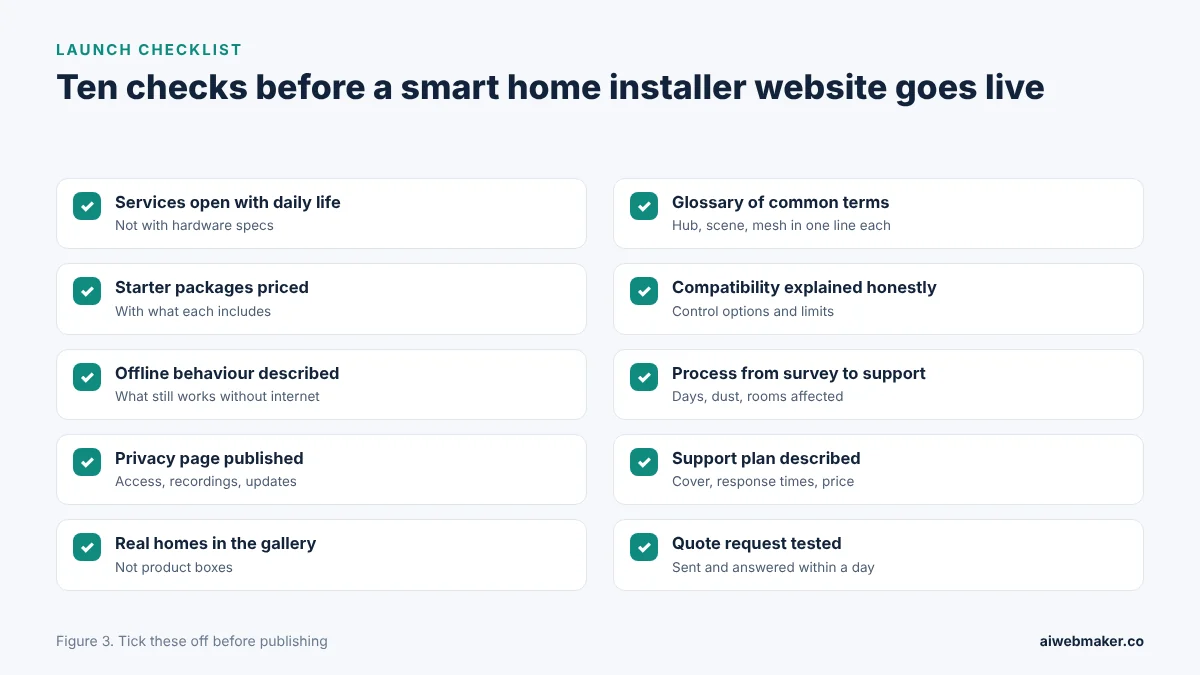
The most common mistake is writing for technology enthusiasts rather than ordinary homeowners, which leaves most visitors confused. Showing product boxes instead of finished homes makes the installer look like a retailer. Silence on privacy leaves cautious families with unanswered worries. No packages or prices make the first step feel open ended and risky. Ignoring support suggests that the installer will vanish after the job. The pictured checklist turns these lessons into launch checks.
Frequently asked questions
Does smart home installation need rewiring?
Many smart home upgrades do not need rewiring, because smart switches, thermostats and wireless devices often fit into existing wiring and boxes. Larger projects, such as whole home lighting control or wired audio, may need new cabling, which is easier during renovation. The website can explain which packages usually need cabling and which do not. A survey visit confirms what each home needs. Clear answers reduce the fear of disruption.
Can a smart home system be expanded later?
Most systems can be expanded room by room, which is why starter packages are popular. The website can explain how a lighting starter can later connect to heating, security and audio. Choosing compatible devices from the start avoids replacing them later. Installers can note which expansions are straightforward and which need planning. Clients appreciate knowing that today's choice will not be wasted.
What happens if the internet goes down?
What happens depends on the system, and the website should explain it honestly. Many lighting and heating controls keep working locally, while remote access and voice control may pause until the connection returns. Security systems may have backup connections or local recording. Explaining this calmly shows real expertise and builds trust. Clients prefer honest answers to vague promises.
Is publishing package prices a good idea for installers?
Showing starting prices for packages helps homeowners decide whether automation fits their budget, and it filters out enquiries far from the installer's range. Each price should state what is included and the size of home it assumes. Whole home projects can carry a guide range with a note that a survey sets the final figure. Prices can be updated in the editor as costs change. Transparency encourages the first step.
Do a few installations cover the website for the year?
A single installation brings in far more than the $119 that hosting costs for the year, and one support visit covers a month at $19. Projects beyond the first are pure gain from the website. Each case study and review makes the next cautious homeowner more willing to ask. The home services website builder for automation and electrical trades section shows how electricians and other trades present similar services. Installers who write plainly, show real homes and promise support turn more visitors into clients. A steady stream of consultations is the return worth paying for.
Build your website in Minutes and get the AI Tools that work
Start Building Your Website →