Urgent Care Clinic Website Cost and Pages That Triage Before Arrival
An urgent care clinic pays $119 to keep its pages reachable for twelve months, or $19 on each monthly invoice, and buys its domain separately. Inside: patients deciding where to go, the treat list, emergency signposting, triage, fees and cover, children and privacy, hours, search and the budget.
- No coding required
- Live in minutes
- Blog, SEO and chatbot tools included
On AI Web Maker, an urgent care clinic pays $119 to keep its pages reachable all year, or a monthly $19, and settles the domain at whatever its ending costs. Nothing is invoiced while the clinic drafts its treat list, emergency band and fee table and checks each one on a phone in the preview. A single self pay visit with an X ray usually exceeds the yearly hosting, so the cost is not the hard part. The hard part is that every reader is in pain or worried about someone who is, and some of them should not come to the clinic at all. A good site sends chest pain to the emergency number, sends sprains through the door and tells both groups so within seconds. What follows covers the readers, the pages, emergency signposting, triage, fees and cover, children and privacy, hours, search and the yearly budget.
This article is part of our complete guide: Healthcare Website Builder.
Who opens an urgent care page, and what are they deciding?
Almost everyone who opens an urgent care page is making one decision under pressure: whether to come in, wait for their own doctor or call for an ambulance. A parent with a feverish toddler wants to know whether children are seen and how late the doors stay open. Someone who twisted an ankle at football wants to know whether there is an X ray on site before limping across town. A traveller far from home, or a resident whose own doctor has no slots this week, wants to know what a visit costs. People with a cut hand or a sore eye check whether their problem appears on the list at all. Each visitor gives the page a few seconds, and the answer has to be visible without scrolling through paragraphs.
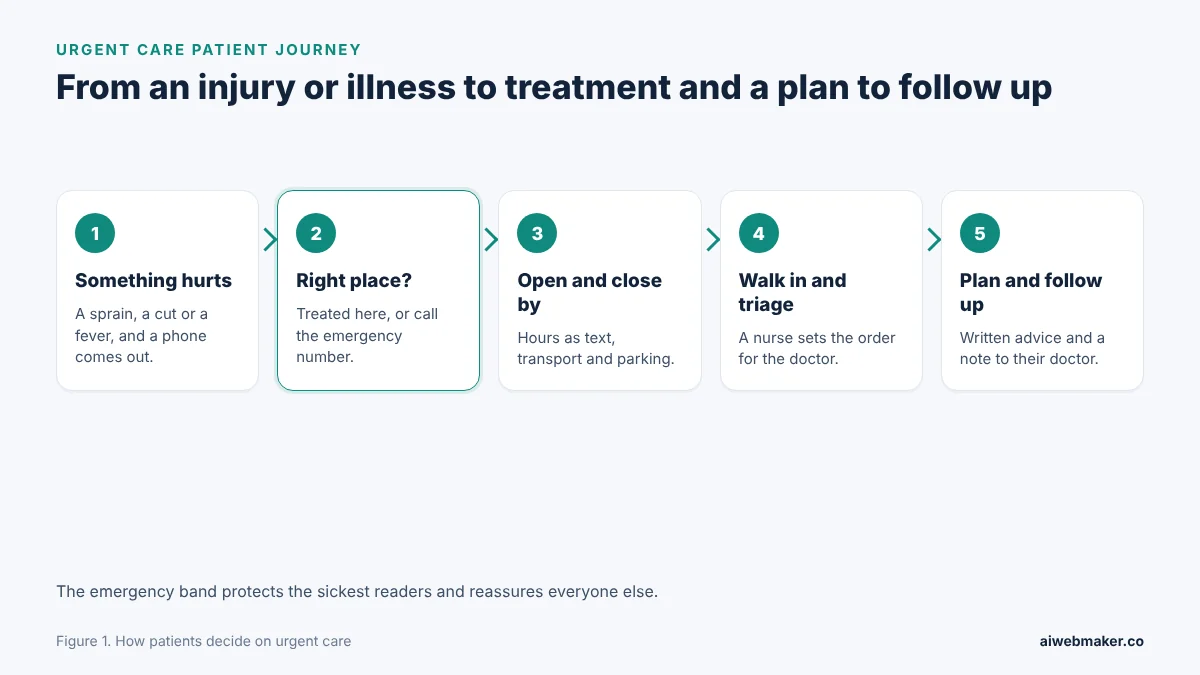
Pain starts this journey, and the second step settles where the patient ends up. Something hurts, swells or burns, and a phone comes out within minutes. The highlighted step is checking whether the problem belongs at urgent care or with the emergency number, which is why the emergency band sits above everything else. Opening hours and distance come next, followed by the walk in itself, where a nurse assesses each patient before the doctor sees them. The visit ends with treatment, a written plan and, where the patient agrees, a note to their own doctor. Answering that second question well protects people too ill for a walk in clinic and reassures everyone else.
Treat lists, emergency signposts and the other pages a walk in clinic needs
A walk in clinic needs a short, sharp set of pages, because nobody in pain reads long introductions. The treat list names the everyday problems the clinic handles in words patients use. An emergency band and a where else to go table protect people who need a different service. A visit walkthrough, a what to bring section and the fees answer the practical questions the desk would otherwise field all day. Hours, directions and a form for non clinical questions complete the set.
| Page or section | The reader's question | What it should say |
|---|---|---|
| Treat list | Is my problem seen here? | Injuries and illnesses in everyday words |
| Emergency band | Is this an emergency? | Danger signs and the local emergency number |
| Where else to go | Who handles the rest? | Dental, crisis care and repeat medicines |
| Your visit | What happens inside? | Check in, nurse assessment, treatment, plan |
| What to bring | What should come along? | Identification, medicines list, cover details |
| Fees | What will it cost? | Self pay prices and a note on insurance |
| Hours and directions | Is it open now? | Daily and holiday hours as text, transport, parking |
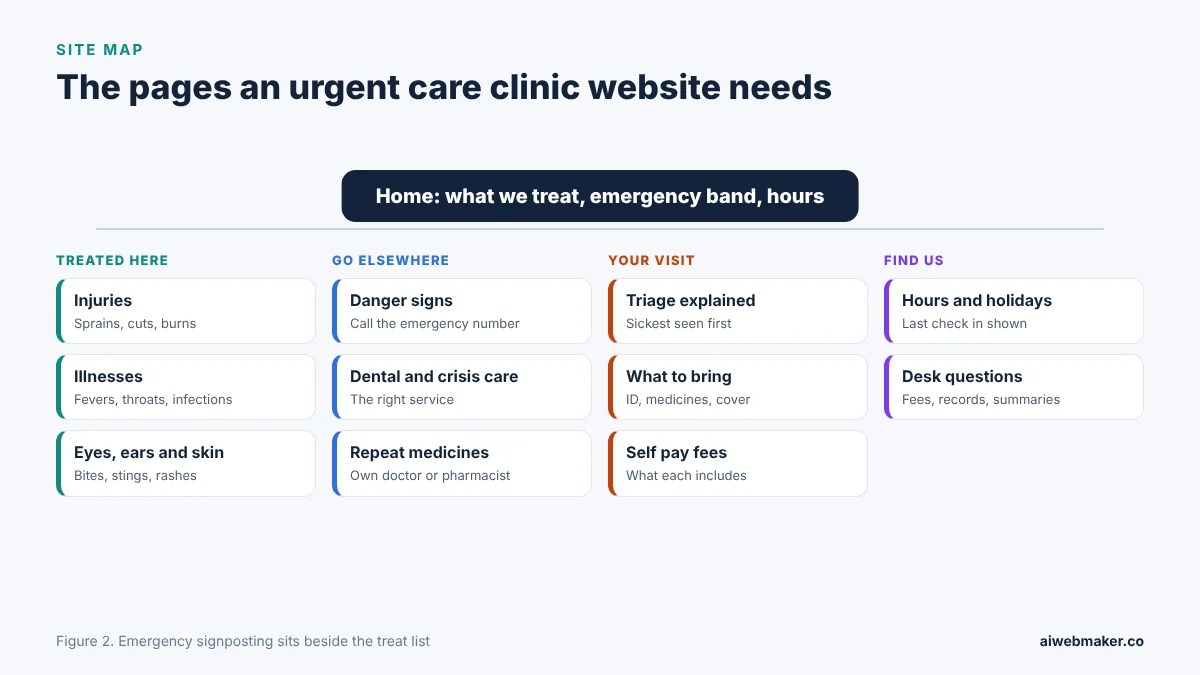
Sorted by the decision each one supports, the clinic's pages split into what is treated, what goes elsewhere, the visit itself and how to get there. The treated group carries injuries, illnesses, and eye, ear and skin problems. The go elsewhere group holds the danger signs, dental and crisis care and repeat medicines. Our sample clinic, Corner Street Urgent Care, keeps all of this on one page, with cards for sprains and suspected breaks, cuts and minor burns, coughs, fevers and sore throats, eye and ear problems, bites, stings and rashes, and urine and skin infections. Beneath them sit a red emergency band, a where else to go table, a four step visit walkthrough, a what to bring section and a self pay fees table. The urgent care clinic website example with walk in hours and an emergency band closes with a question form for the front desk and the opening hours.
Drawing the line between urgent care and the emergency department
The most important sentence on an urgent care site tells some readers not to come. Chest pain or pressure, a drooping face, a weak arm or slurred speech, heavy bleeding, a seizure and a serious head injury all belong with the emergency number. So do severe breathing difficulty and sudden swelling of the lips or tongue. The number itself differs by country, for example 112 across the European Union and 911 in the United States, so the page should print the local one in full. Thoughts of self harm deserve a calm line pointing to a crisis line or the emergency number, without delay. Saying all of this above the treat list protects patients and keeps the waiting room for problems the clinic can actually treat.
| Sign or need | Where the page sends the reader |
|---|---|
| Chest pain, pressure or tightness | The emergency number, straight away |
| Face drooping, arm weakness, slurred speech | The emergency number, straight away |
| Severe breathing trouble or a swelling tongue | The emergency number |
| Heavy bleeding, a fit or a serious head injury | The emergency number |
| Thoughts of self harm | A crisis line or the emergency number |
| Toothache or a broken tooth | A dentist or emergency dental service |
| Repeat medicines or a long term condition | The patient's own doctor or a pharmacist |
Explaining triage so a long wait does not feel unfair
Triage confuses patients more than anything else at a walk in clinic, so the site should explain it before anyone sits down. A nurse sees each patient briefly on arrival, judges how urgent the problem is and decides the order for the doctor. Someone with a deep cut or a high fever in a small child may therefore be called before a person who arrived an hour earlier. Waiting times change with every arrival, and a clinic without a reliable live figure should say plainly that it does not publish one. Patients should be told to return to the desk at once if they feel worse while waiting. Knowing the rules in advance turns a frustrating wait into an understandable one.
| Visit stage | What the page should explain |
|---|---|
| Check in at the desk | Name, date of birth, contact details and the problem in a sentence |
| Nurse assessment | A short check that sets the order, not first come first served |
| Examination and treatment | A doctor or nurse practitioner, with tests where needed |
| Tests on site | X ray or rapid tests, if the clinic offers them |
| Leaving | A written plan, when to return and any note to the patient's own doctor |
What to bring, self pay fees and how cover differs between countries
A short list of what to bring saves time at the desk and avoids mistakes with medicines. Identification, any insurance card or health number, a list of current medicines and known allergies are the essentials. A parent or guardian should come with a child, and earlier X rays or hospital letters help with a recurring injury. Self pay fees should appear in a table that covers the consultation, an X ray, wound closure, splints and rapid tests, with what each fee includes. Cover varies widely, because some countries fund urgent care publicly at the point of use while others rely on insurance, so the page should tell patients to check their own policy. A line stating that the clinic never withholds urgent advice over payment reassures anyone worried about money.
Children, consent and privacy at a walk in clinic
Parents need to know exactly which ages the clinic sees, so the youngest age should be stated beside the treat list. Very young babies who are unwell may need a different service, and the page should say where to go if the clinic does not see them. Rules on consent for teenagers who attend alone differ between countries, so a short line saying the clinician explains what applies is enough. Health information is protected by law in many places, for example under data protection rules in the European Union, which is why symptoms belong in the treatment room rather than in an email. The site should say how the visit summary is shared with the patient's own doctor and that the patient is asked first. Plain words on children and privacy reassure families before they leave home.
Opening hours, holidays and a builder that drafts the clinic's pages
Opening hours are the single most checked detail on an urgent care site, so they must be correct, in text and on every page. Weekday, weekend and public holiday hours each need a line, along with a last check in time if the clinic stops registering before it closes. Directions should mention public transport, parking and step access, because an injured visitor cannot walk far. The AI website builder that drafts walk in clinic pages with hours and fees writes the treat list, emergency band, fees and directions once the clinic says what it treats in a few lines, and corrections made in the preview cost nothing. Any change of hours should be made on the site and the map listing on the same day. A clinic that keeps its hours accurate earns the trust that brings people back the next time something goes wrong.
Phrases typed by people looking for care open now
People looking for quick treatment type urgent care near me, walk in clinic open now, minor injuries clinic or X ray walk in, often adding their neighbourhood. Plain headings such as sprains and suspected breaks or cuts and minor burns match the words injured people use. The map listing should carry the same hours as the website, including holidays, together with the address, accessibility and the correct category. Replies to reviews should thank people without confirming that anyone was treated, because confidentiality applies online too. Articles on how to tell a sprain from a break or when a cut needs stitches help readers decide calmly, as long as they end with clear advice to seek care when unsure. Accurate, careful writing builds a reputation that lasts beyond any single visit.
The yearly bill for a walk in clinic's site
The recurring cost of a walk in clinic's site is hosting and a domain, plus a few dollars of AI credits for twelve articles. Yearly billing at $119 suits an established clinic. A clinic in its opening season might rather pay $19 every month. Updating hours, fees or the treat list costs nothing extra. Below, yearly sits beside monthly, with the $189 tier as a yardstick and nothing more.
| Item | Yearly | Monthly |
|---|---|---|
| Hosting the urgent care pages | $119 | $228 over twelve months |
| Domain | Depends on the ending | Depends on the ending |
| Higher plan, for comparison | $189 a year | Not needed |
| Twelve minor injury articles at about $0.65 | About $7.80 | About $7.80 |
| Hours, fees and treat list updates | No charge | No charge |
| Year before the domain | About $126.80 | About $235.80 |
Silences on the page that turn injured visitors away
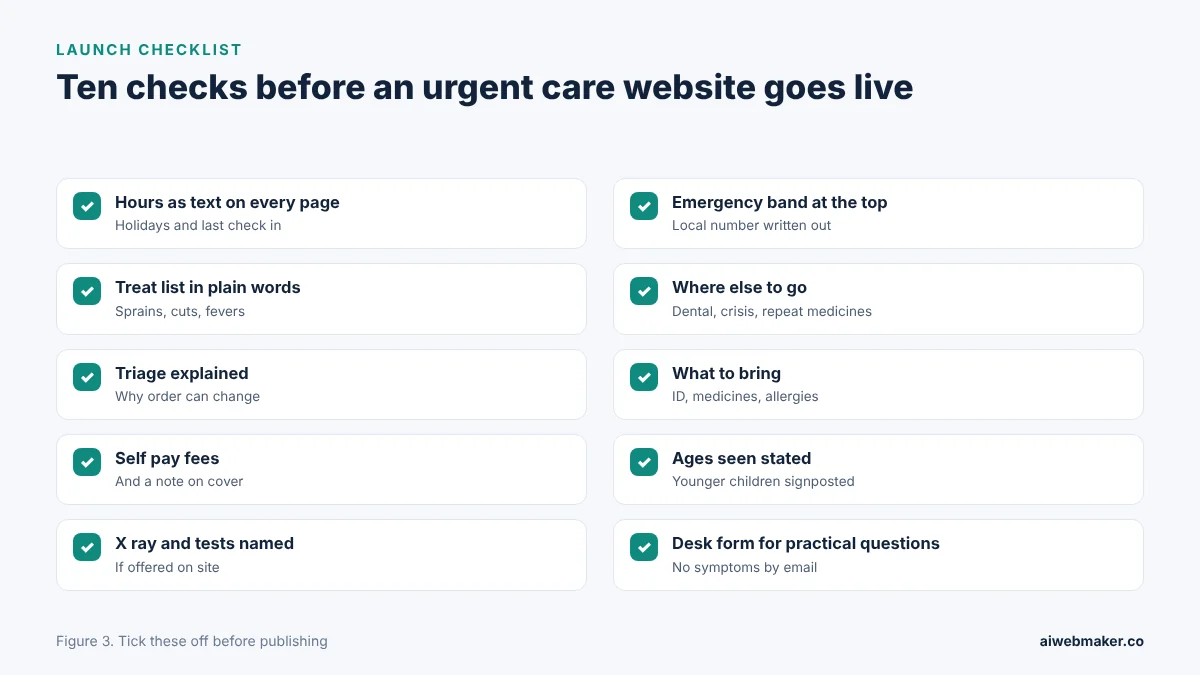
Injured visitors leave an urgent care site at once when the hours are missing, out of date or hidden in a picture. A vague treat list makes people guess, and many guess wrong. No emergency signposting is a safety gap rather than a design flaw. Hidden fees worry anyone paying for themselves, and silence about X ray sends a person with a swollen wrist somewhere that mentions it. Missing parking or step access details lose patients who cannot walk far. Ten remedies for these lapses are drawn in the next picture.
Frequently asked questions
Is it worth listing what the clinic does not treat?
Listing what the clinic does not treat ranks among the most helpful lines on the whole site, because it saves wasted journeys and protects patients who need another service. Dental pain, repeat prescriptions, long term conditions and crisis care are common examples. Each item should point to the right alternative rather than simply saying no. Emergencies belong at the top of that list, with the local emergency number written out. Clear limits make the clinic look more competent, not less.
How should the site describe the last check in before closing?
If the clinic stops registering patients before closing time, the site should state that time beside the opening hours. Late arrivals who have travelled with an injury are far more upset by a closed door than by a clear warning. The page can suggest an alternative for problems that arise after the last check in. Holiday hours deserve the same treatment, updated well before each holiday. Precise times prevent disappointment and angry reviews.
Can the front desk form be used to describe symptoms?
The front desk form is best limited to practical questions about fees, records, visit summaries and directions. Symptoms should be assessed in person, because a written message cannot be triaged safely. The note beside the form should tell anyone who feels unwell to come in during opening hours or to call the emergency number if it cannot wait. Keeping clinical details out of email also reduces privacy risks. A form with a clear purpose gets faster, more useful answers.
Do first aid articles on a clinic site carry any risk?
First aid articles help readers when they stay general, accurate and clear about when to seek care. An article on cooling a minor burn or cleaning a small cut should end by naming the signs that need a clinician. Advice should never replace an assessment, and the article should say so plainly. A clinician at the clinic should check each article before it is published. Careful articles show expertise without putting readers at risk.
Walk in visits needed to cover the hosting year
A single self pay visit with an X ray is usually priced above $119, which is what a whole year of urgent care hosting comes to. On monthly billing, the $19 is well below the price of a single consultation. Every family that finds the hours, checks the treat list and walks in is a visit the site helped bring about. Clear emergency signposting, an honest triage explanation and accurate hours do more for a clinic's reputation than any slogan. Clinics that keep those details current become the place neighbours recommend after a fall in the park. A steady stream of sprains, cuts and fevers walking in is evidence that the pages send the right people.
Build your website in Minutes and get the AI Tools that work
Start Building Your Website →