Museum Website Cost, From Ticket Tables to School Workshop Bookings
Twelve months of museum hosting cost $119, or $19 for each month, with a domain extra. Then come visitors, the pages, tickets and hours, galleries, schools and groups, research and objects, access, search and the budget.
- No coding required
- Live in minutes
- Blog, SEO and chatbot tools included
For a museum, the website's running cost is $119 for each hosting year, with $19 monthly available when the trust would rather pay that way, and a domain completes it. Laying out ticket prices, gallery pages and the school booking form, and studying them in preview, is never invoiced. One booked school workshop, or a single evening reception in a gallery, covers the hosting with plenty left over. The challenge lies in serving very different readers: a family deciding how to spend a rainy Saturday, a teacher fitting a visit to the curriculum, a researcher hunting for a great grandparent and a society planning a tour. Each wants practical facts quickly, while the museum also wants to convey why its collection matters. What comes next covers those readers, the page list, tickets and hours, galleries and the season's exhibition, schools and groups, research and offered objects, access, search and the yearly sums.
This article is part of our complete guide: Website Builder for Creative Businesses.
Families, teachers, researchers and societies: who plans a museum visit
Museum visitors plan in different ways, and each kind of reader looks for a different page first. Families check opening days, ticket prices, what suits young children and whether there is a café or somewhere to eat a packed lunch. Teachers look for workshops matched to the age of their class, the cost per pupil, adult ratios and how far ahead to book. Researchers want to know what the archive holds and how to arrange time in the study room. Societies, clubs and reunion groups ask about guided tours, seating along the route and refreshments afterwards. Tourists passing through want the hours, the address and a reason to stop, which a strong exhibition page often provides. Clear routes from the home page to each of these needs fill the galleries on quiet weekdays as well as busy weekends.
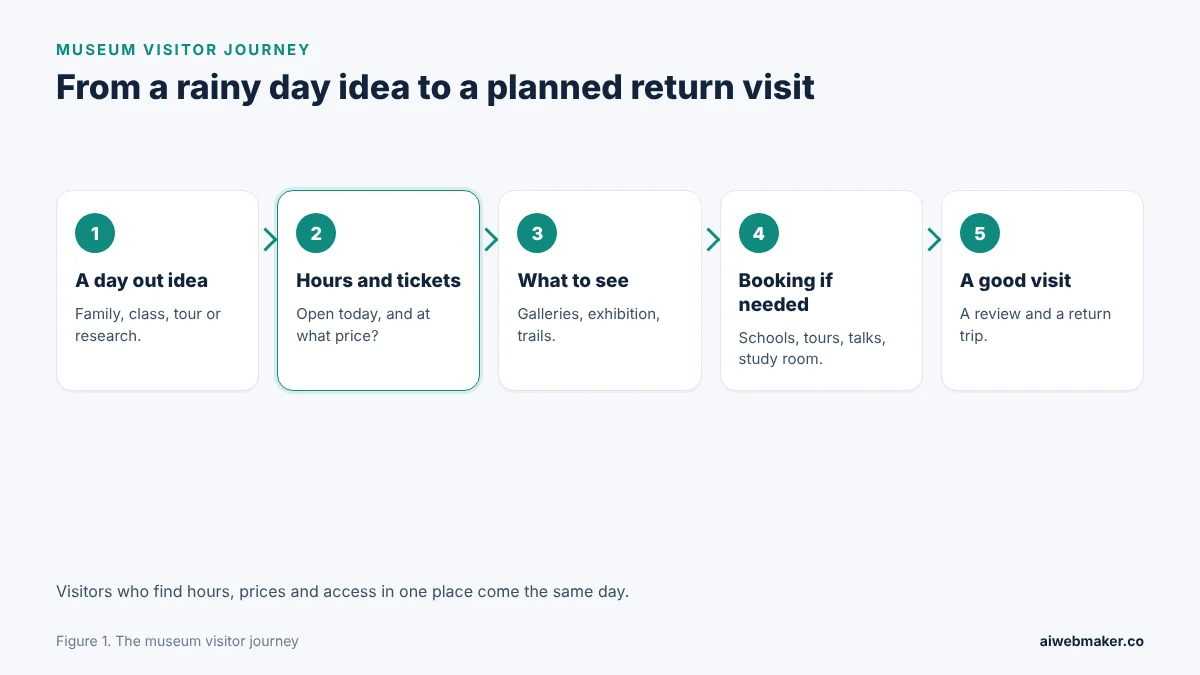
Beginning with a rainy Saturday idea, the five boxes end with a family already planning its next trip back. The coloured box is tickets and hours, because a closed Monday or an unexpected price ends many plans before they start. Choosing what to see follows, guided by the galleries, the exhibition and the activities for children. Booking matters mainly for groups, schools and talks, while most families simply arrive. A good day, with objects to touch and a calm route through the rooms, leads to a review and a second visit. The website should make each box easy to pass in a minute or two on a phone.
Tickets, galleries, exhibitions, schools: the pages a museum needs
A museum website needs a practical core and a storytelling layer, and visitors should be able to reach both easily. The practical core is a visit page with hours, tickets, directions and access. The storytelling layer introduces the permanent galleries and the current exhibition with photographs and short descriptions. Learning pages for schools and groups, an events page and a research page serve the visitors who need to book. An about page covering the trust, the volunteers and funding closes the list. Readers who can move easily between the practical and the stories decide to come far more readily.
| Page | Main readers | What it should cover |
|---|---|---|
| Visit | Families, tourists | Hours, last entry, tickets, directions, parking, café |
| Galleries | Everyone | Each gallery with a photo, a short story and its floor |
| Exhibition | Regulars, press | Title, dates, highlights, tours |
| Schools and groups | Teachers, societies | Workshops, prices per pupil, ratios, tours |
| Events | Locals | Talks, trails, late openings, memory sessions |
| Research and objects | Researchers, donors | Study room slots, how to offer an object |
| Access | Disabled visitors, carers | Lifts, level routes, quiet hours, seating |
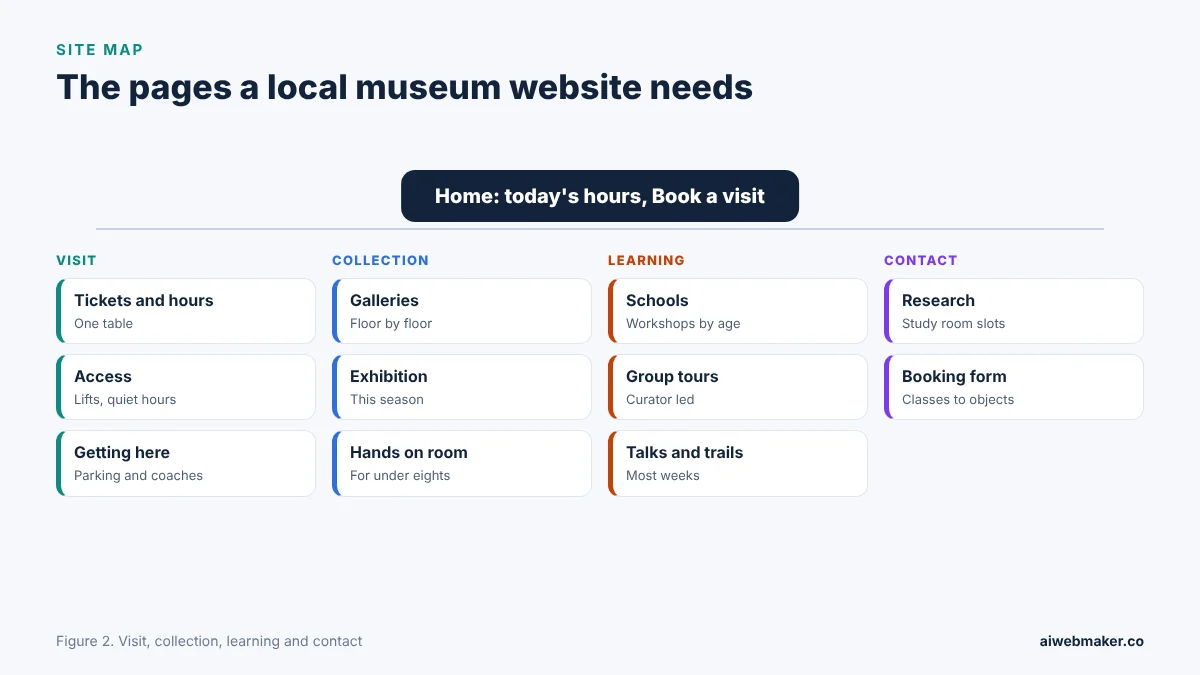
From a home page leading with today's hours and a booking button, the museum's pages divide into visiting, the collection, learning and contact. The sample, The Millbrook Museum, sets tickets and hours in one table, then presents four permanent galleries, The Mill and the River, Kitchens and Parlours, The High Street and Fields and Floods, beside the Hands on Room and a study room. A seasonal exhibition comes next, followed by school visits and tours ranging from a self led class visit and a led workshop to a guided group tour and an evening in the Mill Gallery. Talks, trails and a section on researching a family or offering an object lead into photos, reviews and questions. The museum website example with ticket tables and school workshop bookings ends with one booking form covering classes, tours, gallery evenings, study room slots and offered objects. A museum of almost any size can adopt that sequence, trimming the parts it does not offer.
Tickets and hours in a single table
Opening days, hours and ticket prices are the facts most visitors need, and a single table answers them faster than paragraphs. Each ticket type should show its price and a short note, such as who qualifies for a concession or what a family ticket covers. Categories admitted at no charge, such as children or carers accompanying a disabled visitor, deserve the same prominence as paid tickets. Last entry times and a rough guide to how long a visit takes help people plan the day. Seasonal late openings, holiday closures and days when galleries close for installation should sit beside the table. One accurate table spares the front desk a morning of repetitive calls.
| Ticket or rule | What to explain |
|---|---|
| Adult | Price, and whether it allows return visits |
| Concession | Who qualifies and what proof is asked |
| Family | How many adults and children it covers |
| Children and carers | Any group admitted at no charge |
| Talks and events | Price and how to book |
| Last entry | Minutes before closing, and visit length |
Permanent galleries and the season's exhibition
Gallery pages should tell visitors what they will see and why it matters, in a few sentences and one strong photograph each. Naming the floor of each gallery and the route between them helps visitors with limited time or mobility. The current exhibition deserves a page of its own with dates, a short story, highlights and any curator's tours. Objects lent by local people, or connected to the town's families, give the page a human voice that large national institutions find hard to match. Image rights and object loans come with conditions, so photographs on the website should be ones the museum is entitled to publish. Good gallery pages make the collection feel worth a journey before anyone has bought a ticket.
School workshops, group tours and evening hire
Learning and hire pages are where a museum takes bookings, so they need prices, capacities and plain rules. Workshops should name the topic, the age range, the length, the maximum number of pupils and the adults expected per group. Self led visits with trail sheets suit teachers on tight budgets, while led workshops suit classes wanting objects in their hands. Guided tours for societies and evening hire for receptions follow the same pattern, with capacity, timing and any deposit stated. The AI website builder that museums use for gallery pages and booking requests prepares these pages after the museum sums up its galleries, workshops and tours in a short note. Each booking request then reaches the team, which can confirm it, offer a different date or decline it. Fees and deposits are arranged by the museum with the school or group directly, and none of the money passes to the platform.
| Offer | Booked by | Details to state |
|---|---|---|
| Self led class visit | Teachers | Price per pupil, trail sheets, lunch space |
| Led workshop | Teachers | Topic, ages, length, maximum pupils, adult ratio |
| Guided group tour | Societies, clubs | Group size, length, seating, refreshments |
| Evening hire | Companies, families | Capacity, finishing time, caterers, deposit |
| Study room slot | Researchers | Days, length, what to send in advance |
Researchers, family historians and offers of objects
Study rooms and archives draw dedicated visitors, and a short page explaining how to book a slot saves curators hours of correspondence. The page should list the main types of material held, such as maps, ledgers, registers and photographs, without promising that any particular record exists. Asking researchers to describe what they are looking for in advance lets staff prepare boxes before the visit. Offers of objects need a gentle filter, and asking people to describe the item, its story and its link to the area in words first helps the museum decide whether it fits the collection. Fees for copies or reproduction should be stated plainly. A clear research page turns hopeful emails into productive mornings in the study room.
Access, quiet hours and memory sessions
Accessibility information belongs on the visit page rather than in a footnote, because a disabled visitor or a carer needs it before deciding to come. Lifts, level routes, seating along the galleries, wheelchairs to borrow and accessible toilets should each be mentioned specifically. Quiet hours for visitors who find crowds or noise difficult, and large print guides, widen the audience further. Sessions for people living with dementia and their carers, where a museum offers them, deserve a gentle description of what happens and who leads them. Legal duties on accessibility are set nationally and vary widely, which is why the page ought to describe what the building actually offers rather than claim compliance with a particular standard. Specific, honest detail lets every visitor judge whether the day will work for them.
Days out, school trips and local history: how museum searches begin
Museum searches tend to start from a need rather than a name. Examples include things to do this weekend, museum near me, school trip ideas for a topic, or a local history archive with the town attached. Gallery and exhibition pages that name the town, the period and the themes match many of these searches. A map listing with accurate opening days, last entry, photos of the galleries and a link to the visit page captures people deciding on the spot. Reviews from families, teachers and researchers each reassure a different audience. Articles on a single object, the story behind an exhibition or a local history question give the museum a voice in search and a reason for locals to return.
A museum's yearly website figures
The website's yearly outlay for a museum is hosting plus a domain, with articles on objects and exhibitions adding a few dollars of credits. Trusts that approve one annual budget usually take the yearly route. A small volunteer museum may prefer to spread the cost monthly while grants come through. Changing hours, tickets or exhibition pages costs nothing extra. Paying once is set against paying monthly underneath, and a yardstick row shows the $189 tier.
| Item | Yearly | Monthly |
|---|---|---|
| Hosting the museum pages | $119 | $228 over twelve months |
| Domain | Depends on the ending | Depends on the ending |
| Higher plan, for comparison | $189 a year | Not needed |
| Twelve object and exhibition articles at about $0.65 | About $7.80 | About $7.80 |
| Hours, tickets and exhibition updates | No charge | No charge |
| Year before the domain | About $126.80 | About $235.80 |
Why a rainy day visitor chooses somewhere else
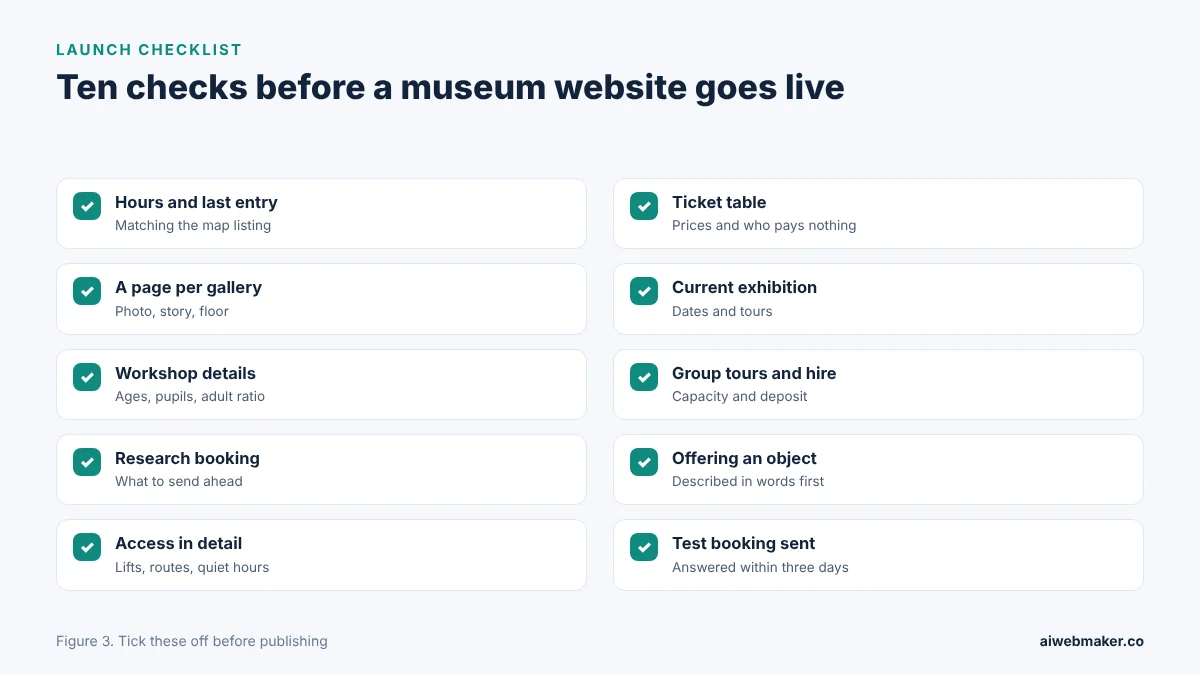
Visitors choose somewhere else when the opening days are hard to find or contradict the map listing. Unclear ticket prices, or no mention of which visitors are admitted at no charge, make families assume the day will be expensive. An exhibition page still advertising last season's show suggests nobody is minding the site. Missing access details turn away disabled visitors and their companions before they consider coming. Teachers leave when workshop prices, ratios or booking lead times are absent. The ten checks in the image underneath keep each of these doors open.
Frequently asked questions
How long should a museum say a visit takes?
An honest estimate, such as about two hours for the whole museum, helps visitors plan parking, meals and children's energy. Shorter routes for families with young children, or highlights for visitors with less time, can be suggested alongside. Last entry times should follow logically from the estimate. Visitors who know the length of a visit arrive at a sensible time. A realistic figure reduces the number of people rushed out at closing time.
May visitors take photographs in the galleries?
Many museums allow photography for personal use without flash, while some objects on loan or the study room may be excluded. Photographing other visitors, especially children, should need their agreement. Filming for publication usually needs permission from the museum office. The website should state the rules so visitors are not surprised at the door. Clear photography rules protect objects, lenders and other visitors alike.
How far ahead should a school book a workshop?
Popular workshops in the spring and summer terms can fill a term in advance, while self led visits may be possible at a few weeks' notice. The learning page can give a rough lead time without promising specific dates. Asking for the class size, ages and topic in the request helps the education team match the right session. A written plan for the day, sent before the visit, reassures teachers and their leaders. Early booking guidance prevents disappointment when the timetable fills.
Why mention admissions, grants and donations on the website?
A short note on how the museum is funded, through admissions, school bookings, hire, a shop or café, grants and donations, helps visitors understand why their ticket matters. Trusts and charities in many countries publish annual reports, and a brief summary on the site adds openness. Inviting donations gently, after the visit information, respects people who came simply to enjoy the galleries. Volunteers are often recruited through the same page. Openness about money encourages the support that keeps the doors open.
One class of pupils, one hosting year
A single led workshop for one class usually brings a museum more than the yearly hosting of $119. Trusts on monthly billing cover the $19 with a handful of adult tickets. Every family that plans a visit from the ticket table, and every teacher who books after reading the workshop page, adds to the income that keeps galleries open. Accurate hours, honest prices, vivid gallery pages and specific access notes persuade visitors who would otherwise stay home. Museums that update the exhibition page each season hand regulars a fresh excuse to return. Classes lining up at the door on a weekday morning show how much work the pages are doing.
Build your website in Minutes and get the AI Tools that work
Start Building Your Website →